

Alternatives to Cece AI
Cece AI slips into your Gmail to handle scheduling, invoices, and follow-ups so your small business runs itself.
20 alternatives found
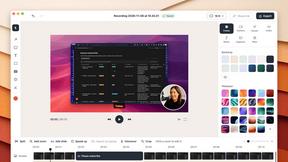
ScreenOtter
A Mac app for screen recordings and screenshots. A zoom on every click, captions made on your Mac, and eight camera layouts. Free to use, pay once.
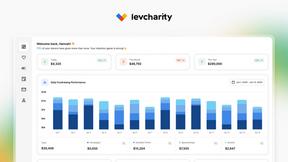
LevCharity
Fundraising platform for nonprofits with donations, campaigns, donor CRM, events, automated communications, reporting, and more.


GigUp
GigUp helps freelancers discover relevant Upwork jobs through AI matching, automated monitoring, and instant alerts.
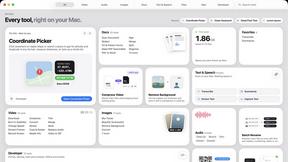
Toolbox
96 private Mac tools in one app: compress video, sign PDFs, remove backgrounds, transcribe. Offline, no account, pay once.

Safe Outreach
AI-powered platform that evaluates the safety of LinkedIn automation tools and helps reduce the risk of account restrictions.

How Long How Many Tool
Timers and hourly checks to figure how out long until a certain time or how many days away.



ButterShare
Realtime peer-to-peer file transfer in the browser. Send files directly between devices, no account and no upload to a server.

HandFonty
Turn typed text into natural-looking handwriting with customizable fonts, paper, ink, and export options.
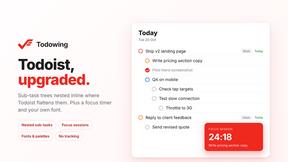
Todowing
Chrome extension that shows nested sub-tasks inline in Todoist's Today, Upcoming, filter and label views. Free tier, $19.99 one-time unlock.

Uniclip
Clip pages, take full-page screenshots and batch-capture list data to Notion, Feishu, Obsidian, Markdown, CSV or JSON.

TroveKey
Search tabs, Chrome bookmarks and history, run browser commands, and save webpages and social posts locally—no account.

LightScreen
Free fullscreen light screen tool online. Turn any display into a flashlight, ambient light, or solid-color screen. No download or sign-up.

Context Board
Context Board brings your numbers, docs, clients, content and day into one workspace that Claude and Codex can read and update.

@fuck.it - email with attitude
Private email. Pure. Secure. Exclusive. No ads, no tracking, no data selling. GDPR compliant, EU-hosted.

Suparelay
Call landlines and mobiles in 200+ countries from your browser. The person you call needs no app. Prepaid, price shown before you dial.
About Cece AI Alternatives
For business owners drowning in the endless tide of inbox management, Cece AI positions itself as a practical lifeline—an AI executive assistant that operates entirely within email to handle scheduling, quoting, invoicing, and follow-ups. It belongs squarely in the productivity and management category, designed to replace the chaos of manual admin with a single, email-based workflow. Yet many users begin searching for alternatives when they hit the limits of email-only interaction, find the pricing doesn’t scale with their growing team, or realize they need deeper integrations with project management tools, CRM platforms, or mobile apps. Others might simply prefer a different interface style, wanting a visual dashboard or a more conversational chatbot rather than the “CC to delegate” model. When evaluating alternatives, the key is to look for a solution that matches your actual workflow rather than forcing you to adapt. Consider whether you need multi-platform support—Slack, Teams, or SMS—beyond just email, and whether the tool can handle industry-specific tasks like inventory management or client portals. Pricing transparency matters too; some tools charge per user while others charge per task, so calculate what fits your volume. Most importantly, assess how much setup and ongoing “babysitting” the tool requires—the best alternative will automate the parts of your day that currently feel like friction, not add another layer of complexity to manage.
FAQs about Cece AI Alternatives
What is Cece AI?
Cece AI is an AI executive assistant that operates directly through email to handle administrative tasks for small business owners. Users CC Cece on an email thread, and it can schedule meetings, respond to customers, create quotes, send invoices, track follow-ups, and manage reminders. It is designed to work inside the inbox where business already happens, turning messy email threads into completed tasks without requiring a separate app or dashboard.
Who is Cece AI for?
Cece AI is built specifically for small business owners and entrepreneurs who are overwhelmed by email, admin work, and unfinished follow-ups. It serves as a practical alternative to hiring a full-time executive assistant, helping solo operators and small teams reclaim time without adding headcount. The tool is ideal for those who want less administrative overhead and faster customer communication, not another chatbot that requires constant supervision.
What are the main features of Cece AI?
Cece AI offers a range of email-based automation features including meeting scheduling, customer response drafting, quote creation, invoice sending, follow-up tracking, and reminder management. Users first set up their calendar, business profile, price book, and preferences in the Cece dashboard, then delegate tasks simply by CCing Cece on emails. The system handles the execution automatically, keeping work moving and reducing dropped balls in daily operations.
Is Cece AI secure?
While the provided content does not detail specific security certifications, Cece AI is designed as a business tool that handles sensitive customer communications, quotes, and invoices. As with any AI assistant that accesses email and calendar data, users should review the platform’s privacy policy and data handling practices before integrating it into their workflow. For security-conscious businesses, it is recommended to confirm encryption standards and compliance with relevant data protection regulations.