
ScreenOtter
A Mac app for screen recordings and screenshots. A zoom on every click, captions made on your Mac, and eight camera layouts. Free to use, pay once.
VisitPublished on:
November 13, 2026
Pricing:
About ScreenOtter
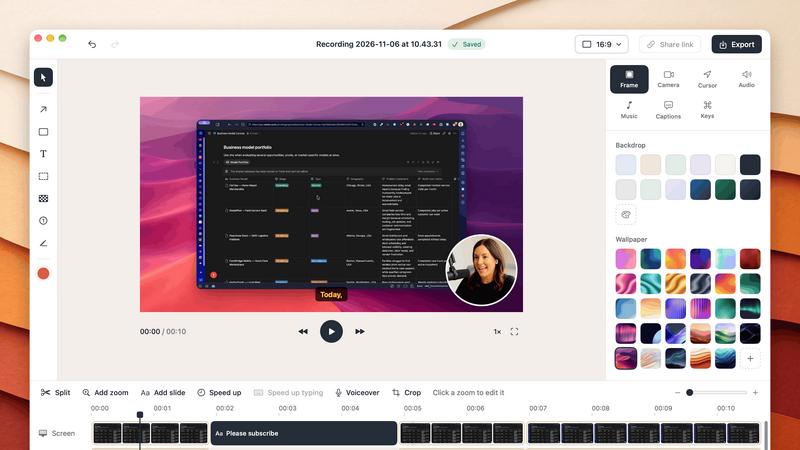
ScreenOtter is a native Mac app for screen recordings and screenshots. Your recordings come back already edited.
Record an area, a window, or a whole display, with your camera, microphone, and your Mac's sound. Open the recording, and there's a zoom on every click. The pointer moves smoothly. Your camera sits in one of eight layouts, and you can change it after you record.
Cut mistakes by deleting words from the transcript. Speed up typing in one click. Blur private data, and the blur follows it as the page scrolls. Add captions made on your Mac, music, and a voiceover. Read your script from a teleprompter that follows your voice and never shows in the video. Export an MP4 up to 4K at 60 fps, or a looping GIF.
Screenshots are copied to your clipboard the moment you take them. Add curved arrows, text, numbered steps, blur, and a backdrop, then paste them anywhere.
Everything runs on your Mac. Nothing is uploaded, and you don't need an account. Every feature works in the free version, with exports up to 720p and a small badge. One payment unlocks full quality, with every future update included. No subscription.
Similar to ScreenOtter
LevCharity
Fundraising platform for nonprofits with donations, campaigns, donor CRM, events, automated communications, reporting, and more.


GigUp
GigUp helps freelancers discover relevant Upwork jobs through AI matching, automated monitoring, and instant alerts.
Toolbox
96 private Mac tools in one app: compress video, sign PDFs, remove backgrounds, transcribe. Offline, no account, pay once.

AI Tiny Desk
Make a 19-second desk-concert video with lead and sax, full band, Halloween or pet-band modes; audio and silent MP4.
Rhinobird
AI video ads, UGC-style videos, and product visuals for cross-border sellers and e-commerce brands.

Safe Outreach
AI-powered platform that evaluates the safety of LinkedIn automation tools and helps reduce the risk of account restrictions.
How Long How Many Tool
Timers and hourly checks to figure how out long until a certain time or how many days away.