
Shrinkpad vs SparkPix
Side-by-side comparison to help you choose the right product.

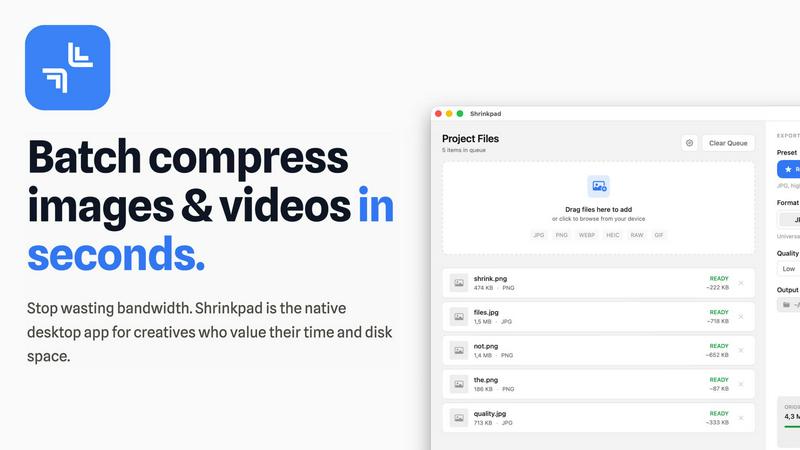
Shrinkpad
Shrinkpad effortlessly compresses images and videos in batches, optimizing your creative assets while saving time and.
Last updated: February 28, 2026

SparkPix
Transform your photos effortlessly with SparkPix, the AI-powered online editor that enhances, restores, and styles images just by typing.
Last updated: March 11, 2026
Visual Comparison
Shrinkpad
SparkPix

Feature Comparison
Shrinkpad
Intelligent Compression
Shrinkpad automatically analyzes the visual complexity of your images and videos to apply the perfect compression ratio. Say goodbye to artifacts and hello to optimized media that maintains its quality, delivering results that matter.
Unlimited Batching
Process thousands of files in a single go without the fear of crashing. Shrinkpad effortlessly handles massive queues, unlike web tools, enabling you to compress multiple assets simultaneously for maximum efficiency.
Folder Mode
With Shrinkpad, you no longer need to drag files one by one. Simply drop an entire folder, and the app automatically finds and prepares all images and videos inside for compression, streamlining your workflow.
Privacy-First Approach
All processing is done locally on your machine, ensuring that your sensitive assets never leave your device. With no cloud uploads, Shrinkpad prioritizes your privacy while providing powerful batch processing capabilities.
SparkPix
AI Photo Editor
The AI Photo Editor feature allows users to type specific instructions like "remove background" or "enhance colors," and the AI seamlessly executes the edits. This feature works in a matter of seconds, saving you time and effort while delivering professional-quality results.
Background Remover
With just one click, the Background Remover can eliminate backgrounds from portraits, product photos, or even intricate scenes. This feature is essential for anyone looking to create clean, professional images for websites or social media without needing any advanced technical skills.
Unblur Image
The Unblur Image functionality uses advanced AI algorithms to fix motion blur, out-of-focus shots, and compression artifacts. This feature is particularly valuable for those who often capture fast-moving subjects or have older photos that didn't turn out as planned.
Photo Restoration
SparkPix's Photo Restoration feature is a game changer for anyone with old, faded, or damaged photographs. Using AI, it can repair scratches, tears, and fading, bringing cherished memories back to life and preserving them for future generations.
Use Cases
Shrinkpad
Streamlining Creative Workflows
For photographers and designers, Shrinkpad simplifies the asset optimization process. Instead of manually exporting files from design software like Figma or Photoshop, users can export everything at higher resolutions and let Shrinkpad handle the rest, saving hours of busywork.
Optimizing Website Performance
Web developers can benefit immensely from Shrinkpad by significantly reducing app bundle sizes and website load times. With faster Largest Contentful Paint (LCP) scores, websites become more user-friendly and perform better in search engine rankings.
Managing Large Media Libraries
Content creators with extensive media libraries will find Shrinkpad invaluable. By enabling the batch processing of thousands of images and videos, creators can easily manage their assets and ensure they remain optimized for various platforms.
Preparing for Social Media
Social media managers can use Shrinkpad to quickly compress large video files and images for platforms like Instagram and Facebook. By ensuring files are optimized, they can share high-quality content without the hassle of size restrictions.
SparkPix
Personal Photo Enhancement
Imagine having a family gathering where the lighting was less than ideal, or perhaps someone accidentally photobombed a perfect shot. With SparkPix, you can quickly enhance these images, adjusting brightness, color, and removing unwanted elements, ensuring that your memories are preserved beautifully.
Professional Marketing Materials
For entrepreneurs and businesses, visual content is key. SparkPix enables you to create stunning product images or promotional materials effortlessly. Use the AI Background Remover and Object Remover to create clean, eye-catching visuals that stand out in crowded markets.
Social Media Content Creation
In the world of social media, having eye-catching images can make the difference between gaining followers or being overlooked. SparkPix allows you to transform ordinary photos into creative masterpieces, such as applying artistic styles or enhancing colors, making your posts more engaging.
Archiving Family History
For those passionate about genealogy, SparkPix's Photo Restoration feature is invaluable. It allows you to restore and colorize old family photographs, preserving your heritage while sharing these restored images with family members or on social media platforms.
Overview
About Shrinkpad
Shrinkpad is an innovative batch image and video compression tool meticulously designed for macOS users who need to optimize their media assets without compromising quality. This powerful native application empowers photographers, designers, and content creators to reclaim valuable disk space while ensuring that their assets retain their visual integrity. Imagine effortlessly dropping hundreds of files or entire folders into Shrinkpad, selecting your desired compression settings, and watching the magic unfold. In mere seconds, your media is compressed, reducing file sizes by up to 90%. Unlike cloud-based solutions, Shrinkpad processes everything locally, ensuring your files remain secure and private. With its user-friendly interface and smart detection capabilities, it takes the guesswork out of compression, allowing you to focus on your creative endeavors without the burden of storage constraints.
About SparkPix
In the digital age, capturing and sharing memories has become a crucial part of our lives, but not everyone possesses the skills to edit photos professionally. Enter SparkPix, an innovative AI-powered photo editing tool that democratizes photo enhancement. SparkPix allows users to edit their images simply by typing what they want. Whether you are a casual user looking to touch up family photos or a professional needing to create stunning visuals for marketing, SparkPix caters to all. Its intuitive interface and powerful AI capabilities enable you to perform complex edits in under 30 seconds, making it accessible to anyone, regardless of their technical skills. With SparkPix, you can breathe new life into your images without the steep learning curve associated with traditional editing software.
Frequently Asked Questions
Shrinkpad FAQ
Can I use Shrinkpad for free?
Yes, Shrinkpad offers a Free Starter plan that includes essential tools for casual use. You can batch compress up to 10 files at a time in common formats like JPG and PNG.
What file formats does Shrinkpad support?
Shrinkpad supports a wide range of formats including JPG, PNG, WEBP, AVIF, MP4, MOV, and even RAW formats, making it versatile for various media types.
Does Shrinkpad support video compression?
Absolutely. Shrinkpad is equipped to handle video files alongside images, allowing users to batch process both types of media efficiently.
How many files can I process at once?
With the Free Starter plan, you can process up to 10 files per batch. However, the Personal and Team plans allow for unlimited batch processing, making it perfect for heavy users.
SparkPix FAQ
How does SparkPix work?
SparkPix utilizes advanced AI algorithms to process and edit images based on user-defined commands. Simply type in what you want to change, and the AI takes care of the rest, providing quick and professional results.
Is SparkPix easy to use?
Absolutely! SparkPix is designed for users of all skill levels. Its intuitive interface allows anyone to edit photos effortlessly by simply typing their requests, eliminating the need for extensive training or prior experience.
Can I use SparkPix for commercial purposes?
Yes, SparkPix is suitable for both personal and commercial use. Whether you are an individual wanting to enhance personal photos or a business in need of professional images, SparkPix can handle your editing needs.
What devices can I use SparkPix on?
SparkPix is a web-based platform, meaning it is accessible from any device with an internet connection. Whether you are using a desktop, iPhone, or Android device, you can edit your photos without needing to download any software.
Alternatives
Shrinkpad Alternatives
Shrinkpad is an innovative batch image and video compression tool tailored for macOS users, designed to enhance digital workflows by optimizing media with ease. As users embrace the need for efficient storage solutions, they often seek alternatives that may better align with their unique requirements, whether it be pricing, additional features, or compatibility with different platforms. The quest for an alternative typically stems from the desire to find a product that not only meets specific needs but also offers a seamless user experience without compromising quality or security. When exploring alternatives to Shrinkpad, it’s crucial to consider factors such as batch processing capabilities, privacy measures, and format compatibility. Users should seek options that allow for efficient handling of multiple files and prioritize local processing to safeguard sensitive media. Additionally, ensuring that the alternative supports a wide range of file formats can significantly streamline the creative workflow and enhance productivity.
SparkPix Alternatives
SparkPix is an innovative AI photo editor that simplifies the editing process by allowing users to make changes through simple text commands. It falls into the category of image and photo editing tools, offering features such as background removal, image enhancement, and style transfer. As users explore their creative options, they often seek alternatives to SparkPix due to varying needs such as pricing structures, specific editing features, or compatibility with different platforms. When looking for alternatives, it's essential to consider factors such as ease of use, the range of tools offered, and pricing plans. Users should also evaluate whether the alternative supports the specific editing tasks they require, whether it is web-based or needs installation, and how well it integrates with existing workflows. By assessing these elements, users can find a solution that fits their unique photo editing journey.