
Shrinkpad
Shrinkpad effortlessly compresses images and videos in batches, optimizing your creative assets while saving time and.
Visit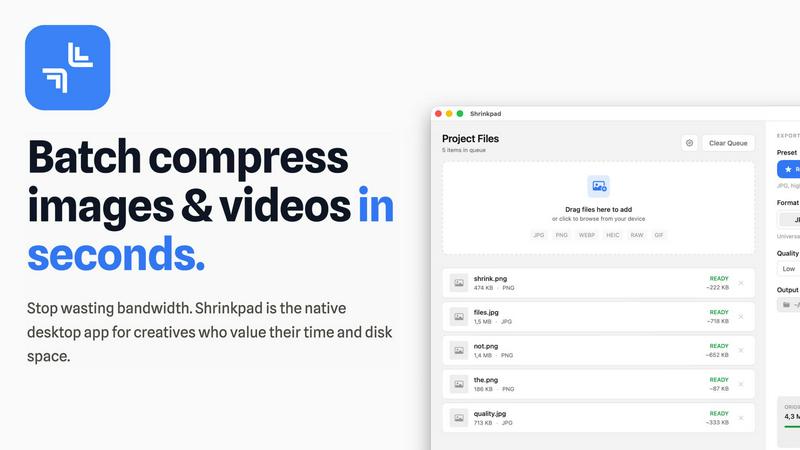
About Shrinkpad
Shrinkpad is an innovative batch image and video compression tool meticulously designed for macOS users who need to optimize their media assets without compromising quality. This powerful native application empowers photographers, designers, and content creators to reclaim valuable disk space while ensuring that their assets retain their visual integrity. Imagine effortlessly dropping hundreds of files or entire folders into Shrinkpad, selecting your desired compression settings, and watching the magic unfold. In mere seconds, your media is compressed, reducing file sizes by up to 90%. Unlike cloud-based solutions, Shrinkpad processes everything locally, ensuring your files remain secure and private. With its user-friendly interface and smart detection capabilities, it takes the guesswork out of compression, allowing you to focus on your creative endeavors without the burden of storage constraints.
Features of Shrinkpad
Intelligent Compression
Shrinkpad automatically analyzes the visual complexity of your images and videos to apply the perfect compression ratio. Say goodbye to artifacts and hello to optimized media that maintains its quality, delivering results that matter.
Unlimited Batching
Process thousands of files in a single go without the fear of crashing. Shrinkpad effortlessly handles massive queues, unlike web tools, enabling you to compress multiple assets simultaneously for maximum efficiency.
Folder Mode
With Shrinkpad, you no longer need to drag files one by one. Simply drop an entire folder, and the app automatically finds and prepares all images and videos inside for compression, streamlining your workflow.
Privacy-First Approach
All processing is done locally on your machine, ensuring that your sensitive assets never leave your device. With no cloud uploads, Shrinkpad prioritizes your privacy while providing powerful batch processing capabilities.
Use Cases of Shrinkpad
Streamlining Creative Workflows
For photographers and designers, Shrinkpad simplifies the asset optimization process. Instead of manually exporting files from design software like Figma or Photoshop, users can export everything at higher resolutions and let Shrinkpad handle the rest, saving hours of busywork.
Optimizing Website Performance
Web developers can benefit immensely from Shrinkpad by significantly reducing app bundle sizes and website load times. With faster Largest Contentful Paint (LCP) scores, websites become more user-friendly and perform better in search engine rankings.
Managing Large Media Libraries
Content creators with extensive media libraries will find Shrinkpad invaluable. By enabling the batch processing of thousands of images and videos, creators can easily manage their assets and ensure they remain optimized for various platforms.
Preparing for Social Media
Social media managers can use Shrinkpad to quickly compress large video files and images for platforms like Instagram and Facebook. By ensuring files are optimized, they can share high-quality content without the hassle of size restrictions.
Frequently Asked Questions
Can I use Shrinkpad for free?
Yes, Shrinkpad offers a Free Starter plan that includes essential tools for casual use. You can batch compress up to 10 files at a time in common formats like JPG and PNG.
What file formats does Shrinkpad support?
Shrinkpad supports a wide range of formats including JPG, PNG, WEBP, AVIF, MP4, MOV, and even RAW formats, making it versatile for various media types.
Does Shrinkpad support video compression?
Absolutely. Shrinkpad is equipped to handle video files alongside images, allowing users to batch process both types of media efficiently.
How many files can I process at once?
With the Free Starter plan, you can process up to 10 files per batch. However, the Personal and Team plans allow for unlimited batch processing, making it perfect for heavy users.
Explore more in this category:
Similar to Shrinkpad
Sprite Sheet Maker
A free browser-based toolkit for creating, cutting, converting, and previewing sprite sheet animations.

Product Launch Checklist
A free launch checklist for SaaS, apps, AI tools and more. Every step says why it matters and when you can skip it.

Try This Skill
One-click AI photo stylization for e-commerce & portraits

Magic Eraser
AI photo editor for removing objects and backgrounds, enhancing images, and creating visuals on web and mobile.
GPT Image 2 API
Production-ready GPT Image 2 image generation and editing for creators, marketers, and developers.
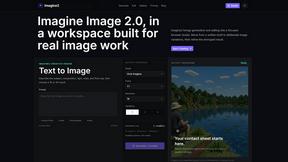
Imagine2
Private browser-based AI image generation and editing with text-to-image, targeted edits, and multi-image references.

Kogashitsuka AI
An online AI image tool that enhances photos and illustrations at their original size or upscales them by 2x or 4x.