
Subclip
Subclip is the AI video editor that reclaims 80% of your time by handling editing, subtitles, silence removal, and voice dubbing in one place.
Visit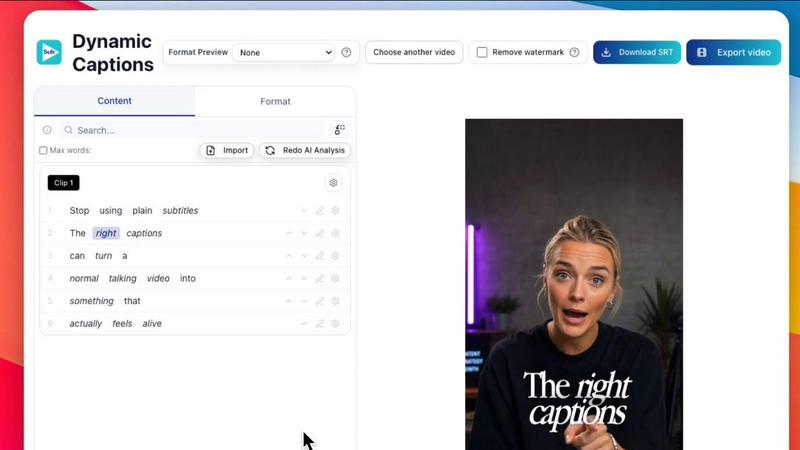
About Subclip
You didn't become a creator to stare at timelines. You became one to share your voice, your story, and your vision with the world. Subclip is an AI-powered video editor built for creators, marketers, and educators who want to reclaim their time and focus on what truly matters: making great content. Imagine editing a video as easily as editing a document. That is the core promise of Subclip. You simply drag in a transcript and start editing, trimming mistakes, and rearranging your narrative without the manual grind of scrubbing through hours of raw footage. Subclip is a complete, browser-based production studio that replaces the complexity of traditional tools with intuitive, AI-driven features. You can clone your own voice and use it to re-record parts of your video, remove silences and filler words with a single click, auto-generate stunning subtitles in over 48 languages, and even dub your entire video into 21+ languages while perfectly preserving your original background music and tone. Whether you are a YouTuber, podcaster, course creator, vlogger, or part of a content agency, Subclip streamlines your entire workflow from raw footage to a finished, published video. It is built for speed and simplicity, helping you reclaim up to 80% of your time. With a freemium model that includes a generous free tier, Subclip makes professional video production accessible to everyone.
Features of Subclip
Rough Cut using Text Transcript
Edit your videos like a Google Doc. Subclip generates a full transcript of your video, allowing you to read through the text, trim mistakes, delete entire sections, and rearrange the flow of your narrative instantly. Every change you make to the text automatically updates your video timeline, eliminating the need for manual rework and scrubbing. When you are done, you can export your NLE timeline directly to professional editors like DaVinci Resolve, Final Cut Pro, and Adobe Premiere Pro for final polish.
AI Clipping and Viral Score
Stop searching for your best moments. Subclip's intelligence engine automatically scans your long-form videos for high-energy segments, punchlines, and key emotional shifts. It assigns each potential clip a Viral Score, an Engagement Score, and a Retention Score, so you know exactly which moments will perform best on social media. This feature turns hours of footage into short, high-retention clips in minutes, allowing you to 10x your viewership with zero manual effort.
AI Dubbing with Voice Clone
Break through language barriers without losing your authentic voice. Subclip uses advanced AI to translate your video into 21+ languages while cloning your unique vocal tone, emotion, and delivery. Your audience in Spain, France, or Japan will hear you speaking their language, but it will still sound like you. This feature is perfect for course creators who want to reach a global audience and for content teams who need to localize their video assets without the high cost of re-recording or hiring voice actors.
One-Click Unlimited Captions and Export
Generate stunning, accurate subtitles for your videos in over 48 languages with a single click. There are no limits on transcription minutes or export minutes, even on the free plan. You can customize the text style, format, and animation of your captions to match your brand, making your content instantly more engaging and accessible. Once your video is ready, Subclip allows you to export it in multiple aspect ratios (16:9, 9:16, 1:1) and even schedule it directly to platforms like YouTube and X (Twitter) from a single calendar.
Use Cases of Subclip
Subclip for Creators and Podcasters
Long-form podcasters and YouTubers can dramatically increase their output. Record a single hour-long podcast, and Subclip will automatically identify the best clips, remove all silences and filler words, add eye-catching captions, and prepare the clips for social media. You can then dub the clips into multiple languages to reach a global audience. This turns one recording session into a week's worth of high-retention content across all your platforms.
Subclip for Coaches and Course Creators
If you have recorded a course or coaching session, you can instantly make it accessible to the world. Subclip allows you to dub your entire course into 20+ languages using a clone of your own voice. Your students in different countries will hear your authentic tone and emotion, not a robotic narrator. You can also enhance the audio quality, removing background noise and echo to ensure every lesson sounds studio-ready and professional.
Subclip for Vloggers
Vloggers can streamline their entire editing workflow. Upload your raw footage, and Subclip generates a transcript for text-based editing. You can quickly cut out the boring parts, add B-roll markers, and enhance your voice with a single click. The tool then lets you add stunning, customizable captions and export your final video in the perfect vertical or horizontal format for your platform, all without waiting for slow upload and download times.
Subclip for Agencies and Freelancers
Agencies and freelancers can increase their output at a fraction of the cost. Subclip provides unlimited transcription and export for all team members, along with a shared workspace for collaboration. You can share projects with clients like a Google Doc, collect feedback, and make edits instantly. The built-in scheduling tool allows you to plan and publish content for multiple clients from a single calendar, making it the ultimate tool for scaling a video production business.
Frequently Asked Questions
What makes Subclip different from traditional video editors like Adobe Premiere or DaVinci Resolve?
Subclip is built for speed and simplicity. Traditional editors require you to manually scrub through a timeline, cut clips, and sync audio. Subclip replaces this by letting you edit your video through its text transcript. You simply read and edit the text, and the video timeline updates automatically. It also includes powerful AI features like one-click silence removal, voice cloning for dubbing, and automatic clip selection, which are not native to traditional NLEs. You can then export your project as a .fcpxml file to finish in those advanced editors if needed.
Can I really dub my video into another language with my own voice?
Yes. Subclip uses advanced AI voice cloning technology. You first create a voice model by providing a short sample of your speech. Then, when you choose to dub your video into one of the 21+ supported languages, the AI translates the script and generates speech that sounds like you, maintaining your original tone, emotion, and pacing. This is a much faster and more cost-effective solution than hiring human voice actors for each language.
Is there a limit on how many videos I can transcribe or export?
No. Subclip offers unlimited transcription and unlimited export video minutes, even on its free tier. You can upload as much content as you need, generate subtitles in over 48 languages, and export your final videos without worrying about hitting a cap. This makes it an ideal solution for heavy content creators, agencies, and anyone who produces a high volume of video content.
How does the AI clipping feature work?
Subclip's AI engine analyzes your video for key moments that are likely to perform well on social media. It looks for high-energy segments, punchlines, and emotional shifts. For each potential clip, it generates a Viral Score, Engagement Score, and Retention Score. You can then select the highest-scoring clips and export them as short, standalone videos. This saves you hours of manually searching through your footage for the best highlights.
Pricing of Subclip
Subclip operates on a freemium pricing model. It offers a generous free tier that includes unlimited transcription and export minutes, access to local transcription in 48+ languages, and basic editing features. For users who need more advanced features, such as AI voice cloning, multi-language dubbing, team collaboration, and priority support, Subclip offers affordable paid plans. Specific pricing details for the paid tiers are available on the Subclip website's pricing page.
Similar to Subclip

Oravaa
Oravaa gives your business a voice that books leads, resolves support, and works 24/7, all while sounding completely human.

Hush Touch | Voice-to-Text for MacOS
Transform your Mac into a smart dictation tool that learns your words and works offline for just $20.

Glossa
Glossa bridges language barriers with real-time AI translations for sermons, empowering churches to connect globally.

Bantr: Offline & Unlimited TTS for Mac
Bantr empowers your Mac with unlimited offline text-to-speech, delivering natural voiceovers while ensuring your.

KaiCalls
KaiCalls is your 24/7 AI phone agent that answers calls, qualifies leads, and books appointments automatically.

Vowen
Vowen is your private voice companion that transforms speech into text and action across all your apps.
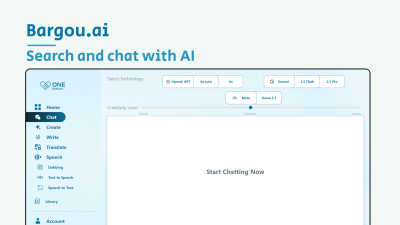
Bargou One
Begin your creative journey with Bargou One, the all-in-one AI suite for chat, creation, and translation.