
Picture Enhancer
Transform your blurry, damaged, or low-res photos into sharp, clear images instantly with free AI enhancement right in your browser.
Visit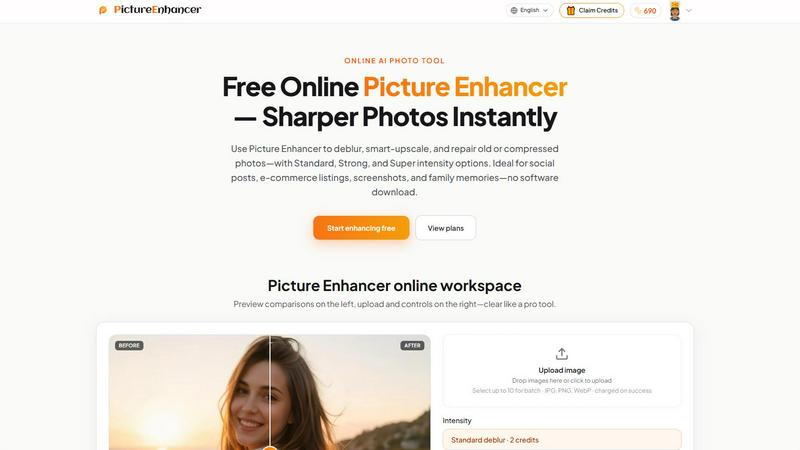
About Picture Enhancer
Picture Enhancer is a free online AI photo enhancement tool designed for creators, sellers, and everyday users who need sharper, clearer images without complicated software or expensive subscriptions. At its core, this tool transforms blurry, compressed, or damaged photos into crisp, professional-looking visuals in seconds. The journey begins when you upload a JPG, PNG, or WebP photo, then choose from three powerful enhancement modes: Deblur, Upscale, or Restore. Each mode offers three intensity levels Standard, Strong, and Super allowing you to dial in exactly how much processing your image needs. Before committing to a download, you can preview the result using a side-by-side before and after slider, ensuring you are satisfied with the transformation. The output is always watermark-free, giving you clean, usable images for any purpose. Picture Enhancer is built for everyone from social media creators polishing their feeds to e-commerce sellers showcasing product details, from professionals cleaning up screenshots to families breathing new life into old scanned photographs. The platform respects your privacy, processing images securely and only using them to complete your enhancement request. With results delivered in seconds, this tool removes the barrier between your current photo and the sharper, more detailed version you envision.
Features of Picture Enhancer
AI Deblur Technology
Picture Enhancer uses advanced artificial intelligence to rebuild edges and texture from images affected by camera shake, soft focus, or mild motion blur. The AI analyzes each pixel and reconstructs lost detail, making faces, text, and objects appear significantly clearer. You can choose Standard deblur for light corrections, Strong deblur for more noticeable improvements, or Super deblur for maximum sharpening on heavily blurred photos. This feature is especially valuable for salvaging candid shots, event photography, or any image where the camera did not quite capture the moment perfectly.
Smart Upscale Capability
This feature allows you to enlarge your images by 2x or 4x while adding genuine detail rather than simply stretching pixels. Unlike traditional upscaling that creates blocky, pixelated results, Picture Enhancer intelligently fills in missing information based on learned patterns from millions of images. Start with a small file from an old phone, a thumbnail, or a compressed web image, and watch it transform into a larger, sharper version suitable for social media covers, product hero shots, or even print previews. The upscale mode preserves edges and textures so your enlarged image looks natural and professional.
Old Photo and Damage Restoration
Picture Enhancer can reduce scratches, fade, and compression artifacts that accumulate on older photographs or heavily compressed digital files. The AI identifies damaged areas and intelligently repairs them, smoothing out imperfections while preserving the original character of the image. Standard restore handles light wear, Strong restore tackles moderate damage like visible scratches and color fading, while Super restore addresses heavy damage on scanned family prints or badly degraded images. This feature turns treasured but damaged memories into clean, shareable digital files ready for printing or posting online.
Batch Processing for Paid Users
Subscribers and permanent credit pack buyers unlock the ability to enhance up to ten images at once, dramatically speeding up workflows for professionals and power users. Instead of processing each image individually, you can upload multiple photos, apply consistent settings, and let the AI work through them in sequence. This feature is ideal for e-commerce sellers managing product catalogs, social media managers preparing content batches, or anyone handling large volumes of images who values efficiency. Batch processing maintains the same quality standards as single image enhancement while saving significant time.
Use Cases of Picture Enhancer
Portraits and Everyday Photos
Reduce mild blur so faces and clothing look cleaner for social media feeds, personal portfolios, or family albums. Whether you captured a quick photo on your phone or scanned an old print, Picture Enhancer brings out natural details that make your subjects stand out. The deblur mode sharpens eyes, hair, and fabric textures while keeping skin tones natural. This use case helps anyone who wants their personal photos to look their best without needing professional editing skills or software.
E-commerce and Product Shots
Upscale product detail and tame compression noise so your listings stand out in crowded online marketplaces. Small product images from phones or compressed uploads can be enlarged and sharpened, revealing textures, labels, and fine details that convince buyers to click and purchase. The restore mode also helps clean up images that have been resized or compressed multiple times during the listing process. Sellers can process batches of product photos quickly, maintaining consistent quality across their entire catalog.
Screenshots and UI Captures
Sharpen text edges for tutorials, support threads, or documentation archives where clarity is essential. Screenshots often suffer from compression artifacts, especially when shared through messaging apps or uploaded to websites. Picture Enhancer cleans up these artifacts, making text crisp and readable again. This use case benefits technical writers, customer support teams, educators, and anyone who creates visual guides or documentation that relies on clear, legible screenshots.
Old Photo Memories
Repair fade and scratches so scanned family prints are ready to share or print for generations to come. Old photographs stored in albums or boxes often show signs of age, including yellowing, scratches, dust spots, and fading colors. Picture Enhancer can significantly reduce these imperfections, restoring the original vibrancy and detail of cherished memories. The restore mode works gently enough to preserve the authentic feel of vintage photos while removing distracting damage, making it perfect for digitizing family archives.
Frequently Asked Questions
What is Picture Enhancer?
Picture Enhancer is a free online AI photo enhancement tool that improves image quality through deblurring, smart upscaling, and damage restoration. It works with JPG, PNG, and WebP files and offers three intensity levels for each mode. The tool is designed for creators, sellers, and everyday users who need sharper images without installing software. Results are delivered in seconds, and downloads are always watermark-free. Users can preview before and after comparisons before committing to a download.
Can I try Picture Enhancer without signing in?
Yes, guests receive three free lifetime tries per IP address with no signup required. This allows you to test the tool on your own images before deciding to create an account. Each guest try uses the Standard intensity level and processes one image at a time. After your three tries are used, you can sign in to access credits and continue enhancing images.
How does billing work after sign-in?
New accounts receive starter credits automatically. Credits are charged only when an enhancement result succeeds, meaning you never pay for failed attempts. Standard intensity costs 2 credits, Strong costs 4 credits, and Super costs 6 credits. Paid users unlock Super tiers and batch enhance capabilities for up to ten images. Monthly plans grant credits each billing cycle, while permanent packs never expire and remain available as long as your account is active.
Which modes does Picture Enhancer support?
Picture Enhancer supports three main modes: Deblur, which rebuilds edges and texture from camera shake and soft focus; Upscale, which enlarges images by 2x or 4x while adding detail; and Restore, which reduces scratches, fade, and compression artifacts. Each mode offers Standard, Strong, and Super intensity levels. Super tiers are available to paid users, while Standard and Strong are accessible with credits after signing in.
Will downloads include a watermark?
No, all successful enhancement downloads are completely watermark-free. You receive the clean, enhanced image without any branding or logos overlaid. This applies to guest tries, signed-in users, and paid subscribers alike. The before and after preview is only shown on screen and is not added to your final download.
What is the difference between subscription and permanent credit packs?
Subscriptions grant you a set number of credits each billing cycle, renewing monthly or annually depending on your plan. Permanent credit packs provide a one-time credit balance that never expires, giving you flexibility to enhance images whenever you need without ongoing payments. Both options unlock Super tiers and batch processing capabilities. Choose a subscription if you enhance images regularly, or a permanent pack if you prefer pay once and use later.
Are my photos safe?
Yes, your photos are processed securely and privately. Picture Enhancer uses your uploaded images only to complete your enhancement request and does not store them longer than necessary. The platform does not share your images with third parties or use them for training purposes. Your privacy is respected throughout the entire enhancement process.
Where do I check balance and history?
Signed-in users can view their credit balance and enhancement history in the My Assets section of your account. This area shows your remaining credits, past enhancements, and allows you to revisit and download previously enhanced images. Guests do not have access to history since they are not signed in, so you must download your results during your session.
Explore more in this category:
Similar to Picture Enhancer
ImageGenerator
Create and edit AI images online with multiple models, text-to-image, image-to-image, background removal, and upscaling.

EditTextPhoto
AI-powered image text editor to edit, replace, fix, or translate text in images while preserving the original font, color, size, and style.
AIPetGen
Create anything with your pet. AI studio for pet images and short videos.

Remove Text
Remove text from images online with AI
ideogram-45
AI image generation and editing with sharp typography, native 2K output, and localized edits that preserve the rest of your image.
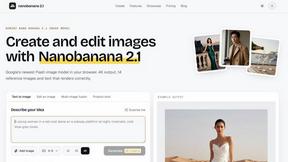
nanobanana 21
A fast, simple image studio powered by Nano Banana 2.1. Create and edit high-quality AI images with readable text and consistent characters.

qwenimage-21
AI image generation and editing with detailed prompts, reference images, portrait and typography refinement, and transparent RGBA output.

AI Album Cover Maker
Create release-ready album covers from a prompt or photo. Generate, refine, and export art for singles, EPs, mixtapes, and playlists.