
Photo Animate
Transform still photos into captivating, lifelike videos with Photo Animate's powerful AI-driven animation technology.
Visit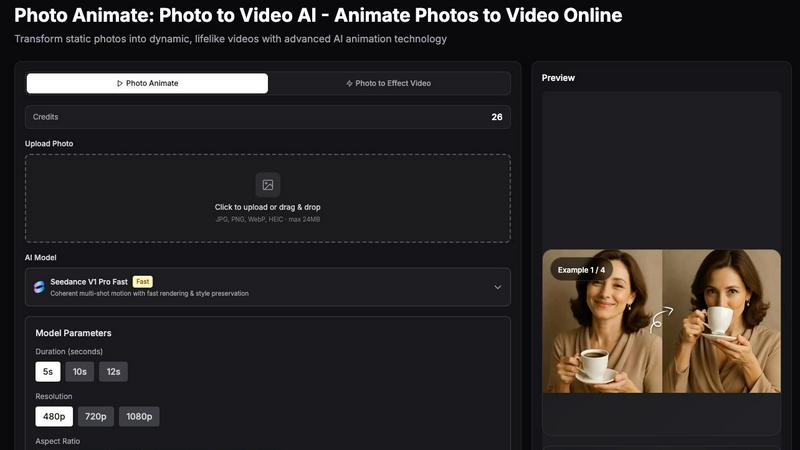
About Photo Animate
Photo Animate is an innovative AI-powered tool designed to breathe life into static photos by transforming them into dynamic, engaging videos. With cutting-edge animation technology, users can easily create lifelike animations from still images, making it perfect for a variety of applications. Whether you're a content creator looking to enhance your portfolio, a family historian wanting to preserve cherished memories, or an artist seeking to add a unique twist to your work, Photo Animate offers a seamless and user-friendly experience. The platform focuses on delivering natural and subtle movements, ensuring that the essence of the original image is maintained. This makes it ideal for animating portraits, old family photos, and other meaningful visuals. With Photo Animate, you can effortlessly create memorable video content that resonates emotionally, allowing you to tell stories in a new and captivating way.
Features of Photo Animate
Advanced AI Animation Technology
Photo Animate utilizes state-of-the-art AI animation technology to transform static images into fluid videos. This feature ensures that movements are realistic and coherent, providing a captivating viewing experience that enhances the emotional connection to the images.
User-Friendly Workflow
The platform is designed with simplicity in mind. Users can easily upload their photos, choose the desired animation style, preview the result, and download their videos with just a few clicks. This straightforward process eliminates the need for advanced editing skills, making it accessible to everyone.
Customizable Animation Styles
With various animation styles available, users can tailor the motion of their photos to suit their personal preferences. Whether you want subtle movements like blinking and smiling or more dynamic effects, Photo Animate allows for customization that aligns with the emotional tone of the project.
High-Quality Output Options
Photo Animate offers multiple resolution options, including 480p, 720p, and 1080p. This flexibility ensures that users can create videos suited for various platforms, whether for social media sharing, family archives, or professional presentations, maintaining high visual quality throughout.
Use Cases of Photo Animate
Family Storytelling
Photo Animate is a powerful tool for families looking to preserve their histories. By animating old family photos, users can create touching video montages that bring stories to life, making it easier to share memories with loved ones during gatherings or special events.
Memorial Tributes
The platform provides a respectful way to honor deceased loved ones by creating subtle animations of their photographs. This feature allows for gentle movements that can evoke cherished memories, making it a thoughtful addition to memorial services or personal tributes.
Creative Projects
Artists and content creators can leverage Photo Animate to add unique flair to their works. By animating portraits or artwork, they can create eye-catching content for social media, enhancing engagement and interest in their projects.
Educational Resources
Educators can use Photo Animate to create engaging visual aids for lessons. By animating historical figures or significant events, teachers can provide dynamic educational content that captures students' attention and enhances their learning experience.
Frequently Asked Questions
How does Photo Animate work?
Photo Animate uses advanced AI algorithms to analyze the uploaded images and apply realistic motion effects. Users simply upload a photo, select an animation style, and the tool generates a video that retains the original photo's essence while adding lifelike movements.
What file formats does Photo Animate support?
Users can upload images in multiple formats, including JPG, PNG, WebP, and HEIC, with a maximum file size of 24MB. This versatility ensures that most common image files can be easily animated.
Can I customize the duration and resolution of my videos?
Yes, Photo Animate allows users to choose the duration of their animations, ranging from 5 to 12 seconds. Additionally, users can select from various resolution options, including 480p, 720p, and 1080p, to suit their specific needs.
Is there a limit to the number of photos I can animate?
While there is no strict limit on the number of photos you can animate, users should be mindful of the credits required for each animation. Each photo animation consumes credits based on the selected features, so managing credits is essential for larger projects.
Explore more in this category:
Similar to Photo Animate

hotel-lobby
Two-person AI video concept in a warm orange booth, with two performers sharing one microphone.
Sprite Sheet Maker
A free browser-based toolkit for creating, cutting, converting, and previewing sprite sheet animations.

TryKlingAI
Create Kling AI videos from text, images, audio, and motion references with Kling 3.0, Motion Control, Lip Sync, and API workflows.
Wan Video
Wan Video is an AI video generator and API for Wan 2.7, turning text or images into videos online.

Try This Skill
One-click AI photo stylization for e-commerce & portraits