
Omni Video AI Generator
Turn your words and images into cinematic masterpieces with Omni Video AI, where every idea becomes a stunning video in seconds.
Visit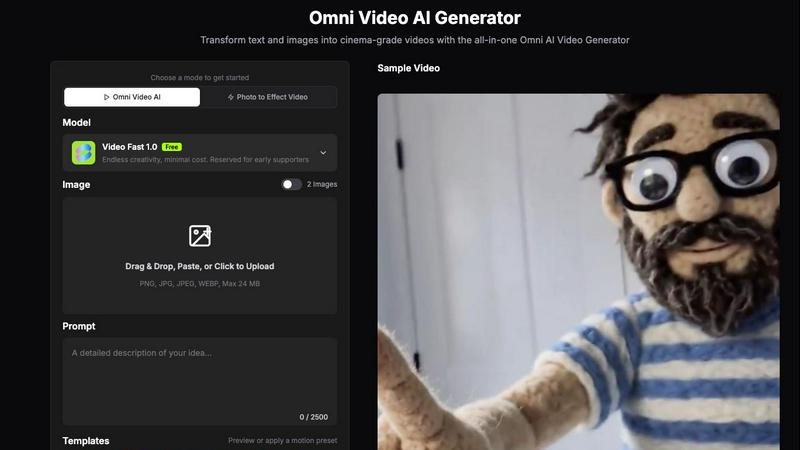
About Omni Video AI Generator
Omni Video AI Generator is an all-in-one artificial intelligence tool designed to transform simple text prompts and static images into cinema-grade videos. This product serves content creators, marketers, filmmakers, and businesses who want to produce professional video content quickly without expensive equipment or complex editing software. The core value proposition is accessibility: anyone can describe a scene or upload a photo, and the Omni Video Model handles the rest. It generates videos with realistic lighting, fluid motion, and stunning resolution up to 4K. The tool is journey-focused, meaning it guides users from an initial idea or image through a creative workflow that includes uploading, prompting, generating, previewing, and finally exporting. Whether you are animating an old family photo, creating product demos, or generating cinematic scenes from scratch, Omni Video AI removes technical barriers. It offers multiple modes including text-to-video, image-to-video animation, and photo to effect video. Users can choose from preset motion templates like Dance, LoveHeart, Walking, or Ghibli style, or write custom prompts to direct camera movements and subject actions. The platform is built for speed, generating videos in seconds, and supports various aspect ratios and durations. With free credits available for testing, Omni Video AI invites early supporters to explore endless creativity at minimal cost. It is a unified pipeline where one powerful model handles every input type, making video creation as simple as typing a sentence.
Features of Omni Video AI Generator
Text-to-Video Generation
Transform simple text prompts into stunning, high-quality videos with cinematic precision. Describe any scene you imagine, from a sunset over a futuristic city to a dancer in a rainstorm, and watch the Omni Video Model bring your vision to life. This feature eliminates the need for stock footage or complex filming setups. You control the narrative entirely through words, and the AI interprets your description to generate realistic lighting, textures, and character actions. It is perfect for storytellers, advertisers, and educators who need custom visuals on demand.
Image-to-Video Animation
Upload any static image, whether it is a portrait, product shot, artwork, or landscape, and animate it into a dynamic video. The Omni Video Model intelligently adds motion, depth, and life to still photos with remarkable realism. Your subject can wave, walk, or simply breathe with subtle movement. Backgrounds can shift with gentle camera zooms or pans. This feature is ideal for bringing old photographs to life, creating engaging social media content, or adding motion to product images for e-commerce websites.
Lightning-Fast Rendering
Generate videos in seconds, not minutes. The Omni Video Model is optimized for speed without sacrificing quality, letting you iterate and create at the speed of thought. You can test multiple prompts, adjust motion settings, and preview results almost instantly. This rapid feedback loop accelerates creative workflows, making it ideal for time-sensitive projects like social media campaigns, breaking news visuals, or client presentations. No more waiting for hours of rendering time.
Multi-Style Adaptability
From photorealistic to anime, cinematic to abstract, the Omni Video Model adapts to any artistic style. One model, unlimited creative possibilities. You can apply preset templates like Ghibli, Cartoon, or Old Photo to instantly change the aesthetic of your video. Alternatively, you can describe the desired style in your prompt, such as watercolor painting or film noir. This versatility ensures that whether you are making a corporate video or a personal art project, the output matches your creative vision.
Use Cases of Omni Video AI Generator
Social Media Content Creation
Marketers and influencers can produce engaging short videos for platforms like Instagram, TikTok, and YouTube. Upload a product image, add a motion prompt describing a slow camera pan or a glowing effect, and generate a professional-looking video in seconds. The tool supports popular aspect ratios like 9:16 for vertical stories and 16:9 for widescreen. This use case saves hours of filming and editing, allowing creators to post fresh content daily.
Old Photo Animation and Preservation
Historians, genealogists, and families can breathe life into treasured old photographs. Upload a scanned image of a grandparent or a historical scene, and use the motion templates like Old Photo or Walking to create a subtle animation. The result is a moving memory that feels more present and emotional. This use case is powerful for storytelling in documentaries, family reunions, or personal keepsakes.
E-commerce Product Demonstrations
Online retailers can convert static product shots into dynamic videos that showcase features. Upload a photo of a piece of clothing, a gadget, or furniture. Add a prompt describing a rotating view or a zoom-in on details. The generated video can be used on product pages, in ads, or on social media to increase engagement and conversion rates. This eliminates the need for expensive video production studios.
Educational and Training Videos
Teachers and trainers can create custom visuals to explain complex concepts. Type a text prompt describing a scientific process, a historical event, or a mechanical operation. The Omni Video AI generates a clear, animated video that illustrates the idea. This makes learning more engaging and accessible, especially for visual learners. It also allows rapid creation of supplementary materials for online courses.
Frequently Asked Questions
What is Omni Video AI?
Omni Video AI is an all-in-one AI video generator that creates stunning videos from text prompts and images. It delivers realistic motion, cinematic camera work, and professional quality. It supports multiple input types including text-to-video, image-to-video, and photo to effect video, all within a single unified pipeline.
How do I create a video from an image?
Upload an image by dragging and dropping, pasting, or clicking to select a file. Then write a short motion prompt describing what should move, such as camera direction or subject action. Choose your generation settings like aspect ratio, duration, and resolution. Finally, click Create for FREE and let the Omni AI Video Generator produce a professional video from your static image.
Can Omni Video AI generate videos from text?
Yes. Omni Video AI fully supports text-to-video generation. Simply type a description of the scene you want to create, including details about the setting, characters, lighting, and camera movement. The AI model interprets your prompt and generates a cinema-grade video that matches your vision. This is a core feature of the platform.
Is there a free Omni Video AI option?
Yes. Omni Video AI offers free credits so you can test the workflow before choosing a paid plan. You can start creating AI videos at no cost, experiment with different prompts and settings, and see the quality of the output. This allows you to evaluate the tool thoroughly before committing to a subscription.
Similar to Omni Video AI Generator
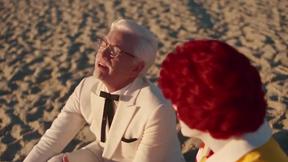
Raindance AI Video Generator
Turn two photos into the Raindance AI pier video with the soundtrack included
AIPetGen
Create anything with your pet. AI studio for pet images and short videos.
DanseAI - Alors on Danse AI Video Genera
Make the Alors on Danse AI meme video from two photos, soundtrack included
Opus 5.5 Video Generator
Turn a prompt into a 1080p motion-graphics MP4 planned and coded by Claude Opus 5.5
Rumpelstiltskin AI Video Generator
Make the viral Rumpelstiltskin tiptoe dance meme video from two photos

Hotel Lobby AI Video Generator
Turn two photos into a Hotel Lobby dance video in the orange A COLORS SHOW booth
TryH3 - MiniMax H3 Video Generator
Try MiniMax Hailuo H3 video generation in the browser