
Mp4To
Effortlessly convert MP4 videos and audio to over 30 formats in your browser, all for free and with complete privacy.
Visit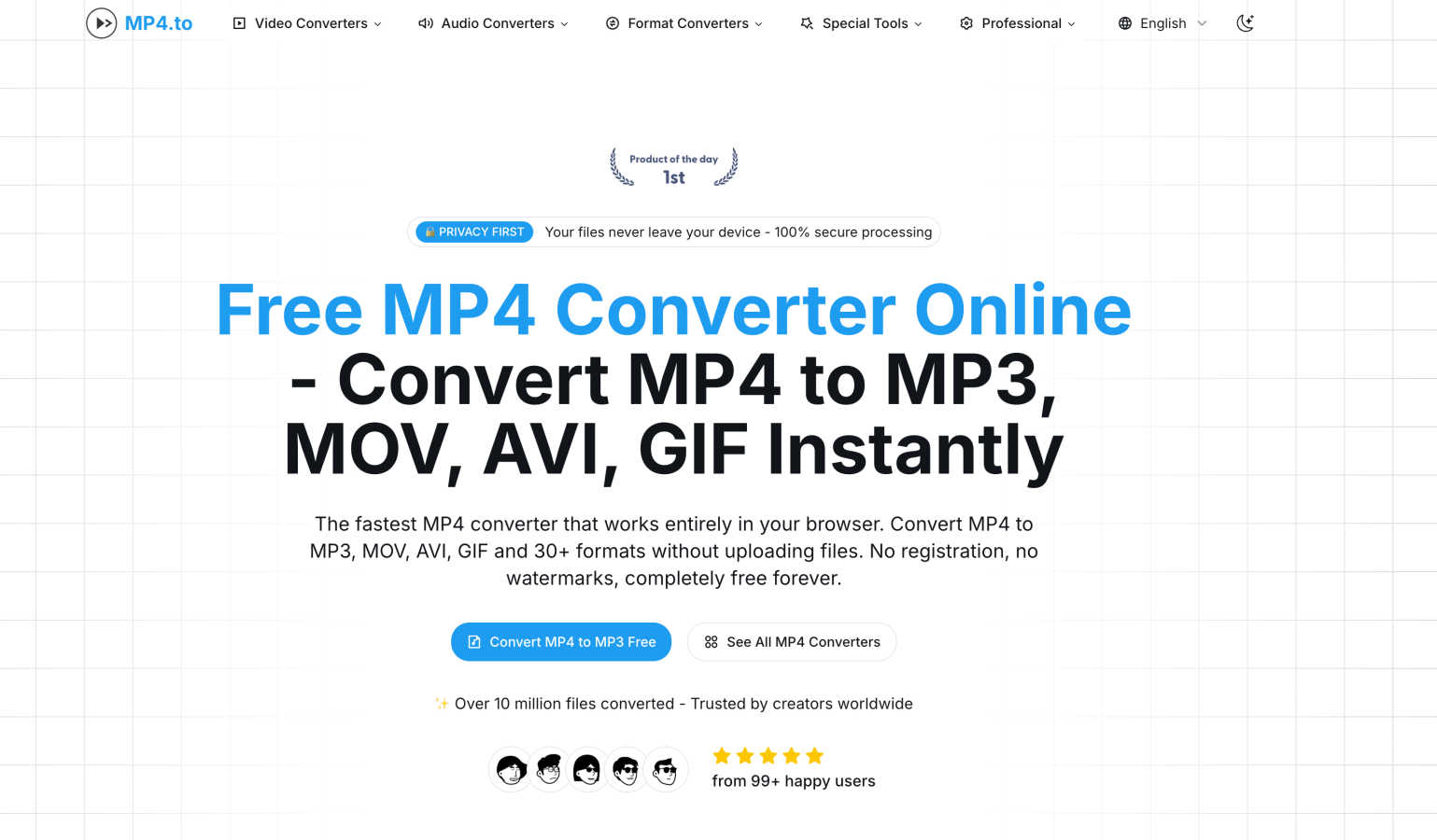
About Mp4To
Mp4To is a revolutionary online video converter designed for the modern user who values privacy and efficiency. At its core, Mp4To allows users to convert MP4 videos and extract audio directly within their web browsers, eliminating the need for file uploads to external servers. This not only streamlines the conversion process but also ensures that users retain complete control over their files, safeguarding their privacy. The platform caters to a diverse audience, from content creators who need to prepare videos for social media sharing to students seeking to extract audio for lectures and personal users wanting to enjoy their favorite media in various formats. With support for over 30 formats and a user-friendly interface, Mp4To stands out as a reliable, high-quality, and completely free solution for anyone seeking seamless video conversion. The journey of converting media files has never been easier or more secure, making Mp4To the go-to choice for video and audio conversion needs.
Features of Mp4To
Privacy-First Approach
Mp4To prioritizes user privacy by ensuring that all conversions occur directly in the browser. This means that your files never leave your device, providing peace of mind for users concerned about data security and privacy.
Lightning-Fast Conversions
Powered by FFmpeg.wasm, Mp4To delivers instant conversions without the hassle of uploading files. This cutting-edge technology ensures that users experience lightning-fast processing times, making it efficient for those in a rush.
Extensive Format Support
The platform supports over 30 different formats, including popular options like MP4, MOV, AVI, MP3, WAV, and FLAC. This extensive format support enables users to convert videos and extract audio according to their specific needs.
User-Friendly Interface
Mp4To features a clean and intuitive interface that allows users to navigate effortlessly. Whether you are a tech-savvy individual or a novice, the straightforward design makes it easy to start converting files in just a few clicks.
Use Cases of Mp4To
Content Creation for Social Media
For content creators, Mp4To offers a quick way to convert videos into the right format for various social media platforms. This ensures that videos are optimized for sharing and can engage audiences effectively.
Academic Use for Students
Students can benefit from Mp4To by extracting audio from lecture videos, allowing them to create audio notes or study materials. This feature enhances learning efficiency and helps in retaining information.
Personal Media Management
Individuals looking to enjoy their favorite music videos or films in different formats can rely on Mp4To. The ability to convert files means that users can play their media on various devices without compatibility issues.
Batch Conversion for Efficiency
For those who have multiple files to convert, Mp4To's batch processing feature allows users to convert several videos at once. This saves significant time and effort, making it ideal for busy professionals or anyone managing large media libraries.
Frequently Asked Questions
Is the MP4 converter really free?
Yes, Mp4To is completely free to use. There are no registration requirements, hidden fees, or limitations on the number of conversions you can perform.
Are my files safe and private?
Absolutely. Mp4To operates with a privacy-first approach, ensuring that all processing happens locally in your browser. Your files are never uploaded to a server, guaranteeing their safety.
What video and audio formats are supported?
Mp4To supports over 30 formats, including popular video formats like MP4, MOV, and AVI, as well as audio formats like MP3, WAV, and FLAC. This extensive support caters to diverse user needs.
Is there a file size limit?
There is no specific file size limit mentioned for conversions on Mp4To. Users are encouraged to test the platform with their files, as the processing occurs entirely within the browser.
Similar to Mp4To


hotel-lobby
Two-person AI video concept in a warm orange booth, with two performers sharing one microphone.

TryKlingAI
Create Kling AI videos from text, images, audio, and motion references with Kling 3.0, Motion Control, Lip Sync, and API workflows.
Wan Video
Wan Video is an AI video generator and API for Wan 2.7, turning text or images into videos online.

VideoAny BR
Create AI videos from text or images, generate images and audio in one online studio.