
KPI Studio
Turn your raw numbers into polished video charts in under 60 seconds, no design skills or complex software needed.
Visit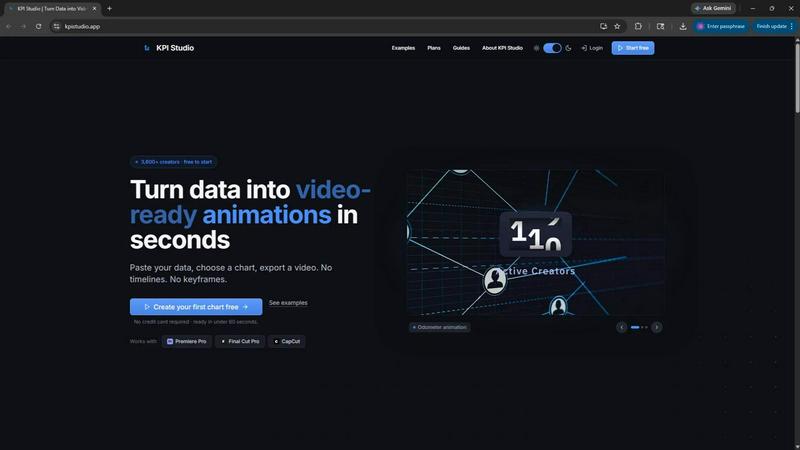
About KPI Studio
KPI Studio is a purpose-built tool for data-driven video creators who need polished, animated charts in every video but lack the time or skills for motion design. This product solves a fundamental problem: the workflow for turning raw numbers into video-ready visuals is broken. Screenshots look amateur and unprofessional. Canva templates lack the flexibility and animation needed for impactful storytelling. After Effects requires hours of learning and laborious keyframe work. Freelancers are slow, expensive, and create bottlenecks in your production schedule. Even emerging AI video tools generate unpredictable visuals that are not built for precise data representation. KPI Studio removes that entire cumbersome process. It is designed for YouTubers, social media managers, financial analysts, e-learning creators, and anyone on a tight publish schedule who needs a chart ready today. The core value proposition is speed and simplicity: paste your raw data, choose a chart type, and export a fully animated, video-ready visual in under 60 seconds. There are no timelines to learn, no keyframes to set, and no complex setup. The exports include transparent backgrounds, allowing charts to drop directly into editing timelines like Premiere Pro, Final Cut Pro, or CapCut with zero additional editing. For advanced workflows, JSON export enables deeper editing and integration into custom pipelines. With over 3,600 creators already using the platform, KPI Studio is establishing itself as the essential tool for anyone who needs to communicate data visually, quickly, and professionally.
Features of KPI Studio
Lightning-Fast Export in Under 60 Seconds
The core feature that defines KPI Studio is its incredible speed. From pasting your raw data to exporting a finished, animated video, the entire process takes less than 60 seconds. There are no timelines to navigate, no keyframes to animate, and no complex setup menus. This speed is built for creators on a strict publish schedule who cannot afford to spend hours on a single chart. When you need the chart today, it is ready immediately. This feature eliminates the friction of traditional animation workflows and allows you to iterate rapidly, testing different chart styles and data sets without wasting precious production time.
Video-Ready Exports with Transparency
KPI Studio provides a range of export formats specifically designed for video editors. You can export as MP4, GIF, MOV with transparency, or PNG sequences. The transparent background support is a game-changer, allowing animated charts to be dropped directly into Premiere Pro, Final Cut Pro, CapCut, or any other editing software without any additional masking or background removal. The charts are ready the moment you click export, seamlessly integrating into your existing video project. This feature supports multiple aspect ratios including 16:9 widescreen, 1:1 square, 9:16 stories, and 4:3 standard, ensuring your data looks perfect on any platform.
Intuitive Three-Step Workflow
The product simplifies data visualization into an intuitive three-step process that anyone can master. Step one is pasting your data directly into the interface, accepting raw numbers without any formatting requirements. Step two allows you to customize the chart type and visual style in real-time with a live preview. Step three is exporting for video with a single click. This streamlined workflow removes all technical barriers, making professional data animation accessible to creators with no design background. Data changes are handled effortlessly by simply re-pasting the new numbers and re-exporting, with no need to redo any keyframes or animations.
Advanced JSON Export for Custom Pipelines
For creators and teams with more complex workflows, KPI Studio offers advanced JSON export capabilities. This feature allows for deeper editing and integration into custom production pipelines. You can export the underlying chart data and animation parameters as a structured JSON file, which can then be ingested by other tools, automated scripts, or custom software. This is particularly valuable for teams that need to maintain brand consistency across hundreds of charts or integrate data visualization into larger automated content production systems. It bridges the gap between quick exports and enterprise-level data handling.
Use Cases of KPI Studio
YouTube Content Creation
YouTubers covering finance, technology, business, or any data-driven topic can use KPI Studio to quickly generate animated charts for their videos. Instead of spending hours in After Effects to animate a subscriber count milestone or a revenue growth chart, creators can paste their data and export a professional visual in under a minute. The transparent background exports drop directly into the editing timeline, allowing the chart to overlay on b-roll footage or the creator's face cam. This elevates the production value of the video without adding hours to the editing process, helping creators maintain a consistent upload schedule.
Social Media Short-Form Content
Social media managers and content creators on platforms like TikTok, Instagram Reels, and YouTube Shorts can use KPI Studio to produce engaging animated data visuals optimized for vertical formats. The 9:16 aspect ratio export is perfect for mobile-first content. Animated count-up numbers showing engagement growth, follower milestones, or revenue achievements capture viewer attention far more effectively than static screenshots. The fast export time allows for rapid content iteration, enabling creators to post timely data-driven content that aligns with current trends or breaking news without missing their window of opportunity.
Business Presentations and Reporting
Professionals who need to present data in meetings, webinars, or client presentations can use KPI Studio to create animated charts that make their reports more engaging and memorable. Instead of showing static slides from Excel or Google Sheets, presenters can drop animated bar charts and line graphs directly into PowerPoint or Google Slides. The motion brings the data to life, helping audiences better understand trends and comparisons. This is particularly valuable for sales teams, financial analysts, and consultants who need to communicate complex information clearly and leave a lasting impression on their audience.
E-Learning and Educational Content
Educators and e-learning content creators can leverage KPI Studio to create animated visual aids that explain data concepts, historical trends, or scientific measurements. The self-drawing line charts and growing bar charts are perfect for illustrating how numbers change over time, making abstract concepts more concrete for learners. The transparent background allows these animations to be seamlessly integrated into educational videos, online courses, or training materials. This visual approach significantly improves message retention, as research shows people remember video content far more effectively than text or static images.
Frequently Asked Questions
What file formats can I export from KPI Studio?
KPI Studio offers a comprehensive range of export formats to suit various editing workflows and platforms. You can export as MP4 for standard video use, GIF for lightweight animations, MOV with transparency for professional video editing, and PNG sequences for frame-by-frame control. Each format is available in multiple aspect ratios including 16:9, 1:1, 9:16, and 4:3. Additionally, advanced users can export JSON files for deeper editing and integration into custom production pipelines. All exports are video-ready and require no additional editing before use.
Do I need any motion design or animation experience to use KPI Studio?
No motion design or animation experience is required whatsoever. KPI Studio is built specifically for creators who do not have time for motion design. The product eliminates the need for timelines, keyframes, and complex setup. The workflow is as simple as pasting your data, choosing a chart type, and exporting a video. Anyone who can copy and paste data can create professional animated charts in under 60 seconds. This makes the tool accessible to YouTubers, social media managers, business professionals, and educators with no technical design background.
How does KPI Studio handle data changes after I have created a chart?
Handling data changes in KPI Studio is remarkably simple and efficient. You do not need to redo any keyframes, animations, or complex settings. Simply paste your updated data into the tool, and the chart will automatically update with the new numbers. You can then re-export the video in the same format and aspect ratio as before. This is a massive time saver compared to traditional tools like After Effects, where every number change means reopening the project and manually adjusting keyframes. With KPI Studio, data changes are handled in seconds.
Can I use KPI Studio with my existing video editing software?
Yes, KPI Studio is designed to integrate seamlessly with all major video editing software. The transparent background exports in MOV format allow charts to be dropped directly into Premiere Pro, Final Cut Pro, CapCut, DaVinci Resolve, and any other professional editing tool. There is no need for additional masking, chroma keying, or background removal. The charts are ready to use the moment you export them. The tool also supports direct integration with PowerPoint and Google Slides for presentations, making it versatile across different content creation workflows.
Similar to KPI Studio

TryKlingAI
Create Kling AI videos from text, images, audio, and motion references with Kling 3.0, Motion Control, Lip Sync, and API workflows.
Wan Video
Wan Video is an AI video generator and API for Wan 2.7, turning text or images into videos online.


CloutStack
Curated directory of tools for influencers engaged with the creator economy

IsThisAIImage
Free online AI image and deepfake checker. Upload a photo for AI-generated and deepfake scores, a clear verdict, and optional generator hints.
Merge Two Photos
Merge two photos free in your browser: side by side, stacked, overlay, or AI. Download a clean PNG, no watermark.