FlashSlides
Transform ideas into stunning presentations in minutes with FlashSlides' intuitive AI content generator.
VisitPublished on:
January 20, 2026
Pricing:

About FlashSlides
FlashSlides is a groundbreaking AI-powered presentation generator that transforms the often tedious process of creating presentations into a seamless experience. Designed for a diverse range of users, including students, business professionals, educators, and startup founders, FlashSlides allows anyone to produce professional-quality presentations in just minutes. Imagine being able to generate visually striking and content-rich slides simply by typing a topic, pasting a YouTube URL, or uploading a document. With FlashSlides, the days of spending hours fiddling with design and content are over. The tool harnesses advanced AI technology to create tailored content and custom images for each slide, which not only saves time but also enhances the overall quality of your presentations. Users can focus on delivering impactful messages while FlashSlides works its magic in the background, ensuring that every presentation captivates and engages its audience.
Features of FlashSlides
AI Content Generation
At the heart of FlashSlides is its powerful AI that generates relevant content for each slide. Simply enter your topic, and in less than a minute, you will receive a fully-formed presentation complete with text and visuals, ensuring that your slides are both informative and appealing.
Custom AI-Generated Images
Each slide generated by FlashSlides comes with unique, AI-created images that align perfectly with the content. This feature enhances the visual appeal of your presentations, making them more engaging and helping to illustrate complex ideas in a simple manner.
Easy Export Options
Once your presentation is ready, you have flexible options for sharing and exporting. Download your slides as a PowerPoint file or share them via a unique URL, allowing for easy distribution and collaboration with others.
User-Friendly Interface
FlashSlides boasts an intuitive interface that caters to users of all skill levels. Its straightforward design allows anyone, from tech-savvy professionals to novices, to create high-quality presentations with just a few clicks, simplifying the entire process.
Use Cases of FlashSlides
Educational Presentations
Students can leverage FlashSlides to create impressive class presentations and project reports in record time. This tool helps them focus on learning rather than spending excessive hours on slide creation, giving them more time to prepare for their actual presentations.
Business Proposals
Business professionals can utilize FlashSlides to quickly prepare polished meeting decks and proposals. The ability to generate content-rich presentations in minutes allows teams to respond to client needs swiftly and maintain a competitive edge.
Engaging Lesson Plans
Teachers and educators can harness FlashSlides to develop engaging lesson plans and educational content. By creating visually appealing slides, they can capture their students' attention, making learning more interactive and enjoyable.
Startup Pitch Decks
For startup founders, FlashSlides is invaluable when crafting compelling pitch decks. The tool enables them to present their ideas clearly and professionally, increasing their chances of securing funding and making a lasting impression on investors.
Frequently Asked Questions
How does FlashSlides work?
FlashSlides operates by allowing users to enter a topic, after which its AI generates a complete presentation with relevant content and custom images for each slide. This efficient process typically takes less than a minute.
Is it really free?
Yes, FlashSlides offers every user one free presentation per day without the need for a credit card. For additional presentations, users can purchase credits, making it accessible for casual and frequent users alike.
What formats can I download?
Presentations created in FlashSlides can be downloaded as PowerPoint (.pptx) files. Additionally, users have the option to share their presentations through a unique URL, facilitating easy access and collaboration.
Are my presentations private?
By default, presentations created with FlashSlides are public and may appear in the archive. However, users have the option to make any presentation private through their dashboard, ensuring confidentiality when needed.
Similar to FlashSlides

AI Email Filter
AI Email Filter sorts incoming mail into folders using plain-language prompts you write. Works with any IMAP mailbox; bring your own LLM if you want.
Wordy
Learn languages with real movie and TV show clips.

Kody Tools
Free collection of online developer utilities, code formatters, and digital converters designed to streamline your daily workflow.

JsonTranslate
Translate JSON, Markdown, and TXT while preserving keys, nested paths, and project structure.

tallycounterweb.com
Online tally counter for tracking attendance, workouts, inventory, visitors, sports scores, habits, and everyday counting tasks.

What's on the menu
Smart translate any restaurant menu
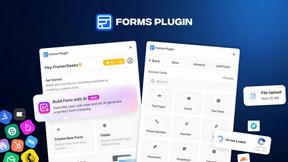
Forms Plugin
The #1 Native Form Builder Plugin for Framer - No Code, No Embeds, No External Platforms.