Easymotion - AI Motion Graphic Generator
Turn hours of complex motion graphics into minutes by simply chatting with AI, then export polished animations ready for any platform.
Visit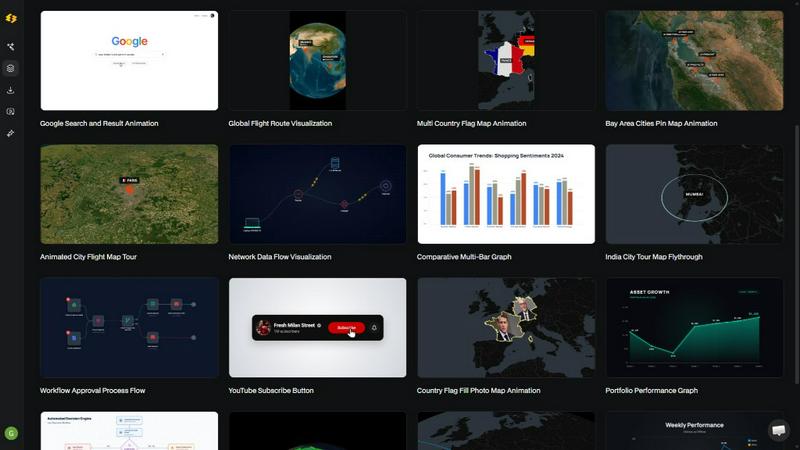
About Easymotion - AI Motion Graphic Generator
Every creator knows the feeling. You have a great idea for a video, but the moment you open a complex editing tool like After Effects, the creative spark begins to dim. Hours vanish into keyframes, layers, and timelines. Easymotion is the antidote to that frustration. It is an AI-powered motion graphics generator and map animation platform designed specifically for content creators, video editors, marketers, founders, and data storytellers who need professional animated videos without the steep learning curve or the endless back-and-forth with freelancers.
Easymotion transforms how you think about video creation. Instead of wrestling with complex software, you simply chat with the AI. Describe what you want in plain English, and the platform brings your vision to life. Whether you need a sleek SaaS product promo, an animated flowchart, a dynamic data chart, a UI explainer, or an interactive quiz, Easymotion handles the heavy lifting. It also excels at geographic storytelling, turning ideas into stunning map animations with flight routes, location pins, and flag fill highlights. You can start from a simple prompt, or upload static images, spreadsheets, and PDFs to instantly convert them into animation-ready scenes. The result is a polished, professional video that once took hours to create, now ready in under five minutes. Easymotion is built for a faster, more intuitive creative workflow, directly in your browser.
Features of Easymotion - AI Motion Graphic Generator
Chat-Based AI Animation Engine
The core of Easymotion is a conversational AI that understands your creative intent. Instead of navigating complex menus and timeline panels, you simply type what you want, like "Design a social media promo video for my coffee shop." The AI generates a complete animation with appropriate motion, pacing, and visual style. You can then refine every aspect by continuing the conversation, asking the AI to adjust colors, timing, labels, layout, or the overall look and feel. This natural language interface removes all technical barriers, letting your ideas flow directly into finished videos.
Static Image to Dynamic Animation
Breathe life into your existing visual assets with a single upload. Easymotion can take a static image, whether it is a product screenshot, a brand graphic, or an illustration, and intelligently animate it. The AI analyzes the composition and adds stunning motion effects, creating a sense of depth and movement that captures viewer attention. This feature is perfect for transforming flat marketing materials, social media graphics, or presentation slides into engaging video content without needing to rebuild anything from scratch.
Data to Animated Visuals
Turn boring spreadsheets into scroll-stopping stories. By uploading a CSV or XLSX file, Easymotion's AI automatically parses your data and generates beautiful animated charts and graphs. Whether it is a bar chart showing quarterly growth, a line graph tracking user adoption, or a pie chart illustrating market share, the platform creates a polished, professional visualization with smooth transitions. This feature empowers data storytellers, analysts, and marketers to communicate insights with far more impact than a static image ever could.
Map Animation Made Effortless
Create captivating geographic narratives in minutes. Easymotion is a powerful map animation maker that allows you to visualize flight routes, pinpoint locations, highlight countries with flag fills, and build immersive globe fly-throughs. You can tell stories of travel, global business expansion, logistics networks, or historical journeys. The AI handles the complex cartography and animation curves, delivering a cinematic result that is perfect for YouTube videos, presentations, and client deliverables. Export options include transparent backgrounds for seamless integration into other editing workflows.
Use Cases of Easymotion - AI Motion Graphic Generator
Social Media Video Creation for Marketers
Marketing teams can now ship campaigns on the same day. Instead of waiting for a designer to free up time or going through endless email revisions, a marketer can directly create polished social media videos. Using Easymotion, they can generate a 9:16 vertical promo for Instagram Reels or a 1:1 square video for a LinkedIn post in minutes. The AI helps maintain brand consistency by allowing quick edits to colors, logos, and messaging. This speed and autonomy mean campaigns launch faster, and teams can iterate based on performance data without a bottleneck.
Data Storytelling for Analysts and Journalists
Your insights deserve better than a static chart in a report. Data storytellers use Easymotion to transform complex datasets into animated narratives that actually stop the scroll. By uploading a spreadsheet of quarterly sales figures or user engagement metrics, they can generate an animated line graph that builds over time, or a dynamic bar chart that compares different segments. The resulting video is far more engaging on social media or within a presentation, helping the audience grasp the story behind the numbers quickly and memorably.
Travel and Geographic Content for Creators
YouTubers and travel creators are racking up views with stunning map animations. Easymotion allows them to build multi-stop travel route maps, visualize their journey across continents, or highlight key locations with animated pins and flag fills. A creator can describe their recent trip to Southeast Asia, and the AI will generate a globe fly-through that shows the flight path from city to city. This adds a professional, cinematic layer to travel vlogs, itinerary videos, and geographic explainers that captivates the audience.
Product Demos and Explainer Videos for Founders
Startups and founders can build their social presence without hiring expensive freelancers. Using Easymotion, they can quickly create animated product demos, UI explainers, and workflow charts that showcase their SaaS solution. By uploading a screenshot of their software interface, the AI can animate it to highlight key features, simulate user clicks, and add callouts. This allows founders to produce high-quality, professional video content for their website, social channels, and pitch decks, driving 5x more engagement than static images.
Frequently Asked Questions
What is Easymotion and who is it for?
Easymotion is an AI-powered motion graphics generator that lets you create professional animated videos simply by chatting. It is designed for content creators, video editors, marketers, founders, and data storytellers who need a faster, easier way to produce motion graphics, map animations, and social media videos without needing complex software like After Effects. Anyone who wants to turn ideas, images, or data into polished video content can use it.
How does the AI motion graphics generation process work?
It works in three simple steps. First, describe the animation you want in plain English, such as "Create an animated bar chart showing sales growth." You can also upload an image, spreadsheet, or PDF. Second, refine the result using chat commands to adjust colors, timing, map styles, or assets. Finally, export your completed video as an MP4 or with a transparent background for use in other editing software. The AI handles all the keyframes, animation curves, and rendering.
What types of videos and animations can I create?
You can create a wide variety of motion graphics, including SaaS product promos, animated flowcharts, data charts and graphs, UI explainers, quizzes, and social media videos. The platform is also a powerful map animation maker, supporting flight routes, location pins, flag fill highlights, and globe fly-throughs. You can work in multiple aspect ratios including 16:9 for YouTube, 9:16 for TikTok and Reels, 1:1 for square posts, and 4:5 for vertical feeds.
What export formats and options are available?
You can export your finished animations as MP4 or MOV files. A key feature is the ability to export videos with a transparent background (alpha channel), which allows you to drop the animation directly into editing software like Premiere Pro or Final Cut Pro for compositing over other footage. This makes Easymotion a powerful tool for video editors who need to quickly generate motion graphics assets to enhance their projects.
Similar to Easymotion - AI Motion Graphic Generator

hotel-lobby
Two-person AI video concept in a warm orange booth, with two performers sharing one microphone.




AI UGC Video Generator
Create AI UGC video ads from a product URL, image, or script with lifelike creators, natural voices, captions, and clear CTAs.

TryKlingAI
Create Kling AI videos from text, images, audio, and motion references with Kling 3.0, Motion Control, Lip Sync, and API workflows.