
ComicsMaker
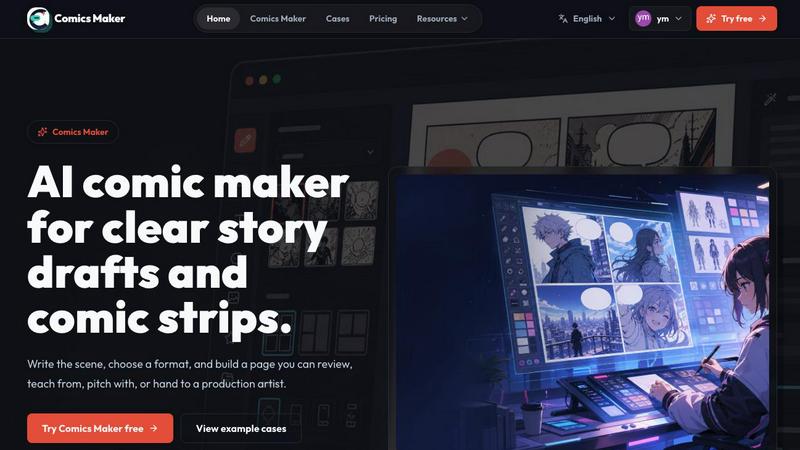
ComicsMaker turns your raw story ideas into structured comic panels and dialogue, ready to export as a visual draft.
VisitPublished on:
July 7, 2026
Pricing:
About ComicsMaker
Every great comic starts with a single spark, a scene that begs to be seen. But for too long, the journey from that spark to a finished page has been a long and winding road, cluttered with complex software and daunting pipelines. ComicsMaker is the AI comic maker built to change that journey, transforming the way creators, marketers, educators, and indie storytellers bring their visual ideas to life. It is a browser-based creative studio that lets you start with nothing more than a plain language description of a scene. From there, it guides you through the entire narrative process: planning the story beats, generating coherent panels, adding dialogue, and arranging the final page. The core value proposition is speed and accessibility. ComicsMaker is designed for fast ideation, ensuring that your creative momentum never stalls. It produces consistent comic-style output, whether you are crafting a dramatic manga panel, a humorous webtoon strip, or a storyboard for a client pitch. By handling the heavy lifting of visual generation, it allows you to focus on what truly matters: the story itself. The product is useful for a vast range of applications, from AI comics and manga-style concepts to visual marketing campaigns and classroom storytelling projects. It is a tool for rapid creative prototyping, helping you move from a raw script or concept to a reviewable visual draft without needing a full production pipeline or a team of artists. ComicsMaker is your companion on the journey from idea to image, making the art of visual storytelling accessible to everyone.
Features of ComicsMaker
Scene-First Story Planning
The journey begins not with a blank canvas, but with a clear idea. ComicsMaker’s core feature is its scene-first planning engine. You start by writing a single scene in plain language, describing the character, setting, visible action, and the emotional or narrative change that occurs. This structured input, limited to 1600 characters, forces you to distill your idea to its essence. The tool then helps you plan the beats of your story, suggesting a logical flow of panels that translate your scene into a visual narrative. This approach ensures that every panel has a clear purpose before a single image is generated, saving you time and guiding your creative direction from the very first step.
Flexible Panel Layout and Pacing
Once your story beats are planned, you need a structure to hold them. ComicsMaker provides a clean, intuitive studio for making layout decisions. You can choose from a variety of page formats, including single-panel illustrations, classic three-panel strips, dynamic 2x2 grids, and vertical flows perfect for mobile-first webtoons. The interface keeps critical information like panel count, pacing, shot type (wide, medium, close-up), and reading order visible at all times. This transparency allows you to experiment with different narrative rhythms and visual compositions before you commit to generating the final artwork, ensuring your story’s pacing feels just right.
Consistent Visual Style Control
A comic’s world must feel cohesive, and ComicsMaker ensures your visual direction remains consistent from the first panel to the last. The style control feature allows you to lock in a visual direction before any generation begins. You can define style notes, character details (like hair color, clothing, and build), and environmental references using simple language. This system ensures that every generated panel belongs to the same world, with characters and settings that look like they share a common origin. This consistency is crucial for maintaining reader immersion and allows you to export drafts that an artist, teammate, or client can understand and build upon without confusion.
Practical Project Export and Dialogue Controls
A comic is more than just pictures; it is a blend of visuals and words. ComicsMaker provides robust dialogue controls that let you add captions and speech bubbles directly onto your generated panels, arranging them within the page layout. This turns your visual draft into a complete, reviewable comic page. Furthermore, the tool supports practical project exports. You can hand off the entire project as a JSON file, containing all your prompts, notes, panel arrangements, and dialogue. This data-driven export is invaluable for teams, allowing for seamless handoffs to other artists, writers, or production tools, ensuring that the creative work you do in ComicsMaker can continue its journey beyond the platform.
Use Cases of ComicsMaker
Rapid Storyboarding for Creative Teams
For marketing teams and creative agencies, turning a script into a visual storyboard is a critical but time-consuming step. ComicsMaker accelerates this process by allowing a creative director to input a scene description and generate a multi-panel storyboard in minutes. The team can then review the pacing, shot composition, and narrative flow before a single frame is handed off to an illustrator. This use case transforms the storyboarding phase from a bottleneck into a rapid, iterative collaboration, saving days of production time and ensuring the final video or animation is built on a solid visual foundation.
Classroom Storytelling and Literacy Projects
Educators can use ComicsMaker as a powerful tool to engage students in storytelling, literacy, and creative writing. Instead of a traditional book report, a student can use the tool to visualize a key scene from a novel, planning the beats, generating the panels, and adding dialogue that captures the essence of the story. This hands-on approach helps students understand narrative structure, character development, and the relationship between text and image. It makes abstract literary concepts tangible and provides a highly engaging, project-based learning experience that fosters creativity and critical thinking.
Indie Manga and Webtoon Concept Prototyping
Independent manga and webtoon artists often have dozens of story ideas but limited time and resources to visualize them all. ComicsMaker serves as a rapid prototyping tool for these creators. They can quickly generate a 2x2 page or a vertical strip to test out a new character design, a specific mood (like a dramatic shonen battle or a quiet slice-of-life moment), or a crucial plot twist. This allows them to see their concept in a polished visual form, helping them decide which stories have the strongest visual potential before investing weeks of work into a full chapter.
Social Media Visual Campaigns
Marketers and social media managers need to create eye-catching, story-driven content that stops the scroll. ComicsMaker enables them to quickly produce short, branded comic strips or single-panel visuals for social campaigns. A product reveal, a customer success story, or a brand origin tale can be transformed into a shareable comic sequence in minutes. The ability to control the style and mood ensures the visuals align with the brand’s identity. This use case turns complex product narratives into simple, engaging, and highly visual stories that resonate with audiences on platforms like Instagram, Twitter, and LinkedIn.
Frequently Asked Questions
How do I start creating a comic with ComicsMaker?
You begin by going to the ComicsMaker studio and selecting "Start with one scene." You will then be prompted to name the character, setting, visible action, and the change that occurs in the scene. After writing your scene description (up to 1600 characters), you can choose a layout like a 2x2 grid or a 3-panel strip and a mood. The tool will then help you plan the beats for your panels before generating the visuals.
Can I control the visual style of my comic?
Yes, maintaining a consistent visual style is a core feature of ComicsMaker. Before generating your panels, you can input specific style notes, character details, and environmental references using plain language. This locks the visual direction for the entire project, ensuring that characters and backgrounds remain coherent across all panels, from the first draft to the final export.
What kind of layouts and page formats are available?
ComicsMaker offers a range of flexible layouts to suit different storytelling needs. You can choose from single-panel illustrations, classic three-panel comic strips, dynamic 2x2 page grids, and vertical flow formats ideal for webtoons. The studio interface makes it easy to see and adjust the panel count, pacing, and reading order for each layout.
Can I add dialogue and export my project?
Absolutely. After generating your panels, you can add captions and speech bubbles directly onto them, arranging the text within the page layout. Once your draft is complete, you can export the entire project as a JSON file. This file contains all your prompts, notes, panel data, and dialogue, making it easy to hand off your work to an artist, teammate, or another production tool.
Pricing of ComicsMaker
ComicsMaker offers a tiered pricing structure designed to grow with your creative workflow. You can start small with a free plan to test the tool, and then upgrade when your projects become more regular. The free plan includes 10 starter credits for testing image generation. Paid plans mainly increase the monthly number of credits you receive, while the core editor and JSON project export functionality remain the same across all plans. The plans are:
Free - For trying ComicsMaker with starter draft credits. Cost: $0.
Creator - For creators making comic strips, lessons, and social campaigns every week. Cost: $15/mo.
Studio - For teams producing brand comics, campaigns, and classroom content. Cost: $39/mo.
Similar to ComicsMaker
AIPetGen
Create anything with your pet. AI studio for pet images and short videos.

AI Object Remover
Remove unwanted people, objects, text and watermarks from photos with AI

Hotel Lobby AI Video Generator
Turn two photos into a Hotel Lobby dance video in the orange A COLORS SHOW booth

Remove Text
Remove text from images online with AI
ideogram-45
AI image generation and editing with sharp typography, native 2K output, and localized edits that preserve the rest of your image.

Image to Layers AI
Turn any image into editable transparent PNG/PSD layers with AI

nanobanana 21
A fast, simple image studio powered by Nano Banana 2.1. Create and edit high-quality AI images with readable text and consistent characters.

AI Album Cover Maker
Create release-ready album covers from a prompt or photo. Generate, refine, and export art for singles, EPs, mixtapes, and playlists.