
Nano Banana vs TinyFast
Side-by-side comparison to help you choose the right product.

Nano Banana
Begin your creative journey by transforming simple conversations into stunning, high-quality AI images.
Last updated: March 19, 2026

Effortlessly compress images, videos, and PDFs on your Mac while keeping your files private and secure with TinyFast.
Last updated: February 28, 2026
Visual Comparison
Nano Banana

TinyFast
Feature Comparison
Nano Banana
Nano Banana Pro: Advanced AI Model
Embark on a journey of precision with Nano Banana Pro, the platform's flagship model. It excels where others falter, offering unparalleled consistent character editing and scene preservation, ensuring your subject remains recognizable across multiple generated images. It brings your visions to life with perfect text rendering for impactful designs and stunning 4K ultra-resolution output, making every detail crystal clear for professional-grade results. This model leverages real-world knowledge for deeply reasoned and accurate image creation.
Text-to-Image & Image Edit with Prompts
Your journey begins with a simple description. This core feature allows you to generate entirely new images or edit existing ones using nothing but natural language prompts. Describe the scene, the mood, the specific changes you want—like "replace the grey sky with a sunset" or "add a friendly dragon"—and watch as the AI interprets your words and executes the complex visual transformation instantly, removing the need to learn complicated software interfaces.
AI Image Upscaler
Take your existing visuals on a journey to new clarity. This specialized tool uses powerful AI algorithms to enhance image resolution, transforming low-quality or pixelated photos into sharp, high-definition masterpieces. It's perfect for restoring old photographs, improving digital artwork, or preparing images for large-format printing where every detail matters.
AI Background Remover
Streamline your creative workflow instantly. This feature allows you to cleanly and accurately remove the background from any image with a single click. Whether you're creating product listings, composite artwork, or personalized content, this tool saves hours of manual editing, letting you isolate subjects seamlessly and focus on the creative part of your journey.
TinyFast
Batch & Drag-Drop Shrink
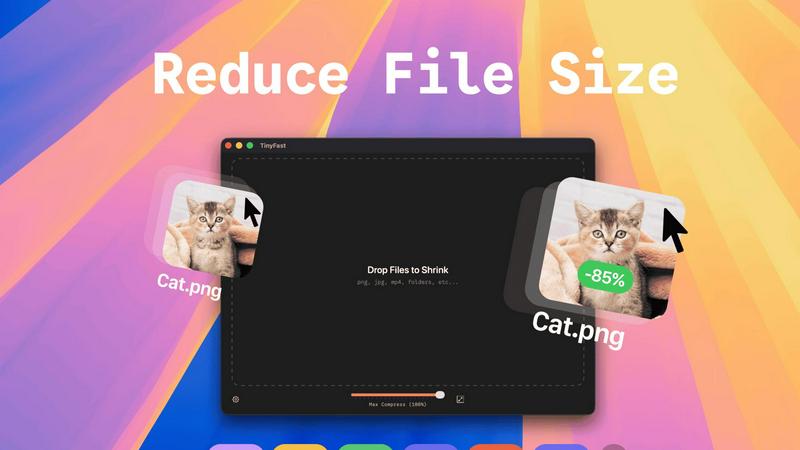
With TinyFast, you can easily drop entire folders into the application and receive optimized outputs in just seconds. This batch processing feature allows you to save time and increase productivity, especially when dealing with multiple files at once.
Blazing-Fast Compression
TinyFast utilizes optimized native engines to deliver lightning-fast compression speeds. You can compress large files in mere seconds without the hassle of uploads and downloads. This feature ensures that your workflow remains uninterrupted and efficient.
Resize Resolution
The application offers an automatic resizing feature for images and videos. You can set TinyFast to adjust the resolution of your files based on your requirements, making it a versatile tool for creators who need tailored outputs.
100% Local & Private
Privacy is at the heart of TinyFast's design. All files remain on your device, ensuring complete confidentiality. You do not need to worry about sensitive assets being exposed online or stored on third-party servers; your files are protected with total privacy.
Use Cases
Nano Banana
Marketing & Advertising Content Creation
Marketers and small business owners can accelerate their campaign journeys. Quickly generate eye-catching ad mockups, social media graphics, and promotional posters without needing a design team. Describe the product in a specific setting, request a branded infographic, or create multiple visual variants for A/B testing—all at the speed of thought.
Bloggers & Content Creators
For writers and digital storytellers, Nano Banana is a treasure trove of unique imagery. Generate custom featured images, in-post illustrations, and banners that perfectly match your article's tone and content. No more searching through stock photo libraries; create one-of-a-kind graphics that make your content stand out and enhance your narrative journey.
Design Inspiration & Prototyping
Professional designers and artists can use Nano Banana to break through creative blocks and rapidly prototype ideas. Input a rough concept prompt to explore visual styles, color palettes, and compositions. It's a powerful sandbox for experimentation, allowing you to visualize concepts early in the creative journey and refine them before moving to detailed production.
Personal Photo Enhancement & Fun
Everyone has a story to tell with their photos. Nano Banana makes personal projects enjoyable. Colorize old family pictures, imagine yourself in a fantasy landscape, create unique greeting cards, or simply give a portrait a professional touch. It turns personal photo editing from a chore into a delightful journey of creativity and reminiscence.
TinyFast
Streamlined Graphic Design
Graphic designers can use TinyFast to compress images for web and print projects without sacrificing quality. This helps in optimizing file sizes for faster loading times on websites, enhancing user experience without compromising on aesthetics.
Efficient Video Editing
Videographers can benefit from TinyFast by quickly compressing video files before sharing or uploading. This enables faster editing workflows and reduces the burden on storage space, making it easier to manage large video projects.
Secure Document Management
For professionals handling sensitive documents, TinyFast provides a secure way to compress and manage files without exposing them to online threats. This is particularly useful for legal and financial documents that require confidentiality.
Audio Production Optimization
Musicians and audio producers can leverage TinyFast to compress audio files efficiently. By reducing file sizes, they can streamline their workflows and make it easier to share tracks without the hassle of losing quality.
Overview
About Nano Banana
Imagine a world where the barrier between your imagination and a stunning visual masterpiece is just a sentence. That's the journey Nano Banana invites you on. It's not just another AI tool; it's your creative co-pilot, transforming the complex, often intimidating realm of professional image creation into a simple, conversational experience. Designed for dreamers, doers, and everyone in between, Nano Banana democratizes high-end visual design. Whether you're a marketer racing against a deadline, a blogger seeking that perfect unique graphic, a designer in need of a spark, or simply someone wanting to bring a family photo to life, this platform meets you where you are. Its core magic lies in translating your natural language descriptions—your visions, your stories—into technically flawless images. From generating entirely new scenes from scratch to performing intricate edits like swapping backgrounds or adjusting mood with light, Nano Banana handles the heavy lifting. With its advanced Pro model, the journey reaches new heights, offering capabilities like maintaining consistent characters across scenes, generating razor-sharp text for posters, and delivering breathtaking 4K resolution suitable for commercial work. It's a complete, intuitive creative suite that turns the journey from idea to image into a seamless, empowering adventure.
About TinyFast
TinyFast is a groundbreaking macOS application that redefines the way users approach file compression. Designed with developers, designers, and creators in mind, it simplifies the process of compressing a diverse range of file formats, including images, videos, documents, and audio files. The beauty of TinyFast lies in its commitment to privacy and speed, allowing users to compress files without ever having to upload them to the cloud. With a straightforward drag-and-drop interface, users can shrink file sizes within seconds, all while ensuring that sensitive materials remain safely stored on their local machines. This local-first approach not only enhances efficiency but also eliminates the security concerns associated with online compression tools. Born from the frustration of dealing with unreliable online services, TinyFast has already garnered a loyal following of over 500 Mac users who recognize the transformative power of this essential tool. For anyone dedicated to file management and efficiency on their Mac, TinyFast is not just an option; it is a necessity.
Frequently Asked Questions
Nano Banana FAQ
What is the difference between Nano Banana and Nano Banana Pro?
Nano Banana Pro is the advanced tier model within the platform, formerly known as Nano Banana 2. It offers superior capabilities specifically designed for professional and complex tasks. While the standard model is powerful for general use, Pro excels at consistent character editing (keeping a subject the same across images), generating sharp, legible text within images, and producing images in stunning 4K ultra-resolution, making it ideal for commercial work.
Is there a free way to try Nano Banana?
Yes, you can begin your creative journey for free. New users can sign up and receive free credits to experiment with the platform. The website promotes an offer to "Get 20 Free Credits & Try Pro," allowing you to experience the advanced Pro model and its 4K resolution capabilities without requiring a credit card upfront.
What kind of images can I create with Nano Banana?
Your imagination is the primary limit. You can create photorealistic scenes, artistic illustrations in styles like oil painting or watercolor, detailed product mockups, social media post templates (complete with UI elements), infographics, diagrams, and much more. The platform is versatile, supporting everything from personal art projects to professional marketing materials.
Can I edit my own existing photos with Nano Banana?
Absolutely. Nano Banana is not just for generating new images. You can upload your own photos and use text prompts to edit them. Ask the AI to change the background, alter the lighting or weather, add or remove objects, restore details, or even apply a specific artistic style to your personal photograph, seamlessly integrating AI into your existing visual assets.
TinyFast FAQ
What file formats does TinyFast support?
TinyFast supports a wide range of file formats, including images (PNG, JPG, TIFF, HEIC, WEBP, GIF, BMP, SVG), videos (MP4, MOV, M4V), documents (PDF, DOCX), code files (JS, CSS, JSON), and audio files (MP3), ensuring versatility for all users.
Is TinyFast really free to use?
Yes, TinyFast offers a free tier that allows users to compress up to five files per day while accessing all its features. This makes it an excellent option for casual users who need occasional file compression.
How does TinyFast ensure privacy?
TinyFast guarantees that all files remain on your device, with no uploads to external servers. This local-first approach is designed to protect your confidential files, ensuring that sensitive information is never at risk of exposure.
Can I compress multiple files at once?
Absolutely! TinyFast allows users to drag and drop entire folders for batch compression, making it easy to optimize multiple files in seconds. This feature is perfect for users who need to compress large quantities of files quickly.
Alternatives
Nano Banana Alternatives
Nano Banana is a creative companion in the world of AI image generation and editing. It belongs to the category of tools that transform text descriptions into stunning visuals, making professional-grade design accessible through simple conversation. This platform is for anyone who wants to bring their ideas to life without navigating complex software. People often explore other options for various reasons. Perhaps they need a tool that fits a specific budget, offers a unique feature set for their niche projects, or integrates seamlessly with their existing workflow on a different platform. The quest for the right tool is a personal journey, driven by individual creative needs and practical constraints. When choosing a different path, consider what matters most for your creative process. Look at the core AI capabilities, the quality and style of the output, and how intuitively the platform understands your vision. The goal is to find a tool that feels like a natural extension of your imagination, empowering you to create without friction.
TinyFast Alternatives
TinyFast is an innovative macOS application that specializes in file compression, catering to the needs of developers, designers, and creators. By efficiently compressing images, videos, documents, and audio files right on your Mac, TinyFast ensures that sensitive data remains private and secure. Many users find themselves seeking alternatives for various reasons, such as pricing, additional features, or specific platform requirements. In a rapidly evolving tech landscape, it’s essential to explore options that align with individual workflows and preferences. When searching for an alternative to TinyFast, consider key factors such as the ease of use, speed of compression, and whether the tool operates locally or requires an internet connection. Additionally, evaluate the range of file formats supported and any unique features that might enhance your experience. A well-rounded alternative should not only meet your technical needs but also seamlessly integrate into your creative process, allowing you to focus on what you do best.