
SureThing.io vs TinyFast
Side-by-side comparison to help you choose the right product.

SureThing.io
SureThing.io is your trusted autonomous business partner, seamlessly remembering your goals and working tirelessly while you rest.
Last updated: March 19, 2026

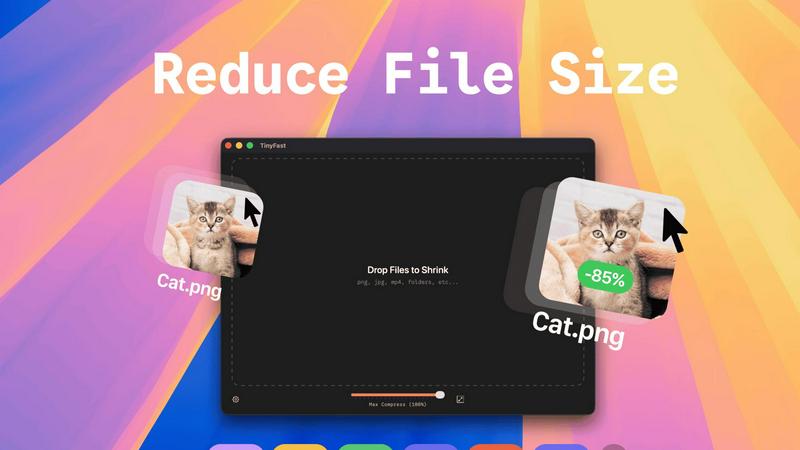
Effortlessly compress images, videos, and PDFs on your Mac while keeping your files private and secure with TinyFast.
Last updated: February 28, 2026
Visual Comparison
SureThing.io

TinyFast
Feature Comparison
SureThing.io
Proactive Email Management
SureThing continuously monitors your inbox, taking the initiative to draft replies that reflect your voice and style. This feature ensures that you never miss important communications, allowing you to stay on top of your correspondence effortlessly.
Persistent Memory
With state-of-the-art agentic memory, SureThing remembers your goals, preferences, and communication style across sessions. The longer you work together, the less you need to repeat information, enabling a more personalized and efficient collaboration.
Schedule Coordination
Managing your calendar can be a daunting task, but SureThing simplifies this by organizing appointments, sending reminders, and even rescheduling meetings as needed. This feature ensures that your schedule aligns with your priorities, providing you with peace of mind.
Cross-Platform Integration
SureThing connects seamlessly with various applications, allowing it to take actions across platforms based on your instructions and preferences. This integration enhances productivity by streamlining workflows and reducing the time spent on administrative tasks.
TinyFast
Batch & Drag-Drop Shrink
With TinyFast, you can easily drop entire folders into the application and receive optimized outputs in just seconds. This batch processing feature allows you to save time and increase productivity, especially when dealing with multiple files at once.
Blazing-Fast Compression
TinyFast utilizes optimized native engines to deliver lightning-fast compression speeds. You can compress large files in mere seconds without the hassle of uploads and downloads. This feature ensures that your workflow remains uninterrupted and efficient.
Resize Resolution
The application offers an automatic resizing feature for images and videos. You can set TinyFast to adjust the resolution of your files based on your requirements, making it a versatile tool for creators who need tailored outputs.
100% Local & Private
Privacy is at the heart of TinyFast's design. All files remain on your device, ensuring complete confidentiality. You do not need to worry about sensitive assets being exposed online or stored on third-party servers; your files are protected with total privacy.
Use Cases
SureThing.io
Efficient Communication
For busy professionals, SureThing acts as an invaluable assistant by managing email correspondence, drafting messages, and responding to inquiries. This allows users to maintain effective communication without becoming overwhelmed by their inbox.
Project Management
Entrepreneurs and project managers can leverage SureThing to track project progress, set reminders for deadlines, and manage team communications. By automating these tasks, users can focus on strategic decision-making and creative initiatives.
Time Management
Individuals seeking to optimize their daily routines can rely on SureThing to manage their schedules, prioritize tasks, and allocate time effectively. This capability helps users avoid burnout and maintain a healthy work-life balance.
Startups and Founders
Solo founders launching new ventures can benefit greatly from SureThing’s capabilities. It assists in everything from drafting business communications to coordinating schedules, allowing founders to concentrate on scaling their startups without getting bogged down in administrative details.
TinyFast
Streamlined Graphic Design
Graphic designers can use TinyFast to compress images for web and print projects without sacrificing quality. This helps in optimizing file sizes for faster loading times on websites, enhancing user experience without compromising on aesthetics.
Efficient Video Editing
Videographers can benefit from TinyFast by quickly compressing video files before sharing or uploading. This enables faster editing workflows and reduces the burden on storage space, making it easier to manage large video projects.
Secure Document Management
For professionals handling sensitive documents, TinyFast provides a secure way to compress and manage files without exposing them to online threats. This is particularly useful for legal and financial documents that require confidentiality.
Audio Production Optimization
Musicians and audio producers can leverage TinyFast to compress audio files efficiently. By reducing file sizes, they can streamline their workflows and make it easier to share tracks without the hassle of losing quality.
Overview
About SureThing.io
SureThing.io is a groundbreaking autonomous AI agent designed to remember who you are and work tirelessly on your behalf, day and night. Operating proactively, SureThing goes beyond traditional AI chatbots that merely respond to commands; it actively monitors your inbox, drafts replies in your unique voice, manages your calendar, tracks ongoing projects, and seamlessly interacts with connected applications. This allows you to concentrate on what truly matters, while SureThing handles routine tasks.
What truly sets SureThing apart is its persistent memory, which enables it to remember your goals, preferences, patterns, and contacts over time. The longer you collaborate with SureThing, the more intuitive and effective it becomes, eliminating the need for repetitive explanations. Built with a focus on reliability, SureThing is SOC 2 certified and Google CASA Tier 2 compliant, making it a trustworthy choice for users who require a dependable agent capable of handling real work without faltering under pressure. Early adopters, including a technical director and solo founders, have lauded SureThing as "the Mac of AI agents," underscoring its unique value in the market.
About TinyFast
TinyFast is a groundbreaking macOS application that redefines the way users approach file compression. Designed with developers, designers, and creators in mind, it simplifies the process of compressing a diverse range of file formats, including images, videos, documents, and audio files. The beauty of TinyFast lies in its commitment to privacy and speed, allowing users to compress files without ever having to upload them to the cloud. With a straightforward drag-and-drop interface, users can shrink file sizes within seconds, all while ensuring that sensitive materials remain safely stored on their local machines. This local-first approach not only enhances efficiency but also eliminates the security concerns associated with online compression tools. Born from the frustration of dealing with unreliable online services, TinyFast has already garnered a loyal following of over 500 Mac users who recognize the transformative power of this essential tool. For anyone dedicated to file management and efficiency on their Mac, TinyFast is not just an option; it is a necessity.
Frequently Asked Questions
SureThing.io FAQ
How does SureThing.io ensure data security?
SureThing is built with enterprise-level security standards, being SOC 2 certified and Google CASA Tier 2 compliant. This ensures that your data is protected and handled with the utmost care.
Can I customize SureThing's responses?
Absolutely! SureThing learns your preferences and communication style, allowing it to draft responses that reflect your voice over time. The more you interact with it, the better it understands your nuances.
Is SureThing compatible with my existing tools?
Yes, SureThing integrates with a variety of applications, enabling it to work seamlessly within your existing workflows. This compatibility enhances its functionality and ease of use.
What types of users benefit most from SureThing?
SureThing is ideal for busy professionals, entrepreneurs, project managers, and anyone looking to streamline their workload. Its proactive capabilities make it a versatile tool for anyone needing assistance with time management and communication.
TinyFast FAQ
What file formats does TinyFast support?
TinyFast supports a wide range of file formats, including images (PNG, JPG, TIFF, HEIC, WEBP, GIF, BMP, SVG), videos (MP4, MOV, M4V), documents (PDF, DOCX), code files (JS, CSS, JSON), and audio files (MP3), ensuring versatility for all users.
Is TinyFast really free to use?
Yes, TinyFast offers a free tier that allows users to compress up to five files per day while accessing all its features. This makes it an excellent option for casual users who need occasional file compression.
How does TinyFast ensure privacy?
TinyFast guarantees that all files remain on your device, with no uploads to external servers. This local-first approach is designed to protect your confidential files, ensuring that sensitive information is never at risk of exposure.
Can I compress multiple files at once?
Absolutely! TinyFast allows users to drag and drop entire folders for batch compression, making it easy to optimize multiple files in seconds. This feature is perfect for users who need to compress large quantities of files quickly.
Alternatives
SureThing.io Alternatives
SureThing.io is a cutting-edge autonomous business management tool designed to streamline your daily operations. As an AI agent that operates 24/7, it proactively manages your inbox, schedules, and projects, allowing you to focus on what truly matters. Users often seek alternatives to SureThing due to various reasons, including pricing, specific feature sets, and the need for compatibility with different platforms. As you explore alternatives, consider factors such as ease of use, depth of automation, and the ability to adapt to your unique workflow. When choosing an alternative, it’s essential to assess how well the platform can integrate with your existing tools, the level of customization it offers, and the reliability of its service. Look for solutions that prioritize security and trustworthiness, especially if you plan to delegate significant responsibilities to the AI. Ultimately, the best alternative should empower you to enhance productivity and manage your tasks more efficiently.
TinyFast Alternatives
TinyFast is an innovative macOS application that specializes in file compression, catering to the needs of developers, designers, and creators. By efficiently compressing images, videos, documents, and audio files right on your Mac, TinyFast ensures that sensitive data remains private and secure. Many users find themselves seeking alternatives for various reasons, such as pricing, additional features, or specific platform requirements. In a rapidly evolving tech landscape, it’s essential to explore options that align with individual workflows and preferences. When searching for an alternative to TinyFast, consider key factors such as the ease of use, speed of compression, and whether the tool operates locally or requires an internet connection. Additionally, evaluate the range of file formats supported and any unique features that might enhance your experience. A well-rounded alternative should not only meet your technical needs but also seamlessly integrate into your creative process, allowing you to focus on what you do best.