
NB2 Hub vs Shrinkpad
Side-by-side comparison to help you choose the right product.

NB2 Hub
Transform your ideas into stunning 4K images effortlessly with the Nano Banana Pro AI Image Generator.
Last updated: March 1, 2026

Shrinkpad
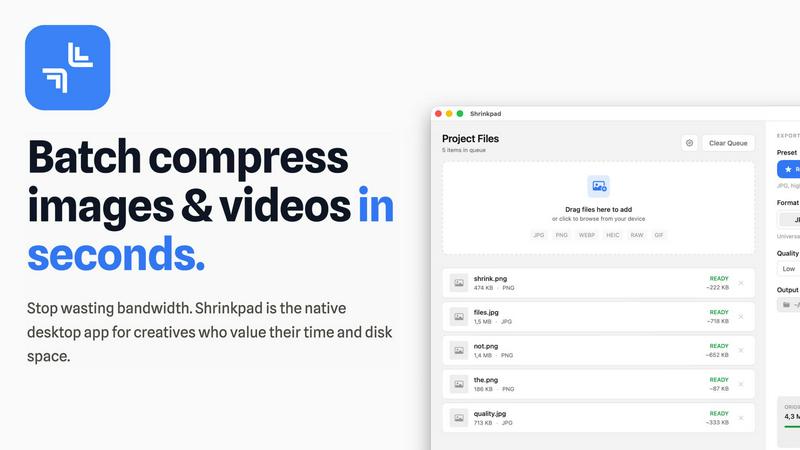
Shrinkpad effortlessly compresses images and videos in batches, optimizing your creative assets while saving time and.
Last updated: February 28, 2026
Visual Comparison
NB2 Hub

Shrinkpad
Feature Comparison
NB2 Hub
Faithful text + image remix
This feature allows users to upload a reference image along with a short text prompt. Nano Banana Pro enhances details and textures while preserving the original layout and lighting. Ideal for UI iterations, product shots, and comic panels, it ensures that your creative vision remains intact while being elevated to new heights.
Crisp text inside images
NB2 Hub enables the generation of clean, legible text within images, supporting multilingual typography without blurriness or halos. This feature is perfect for creating posters, advertisements, and social media covers where the message needs to stand out clearly and beautifully.
Grounded to real-world facts
With a focus on accuracy, this feature utilizes world knowledge and retrieval grounding to visualize real data, places, and styles in your images. It allows creators to produce beautiful yet truthful representations, making it ideal for educational content and informative graphics.
Multi-reference fusion & identity consistency
Users can fuse multiple references while maintaining character, product, and brand element consistency across images. This feature is particularly useful for creating storyboards and multi-angle product sets, ensuring a cohesive visual narrative throughout your project.
Shrinkpad
Intelligent Compression
Shrinkpad automatically analyzes the visual complexity of your images and videos to apply the perfect compression ratio. Say goodbye to artifacts and hello to optimized media that maintains its quality, delivering results that matter.
Unlimited Batching
Process thousands of files in a single go without the fear of crashing. Shrinkpad effortlessly handles massive queues, unlike web tools, enabling you to compress multiple assets simultaneously for maximum efficiency.
Folder Mode
With Shrinkpad, you no longer need to drag files one by one. Simply drop an entire folder, and the app automatically finds and prepares all images and videos inside for compression, streamlining your workflow.
Privacy-First Approach
All processing is done locally on your machine, ensuring that your sensitive assets never leave your device. With no cloud uploads, Shrinkpad prioritizes your privacy while providing powerful batch processing capabilities.
Use Cases
NB2 Hub
Marketing Campaigns
Utilize NB2 Hub to create eye-catching graphics for marketing campaigns. From product shots to social media ads, the platform enables you to generate high-quality visuals that captivate your audience and effectively convey your message.
Social Media Content Creation
Perfect for social media managers and influencers, NB2 Hub allows for the rapid generation of visually appealing content tailored to various platforms. Customize images to fit specific dimensions and styles, ensuring your posts stand out in crowded feeds.
Product Design and Mockups
Designers can leverage NB2 Hub to create realistic product mockups and branding scenes. Apply logos and patterns to 3D objects, enabling quick iterations and presentations that keep your brand's visual identity consistent and appealing.
Educational Materials
NB2 Hub is an excellent tool for educators and content creators looking to produce infographics and educational visuals. The platform’s grounding in real-world facts ensures that your materials are not only engaging but also accurate and informative.
Shrinkpad
Streamlining Creative Workflows
For photographers and designers, Shrinkpad simplifies the asset optimization process. Instead of manually exporting files from design software like Figma or Photoshop, users can export everything at higher resolutions and let Shrinkpad handle the rest, saving hours of busywork.
Optimizing Website Performance
Web developers can benefit immensely from Shrinkpad by significantly reducing app bundle sizes and website load times. With faster Largest Contentful Paint (LCP) scores, websites become more user-friendly and perform better in search engine rankings.
Managing Large Media Libraries
Content creators with extensive media libraries will find Shrinkpad invaluable. By enabling the batch processing of thousands of images and videos, creators can easily manage their assets and ensure they remain optimized for various platforms.
Preparing for Social Media
Social media managers can use Shrinkpad to quickly compress large video files and images for platforms like Instagram and Facebook. By ensuring files are optimized, they can share high-quality content without the hassle of size restrictions.
Overview
About NB2 Hub
NB2 Hub serves as an innovative platform for anyone seeking to unlock their creative potential through high-quality image generation. Powered by Google’s Nano Banana Pro and built on the advanced Gemini 3 pro Image framework, this online tool is a game-changer for artists, marketers, and content creators alike. With its intuitive interface, users can easily transform simple text prompts or image uploads into stunning visuals in mere seconds. The platform excels in delivering character consistency and layout fidelity, ensuring that your creations maintain a professional quality. Whether you are designing captivating graphics for marketing campaigns, crafting unique social media posts, or exploring your artistic inclinations, NB2 Hub provides a comprehensive suite of features tailored to meet your needs. The seamless user experience caters to both novices and seasoned professionals, making it an accessible choice for all. With NB2 Hub, your imagination is the only limit.
About Shrinkpad
Shrinkpad is an innovative batch image and video compression tool meticulously designed for macOS users who need to optimize their media assets without compromising quality. This powerful native application empowers photographers, designers, and content creators to reclaim valuable disk space while ensuring that their assets retain their visual integrity. Imagine effortlessly dropping hundreds of files or entire folders into Shrinkpad, selecting your desired compression settings, and watching the magic unfold. In mere seconds, your media is compressed, reducing file sizes by up to 90%. Unlike cloud-based solutions, Shrinkpad processes everything locally, ensuring your files remain secure and private. With its user-friendly interface and smart detection capabilities, it takes the guesswork out of compression, allowing you to focus on your creative endeavors without the burden of storage constraints.
Frequently Asked Questions
NB2 Hub FAQ
What is NB2 Hub?
NB2 Hub is an advanced image generation platform that allows users to create high-quality visuals using text prompts or image uploads. It leverages the power of Google’s Nano Banana Pro technology.
Who can benefit from using NB2 Hub?
Artists, marketers, educators, and anyone in need of high-quality visual content can benefit from NB2 Hub. The platform is designed to cater to both beginners and experienced professionals.
How does the image generation process work?
Users can input a text prompt or upload an image, and within seconds, NB2 Hub generates a stunning visual. The process is powered by advanced AI technology that ensures high fidelity and quality.
Are there any limitations on the types of images I can generate?
While NB2 Hub is versatile, it is best suited for creating graphics that require layout fidelity, character consistency, and accurate visual representation. Users should keep in mind the context of their prompts for optimal results.
Shrinkpad FAQ
Can I use Shrinkpad for free?
Yes, Shrinkpad offers a Free Starter plan that includes essential tools for casual use. You can batch compress up to 10 files at a time in common formats like JPG and PNG.
What file formats does Shrinkpad support?
Shrinkpad supports a wide range of formats including JPG, PNG, WEBP, AVIF, MP4, MOV, and even RAW formats, making it versatile for various media types.
Does Shrinkpad support video compression?
Absolutely. Shrinkpad is equipped to handle video files alongside images, allowing users to batch process both types of media efficiently.
How many files can I process at once?
With the Free Starter plan, you can process up to 10 files per batch. However, the Personal and Team plans allow for unlimited batch processing, making it perfect for heavy users.
Alternatives
NB2 Hub Alternatives
NB2 Hub is a cutting-edge online tool designed for transforming text and photos into breathtaking 4K images using the power of Google’s Nano Banana Pro AI Image Generator. This platform is particularly popular among artists, marketers, and anyone seeking high-quality visual content. Users frequently explore alternatives to NB2 Hub for various reasons, including pricing structures, feature sets, or specific platform compatibility that may better suit their unique needs. When choosing an alternative, it's essential to consider factors such as usability, the quality of generated images, and the range of features offered. Additionally, evaluating customer support, community engagement, and integration capabilities with other tools can significantly enhance the overall user experience. A thoughtful approach to selecting an alternative can lead to discovering a tool that aligns more closely with your creative vision or operational requirements.
Shrinkpad Alternatives
Shrinkpad is an innovative batch image and video compression tool tailored for macOS users, designed to enhance digital workflows by optimizing media with ease. As users embrace the need for efficient storage solutions, they often seek alternatives that may better align with their unique requirements, whether it be pricing, additional features, or compatibility with different platforms. The quest for an alternative typically stems from the desire to find a product that not only meets specific needs but also offers a seamless user experience without compromising quality or security. When exploring alternatives to Shrinkpad, it’s crucial to consider factors such as batch processing capabilities, privacy measures, and format compatibility. Users should seek options that allow for efficient handling of multiple files and prioritize local processing to safeguard sensitive media. Additionally, ensuring that the alternative supports a wide range of file formats can significantly streamline the creative workflow and enhance productivity.