
ScopeSnap vs TinyFast
Side-by-side comparison to help you choose the right product.

ScopeSnap
ScopeSnap turns your messy discovery notes into a clear, client-ready project proposal in minutes.
Last updated: March 18, 2026

Effortlessly compress images, videos, and PDFs on your Mac while keeping your files private and secure with TinyFast.
Last updated: February 28, 2026
Visual Comparison
ScopeSnap

TinyFast
Feature Comparison
ScopeSnap
AI-Powered Scope Generation
Stop starting from a blank page. Simply paste in your discovery call transcripts, client emails, and scattered notes. ScopeSnap's AI analyzes this raw context to automatically generate a structured project backlog. It identifies key epics, breaks them down into actionable scope items, and intelligently flags assumptions and open questions that need clarification before you can estimate confidently. This feature turns hours of manual synthesis into minutes of productive review.
Interactive Scope Refinement & Estimation
The initial AI-generated scope is just the starting point for a collaborative refinement process. ScopeSnap provides a visual, board-like interface where you can easily drag, drop, edit, and categorize tasks. Assign roles, set time or complexity estimates, and directly address the open questions the AI surfaced. This iterative cycle allows you to pressure-test the scope with your team until every feature is well-understood and accurately estimated, transforming uncertainty into a solid plan.
Automated Proposal & SOW Creation
Once your scope board is finalized, ScopeSnap eliminates the final manual hurdle: document creation. With one click, transform your structured backlog, estimates, and assumptions into a professionally formatted Proposal or Statement of Work. The tool automatically compiles all the agreed-upon details into a client-ready document, saving you from the tedious copy-pasting and formatting that typically takes hours. You can then send it directly to your client, accelerating the closing process.
Centralized Project Discovery Hub
ScopeSnap acts as a single source of truth for your project's foundational phase. Instead of juggling notes across different apps, keep all discovery materials--call transcripts, email threads, meeting notes, and the evolving scope--in one organized workspace. This centralized approach ensures nothing gets lost in the shuffle, provides crucial context during scope refinement, and creates a clear audit trail of how the project's requirements were defined and agreed upon.
TinyFast
Batch & Drag-Drop Shrink
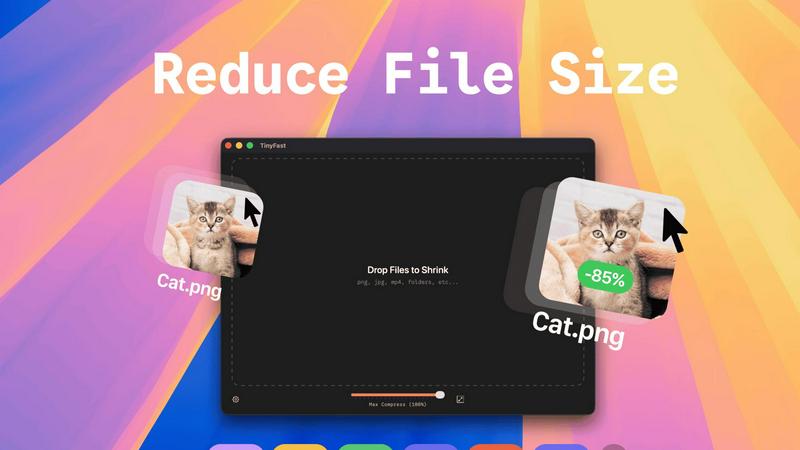
With TinyFast, you can easily drop entire folders into the application and receive optimized outputs in just seconds. This batch processing feature allows you to save time and increase productivity, especially when dealing with multiple files at once.
Blazing-Fast Compression
TinyFast utilizes optimized native engines to deliver lightning-fast compression speeds. You can compress large files in mere seconds without the hassle of uploads and downloads. This feature ensures that your workflow remains uninterrupted and efficient.
Resize Resolution
The application offers an automatic resizing feature for images and videos. You can set TinyFast to adjust the resolution of your files based on your requirements, making it a versatile tool for creators who need tailored outputs.
100% Local & Private
Privacy is at the heart of TinyFast's design. All files remain on your device, ensuring complete confidentiality. You do not need to worry about sensitive assets being exposed online or stored on third-party servers; your files are protected with total privacy.
Use Cases
ScopeSnap
The Solo Freelancer Closing a New Client
A freelance developer has a great initial call with a potential client but is overwhelmed by the prospect of turning their complex idea into a formal proposal. Using ScopeSnap, they upload the call transcript and their notes. The AI generates a clear scope breakdown, highlighting areas that need more detail. The freelancer refines the estimates, resolves the open questions with a quick follow-up email, and generates a polished proposal within an hour, impressing the client with their speed and professionalism and winning the project.
The Small Agency Streamlining Client Onboarding
A small software agency finds their project managers spending days after discovery calls manually building scopes and SOWs from disparate notes. By adopting ScopeSnap, the entire team standardizes their process. After any discovery session, the lead shares the context into a shared ScopeSnap workspace. The team collaboratively refines the AI-generated backlog in real-time, ensuring all technical perspectives are considered. This leads to more accurate estimates and faster, consistent proposal generation for every new client.
The Consultant Scoping a Large, Multi-Phase Project
A technical consultant is engaged for a large enterprise project with vague initial requirements. They use ScopeSnap to systematically deconstruct the high-level goals from multiple stakeholder interviews. The tool helps them organize the work into clear phases and epics, surface major dependencies and assumptions for client sign-off, and build a detailed, phased statement of work. This structured approach builds immense client confidence and establishes a clear roadmap from day one.
Preventing Scope Creep on Fixed-Price Contracts
A developer who frequently works on fixed-price projects uses ScopeSnap to create an ironclad foundation. During discovery, they use the tool to document every requirement and assumption explicitly. The AI helps ensure nothing is missed. The resulting, highly detailed SOW generated by ScopeSnap becomes the official project contract. This clear, mutually agreed-upon document dramatically reduces ambiguity and serves as a definitive reference point to manage scope and client expectations throughout the project lifecycle.
TinyFast
Streamlined Graphic Design
Graphic designers can use TinyFast to compress images for web and print projects without sacrificing quality. This helps in optimizing file sizes for faster loading times on websites, enhancing user experience without compromising on aesthetics.
Efficient Video Editing
Videographers can benefit from TinyFast by quickly compressing video files before sharing or uploading. This enables faster editing workflows and reduces the burden on storage space, making it easier to manage large video projects.
Secure Document Management
For professionals handling sensitive documents, TinyFast provides a secure way to compress and manage files without exposing them to online threats. This is particularly useful for legal and financial documents that require confidentiality.
Audio Production Optimization
Musicians and audio producers can leverage TinyFast to compress audio files efficiently. By reducing file sizes, they can streamline their workflows and make it easier to share tracks without the hassle of losing quality.
Overview
About ScopeSnap
The journey from a promising client conversation to a signed project is often the most treacherous part of freelance development or agency work. You leave a discovery call with a head full of ideas and a page full of scribbled notes, only to face the daunting, solitary task of making sense of it all. The pressure to translate that raw potential into a clear scope, a confident estimate, and a professional proposal can stall projects before they even begin. ScopeSnap was built to transform this chaotic, error-prone process into a structured, confident workflow. It is the AI-powered co-pilot for developers, consultants, and software agencies who specialize in custom projects. At its core, ScopeSnap understands that a successful project starts with a crystal-clear foundation. It guides you from the messy middle of discovery directly to a client-ready deliverable. By intelligently processing your notes, transcripts, and emails, it helps you deconstruct a project vision into estimatable tasks, surface critical assumptions, and resolve open questions collaboratively. Once your scope is solid, it seamlessly generates the polished proposals and statements of work that win trust and secure projects. ScopeSnap isn't just a tool; it's a new path from ambiguity to agreement, designed to give you back hours of tedious work and the confidence to price and promise with precision.
About TinyFast
TinyFast is a groundbreaking macOS application that redefines the way users approach file compression. Designed with developers, designers, and creators in mind, it simplifies the process of compressing a diverse range of file formats, including images, videos, documents, and audio files. The beauty of TinyFast lies in its commitment to privacy and speed, allowing users to compress files without ever having to upload them to the cloud. With a straightforward drag-and-drop interface, users can shrink file sizes within seconds, all while ensuring that sensitive materials remain safely stored on their local machines. This local-first approach not only enhances efficiency but also eliminates the security concerns associated with online compression tools. Born from the frustration of dealing with unreliable online services, TinyFast has already garnered a loyal following of over 500 Mac users who recognize the transformative power of this essential tool. For anyone dedicated to file management and efficiency on their Mac, TinyFast is not just an option; it is a necessity.
Frequently Asked Questions
ScopeSnap FAQ
What kind of input does ScopeSnap need to generate a scope?
ScopeSnap is designed to work with the raw, unstructured information you already collect. You can paste in text from discovery call transcripts (from tools like Otter.ai or Rev), copy-paste relevant email threads, upload meeting notes, or simply type out your own summary. The AI analyzes this context to identify project goals, features, and requirements. The more detailed your input, the more comprehensive and accurate the initial scope generation will be.
How accurate are the AI-generated estimates?
ScopeSnap's AI is designed to assist with structuring and breaking down work, not to provide final estimates on its own. The primary value is in creating a complete, structured backlog of tasks that you, the expert, can then review and estimate based on your own experience and team velocity. The tool flags complex or ambiguous items for your attention, ensuring you don't overlook something difficult to estimate. The final estimates are always set by you.
Can I collaborate with my team or client in ScopeSnap?
Yes, ScopeSnap supports collaboration. You can invite team members to a workspace to jointly review and refine the AI-generated scope, assign tasks, and discuss open questions. For client collaboration, you can share specific views or use the tool to generate clear summaries and questions for them. The automated proposals and SOWs are designed to be the final, client-facing deliverable that encapsulates all the collaborative refinement done internally.
Is my client's data secure and private?
Data security and privacy are paramount. ScopeSnap employs industry-standard encryption for data both in transit and at rest. Client information and your proprietary project details are not used to train public AI models. We recommend reviewing the full Privacy Policy and Terms of Service on the ScopeSnap website for detailed information on data handling, retention, and your rights regarding the information you input into the platform.
TinyFast FAQ
What file formats does TinyFast support?
TinyFast supports a wide range of file formats, including images (PNG, JPG, TIFF, HEIC, WEBP, GIF, BMP, SVG), videos (MP4, MOV, M4V), documents (PDF, DOCX), code files (JS, CSS, JSON), and audio files (MP3), ensuring versatility for all users.
Is TinyFast really free to use?
Yes, TinyFast offers a free tier that allows users to compress up to five files per day while accessing all its features. This makes it an excellent option for casual users who need occasional file compression.
How does TinyFast ensure privacy?
TinyFast guarantees that all files remain on your device, with no uploads to external servers. This local-first approach is designed to protect your confidential files, ensuring that sensitive information is never at risk of exposure.
Can I compress multiple files at once?
Absolutely! TinyFast allows users to drag and drop entire folders for batch compression, making it easy to optimize multiple files in seconds. This feature is perfect for users who need to compress large quantities of files quickly.
Alternatives
ScopeSnap Alternatives
ScopeSnap is an AI-powered productivity tool designed to streamline the often chaotic process of scoping and proposing custom software projects. It helps freelancers and agencies transform rough ideas into structured, estimatable plans and client-ready documents. This category of software is essential for professionals who need to translate client conversations into clear, actionable, and profitable agreements. Users might explore alternatives for various reasons, such as budget constraints, a need for different feature sets, or integration with their existing project management stack. Some may seek more granular control over proposal templates, while others prioritize collaborative editing or specific pricing models. The search for the right tool is a personal journey to find a solution that fits a unique workflow. When evaluating options, consider how a tool handles the core challenge: turning ambiguity into clarity. Look for solutions that reduce the risk of missed requirements, save significant time on administrative tasks, and ultimately build client trust through professionalism. The right fit will feel like a natural extension of your process, helping you scope with confidence rather than adding complexity.
TinyFast Alternatives
TinyFast is an innovative macOS application that specializes in file compression, catering to the needs of developers, designers, and creators. By efficiently compressing images, videos, documents, and audio files right on your Mac, TinyFast ensures that sensitive data remains private and secure. Many users find themselves seeking alternatives for various reasons, such as pricing, additional features, or specific platform requirements. In a rapidly evolving tech landscape, it’s essential to explore options that align with individual workflows and preferences. When searching for an alternative to TinyFast, consider key factors such as the ease of use, speed of compression, and whether the tool operates locally or requires an internet connection. Additionally, evaluate the range of file formats supported and any unique features that might enhance your experience. A well-rounded alternative should not only meet your technical needs but also seamlessly integrate into your creative process, allowing you to focus on what you do best.