
RemoveTexts vs TinyFast
Side-by-side comparison to help you choose the right product.

RemoveTexts
Effortlessly erase text, watermarks, and unwanted elements from images in seconds with RemoveTexts, no design skills needed.
Last updated: March 11, 2026

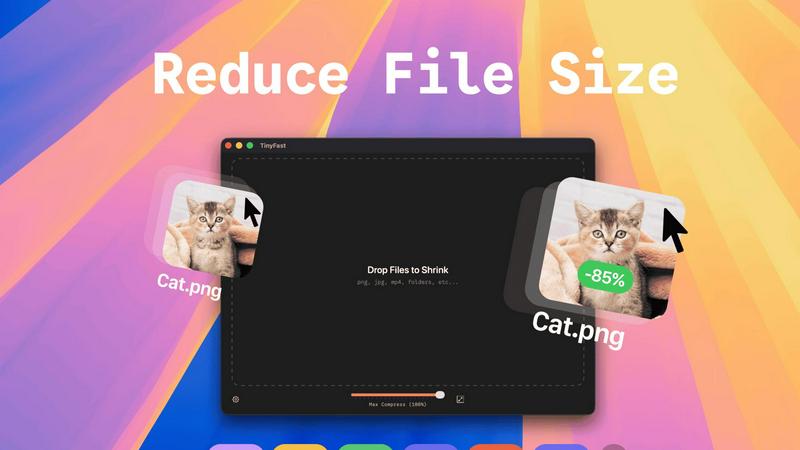
Effortlessly compress images, videos, and PDFs on your Mac while keeping your files private and secure with TinyFast.
Last updated: February 28, 2026
Visual Comparison
RemoveTexts

TinyFast
Feature Comparison
RemoveTexts
Paint to Remove
This feature allows users to have precise control over the text removal process. By simply brushing over specific areas of unwanted text, users can ensure that only the intended elements are erased, resulting in a tailored editing experience.
Auto Remove All
With this intelligent feature, RemoveTexts automatically detects and removes all text elements in the image with just one click. This is perfect for users who want to clean up images rapidly without the need for manual adjustments.
Edit & Replace Text
RemoveTexts goes beyond simple removal by allowing users to replace existing text in images while perfectly matching the original style. This feature is ideal for those who want to change information or branding without altering the overall look of the image.
Remove Objects
This versatile feature enables users to erase not only text but also unwanted objects, logos, and visual elements from their images. It expands the utility of RemoveTexts beyond text-only tasks to comprehensive image editing.
TinyFast
Batch & Drag-Drop Shrink
With TinyFast, you can easily drop entire folders into the application and receive optimized outputs in just seconds. This batch processing feature allows you to save time and increase productivity, especially when dealing with multiple files at once.
Blazing-Fast Compression
TinyFast utilizes optimized native engines to deliver lightning-fast compression speeds. You can compress large files in mere seconds without the hassle of uploads and downloads. This feature ensures that your workflow remains uninterrupted and efficient.
Resize Resolution
The application offers an automatic resizing feature for images and videos. You can set TinyFast to adjust the resolution of your files based on your requirements, making it a versatile tool for creators who need tailored outputs.
100% Local & Private
Privacy is at the heart of TinyFast's design. All files remain on your device, ensuring complete confidentiality. You do not need to worry about sensitive assets being exposed online or stored on third-party servers; your files are protected with total privacy.
Use Cases
RemoveTexts
E-commerce Product Photos
Online sellers can use RemoveTexts to clean up their product images by removing distracting watermarks or text overlays. This results in visually appealing photos that can enhance sales and attract potential customers.
Legal Document Redaction
Lawyers and legal professionals can utilize RemoveTexts to redact sensitive information from documents and images, ensuring that confidential details are securely removed without compromising the image's quality.
Social Media Content Creation
Content creators can take advantage of RemoveTexts to enhance their social media graphics by swiftly removing unnecessary text, allowing for a cleaner look that attracts more engagement from followers.
Educational Resources
Educators can use RemoveTexts to prepare instructional materials by removing unwanted text or distractions from images, ensuring that the focus remains on the essential content being presented.
TinyFast
Streamlined Graphic Design
Graphic designers can use TinyFast to compress images for web and print projects without sacrificing quality. This helps in optimizing file sizes for faster loading times on websites, enhancing user experience without compromising on aesthetics.
Efficient Video Editing
Videographers can benefit from TinyFast by quickly compressing video files before sharing or uploading. This enables faster editing workflows and reduces the burden on storage space, making it easier to manage large video projects.
Secure Document Management
For professionals handling sensitive documents, TinyFast provides a secure way to compress and manage files without exposing them to online threats. This is particularly useful for legal and financial documents that require confidentiality.
Audio Production Optimization
Musicians and audio producers can leverage TinyFast to compress audio files efficiently. By reducing file sizes, they can streamline their workflows and make it easier to share tracks without the hassle of losing quality.
Overview
About RemoveTexts
RemoveTexts is a revolutionary AI-powered online tool designed for effortless image editing, specifically focusing on removing unwanted text from images. Whether you are a designer, marketer, or simply someone looking to enhance your images, RemoveTexts provides an intuitive solution to clean up visuals in mere seconds. With no prior design skills required, users can simply upload their images, and RemoveTexts will intelligently erase watermarks, captions, subtitles, and any other text elements while preserving the integrity of the original background. The tool harnesses advanced deep learning inpainting technology to ensure that the results are not only quick but also professional-grade. Trusted by over 100,000 users globally, RemoveTexts has established itself as an essential resource for anyone needing clean and polished images without the hassle of complex software.
About TinyFast
TinyFast is a groundbreaking macOS application that redefines the way users approach file compression. Designed with developers, designers, and creators in mind, it simplifies the process of compressing a diverse range of file formats, including images, videos, documents, and audio files. The beauty of TinyFast lies in its commitment to privacy and speed, allowing users to compress files without ever having to upload them to the cloud. With a straightforward drag-and-drop interface, users can shrink file sizes within seconds, all while ensuring that sensitive materials remain safely stored on their local machines. This local-first approach not only enhances efficiency but also eliminates the security concerns associated with online compression tools. Born from the frustration of dealing with unreliable online services, TinyFast has already garnered a loyal following of over 500 Mac users who recognize the transformative power of this essential tool. For anyone dedicated to file management and efficiency on their Mac, TinyFast is not just an option; it is a necessity.
Frequently Asked Questions
RemoveTexts FAQ
How does RemoveTexts work?
RemoveTexts uses advanced AI and deep learning inpainting technology to analyze surrounding pixels and seamlessly reconstruct the background after removing text. This ensures that the edited image looks natural and professional.
What file formats does RemoveTexts support?
Users can upload images in JPG, PNG, and WebP formats, with a maximum file size of 10 MB. This flexibility allows users to work with various image types for their editing needs.
Is there a limit to how many images I can process?
While RemoveTexts is designed for efficient processing, there is no specific limit on the number of images you can process. Users can upload and edit multiple images as needed.
Are there any skills required to use RemoveTexts?
No design skills are required to use RemoveTexts. The tool is designed to be user-friendly, allowing anyone to easily upload images and remove text without any prior experience in graphic design or editing software.
TinyFast FAQ
What file formats does TinyFast support?
TinyFast supports a wide range of file formats, including images (PNG, JPG, TIFF, HEIC, WEBP, GIF, BMP, SVG), videos (MP4, MOV, M4V), documents (PDF, DOCX), code files (JS, CSS, JSON), and audio files (MP3), ensuring versatility for all users.
Is TinyFast really free to use?
Yes, TinyFast offers a free tier that allows users to compress up to five files per day while accessing all its features. This makes it an excellent option for casual users who need occasional file compression.
How does TinyFast ensure privacy?
TinyFast guarantees that all files remain on your device, with no uploads to external servers. This local-first approach is designed to protect your confidential files, ensuring that sensitive information is never at risk of exposure.
Can I compress multiple files at once?
Absolutely! TinyFast allows users to drag and drop entire folders for batch compression, making it easy to optimize multiple files in seconds. This feature is perfect for users who need to compress large quantities of files quickly.
Alternatives
RemoveTexts Alternatives
RemoveTexts is an innovative AI-powered tool designed to quickly and efficiently remove unwanted text from images, making it ideal for creators, marketers, and designers. This product falls within the image editing category, offering features that streamline the process of cleaning up visuals without the need for complex software like Photoshop. Users often seek alternatives to RemoveTexts for various reasons, including pricing considerations, specific feature sets, or compatibility with different platforms. When searching for an alternative, it's essential to evaluate aspects such as ease of use, the effectiveness of text removal technology, and the range of editing options available. Compatibility with multiple languages and the quality of output should also be key factors, as these elements significantly impact the overall user experience and satisfaction.
TinyFast Alternatives
TinyFast is an innovative macOS application that specializes in file compression, catering to the needs of developers, designers, and creators. By efficiently compressing images, videos, documents, and audio files right on your Mac, TinyFast ensures that sensitive data remains private and secure. Many users find themselves seeking alternatives for various reasons, such as pricing, additional features, or specific platform requirements. In a rapidly evolving tech landscape, it’s essential to explore options that align with individual workflows and preferences. When searching for an alternative to TinyFast, consider key factors such as the ease of use, speed of compression, and whether the tool operates locally or requires an internet connection. Additionally, evaluate the range of file formats supported and any unique features that might enhance your experience. A well-rounded alternative should not only meet your technical needs but also seamlessly integrate into your creative process, allowing you to focus on what you do best.