
poseup vs Shrinkpad
Side-by-side comparison to help you choose the right product.

poseup
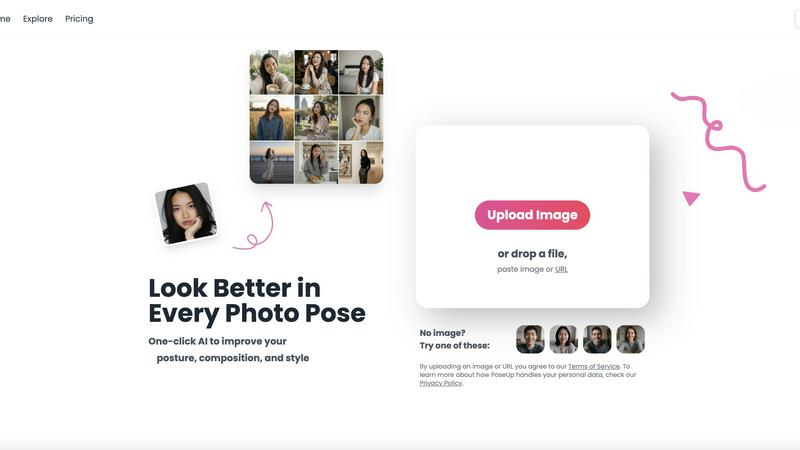
Transform your photos from ordinary to extraordinary with one click of our AI pose enhancer.
Last updated: March 1, 2026

Shrinkpad
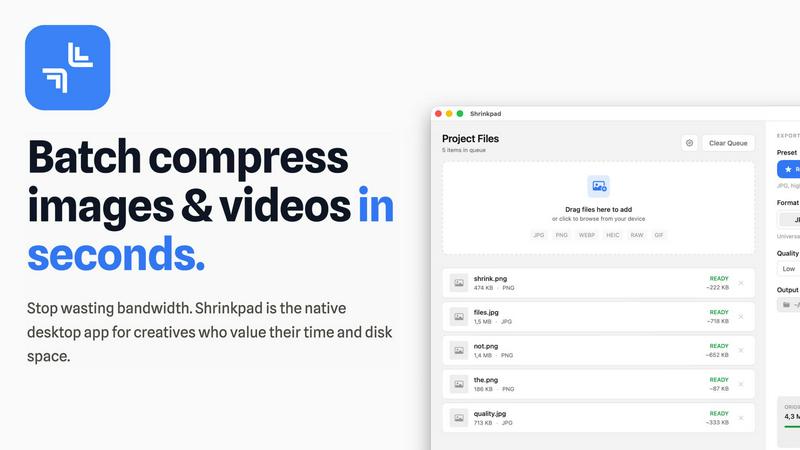
Shrinkpad effortlessly compresses images and videos in batches, optimizing your creative assets while saving time and.
Last updated: February 28, 2026
Visual Comparison
poseup
Shrinkpad
Feature Comparison
poseup
One-Click AI Pose Enhancement
The heart of the PoseUp journey is its effortless one-click magic. You are not required to have any technical knowledge of photography or body mechanics. Simply upload your photo, and the AI takes over, conducting a comprehensive analysis of the subject's stance, limb positioning, and spatial relationship within the frame. It then applies sophisticated corrections to straighten slouches, adjust asymmetries, and create a more balanced, confident, and aesthetically pleasing pose automatically, saving you from hours of trial-and-error or reshoots.
Intelligent Posture Correction & Composition Optimization
PoseUp goes beyond simple filters by understanding the fundamentals of a great photo. Its AI doesn't just see a person; it analyzes the entire scene. It evaluates lighting balance, the rule of thirds, and background elements to suggest the most impactful composition. Simultaneously, it identifies and corrects subtle posture issues like hunched shoulders, tilted heads, or awkward arm placement, ensuring the subject appears poised and natural within their environment, as if guided by an invisible professional photographer.
Versatile Scene Adaptation
Your photographic journey happens everywhere, and PoseUp is built to follow. The technology is trained to deliver exceptional results across a wide spectrum of scenarios. Whether it's a casual coffee shop work session, an energetic outdoor adventure, a serene fitness moment, a professional headshot against a plain background, or a cozy lifestyle shot at home, PoseUp's algorithms adapt their enhancement strategy to suit the context, ensuring appropriate and natural-looking improvements for every story you want to tell.
User-Friendly Platform with Free Tools
PoseUp invites you to start your enhancement journey without barriers. The platform boasts an intuitive interface where dragging, dropping, or pasting an image URL is all it takes to begin. To help you explore and have fun, PoseUp offers a suite of free creative tools like the Pose Changer, Expression Switcher, and nostalgic filters such as the 90s Japanese Lifestyle Filter. This approach lowers the entry point, allowing everyone to experiment and discover the power of AI photo enhancement in an engaging way.
Shrinkpad
Intelligent Compression
Shrinkpad automatically analyzes the visual complexity of your images and videos to apply the perfect compression ratio. Say goodbye to artifacts and hello to optimized media that maintains its quality, delivering results that matter.
Unlimited Batching
Process thousands of files in a single go without the fear of crashing. Shrinkpad effortlessly handles massive queues, unlike web tools, enabling you to compress multiple assets simultaneously for maximum efficiency.
Folder Mode
With Shrinkpad, you no longer need to drag files one by one. Simply drop an entire folder, and the app automatically finds and prepares all images and videos inside for compression, streamlining your workflow.
Privacy-First Approach
All processing is done locally on your machine, ensuring that your sensitive assets never leave your device. With no cloud uploads, Shrinkpad prioritizes your privacy while providing powerful batch processing capabilities.
Use Cases
poseup
Elevating Social Media Presence
For influencers, content creators, and professionals building a personal brand online, every image is a part of their narrative. PoseUp acts as a constant, reliable editor for this visual story. It ensures that every selfie, outfit photo, or candid shot projects confidence and polish. By consistently delivering high-quality, well-composed images, users can strengthen their social media profiles, attract more engagement, and present a cohesive, professional image to their audience without needing a photographer on standby.
Perfecting Professional Portraits and Headshots
The journey to a great professional headshot is often fraught with anxiety and cost. PoseUp democratizes this process. Individuals can take multiple shots at home or in the office, upload the best contenders, and use AI to refine their posture and composition to studio-quality standards. This is invaluable for job seekers, remote workers, entrepreneurs, and professionals who need to make a strong first impression on LinkedIn, company websites, or speaking portfolios without the expense of a professional photoshoot.
Enhancing Personal and Family Memories
Family photos, vacation pictures, and celebrations are meant to be cherished, but they're often rushed or awkward. PoseUp helps rescue these precious moments. It can correct a child's slouch, align a group so everyone is seen perfectly, or improve the stance of a couple in a romantic snapshot. This transforms albums and frames from collections of "almost perfect" shots into a gallery of flawless memories where everyone looks their natural, happy best, preserving the true emotion of the occasion.
Exploring Creative Photography and Couple Poses
Amateur photographers and couples looking for unique photos can use PoseUp as a creative springboard. The tool can analyze a basic pose and suggest more dynamic or romantic alternatives, providing inspiration for photoshoots. Users can experiment with different stylistic outcomes using the free tools, like switching expressions or applying artistic filters. This turns photo enhancement into a playful journey of discovery, helping users break out of repetitive poses and find new, visually striking ways to capture their connection or artistic vision.
Shrinkpad
Streamlining Creative Workflows
For photographers and designers, Shrinkpad simplifies the asset optimization process. Instead of manually exporting files from design software like Figma or Photoshop, users can export everything at higher resolutions and let Shrinkpad handle the rest, saving hours of busywork.
Optimizing Website Performance
Web developers can benefit immensely from Shrinkpad by significantly reducing app bundle sizes and website load times. With faster Largest Contentful Paint (LCP) scores, websites become more user-friendly and perform better in search engine rankings.
Managing Large Media Libraries
Content creators with extensive media libraries will find Shrinkpad invaluable. By enabling the batch processing of thousands of images and videos, creators can easily manage their assets and ensure they remain optimized for various platforms.
Preparing for Social Media
Social media managers can use Shrinkpad to quickly compress large video files and images for platforms like Instagram and Facebook. By ensuring files are optimized, they can share high-quality content without the hassle of size restrictions.
Overview
About poseup
Imagine looking at a photo and feeling that subtle pang of disappointment. The lighting was perfect, the background was beautiful, but your posture feels slightly off, or the composition doesn't quite capture the moment's magic. This is the universal moment before PoseUp enters the scene. PoseUp is your AI-powered companion on the journey from a "good enough" snapshot to a confident, professional-grade photograph. It's designed for anyone who has ever stood in front of a camera, from the social media creator crafting their personal brand to the parent trying to capture a perfect family memory, or the professional needing a standout headshot without the cost of a studio session. The tool's core promise is profound yet simple: to democratize the art of posing. With a single click, its advanced algorithms analyze your image, intelligently correcting posture, suggesting more flattering angles, and optimizing the overall composition. It transforms the often awkward process of "figuring out how to stand" into a seamless, empowering experience, ensuring that the story your photo tells is as compelling as the moment it captures.
About Shrinkpad
Shrinkpad is an innovative batch image and video compression tool meticulously designed for macOS users who need to optimize their media assets without compromising quality. This powerful native application empowers photographers, designers, and content creators to reclaim valuable disk space while ensuring that their assets retain their visual integrity. Imagine effortlessly dropping hundreds of files or entire folders into Shrinkpad, selecting your desired compression settings, and watching the magic unfold. In mere seconds, your media is compressed, reducing file sizes by up to 90%. Unlike cloud-based solutions, Shrinkpad processes everything locally, ensuring your files remain secure and private. With its user-friendly interface and smart detection capabilities, it takes the guesswork out of compression, allowing you to focus on your creative endeavors without the burden of storage constraints.
Frequently Asked Questions
poseup FAQ
How does PoseUp work?
PoseUp utilizes advanced artificial intelligence and computer vision models trained on vast datasets of professional photography. When you upload an image, the AI analyzes key elements including human pose keypoints (joints and limbs), body posture, facial orientation, lighting conditions, and the overall composition of the scene. It then compares this analysis to ideal photographic principles and generates subtle adjustments to align the subject with these standards, outputting an enhanced image that looks natural and professionally composed.
Is my data and privacy safe with PoseUp?
Yes, PoseUp takes your privacy seriously. As stated in their Terms of Service and Privacy Policy, uploaded images are processed securely to provide the enhancement service. The company has policies in place regarding data handling. For specific details on how your personal data is processed, stored, or deleted, it is recommended to review their official Privacy Policy document available on their website to understand the full scope of their data practices and your rights.
What image formats and sizes does PoseUp support?
PoseUp is designed to be accessible for most common photo types. The platform supports popular image formats including JPG, PNG, WEBP, and HEIC. There is a file size limit of up to 5MB per image for upload and processing. This ensures the tool remains fast and efficient for everyday use while accommodating high-quality photos from most modern smartphones and digital cameras without requiring complex file conversions from the user.
Are there any free credits or trials available?
Absolutely! PoseUp encourages new users to begin their journey by offering 50 free credits upon sign-up. These credits allow you to experience the core AI pose enhancement features firsthand. Additionally, the platform hosts a variety of "Free Tools" like the Pose Changer and creative filters that you can use without spending credits, providing ample opportunity to explore the technology's capabilities before committing to a paid plan for higher-volume usage.
Shrinkpad FAQ
Can I use Shrinkpad for free?
Yes, Shrinkpad offers a Free Starter plan that includes essential tools for casual use. You can batch compress up to 10 files at a time in common formats like JPG and PNG.
What file formats does Shrinkpad support?
Shrinkpad supports a wide range of formats including JPG, PNG, WEBP, AVIF, MP4, MOV, and even RAW formats, making it versatile for various media types.
Does Shrinkpad support video compression?
Absolutely. Shrinkpad is equipped to handle video files alongside images, allowing users to batch process both types of media efficiently.
How many files can I process at once?
With the Free Starter plan, you can process up to 10 files per batch. However, the Personal and Team plans allow for unlimited batch processing, making it perfect for heavy users.
Alternatives
poseup Alternatives
In the vibrant world of image and photo enhancement, tools like PoseUp are changing the game. They belong to a new category of AI-powered assistants that go beyond simple filters, focusing on the art of the pose itself. These tools analyze your photos to transform posture, composition, and style, turning everyday snapshots into polished, professional-looking images with just a single click. People often begin their search for alternatives for many reasons. Perhaps they need a tool that fits a specific budget, offers a unique feature for their creative workflow, or is available on a different platform. The journey to find the right tool is personal, driven by the unique stories each user wants to tell through their photos. When exploring other options, consider what matters most for your creative journey. Look for a tool that understands your vision, whether you prioritize advanced posture correction, support for specific image formats, or a supportive community to share your progress. The best choice is one that feels like a natural extension of your own creative process.
Shrinkpad Alternatives
Shrinkpad is an innovative batch image and video compression tool tailored for macOS users, designed to enhance digital workflows by optimizing media with ease. As users embrace the need for efficient storage solutions, they often seek alternatives that may better align with their unique requirements, whether it be pricing, additional features, or compatibility with different platforms. The quest for an alternative typically stems from the desire to find a product that not only meets specific needs but also offers a seamless user experience without compromising quality or security. When exploring alternatives to Shrinkpad, it’s crucial to consider factors such as batch processing capabilities, privacy measures, and format compatibility. Users should seek options that allow for efficient handling of multiple files and prioritize local processing to safeguard sensitive media. Additionally, ensuring that the alternative supports a wide range of file formats can significantly streamline the creative workflow and enhance productivity.