
Nano Photo vs Photo Animate
Side-by-side comparison to help you choose the right product.

Transform your creative ideas into breathtaking AI videos and photos with ease using Nano Photo's powerful tools.
Last updated: March 1, 2026

Photo Animate
Transform still photos into captivating, lifelike videos with Photo Animate's powerful AI-driven animation technology.
Last updated: April 4, 2026
Visual Comparison
Nano Photo
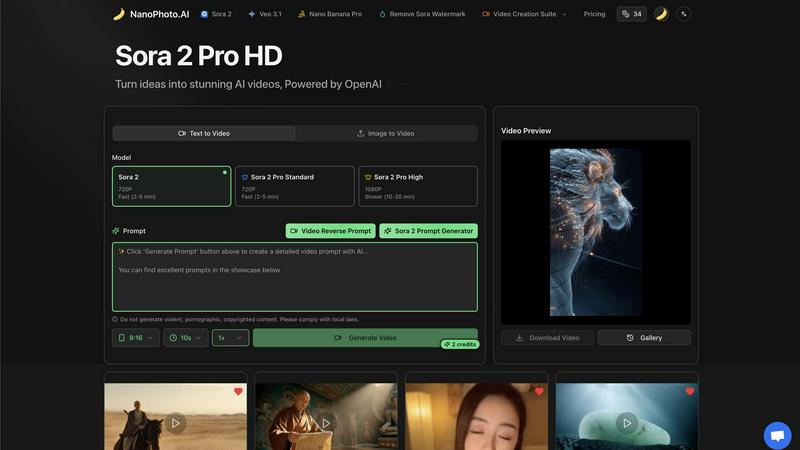
Photo Animate
Feature Comparison
Nano Photo
AI-Powered Video Creation
With Nano Photo, transforming your ideas into engaging videos is a breeze. The AI-powered video creation tools allow you to generate stunning content effortlessly, whether you're starting from scratch or using existing media.
Text to Video Transformation
This feature enables you to convert written content into dynamic video presentations. By simply inputting text, Nano Photo's advanced algorithms will create visually appealing videos that capture attention and convey your message effectively.
Image to Video Conversion
Elevate your static images by turning them into captivating videos. This feature allows you to animate your photos, adding movement and context to enhance storytelling and engage your audience in a whole new way.
Sora 2 Prompt Generator
The Sora 2 Prompt Generator is a unique tool designed to help you generate creative prompts for your video projects. It inspires new ideas and ensures you never run out of content, making the creative process smooth and enjoyable.
Photo Animate
Advanced AI Animation Technology
Photo Animate utilizes state-of-the-art AI animation technology to transform static images into fluid videos. This feature ensures that movements are realistic and coherent, providing a captivating viewing experience that enhances the emotional connection to the images.
User-Friendly Workflow
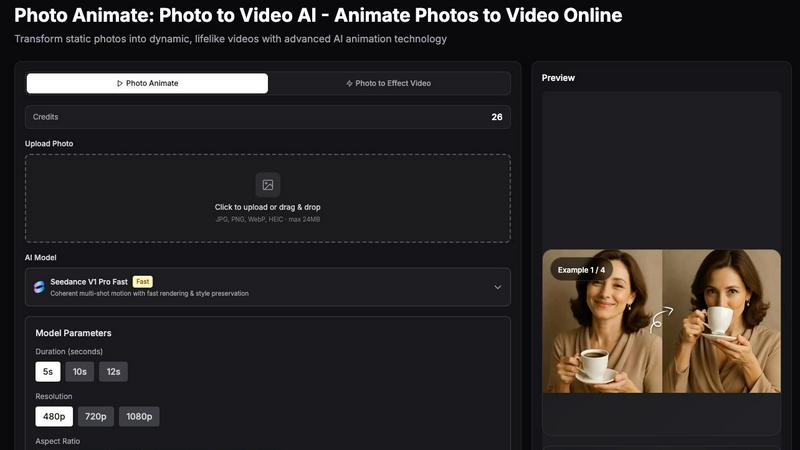
The platform is designed with simplicity in mind. Users can easily upload their photos, choose the desired animation style, preview the result, and download their videos with just a few clicks. This straightforward process eliminates the need for advanced editing skills, making it accessible to everyone.
Customizable Animation Styles
With various animation styles available, users can tailor the motion of their photos to suit their personal preferences. Whether you want subtle movements like blinking and smiling or more dynamic effects, Photo Animate allows for customization that aligns with the emotional tone of the project.
High-Quality Output Options
Photo Animate offers multiple resolution options, including 480p, 720p, and 1080p. This flexibility ensures that users can create videos suited for various platforms, whether for social media sharing, family archives, or professional presentations, maintaining high visual quality throughout.
Use Cases
Nano Photo
Marketing Campaigns
For marketers, Nano Photo is a game changer. It allows you to create compelling video ads quickly, helping you meet tight deadlines without sacrificing quality. With AI’s assistance, your marketing materials can stand out in a crowded digital landscape.
Social Media Content Creation
Content creators will find Nano Photo indispensable for generating viral videos for platforms like TikTok and Instagram. The ease of turning ideas into short, engaging clips means you can consistently produce fresh content that resonates with your audience.
Brand Storytelling
Entrepreneurs can leverage Nano Photo to craft their brand's narrative through visually engaging videos. Whether it's through product showcases or brand stories, Nano Photo helps you communicate your vision clearly and effectively.
Educational Content Development
Educators and trainers can utilize Nano Photo to create informative and engaging educational videos. By transforming lessons into visual formats, they can enhance learning experiences and make complex topics more accessible.
Photo Animate
Family Storytelling
Photo Animate is a powerful tool for families looking to preserve their histories. By animating old family photos, users can create touching video montages that bring stories to life, making it easier to share memories with loved ones during gatherings or special events.
Memorial Tributes
The platform provides a respectful way to honor deceased loved ones by creating subtle animations of their photographs. This feature allows for gentle movements that can evoke cherished memories, making it a thoughtful addition to memorial services or personal tributes.
Creative Projects
Artists and content creators can leverage Photo Animate to add unique flair to their works. By animating portraits or artwork, they can create eye-catching content for social media, enhancing engagement and interest in their projects.
Educational Resources
Educators can use Photo Animate to create engaging visual aids for lessons. By animating historical figures or significant events, teachers can provide dynamic educational content that captures students' attention and enhances their learning experience.
Overview
About Nano Photo
Imagine a world where your creative visions can flow freely without the constraints of complicated tools. Welcome to Nano Photo, your AI-powered creative companion that transforms how you edit photos and videos. Designed for marketers, content creators, and entrepreneurs alike, Nano Photo simplifies the editing process, making professional-grade results accessible to everyone. With a suite of powerful AI models integrated into one user-friendly platform, it eliminates the hassle of juggling multiple applications and the steep learning curves of traditional software. Whether you need to whip up a compelling advertisement or craft a stunning video from just a simple idea, Nano Photo guides you through every step of the creative journey. It empowers you to turn fleeting thoughts into captivating visuals and narratives without technical barriers, ensuring that your creativity is the only limit to what you can achieve.
About Photo Animate
Photo Animate is an innovative AI-powered tool designed to breathe life into static photos by transforming them into dynamic, engaging videos. With cutting-edge animation technology, users can easily create lifelike animations from still images, making it perfect for a variety of applications. Whether you're a content creator looking to enhance your portfolio, a family historian wanting to preserve cherished memories, or an artist seeking to add a unique twist to your work, Photo Animate offers a seamless and user-friendly experience. The platform focuses on delivering natural and subtle movements, ensuring that the essence of the original image is maintained. This makes it ideal for animating portraits, old family photos, and other meaningful visuals. With Photo Animate, you can effortlessly create memorable video content that resonates emotionally, allowing you to tell stories in a new and captivating way.
Frequently Asked Questions
Nano Photo FAQ
What types of media can I create with Nano Photo?
Nano Photo allows you to create both photos and videos. You can transform text into videos, animate images, or generate video content from scratch, making it versatile for various projects.
Is Nano Photo suitable for beginners?
Absolutely! Nano Photo is designed with user-friendliness in mind. Its intuitive interface and AI-driven features make it easy for beginners to produce high-quality content without prior experience.
Can I use Nano Photo for commercial projects?
Yes, Nano Photo is perfect for commercial use. Whether you're creating advertisements, social media content, or promotional videos, you can utilize the platform's features for business purposes.
What is the pricing structure for Nano Photo?
[Pricing information is not provided in the current context.]
Photo Animate FAQ
How does Photo Animate work?
Photo Animate uses advanced AI algorithms to analyze the uploaded images and apply realistic motion effects. Users simply upload a photo, select an animation style, and the tool generates a video that retains the original photo's essence while adding lifelike movements.
What file formats does Photo Animate support?
Users can upload images in multiple formats, including JPG, PNG, WebP, and HEIC, with a maximum file size of 24MB. This versatility ensures that most common image files can be easily animated.
Can I customize the duration and resolution of my videos?
Yes, Photo Animate allows users to choose the duration of their animations, ranging from 5 to 12 seconds. Additionally, users can select from various resolution options, including 480p, 720p, and 1080p, to suit their specific needs.
Is there a limit to the number of photos I can animate?
While there is no strict limit on the number of photos you can animate, users should be mindful of the credits required for each animation. Each photo animation consumes credits based on the selected features, so managing credits is essential for larger projects.
Alternatives
Nano Photo Alternatives
Nano Photo is an innovative tool designed to transform creative ideas into visually stunning AI-generated videos and photos with ease. It belongs to the realm of AI-powered creative software, catering to a diverse range of users—from marketers to content creators and entrepreneurs. This platform streamlines the complex processes of video and photo editing, allowing users to focus on their creative vision rather than getting bogged down by technical challenges. Users often seek alternatives to Nano Photo for various reasons, including pricing, specific feature sets, and platform compatibility. When searching for a suitable alternative, it’s essential to consider factors such as user-friendliness, the breadth of creative tools available, and the ability to produce high-quality outputs. Ensuring that the alternative fits your unique workflow and creative needs will help you make an informed decision that enhances your creative journey.
Photo Animate Alternatives
Photo Animate is a powerful tool that specializes in transforming static images into dynamic videos using advanced AI-driven technology. It belongs to the image and video category, allowing users to create stunning visuals effortlessly. Many users seek alternatives to Photo Animate for various reasons, such as pricing concerns, specific feature requirements, or compatibility with different platforms. As you explore options, consider the features that best suit your needs, the user interface, and the overall value proposition, ensuring that the alternative aligns with your creative vision. When choosing an alternative, it's essential to evaluate not only the cost but also the ease of use and the quality of the output. Look for tools that offer a range of features, such as customizable animations, templates, and support for various file formats. Additionally, user reviews and community feedback can provide valuable insights into the overall experience and reliability of the alternative, helping you make an informed decision that meets your creative aspirations.