
MeetingMind vs Never Drop
Side-by-side comparison to help you choose the right product.

MeetingMind
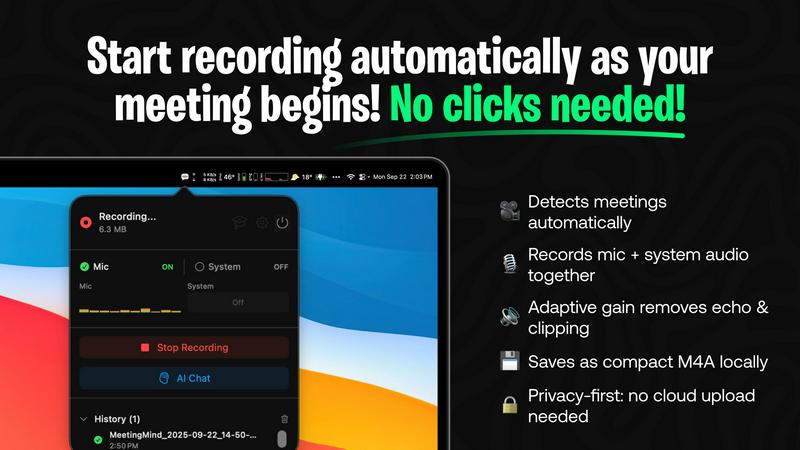
MeetingMind automatically records and summarizes your Zoom meetings so you never miss a detail.
Last updated: March 1, 2026

Never Drop
NeverDrop instantly captures event leads and drafts personalized follow-ups to close deals faster.
Last updated: February 28, 2026
Visual Comparison
MeetingMind
Never Drop

Feature Comparison
MeetingMind
Automatic Zoom Detection
The journey to effortless meeting capture begins the moment you join a call. MeetingMind intelligently monitors your system and automatically detects when a Zoom meeting starts. There are no buttons to press, no workflows to remember. It simply wakes up and starts working, ensuring you never miss the first crucial minutes of a discussion because you were fumbling to start a recorder. This seamless integration allows you to be fully present from "hello" onwards.
Local, Private AI Processing
In a world where data privacy is paramount, MeetingMind keeps your confidential conversations exactly where they belong: on your Mac. All audio processing, transcription, and summarization happen locally on your device using on-device AI. Your sensitive meeting discussions, strategic plans, and client details never travel to the cloud or a third-party server, giving you complete peace of mind and uncompromising security.
Intelligent Transcripts & Summaries
After your meeting concludes, the real magic happens. MeetingMind processes the audio and delivers not just a raw transcript, but an intelligent, structured document. It attributes speech to different speakers and uses AI to generate a concise summary that captures key points, decisions, and action items. This transforms hours of dialogue into a minutes-long read, saving you immense time and ensuring clarity.
Markdown Export & AI Chat
The insights don't just live within the app. MeetingMind exports the entire transcript and AI summary into beautifully formatted Markdown files, ready to be integrated into your note-taking apps, project management tools, or knowledge bases. Furthermore, with its built-in AI chat (powered by your choice of local Ollama or cloud OpenRouter), you can interact with your meeting notes, asking questions to uncover deeper insights long after the meeting ends.
Never Drop
AI-Powered Business Card Scanning
Gone are the days of manually typing details from a stack of cards or squinting at faded print. Simply open the Never Drop app on your phone and snap a photo of any business card. Our advanced AI-powered Optical Character Recognition (OCR) technology instantly extracts every critical detail—name, company, title, phone number, and email—with remarkable accuracy. This feature eliminates tedious data entry, saving you valuable time and preventing errors before they can enter your pipeline.
Intelligent Contact Enrichment & Email Finding
Business cards often lack direct contact information or contain generic front-desk emails. Never Drop solves this by automatically searching for and verifying the lead's professional work email using their name and company details. This intelligent enrichment builds a complete, actionable contact profile without requiring you to manually scour LinkedIn or guess email formats, ensuring your follow-up reaches the right person directly.
Context-Aware AI Follow-Up Drafts
This is the heart of the Never Drop experience. After scanning a card, you can immediately record a quick voice note or add text context summarizing your conversation—key points discussed, their challenges, or next steps. Never Drop's AI then synthesizes this unique context to generate a personalized, natural-sounding follow-up email draft. It’s not a generic template; it’s a tailored message that reflects your actual discussion, ready for you to review and send in just one tap.
Seamless CRM Integration & Team Workspace
Never Drop ensures your captured leads flow directly into your sales ecosystem. It integrates seamlessly with popular CRMs like HubSpot, pushing enriched contact profiles straight into your pipeline. Furthermore, the platform provides a unified team workspace where managers can organize scans by event, reassign leads between reps, and track overall activity from a central dashboard, ensuring team alignment and that no opportunity falls through the cracks.
Use Cases
MeetingMind
The Project Manager's Clarifier
For project managers juggling multiple agile stand-ups and client syncs, MeetingMind is a lifeline. It automatically records every daily scrum and planning session, providing crystal-clear records of commitments and blockers. After the meeting, the AI-generated summary instantly highlights action items and owner assignments, which can be exported directly to task tickets, ensuring nothing slips through the cracks and velocity stays on track.
The Consultant's Trusted Archive
Independent consultants and advisors live on billable hours and client trust. MeetingMind allows them to engage fully in strategic conversations without distraction. Every client recommendation, agreed-upon scope, and nuanced feedback is captured verbatim. This creates a flawless, searchable archive for each client, invaluable for preparing follow-up reports, invoicing accurately, and building a long-term record of advice and decisions.
The Remote Team's Knowledge Hub
For distributed teams, asynchronous communication and documentation are critical. MeetingMind records important team meetings, all-hands, and brainstorming sessions. The resulting searchable transcripts and summaries become a shared source of truth, accessible to team members in different time zones. This eliminates "he said, she said" confusion and ensures everyone, regardless of attendance, is aligned with decisions and next steps.
The Student & Researcher's Assistant
Students in virtual lectures and researchers conducting participant interviews can use MeetingMind to capture every detail. Instead of struggling to write and listen simultaneously, they can focus on understanding complex material. Later, they can review the full transcript, use the AI to summarize core concepts, and even chat with the content to test their understanding or generate study questions from the lecture notes.
Never Drop
Dominating Trade Shows and Conferences
For sales reps navigating the chaotic floors of major industry trade shows, Never Drop is a game-changer. Instead of fumbling with cards and a notepad, you can scan a lead's card right at the booth, dictate a note while the conversation is fresh ("Loved our demo for inventory management, needs a quote for 500 units"), and have a personalized follow-up ready to send before you even reach the next aisle, dramatically increasing your chance of being the first responder.
Streamlining Post-Networking Event Follow-Ups
After a chamber of commerce mixer or an executive dinner, following up with dozens of new contacts is a massive task. With Never Drop, you can quickly process all collected cards in one sitting. The AI drafts unique emails for each contact based on the brief context you add, transforming a hours-long chore into a 30-minute, high-impact activity that strengthens new professional relationships immediately.
Empowering Field Sales Teams
For B2B sales representatives who meet prospects in person at their offices or over coffee, Never Drop ensures every meeting detail is captured and acted upon. Scanning the card and adding voice notes right after the meeting preserves crucial nuances and commitments, enabling a follow-up that demonstrates attentiveness and professionalism, directly from your phone before you start the car.
Managing Team-Based Event Campaigns
For sales managers coordinating a team at a large conference, Never Drop provides visibility and control. You can assign leads from a central pool, track which rep has followed up, and ensure a consistent standard of post-event communication across the entire team. This turns a disjointed effort into a coordinated sales campaign where every lead is tracked and nurtured.
Overview
About MeetingMind
Imagine walking out of a crucial meeting, your mind buzzing with ideas and action items, only to feel that familiar pang of anxiety an hour later. Did you capture that brilliant suggestion from Sarah? What was the exact deadline the client agreed to? This is the story of modern professional life, where the most valuable insights are often lost in the shuffle of notes and memory. MeetingMind is the final chapter in that story. It is your intelligent, silent partner for every Zoom meeting, designed to liberate you from the burden of frantic note-taking. This macOS application sits discreetly in your menu bar, automatically springing to life when you join a Zoom call. It captures every word by recording both your microphone and the system audio, then uses powerful on-device AI to transform the conversation into a clear, speaker-attributed transcript and a concise summary. For professionals, project managers, and teams, MeetingMind isn't just a tool; it's a transformation. It turns the passive act of attending a meeting into an active, engaged experience, knowing that a perfect, searchable record is being crafted in the background. Your journey to more productive, present, and documented meetings begins here.
About Never Drop
Imagine you're at a bustling trade show. The energy is electric, conversations are flowing, and your pocket is filling with business cards from promising leads. But as the day winds down, a familiar dread sets in. Which card was from the eager prospect who loved your demo? What was the specific pain point the CEO from that mid-market company mentioned? The details blur, and the follow-up process becomes a daunting mountain of data entry and guesswork. This is where the journey with Never Drop begins. Never Drop is an innovative lead-capture app built specifically for sales professionals and teams who operate in fast-paced, high-stakes environments like conferences, trade shows, and networking events. It transforms the chaotic post-event scramble into a streamlined, intelligent workflow. The core mission is simple yet powerful: to ensure no lead is ever forgotten or lost. The app allows you to instantly scan a business card with your smartphone, enrich that contact with voice notes about your conversation, and then leverages advanced AI to draft a personalized, context-rich follow-up email—all within two minutes. By closing the gap between meeting and meaningful communication, Never Drop turns every handshake into a warm lead and every conversation into a tangible step toward a closed deal, ensuring your sales pipeline remains organized and actionable.
Frequently Asked Questions
MeetingMind FAQ
How does MeetingMind handle meeting privacy and consent?
MeetingMind is a tool that assists you in recording your meetings, but the responsibility for lawful recording rests with you. The application includes a clear recording disclosure reminder, stating you must always inform all participants and obtain consent before recording any conversation. It is crucial to comply with local laws and regulations, which often require two-party or all-party consent. Never record a meeting without proper disclosure.
What is included in the free 60 minutes per day?
The free tier is designed to be genuinely useful. It includes 60 minutes of total recording time per calendar day, alongside all core features: automatic Zoom detection, live transcription, AI-powered summaries and action items, and 100% local on-device processing. This is perfect for daily stand-ups, short syncs, or trying the app thoroughly before deciding to upgrade to the unlimited, one-time purchase plan.
Do I need an internet connection for MeetingMind to work?
For core recording and local AI processing (using Ollama), an internet connection is not required. All audio processing and transcription happen securely on your Mac. However, if you choose to use the cloud-based OpenRouter option for the AI chat and summarization features, then an internet connection would be necessary for those specific functions to communicate with the external API.
Is MeetingMind a subscription service?
No. MeetingMind offers a simple, fair pricing model. You can use it forever for free with 60 minutes of recording per day. If you need more, you can make a single one-time purchase to unlock unlimited recording. This purchase includes lifetime access to the unlimited version and future updates, with no recurring subscription fees ever.
Never Drop FAQ
What is Never Drop?
Never Drop is a lead-capture application designed for sales teams who attend events. It simplifies the process of collecting leads by allowing you to scan business cards with your phone, add contextual notes about your conversation via voice or text, and then automatically generates a personalized follow-up email draft in under two minutes. It also enriches contact data with verified emails and syncs everything to your CRM.
How does the business card scanning work?
You use the Never Drop mobile app to take a photo of any standard business card. Our AI-powered OCR (Optical Character Recognition) technology instantly analyzes the image and accurately extracts the printed contact details, including name, company, title, phone number, and email address. You also have the option to manually enter details if preferred.
What types of events is Never Drop best for?
Never Drop is built for any in-person scenario where exchanging business cards and needing quick follow-up is critical. This includes trade shows, industry conferences, networking events, meetups, client dinners, and field sales meetings. The app lets you organize your scans by event name for easy tracking and management.
Is my data secure with Never Drop?
Yes. Never Drop is developed by SCOPEO, a company based in France. All user data is hosted in the European Union and processed in full compliance with GDPR regulations. Data is encrypted both during transmission (in transit) and while stored on our servers (at rest). Images of business cards are used solely for the purpose of contact extraction and are not shared with any third parties.
Alternatives
MeetingMind Alternatives
In the bustling world of productivity tools, MeetingMind stands out as an intelligent meeting assistant, designed to capture the full narrative of your Zoom conversations. It belongs to a category of software that transforms spoken dialogue into actionable, searchable notes, aiming to free professionals from the burden of manual notetaking. Yet, every professional's journey is unique. Some may seek alternatives due to budget constraints, needing a different set of core features, or because their collaboration happens on platforms beyond Zoom. The search for the right tool is a personal quest to find a solution that aligns perfectly with one's workflow and team dynamics. When embarking on this search, consider what matters most on your path. Prioritize the quality of transcription, the depth of AI analysis, and how seamlessly a tool integrates into your daily rituals. The goal is to find a companion that not only records meetings but genuinely enhances your focus and follow-through, turning discussion into decisive action.
Never Drop Alternatives
In the bustling world of sales, where a handshake can lead to a deal, tools like Never Drop have become essential. It belongs to the category of productivity and lead management software, specifically designed to capture contact details and automate personalized follow-ups after networking events. This transforms chaotic business card piles into a streamlined pipeline. Sales professionals often explore alternatives for various reasons. Perhaps their budget requires a different pricing model, or their workflow demands specific features not available. Others might need an app that works seamlessly on a different platform or integrates with a niche CRM system beyond the standard options. When searching for a different solution, focus on what matters most for your team's journey. Consider the core need: is it flawless card scanning, deep CRM connectivity, or the AI's ability to craft genuinely personalized messages? The right tool should not just capture a lead, but enrich it with context and propel it forward, ensuring no potential deal is ever forgotten.