
MeetingMind
MeetingMind automatically records and summarizes your Zoom meetings so you never miss a detail.
Visit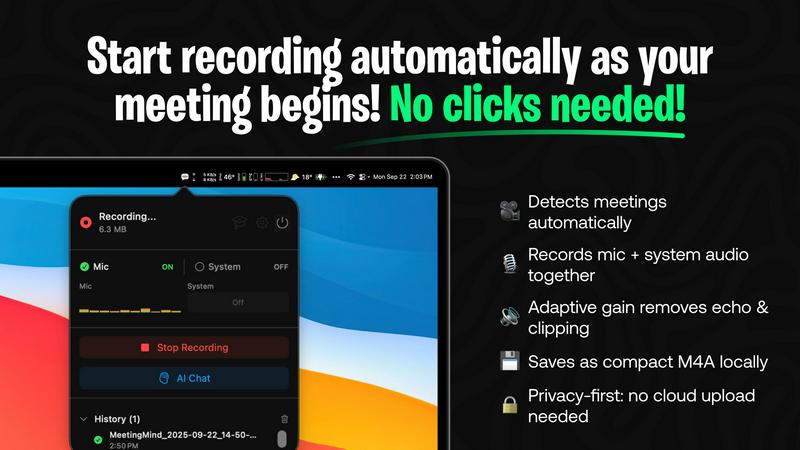
About MeetingMind
Imagine walking out of a crucial meeting, your mind buzzing with ideas and action items, only to feel that familiar pang of anxiety an hour later. Did you capture that brilliant suggestion from Sarah? What was the exact deadline the client agreed to? This is the story of modern professional life, where the most valuable insights are often lost in the shuffle of notes and memory. MeetingMind is the final chapter in that story. It is your intelligent, silent partner for every Zoom meeting, designed to liberate you from the burden of frantic note-taking. This macOS application sits discreetly in your menu bar, automatically springing to life when you join a Zoom call. It captures every word by recording both your microphone and the system audio, then uses powerful on-device AI to transform the conversation into a clear, speaker-attributed transcript and a concise summary. For professionals, project managers, and teams, MeetingMind isn't just a tool; it's a transformation. It turns the passive act of attending a meeting into an active, engaged experience, knowing that a perfect, searchable record is being crafted in the background. Your journey to more productive, present, and documented meetings begins here.
Features of MeetingMind
Automatic Zoom Detection
The journey to effortless meeting capture begins the moment you join a call. MeetingMind intelligently monitors your system and automatically detects when a Zoom meeting starts. There are no buttons to press, no workflows to remember. It simply wakes up and starts working, ensuring you never miss the first crucial minutes of a discussion because you were fumbling to start a recorder. This seamless integration allows you to be fully present from "hello" onwards.
Local, Private AI Processing
In a world where data privacy is paramount, MeetingMind keeps your confidential conversations exactly where they belong: on your Mac. All audio processing, transcription, and summarization happen locally on your device using on-device AI. Your sensitive meeting discussions, strategic plans, and client details never travel to the cloud or a third-party server, giving you complete peace of mind and uncompromising security.
Intelligent Transcripts & Summaries
After your meeting concludes, the real magic happens. MeetingMind processes the audio and delivers not just a raw transcript, but an intelligent, structured document. It attributes speech to different speakers and uses AI to generate a concise summary that captures key points, decisions, and action items. This transforms hours of dialogue into a minutes-long read, saving you immense time and ensuring clarity.
Markdown Export & AI Chat
The insights don't just live within the app. MeetingMind exports the entire transcript and AI summary into beautifully formatted Markdown files, ready to be integrated into your note-taking apps, project management tools, or knowledge bases. Furthermore, with its built-in AI chat (powered by your choice of local Ollama or cloud OpenRouter), you can interact with your meeting notes, asking questions to uncover deeper insights long after the meeting ends.
Use Cases of MeetingMind
The Project Manager's Clarifier
For project managers juggling multiple agile stand-ups and client syncs, MeetingMind is a lifeline. It automatically records every daily scrum and planning session, providing crystal-clear records of commitments and blockers. After the meeting, the AI-generated summary instantly highlights action items and owner assignments, which can be exported directly to task tickets, ensuring nothing slips through the cracks and velocity stays on track.
The Consultant's Trusted Archive
Independent consultants and advisors live on billable hours and client trust. MeetingMind allows them to engage fully in strategic conversations without distraction. Every client recommendation, agreed-upon scope, and nuanced feedback is captured verbatim. This creates a flawless, searchable archive for each client, invaluable for preparing follow-up reports, invoicing accurately, and building a long-term record of advice and decisions.
The Remote Team's Knowledge Hub
For distributed teams, asynchronous communication and documentation are critical. MeetingMind records important team meetings, all-hands, and brainstorming sessions. The resulting searchable transcripts and summaries become a shared source of truth, accessible to team members in different time zones. This eliminates "he said, she said" confusion and ensures everyone, regardless of attendance, is aligned with decisions and next steps.
The Student & Researcher's Assistant
Students in virtual lectures and researchers conducting participant interviews can use MeetingMind to capture every detail. Instead of struggling to write and listen simultaneously, they can focus on understanding complex material. Later, they can review the full transcript, use the AI to summarize core concepts, and even chat with the content to test their understanding or generate study questions from the lecture notes.
Frequently Asked Questions
How does MeetingMind handle meeting privacy and consent?
MeetingMind is a tool that assists you in recording your meetings, but the responsibility for lawful recording rests with you. The application includes a clear recording disclosure reminder, stating you must always inform all participants and obtain consent before recording any conversation. It is crucial to comply with local laws and regulations, which often require two-party or all-party consent. Never record a meeting without proper disclosure.
What is included in the free 60 minutes per day?
The free tier is designed to be genuinely useful. It includes 60 minutes of total recording time per calendar day, alongside all core features: automatic Zoom detection, live transcription, AI-powered summaries and action items, and 100% local on-device processing. This is perfect for daily stand-ups, short syncs, or trying the app thoroughly before deciding to upgrade to the unlimited, one-time purchase plan.
Do I need an internet connection for MeetingMind to work?
For core recording and local AI processing (using Ollama), an internet connection is not required. All audio processing and transcription happen securely on your Mac. However, if you choose to use the cloud-based OpenRouter option for the AI chat and summarization features, then an internet connection would be necessary for those specific functions to communicate with the external API.
Is MeetingMind a subscription service?
No. MeetingMind offers a simple, fair pricing model. You can use it forever for free with 60 minutes of recording per day. If you need more, you can make a single one-time purchase to unlock unlimited recording. This purchase includes lifetime access to the unlimited version and future updates, with no recurring subscription fees ever.
Explore more in this category:
Similar to MeetingMind

@fuck.it - email with attitude
Private email. Pure. Secure. Exclusive. No ads, no tracking, no data selling. GDPR compliant, EU-hosted.


Capafy AI
Agent Skills marketplace: discover expert AI agents, run them online, or publish a Skill and earn from every sale.

Suparelay
Call landlines and mobiles in 200+ countries from your browser. The person you call needs no app. Prepaid, price shown before you dial.

Novastart
Apps and files on an infinite canvas where people and AI agents work together.

JevModel
JevModel helps teams make structured AI decisions with Choice, Score, and Noul frameworks.
AI Email Filter
AI Email Filter sorts incoming mail into folders using plain-language prompts you write. Works with any IMAP mailbox; bring your own LLM if you want.