
LuxSign vs MeetingMind
Side-by-side comparison to help you choose the right product.

LuxSign lets you securely sign and manage documents online in minutes, ensuring compliance and peace of mind across the.
Last updated: February 27, 2026

MeetingMind
MeetingMind automatically records and summarizes your Zoom meetings so you never miss a detail.
Last updated: March 1, 2026
Visual Comparison
LuxSign

MeetingMind
Feature Comparison
LuxSign
Multiple Signature Methods
LuxSign offers diverse signature methods to accommodate different user preferences. You can draw your signature using your mouse, type your name, or upload an image of your signature. This flexibility ensures that signing documents is quick and easy, catering to personal preferences for a more authentic touch.
Advanced Security
Security is paramount with LuxSign. The platform employs industry-standard encryption to protect your documents throughout the signing process. Additionally, all data is securely stored within EU data centers, ensuring compliance with rigorous data protection regulations, making it a trusted choice for sensitive business transactions.
Email Notifications
Stay updated with LuxSign's automatic email notifications. Once documents are sent, viewed, or signed, you receive real-time alerts, keeping you informed every step of the way. This feature allows for better tracking and management of your documents, ensuring no step is overlooked.
Collaboration Workspaces
LuxSign enables teams to work together seamlessly through its collaboration workspaces. You can create shared folders for organizing documents, manage access for team members, and collaborate on signing workflows. This functionality enhances teamwork and productivity by simplifying document management.
MeetingMind
Automatic Zoom Detection
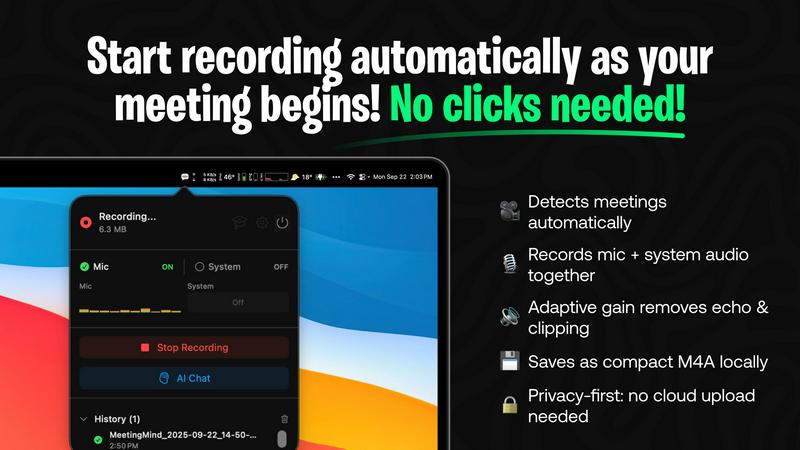
The journey to effortless meeting capture begins the moment you join a call. MeetingMind intelligently monitors your system and automatically detects when a Zoom meeting starts. There are no buttons to press, no workflows to remember. It simply wakes up and starts working, ensuring you never miss the first crucial minutes of a discussion because you were fumbling to start a recorder. This seamless integration allows you to be fully present from "hello" onwards.
Local, Private AI Processing
In a world where data privacy is paramount, MeetingMind keeps your confidential conversations exactly where they belong: on your Mac. All audio processing, transcription, and summarization happen locally on your device using on-device AI. Your sensitive meeting discussions, strategic plans, and client details never travel to the cloud or a third-party server, giving you complete peace of mind and uncompromising security.
Intelligent Transcripts & Summaries
After your meeting concludes, the real magic happens. MeetingMind processes the audio and delivers not just a raw transcript, but an intelligent, structured document. It attributes speech to different speakers and uses AI to generate a concise summary that captures key points, decisions, and action items. This transforms hours of dialogue into a minutes-long read, saving you immense time and ensuring clarity.
Markdown Export & AI Chat
The insights don't just live within the app. MeetingMind exports the entire transcript and AI summary into beautifully formatted Markdown files, ready to be integrated into your note-taking apps, project management tools, or knowledge bases. Furthermore, with its built-in AI chat (powered by your choice of local Ollama or cloud OpenRouter), you can interact with your meeting notes, asking questions to uncover deeper insights long after the meeting ends.
Use Cases
LuxSign
Streamlined Contract Management
For businesses that deal with numerous contracts daily, LuxSign simplifies the process. You can upload contracts, add signers, and send them for signature in minutes. This streamlined approach reduces the time spent on paperwork and accelerates the contracting process.
Secure Client Onboarding
When onboarding new clients, security and efficiency are vital. LuxSign allows you to send necessary documents for signature, ensuring they are signed quickly and securely. This feature enhances the client experience while maintaining compliance with data protection regulations.
Internal Approvals
Many organizations require multiple internal approvals before finalizing decisions. With LuxSign, you can set up sequential signing workflows that ensure each team member reviews and signs documents in the required order. This method helps maintain accountability and transparency throughout the process.
Bulk Signing for Large Teams
For enterprises with large teams, bulk signing capabilities are essential. LuxSign allows you to send documents to multiple signers simultaneously, saving time and effort. This feature is particularly beneficial for HR departments dealing with employee contracts or policy acknowledgments.
MeetingMind
The Project Manager's Clarifier
For project managers juggling multiple agile stand-ups and client syncs, MeetingMind is a lifeline. It automatically records every daily scrum and planning session, providing crystal-clear records of commitments and blockers. After the meeting, the AI-generated summary instantly highlights action items and owner assignments, which can be exported directly to task tickets, ensuring nothing slips through the cracks and velocity stays on track.
The Consultant's Trusted Archive
Independent consultants and advisors live on billable hours and client trust. MeetingMind allows them to engage fully in strategic conversations without distraction. Every client recommendation, agreed-upon scope, and nuanced feedback is captured verbatim. This creates a flawless, searchable archive for each client, invaluable for preparing follow-up reports, invoicing accurately, and building a long-term record of advice and decisions.
The Remote Team's Knowledge Hub
For distributed teams, asynchronous communication and documentation are critical. MeetingMind records important team meetings, all-hands, and brainstorming sessions. The resulting searchable transcripts and summaries become a shared source of truth, accessible to team members in different time zones. This eliminates "he said, she said" confusion and ensures everyone, regardless of attendance, is aligned with decisions and next steps.
The Student & Researcher's Assistant
Students in virtual lectures and researchers conducting participant interviews can use MeetingMind to capture every detail. Instead of struggling to write and listen simultaneously, they can focus on understanding complex material. Later, they can review the full transcript, use the AI to summarize core concepts, and even chat with the content to test their understanding or generate study questions from the lecture notes.
Overview
About LuxSign
LuxSign is a cutting-edge electronic signature platform designed to cater specifically to the compliance needs of businesses. Hailing from Luxembourg, it operates on a secure, cloud-based infrastructure that ensures all documents are encrypted end-to-end and stored exclusively within the country. This unique setup guarantees full compliance with the General Data Protection Regulation (GDPR), making LuxSign an ideal choice for businesses operating in the EU. The platform supports eIDAS Simple Electronic Signatures (SES), providing legal validity for contracts across all member states. With its intuitive interface, LuxSign allows users to manage documents efficiently, incorporating features like drag-and-drop signature field placement, automated email notifications, and customizable signing workflows. Whether you are a small business or a large enterprise, LuxSign streamlines the signing process, enhancing productivity while maintaining the highest standards of security and compliance.
About MeetingMind
Imagine walking out of a crucial meeting, your mind buzzing with ideas and action items, only to feel that familiar pang of anxiety an hour later. Did you capture that brilliant suggestion from Sarah? What was the exact deadline the client agreed to? This is the story of modern professional life, where the most valuable insights are often lost in the shuffle of notes and memory. MeetingMind is the final chapter in that story. It is your intelligent, silent partner for every Zoom meeting, designed to liberate you from the burden of frantic note-taking. This macOS application sits discreetly in your menu bar, automatically springing to life when you join a Zoom call. It captures every word by recording both your microphone and the system audio, then uses powerful on-device AI to transform the conversation into a clear, speaker-attributed transcript and a concise summary. For professionals, project managers, and teams, MeetingMind isn't just a tool; it's a transformation. It turns the passive act of attending a meeting into an active, engaged experience, knowing that a perfect, searchable record is being crafted in the background. Your journey to more productive, present, and documented meetings begins here.
Frequently Asked Questions
LuxSign FAQ
What types of documents can I sign with LuxSign?
You can sign various file formats including PDF, DOC, and DOCX. LuxSign automatically converts documents for you, allowing for easy and efficient signing regardless of the original format.
Is LuxSign compliant with GDPR?
Yes, LuxSign is fully compliant with GDPR and Luxembourg data protection laws. All documents are stored securely within Luxembourg, ensuring that your data privacy is protected at all times.
Can I track the status of my documents?
Absolutely! LuxSign provides real-time tracking capabilities. You will receive automatic notifications about the status of your documents, including when they are viewed and signed.
What if I need more advanced features for my business?
LuxSign offers various pricing tiers to accommodate different business needs. The Premium and Business plans include advanced features such as bulk signing, collaboration workspaces, and API access, ensuring you have the tools necessary for your organization.
MeetingMind FAQ
How does MeetingMind handle meeting privacy and consent?
MeetingMind is a tool that assists you in recording your meetings, but the responsibility for lawful recording rests with you. The application includes a clear recording disclosure reminder, stating you must always inform all participants and obtain consent before recording any conversation. It is crucial to comply with local laws and regulations, which often require two-party or all-party consent. Never record a meeting without proper disclosure.
What is included in the free 60 minutes per day?
The free tier is designed to be genuinely useful. It includes 60 minutes of total recording time per calendar day, alongside all core features: automatic Zoom detection, live transcription, AI-powered summaries and action items, and 100% local on-device processing. This is perfect for daily stand-ups, short syncs, or trying the app thoroughly before deciding to upgrade to the unlimited, one-time purchase plan.
Do I need an internet connection for MeetingMind to work?
For core recording and local AI processing (using Ollama), an internet connection is not required. All audio processing and transcription happen securely on your Mac. However, if you choose to use the cloud-based OpenRouter option for the AI chat and summarization features, then an internet connection would be necessary for those specific functions to communicate with the external API.
Is MeetingMind a subscription service?
No. MeetingMind offers a simple, fair pricing model. You can use it forever for free with 60 minutes of recording per day. If you need more, you can make a single one-time purchase to unlock unlimited recording. This purchase includes lifetime access to the unlimited version and future updates, with no recurring subscription fees ever.
Alternatives
LuxSign Alternatives
LuxSign is a cutting-edge electronic signature platform based in Luxembourg, designed to meet the needs of businesses that require high compliance standards. As an eIDAS SES compliant service, it ensures that signatures are legally valid throughout the European Union, providing users with the confidence to manage their contracts securely. However, users often seek alternatives for various reasons, such as pricing structures, specific feature sets, or compatibility with existing platforms. When choosing an alternative to LuxSign, it's important to consider factors like security measures, compliance with local and international regulations, user experience, and the range of features offered. An ideal platform should enhance productivity while ensuring that all signatures and documents are handled efficiently and securely.
MeetingMind Alternatives
In the bustling world of productivity tools, MeetingMind stands out as an intelligent meeting assistant, designed to capture the full narrative of your Zoom conversations. It belongs to a category of software that transforms spoken dialogue into actionable, searchable notes, aiming to free professionals from the burden of manual notetaking. Yet, every professional's journey is unique. Some may seek alternatives due to budget constraints, needing a different set of core features, or because their collaboration happens on platforms beyond Zoom. The search for the right tool is a personal quest to find a solution that aligns perfectly with one's workflow and team dynamics. When embarking on this search, consider what matters most on your path. Prioritize the quality of transcription, the depth of AI analysis, and how seamlessly a tool integrates into your daily rituals. The goal is to find a companion that not only records meetings but genuinely enhances your focus and follow-through, turning discussion into decisive action.