
Fieldtics vs Invoice Guru
Side-by-side comparison to help you choose the right product.

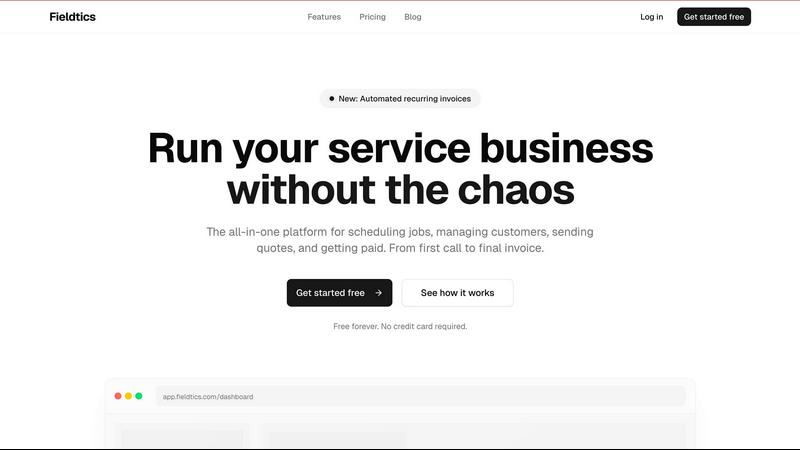
Fieldtics is your all-in-one platform to effortlessly schedule jobs, manage customers, and streamline invoicing for.
Last updated: February 27, 2026

Invoice Guru
Invoice Guru empowers UK tradespeople to effortlessly create compliant invoices in under a minute, boosting efficiency.
Last updated: February 28, 2026
Visual Comparison
Fieldtics
Invoice Guru

Feature Comparison
Fieldtics
Smart Job Scheduling
Fieldtics offers intelligent job scheduling that allows businesses to efficiently assign tasks and allocate resources. This feature reduces the chaos of daily operations by enabling users to view and manage appointments in real time, ensuring that no job is overlooked.
Customer Relationship Management (CRM)
The integrated CRM tool provides a comprehensive view of customer interactions, enabling teams to nurture relationships effectively. By tracking communication history and customer preferences, businesses can tailor their services and improve client satisfaction.
Invoicing and Payment Processing
With Fieldtics, creating and sending invoices is a breeze. The platform allows for quick payment processing, reducing delays that often accompany billing. This feature simplifies financial management, helping businesses maintain cash flow and improve their financial health.
Customizable Dashboard
Fieldtics understands that every business is unique. Its customizable dashboard empowers users to tailor the layout and branding to reflect their identity. This personalization enhances user experience, making it easier to navigate and manage tasks efficiently.
Invoice Guru
Instant Invoice Creation
With Invoice Guru, creating an invoice is a breeze. Users can input client details and item descriptions in seconds, enabling them to send professional invoices with just a few taps. The platform also allows customization with logos, payment terms, and due dates automatically filled in.
Automatic Invoice Numbering
Say goodbye to manual numbering. Invoice Guru automatically assigns invoice numbers and dates based on your fiscal year settings, ensuring that all invoices are correctly organized and compliant with accounting principles.
OCR Receipt Scanner (AI)
This innovative feature uses artificial intelligence to simplify expense tracking. Users can take a photo of their receipts, and the AI will extract all necessary details, eliminating the need for tedious manual data entry and ensuring accurate record-keeping.
Smart Payment Tracking
Invoice Guru takes the hassle out of tracking payments. It automatically matches incoming bank transactions with unpaid invoices, providing users with real-time updates on which clients have paid and which invoices are still outstanding.
Use Cases
Fieldtics
Streamlining Field Service Operations
Fieldtics is ideal for field service businesses, ensuring that technicians can receive real-time job updates and customer information on the go. This capability enhances productivity and enables teams to provide timely service to clients.
Managing Customer Relationships
For businesses that rely on strong client connections, Fieldtics’ CRM functionality allows for effective tracking of customer interactions. Service providers can maintain detailed records of client preferences, leading to more personalized service.
Simplifying Invoicing for Service Providers
Freelancers and small service businesses can utilize Fieldtics to automate invoicing processes. This feature ensures that invoices are generated and sent promptly, reducing the time spent on administrative tasks and improving cash flow.
Monitoring Project Progress
Fieldtics provides a unified dashboard where teams can monitor the progress of various projects. This visibility helps in identifying bottlenecks or delays, allowing businesses to address issues proactively and keep projects on track.
Invoice Guru
On-Site Invoicing for Electricians
Imagine an electrician finishing up a job in a client's loft. With Invoice Guru, they can create and send an invoice in less than a minute while still on-site, ensuring they get paid promptly without returning to the office.
Quick Invoicing for Painters
A painter can seamlessly generate an invoice between coats of paint, capturing their work's details while still engaging with their clients. This instant invoicing capability helps maintain cash flow and client satisfaction.
Efficient Plumbing Billing
For plumbers working in tight spaces, Invoice Guru allows them to generate professional invoices directly from their mobile devices. They can send invoices immediately after the job is completed, reducing delays in payment.
Hassle-Free Expense Management for Contractors
Contractors often deal with numerous receipts. With Invoice Guru's OCR receipt scanner, they can simply snap a photo of their receipts, and the software will automatically log expenses, saving time and ensuring accuracy.
Overview
About Fieldtics
Fieldtics is a transformative platform designed specifically for service businesses that seek to streamline their operations and enhance efficiency. In the hustle and bustle of daily tasks, Fieldtics acts as a beacon of order, integrating all essential tools into one accessible interface. This platform excels in job scheduling, customer relationship management, invoicing, and payment processing, addressing every aspect of workflow management. Whether your team is stationed in the office or out in the field, Fieldtics ensures that everyone is connected and synchronized through its web and mobile applications. Customization options allow businesses to tailor the dashboard, branding, and menus, making it feel like a natural extension of their unique identity. With seamless integrations to existing tools, Fieldtics automates workflows and centralizes data, offering clarity and control that empower service businesses to thrive and grow.
About Invoice Guru
Invoice Guru is a revolutionary mobile-first invoicing software designed specifically for tradespeople and service providers who need a fast, efficient way to manage their invoicing on the go. Born from the experiences of a tradesperson, this tool addresses the challenges of traditional desktop invoicing that often feels cumbersome and time-consuming after a long day at work. With Invoice Guru, users can create professional invoices in just 60 seconds directly from their smartphones, ensuring they can focus on their craft rather than administrative headaches. The platform integrates advanced features like AI receipt scanning, automatic payment tracking, and compliance with HMRC regulations, providing small business owners the confidence to manage their finances while staying organized effortlessly. Ultimately, Invoice Guru empowers users to get paid faster and streamline their invoicing process, allowing them to concentrate on what they do best.
Frequently Asked Questions
Fieldtics FAQ
What types of businesses can benefit from Fieldtics?
Fieldtics is designed for service businesses of all sizes, including cleaning services, electricians, landscapers, and more. Its flexible features cater to various operational needs.
Is there a free trial available for Fieldtics?
Yes, Fieldtics offers a free plan that allows users to access essential features without requiring a credit card. This enables businesses to explore the platform before committing to a paid plan.
How does Fieldtics handle invoicing and payments?
Fieldtics simplifies invoicing by allowing users to create and send invoices easily. It also facilitates quick payment processing, ensuring that businesses can collect payments without delays.
Can I customize the Fieldtics platform?
Absolutely! Fieldtics offers customization options that allow businesses to tailor the dashboard, branding, and menus to align with their unique identity, enhancing user experience.
Invoice Guru FAQ
How does Invoice Guru ensure HMRC compliance?
Invoice Guru is designed with UK tradespeople in mind, ensuring that all invoices are compliant with HMRC regulations, including Making Tax Digital (MTD) requirements, so users can focus on their work without worrying about compliance issues.
Can I use Invoice Guru for international transactions?
Yes! Invoice Guru supports multiple currencies and languages, making it suitable for international business transactions. Users can easily create invoices tailored to different markets.
Is there a free trial available?
Absolutely! Invoice Guru offers a 10-day free trial, allowing users to explore all features without any commitments. Users can also access a free plan with limited features to get started.
What types of payment integrations does Invoice Guru support?
Invoice Guru supports various payment methods, including bank transfers, PayPal, and Stripe. This flexibility ensures that users can receive payments through their preferred channels, making it easier for clients to pay.
Alternatives
Fieldtics Alternatives
Fieldtics is an all-in-one platform designed specifically for service businesses, streamlining essential operations like scheduling, customer management, invoicing, and payment processing. As a comprehensive solution, it helps teams—whether in the office or on the field—stay connected and efficient, making daily tasks more manageable. Users often seek alternatives to Fieldtics for various reasons, such as pricing considerations or specific feature requirements. They may also look for platforms that better cater to their unique operational needs or those that offer enhanced customization options. When considering an alternative, it’s vital to evaluate factors such as ease of use, integration capabilities, and support for mobile access to ensure that the new solution aligns with your business objectives.
Invoice Guru Alternatives
Invoice Guru is a mobile-first invoicing tool designed specifically for tradespeople in the UK, enabling them to create compliant invoices on-site in seconds. It caters to professionals who need a quick and efficient way to manage their invoicing without the hassle of traditional desktop software. Users often seek alternatives to Invoice Guru for various reasons such as pricing, features that better suit their specific needs, or compatibility with other platforms they may be using. When looking for an alternative, it’s essential to consider factors like ease of use, the ability to generate compliant invoices quickly, mobile access, and any additional features that streamline bookkeeping processes. Understanding your unique workflow and requirements will help you find the right tool that complements your trade and enhances your efficiency.