
ImaginePro vs Shrinkpad
Side-by-side comparison to help you choose the right product.

ImaginePro
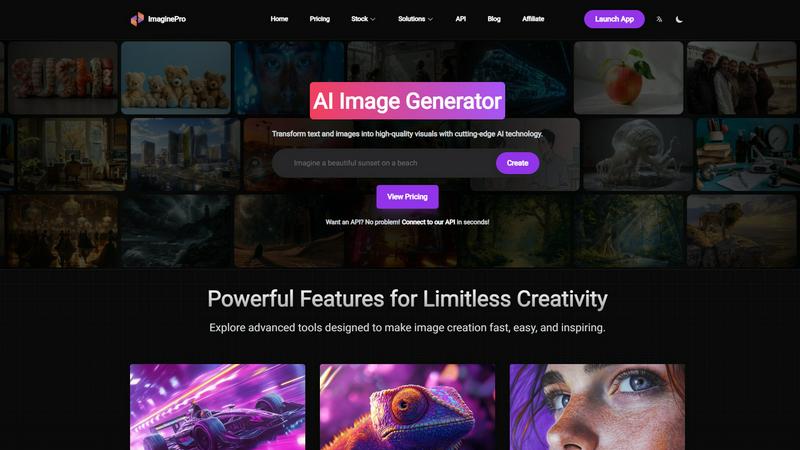
ImaginePro transforms your words into stunning, high-quality images with advanced AI.
Last updated: March 1, 2026

Shrinkpad
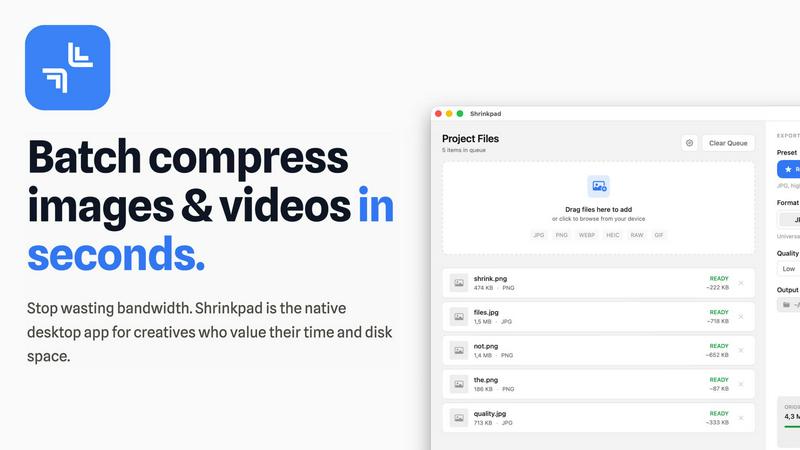
Shrinkpad effortlessly compresses images and videos in batches, optimizing your creative assets while saving time and.
Last updated: February 28, 2026
Visual Comparison
ImaginePro
Shrinkpad
Feature Comparison
ImaginePro
Instant Masterpieces with Top-Tier AI
Begin your creative journey without delay. ImaginePro harnesses powerful, top-tier AI models to generate professional-quality images in mere seconds. Describe your vision in simple text, and watch as the AI interprets your words into detailed, high-resolution visuals. This feature is designed for speed and quality, perfect for when you need compelling content for marketing materials, social posts, or personal projects without sacrificing an ounce of polish or realism.
Unparalleled Creative Control
This is where your vision takes precise shape. ImaginePro gives you the reins to fine-tune every aspect of your generated image. Go beyond the initial result by adjusting styles with precise references, modifying color palettes to set the perfect mood, and applying specific visual effects. This depth of control ensures that the final output isn’t just AI-generated—it’s uniquely yours, matching the exact detail and emotion you envisioned from the start.
Advanced Background Removal
Effortlessly isolate your subject and unlock new creative possibilities. With a single click, ImaginePro's advanced AI can cleanly remove backgrounds from any image. This feature is a game-changer for creating professional product shots for e-commerce, crafting clean portraits, or designing layered social media graphics. It simplifies what was once a complex editing task, allowing you to focus on the creative composition rather than tedious manual cutting.
Dynamic Text Behind Image
Create magazine-cover-worthy designs with intelligent text placement. This innovative feature allows you to add text that seamlessly weaves behind objects in your image. The AI intelligently detects subjects, enabling text to interact with the foreground for a dynamic, professional look. Customize your message with various fonts and styles to convey your inspiration, adding a layer of narrative depth and visual intrigue to any design with minimal effort.
Shrinkpad
Intelligent Compression
Shrinkpad automatically analyzes the visual complexity of your images and videos to apply the perfect compression ratio. Say goodbye to artifacts and hello to optimized media that maintains its quality, delivering results that matter.
Unlimited Batching
Process thousands of files in a single go without the fear of crashing. Shrinkpad effortlessly handles massive queues, unlike web tools, enabling you to compress multiple assets simultaneously for maximum efficiency.
Folder Mode
With Shrinkpad, you no longer need to drag files one by one. Simply drop an entire folder, and the app automatically finds and prepares all images and videos inside for compression, streamlining your workflow.
Privacy-First Approach
All processing is done locally on your machine, ensuring that your sensitive assets never leave your device. With no cloud uploads, Shrinkpad prioritizes your privacy while providing powerful batch processing capabilities.
Use Cases
ImaginePro
Social Media Content Creation
For influencers, marketers, and brands, consistently producing fresh, engaging visual content is a constant journey. ImaginePro accelerates this process, enabling the rapid generation of unique, high-quality images for posts, stories, and ads. Whether you need a captivating graphic to illustrate a blog topic or an eye-catching backdrop for a quote, you can create brand-consistent visuals that stop the scroll and tell your story without a photoshoot.
E-commerce Product Visualization
Selling online is a visual journey, and product images are your most important storyteller. ImaginePro empowers sellers to create stunning, clean product visuals by generating realistic lifestyle shots or providing perfect background removal for existing photos. Showcase your products in any setting or context imaginable, creating professional listings that build customer trust and drive conversions, all without expensive equipment or studios.
Graphic Design & Marketing Material
Designers and agencies can embark on projects with a powerful new ally. Use ImaginePro to rapidly prototype concepts, generate original artwork for campaigns, or create complete assets for brochures, websites, and advertisements. The ability to fine-tune styles and integrate text professionally streamlines the entire design journey, from initial brainstorm to final deliverable, saving valuable time and expanding creative options.
Automated Developer Workflows
For developers and tech-savvy creators building the next generation of apps, the journey involves automation. With ImaginePro's API and dedicated AI Agent skill, you can integrate powerful image generation directly into your pipelines. Automate content creation for chatbots, build dynamic marketing tools, or enable user-generated art features—all powered by ImaginePro's models for upscaling, background removal, and prompt enhancement, accessed through simple code.
Shrinkpad
Streamlining Creative Workflows
For photographers and designers, Shrinkpad simplifies the asset optimization process. Instead of manually exporting files from design software like Figma or Photoshop, users can export everything at higher resolutions and let Shrinkpad handle the rest, saving hours of busywork.
Optimizing Website Performance
Web developers can benefit immensely from Shrinkpad by significantly reducing app bundle sizes and website load times. With faster Largest Contentful Paint (LCP) scores, websites become more user-friendly and perform better in search engine rankings.
Managing Large Media Libraries
Content creators with extensive media libraries will find Shrinkpad invaluable. By enabling the batch processing of thousands of images and videos, creators can easily manage their assets and ensure they remain optimized for various platforms.
Preparing for Social Media
Social media managers can use Shrinkpad to quickly compress large video files and images for platforms like Instagram and Facebook. By ensuring files are optimized, they can share high-quality content without the hassle of size restrictions.
Overview
About ImaginePro
Every creative journey begins with a spark—an idea waiting to be seen. ImaginePro is your companion on that journey, a state-of-the-art AI image generator designed to transform your fleeting thoughts into stunning, tangible visuals within seconds. It’s more than just a tool; it’s a gateway to a world where your imagination sets the only limit. Leveraging cutting-edge AI technology, ImaginePro crafts high-resolution, lifelike images that are ready to make an impact, whether for a social media campaign, an e-commerce listing, a graphic design project, or a personal artistic endeavor. This platform is crafted for every storyteller, from the professional designer seeking efficiency to the marketer crafting a brand narrative and the hobbyist exploring new creative horizons. With an intuitive interface that feels like second nature, ImaginePro removes the technical barriers between vision and reality. It empowers you to not just create, but to refine—customizing colors, styles, and compositions until the image perfectly matches the story in your mind. Unique features like intelligent background removal and dynamic text integration further streamline your workflow, allowing you to produce polished, commercial-ready imagery without ever needing complex editing software. ImaginePro is where your creative journey accelerates, turning inspiration into masterpiece with effortless grace.
About Shrinkpad
Shrinkpad is an innovative batch image and video compression tool meticulously designed for macOS users who need to optimize their media assets without compromising quality. This powerful native application empowers photographers, designers, and content creators to reclaim valuable disk space while ensuring that their assets retain their visual integrity. Imagine effortlessly dropping hundreds of files or entire folders into Shrinkpad, selecting your desired compression settings, and watching the magic unfold. In mere seconds, your media is compressed, reducing file sizes by up to 90%. Unlike cloud-based solutions, Shrinkpad processes everything locally, ensuring your files remain secure and private. With its user-friendly interface and smart detection capabilities, it takes the guesswork out of compression, allowing you to focus on your creative endeavors without the burden of storage constraints.
Frequently Asked Questions
ImaginePro FAQ
What is ImaginePro and who is it for?
ImaginePro is an advanced AI image generator that transforms text descriptions and images into high-quality, realistic visuals. It's designed for a wide spectrum of creators on their unique journeys, including professional designers, marketers, social media managers, e-commerce sellers, hobbyists, and even developers looking to integrate AI imagery into applications. Its intuitive interface makes it accessible for beginners, while its powerful features cater to professional needs.
How does the 'Text Behind Image' feature work?
This feature allows for sophisticated design by letting you place text behind key subjects in an image. ImaginePro's AI first intelligently identifies the main objects or people in your picture. You can then add your custom text, and the system will automatically render portions of the text behind these detected subjects, creating a layered, professional effect similar to magazine covers. You retain full control to adjust the text's font, size, color, and position.
Can I use ImaginePro images for commercial purposes?
Yes, images generated by ImaginePro are designed to be high-quality and polished, making them suitable for commercial use. You can confidently use the visuals created on the platform for your business projects, including marketing materials, product listings, website content, and paid advertising campaigns, allowing you to bring professional-grade assets into your commercial journey.
Is there an API for developers?
Absolutely. ImaginePro offers a robust API and a specialized zero-dependency Python skill for AI agents like Claude and Codex. This allows developers to programmatically generate images, access features like upscaling and background removal, and integrate ImaginePro's capabilities directly into automated workflows, chatbots, or custom applications, powering a new journey in automated content creation.
Shrinkpad FAQ
Can I use Shrinkpad for free?
Yes, Shrinkpad offers a Free Starter plan that includes essential tools for casual use. You can batch compress up to 10 files at a time in common formats like JPG and PNG.
What file formats does Shrinkpad support?
Shrinkpad supports a wide range of formats including JPG, PNG, WEBP, AVIF, MP4, MOV, and even RAW formats, making it versatile for various media types.
Does Shrinkpad support video compression?
Absolutely. Shrinkpad is equipped to handle video files alongside images, allowing users to batch process both types of media efficiently.
How many files can I process at once?
With the Free Starter plan, you can process up to 10 files per batch. However, the Personal and Team plans allow for unlimited batch processing, making it perfect for heavy users.
Alternatives
ImaginePro Alternatives
ImaginePro is a leading AI image generator in the creative software category, transforming text prompts into high-quality, professional visuals. It empowers creators to bring their ideas to life with speed and precision, making it a go-to tool for digital art, marketing, and design. Users often explore alternatives for various reasons. Some seek different pricing models or subscription tiers that better fit their budget. Others might need specific features, like a particular artistic style or integration with other platforms, that align with their unique workflow. The search is a natural part of finding the perfect creative partner for your journey. When evaluating other options, consider what matters most for your projects. Look at the core quality of image generation, the depth of creative control offered, and the suitability of the output for your intended use, whether for personal passion or commercial work. The right tool should feel like an extension of your imagination.
Shrinkpad Alternatives
Shrinkpad is an innovative batch image and video compression tool tailored for macOS users, designed to enhance digital workflows by optimizing media with ease. As users embrace the need for efficient storage solutions, they often seek alternatives that may better align with their unique requirements, whether it be pricing, additional features, or compatibility with different platforms. The quest for an alternative typically stems from the desire to find a product that not only meets specific needs but also offers a seamless user experience without compromising quality or security. When exploring alternatives to Shrinkpad, it’s crucial to consider factors such as batch processing capabilities, privacy measures, and format compatibility. Users should seek options that allow for efficient handling of multiple files and prioritize local processing to safeguard sensitive media. Additionally, ensuring that the alternative supports a wide range of file formats can significantly streamline the creative workflow and enhance productivity.