
Fusedash vs TrafficClaw
Side-by-side comparison to help you choose the right product.

Fusedash transforms raw data into intuitive dashboards and charts, empowering your team to act on insights instantly.
Last updated: March 4, 2026

TrafficClaw
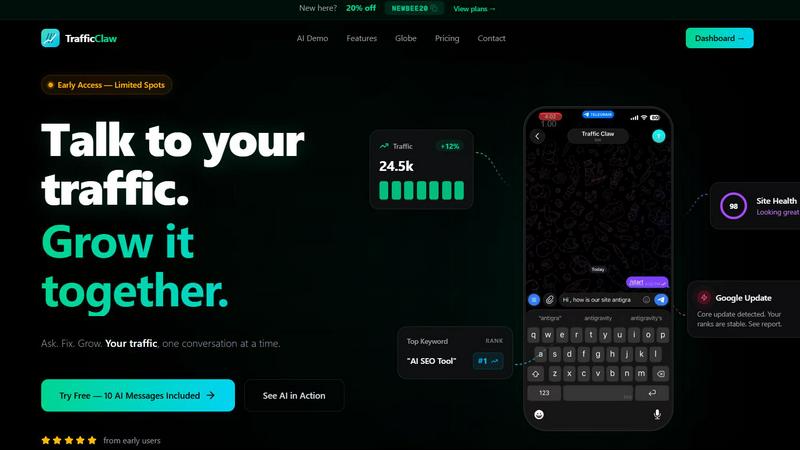
TrafficClaw is your AI analyst that turns your SEO data into a clear growth conversation.
Last updated: April 13, 2026
Visual Comparison
Fusedash

TrafficClaw
Feature Comparison
Fusedash
Flexible Views
Fusedash allows users to create tailored dashboard views that cater to the specific needs of different teams. With the ability to transform the same dataset into various formats—dashboards, charts, maps, or report-style views—it ensures stakeholders see only the most relevant information. This flexibility reduces the need for back-and-forth communication and empowers teams to focus on the insights that matter most.
AI Chart Generator
The AI Chart Generator feature enables users to swiftly create high-quality visuals from their data. Whether starting from a CSV or an API, users can generate charts in minutes, apply comparisons, and refine labels to ensure the visuals effectively communicate the intended story. This feature allows charts to be used as standalone visuals or integrated into larger dashboards, enhancing reporting efficiency.
Dashboard Software
Fusedash combines powerful dashboarding capabilities with narrative reporting, allowing teams to not only monitor KPIs but also understand the context behind performance changes. By integrating storytelling elements into dashboards, users can communicate what has changed, why it matters, and what the next steps should be, promoting alignment and reducing discrepancies in reporting.
AI Chat
Fusedash features an AI-powered chat interface that allows users to ask questions about their data in plain language. This smart chat functionality helps users explore breakdowns, get suggestions for relevant metrics and charts, and quickly generate insights that can be transformed into shareable dashboard views. This feature empowers users to engage with their data intuitively and efficiently.
TrafficClaw
AI Analyst Chat
This is the heart of your journey with TrafficClaw. Move beyond static reports and engage in a natural language conversation with your data. Ask any question about your traffic, rankings, or site performance. The AI Analyst doesn't offer guesses—it analyzes your live Google Analytics and Search Console data to deliver specific verdicts, supported by charts and evidence. It’s like having a senior SEO and data analyst on call 24/7, ready to translate complex metrics into clear, actionable steps.
SEO Intelligence Suite
Stop playing whack-a-mole with SEO issues. TrafficClaw proactively monitors your site's health, alerting you to critical opportunities and threats. It automatically detects keyword gaps where you could rank, flags content decay on older pages, identifies cannibalization where your own pages compete, and provides an AEO (Answer Engine Optimization) engine to prepare your content for AI-powered search. This feature ensures you're always one step ahead, optimizing for growth instead of just reacting to losses.
Real-Time Analytics & Live Globe
See the pulse of your website in a stunning, unified command center. The dashboard blends real-time visitor stats, traffic trends, and conversion funnels into one intuitive view. The standout feature is the interactive 3D globe, which visually plots your live visitors with a detailed activity feed. You can see where users are coming from, what pages they're on, and where they go next, all without needing to install any additional tracking scripts on your site.
Integrated Site Audit & Content Tools
TrafficClaw consolidates your entire workflow. Run deep, page-level technical audits that score performance, Core Web Vitals, and SEO, complete with auto-fix suggestions. Then, move seamlessly into creation with AI-powered content tools. Generate structured data schema, research keywords, optimize internal linking, and even draft blog posts—all within the same platform. It bridges the gap between insight and execution, turning recommendations into reality.
Use Cases
Fusedash
Marketing Analytics
Marketing teams can leverage Fusedash to visualize campaign performance across various channels. By creating tailored dashboards, they can track key metrics such as engagement rates, conversion rates, and ROI, ensuring that stakeholders have a clear view of what strategies are working and what needs adjustment.
Sales Performance Monitoring
Sales teams can utilize Fusedash to monitor their performance in real-time. By integrating data from multiple sources, they can create dashboards that showcase sales trends, pipeline health, and regional performance, allowing for informed decision-making and timely interventions.
Operational Insights
Operations teams can benefit from Fusedash by visualizing operational metrics such as inventory levels, supply chain performance, and production efficiency. Custom dashboards provide insights that help identify bottlenecks and optimize processes, driving overall operational excellence.
Financial Reporting
Finance departments can streamline their reporting processes with Fusedash. By connecting various financial datasets, they can build comprehensive dashboards that display key financial metrics, trends, and forecasts, fostering transparency and enabling strategic financial planning.
TrafficClaw
Diagnosing Sudden Traffic Drops
When your analytics graph takes an unexpected dive, panic often sets in. Instead of spending hours cross-referencing data, you simply ask TrafficClaw's AI, "Why did my traffic drop yesterday?" The system analyzes your connected data, checking for Google algorithm updates, ranking drops for key pages, technical errors, or cannibalization issues, and delivers a pinpoint verdict with the evidence and immediate steps to recover.
Uncovering New Growth Opportunities
You feel stuck in a growth plateau, unsure where to find your next wave of visitors. By asking the AI, "What are my top untapped keyword opportunities?" TrafficClaw sifts through thousands of search queries in your data, identifies high-potential, low-competition terms you're already close to ranking for, and provides a content strategy to target them, turning latent potential into measurable traffic.
Monitoring Site Health During Updates
A Google Core Update is announced, and every site owner's anxiety spikes. With TrafficClaw, you get proactive stability reports. The system monitors your rankings and traffic in real-time against known update periods, alerting you if your site is affected or, reassuringly, if your ranks remain stable, allowing you to focus your efforts wisely instead of worrying blindly.
Creating Data-Backed Content
You need to write a new blog post but want to ensure it drives traffic. Using the integrated content tools, you can first research keywords based on your actual search performance, then use the AI to help draft an outline or full article optimized for those terms, and finally generate the proper JSON-LD schema to enhance its visibility in search results—all in one cohesive workflow.
Overview
About Fusedash
Fusedash is an innovative AI-powered data visualization platform that empowers teams to convert their connected data into meaningful, actionable insights. Designed for organizations tired of navigating through disjointed reporting tools, Fusedash serves as a cohesive workspace where users can create decision-ready dashboards, interactive charts, detailed maps, and narrative reports efficiently. Its core value proposition revolves around consistency and efficiency: teams define key metrics and KPIs once and reuse them across all visualizations and reports. This ensures that everyone—from executives to marketing and operations—is aligned with the same trusted data. Fusedash is perfect for teams seeking to streamline their reporting processes, eliminate conflicting data narratives, and foster a data-driven culture. By leveraging integrated AI features such as natural language data chat and smart visualization assistance, Fusedash enhances data exploration and makes reporting not only faster but also more accessible. Ultimately, it transforms raw data into a shared source of truth, driving alignment and informed decision-making across the organization.
About TrafficClaw
Imagine the sinking feeling of watching your website traffic plummet. You scramble to Google Analytics, only to be met with a sea of confusing graphs and numbers that tell you what happened, but never why. You check Search Console, and it confirms the drop with more charts. The question hangs in the air, unanswered: "What do I do now?" This is the journey that ends with TrafficClaw. It's not another dashboard to stare at; it's your AI co-pilot for growth. Built for website owners, marketers, and developers tired of data guesswork, TrafficClaw transforms your analytics from a passive report into an active conversation. You simply connect your GA4 and Search Console accounts—a process that takes under a minute—and start asking questions in plain English. "Why did my traffic drop last Tuesday?" "What's my top keyword opportunity?" "Is my site ready for the latest Google update?" Instead of generic blog advice, you get a verdict. The AI dives into your unique data, correlates insights, and delivers actionable fixes with evidence. It’s the difference between seeing a problem and having a clear path to solve it, turning anxiety into action and data into growth.
Frequently Asked Questions
Fusedash FAQ
What types of data can I integrate with Fusedash?
Fusedash allows users to integrate data from various sources, including CSV uploads, API connections, and public datasets. This flexibility enables teams to create comprehensive views that combine multiple data streams for deeper insights.
How does Fusedash ensure data consistency across reports?
Fusedash allows users to define key metrics and KPIs once, which can then be reused across all dashboards and reports. This standardization ensures that all teams are working with the same definitions and numbers, promoting trust in the data.
Can I share my dashboards with stakeholders?
Yes, Fusedash provides options to share dashboards with stakeholders, ensuring that everyone has access to the same insights. This feature fosters alignment within teams and enhances collaborative decision-making.
How does the AI Chat feature work?
The AI Chat feature allows users to ask questions about their data in natural language. It provides suggestions for metrics, charts, and breakdowns, helping users navigate their data more effectively and quickly generate insights for reporting.
TrafficClaw FAQ
How does TrafficClaw access my data?
TrafficClaw uses secure, read-only Google OAuth to connect to your Google Analytics 4 and Search Console accounts. This means we never see your password, and we can only view your data—we cannot edit, delete, or modify anything in your Google accounts. Your data remains yours and is used solely to power your insights within TrafficClaw.
Is there a free plan to try it?
Yes, you can start with a free plan that includes 10 AI messages to explore the core functionality. This allows you to connect your data and ask several questions to experience how the AI Analyst provides verdicts based on your real analytics, with no credit card required upfront.
What makes this different from other analytics tools?
Unlike traditional dashboards that only show data, TrafficClaw is built for conversation and action. It doesn't just show you a chart of a traffic drop; it tells you why it happened and what to do about it. It combines analytics, SEO, auditing, and content creation into one intelligent interface, eliminating the need to switch between a dozen different tools.
Can I embed the live visitor globe on my website?
Absolutely. TrafficClaw offers a free embeddable 3D globe widget that shows real-time visitor locations and an activity feed on your own site. It works with any website or CMS via a simple iframe code, requires no additional tracking scripts, and pulls data directly from your connected GA4 property.
Alternatives
Fusedash Alternatives
Fusedash is an AI-powered data visualization platform that simplifies the process of turning raw data into actionable insights through clear dashboards and interactive charts. As part of the Analytics & Data category, it is designed for teams seeking a unified workspace to streamline their reporting and decision-making processes. However, users often find themselves exploring alternatives due to various factors such as pricing concerns, specific feature requirements, or compatibility with existing platforms. When considering alternatives, it's essential to evaluate the ease of use, integration capabilities, and the ability to deliver consistent and accurate data that aligns with your organization's goals.
TrafficClaw Alternatives
TrafficClaw is a new kind of AI assistant for SEO and analytics. It sits in the category of conversational data analysis tools, designed to let you ask plain-English questions about your traffic and get direct, data-backed answers. Instead of staring at silent dashboards, you have a dialogue with your own Google Analytics and Search Console data. People explore alternatives for many reasons. Perhaps a tool's pricing doesn't fit a startup's budget, or an enterprise needs deeper platform integrations. Some may seek more advanced reporting features, while others prioritize a simpler, more guided experience. The quest for the right fit is a natural part of any software journey. When evaluating options, consider what matters most for your workflow. Look at core functionality: does it connect to your essential data sources? Assess the intelligence of the insights—are they generic or uniquely tailored to your site? Finally, weigh the user experience; the best tool is one your team will actually use to uncover stories hidden in your data.