
Dokta vs QuickData.ai
Side-by-side comparison to help you choose the right product.

Dokta transforms your scattered documents into a clear financial journey, automating invoices, quotes, and payments so you can focus on your work.
Last updated: April 4, 2026

QuickData.ai
QuickData.ai automates your rent roll and T12 data entry, turning hours of underwriting into minutes.
Last updated: March 1, 2026
Visual Comparison
Dokta

QuickData.ai
Feature Comparison
Dokta
Instant AI Document Analysis
At the heart of Dokta is its powerful AI engine, powered by Claude from Anthropic. Within 60 seconds of uploading a photo, scan, or PDF, it performs automatic OCR reading, classifies the document type (invoice, quote, contract), and extracts critical data like amounts, due dates, and client details. This eliminates manual data entry, ensuring accuracy and saving you hours of tedious work every week.
Automated Invoicing & Quote Management
Dokta streamlines your entire billing workflow. Create professional invoices and quotes in just a few clicks. For freelancers on day-rate contracts, it can even automate monthly invoicing. A standout feature is the online quote acceptance; send a quote with a link for clients to approve, and convert it to an invoice with a single click, seamlessly moving from proposal to payment.
Real-Time Cash Flow Dashboard
Gain instant clarity on your financial health. Dokta’s dashboard provides a real-time overview of your invoiced revenue, collected cash, outstanding payments, and VAT. With a visual 12-month graph, you can track trends, forecast earnings, and make informed business decisions without ever opening a separate accounting spreadsheet.
Anomaly Detection & Client Intelligence
Dokta acts as your vigilant guardian. Its AI proactively detects anomalies in your documents, such as changed IBAN numbers, duplicate invoices, inconsistent VAT, or missing numbering. Furthermore, it automatically enriches contact details using SIRET numbers and provides payment scoring for clients and suppliers, building a smart, historical database of every business relationship.
QuickData.ai
AI-Powered Document Data Extraction
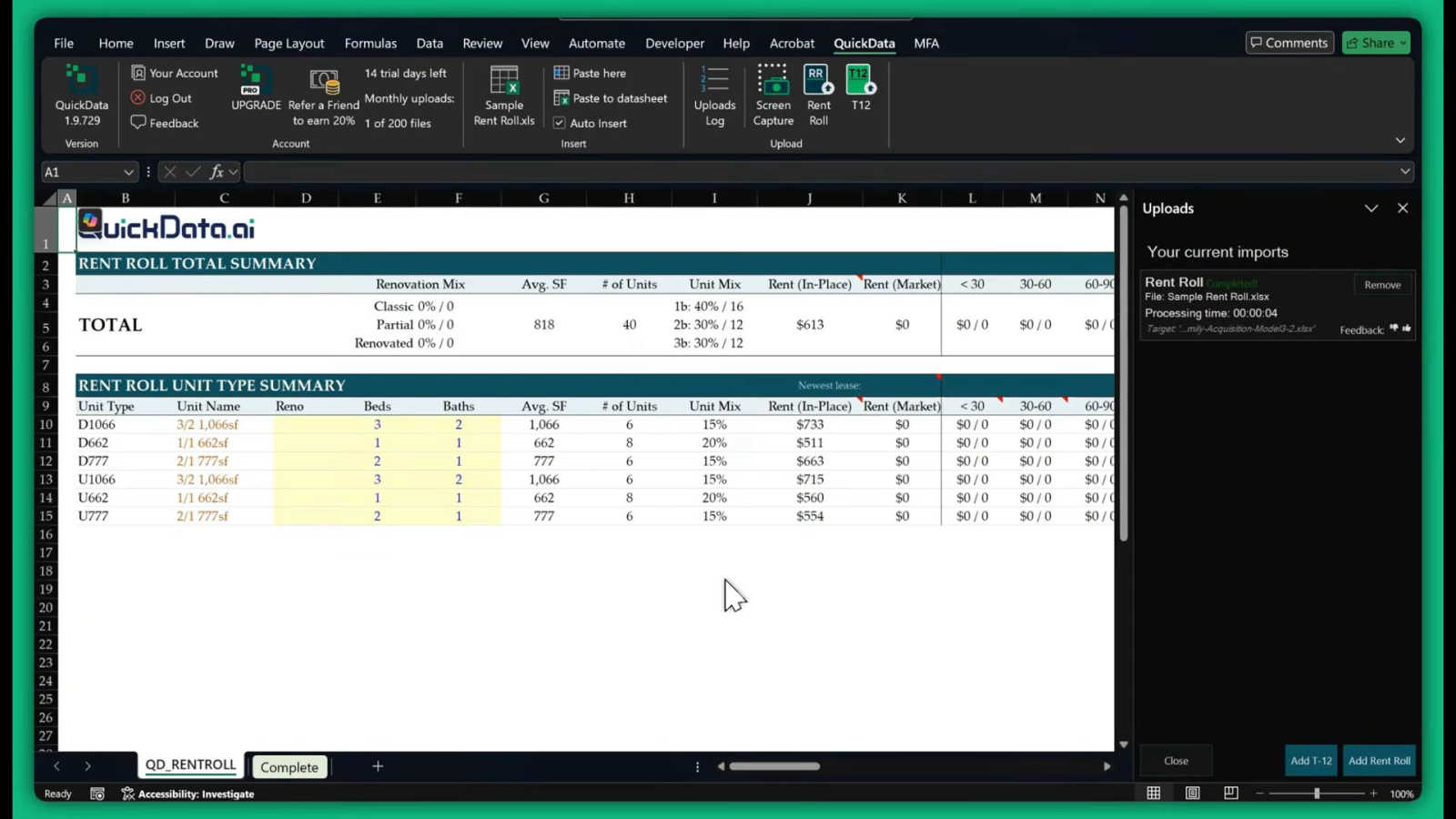
At the heart of QuickData.ai is its advanced artificial intelligence, trained specifically on multifamily real estate documents. This feature understands the complex structure of rent rolls, T12s, and offering memorandums. Simply upload a PDF, and the AI intelligently identifies, categorizes, and extracts key metrics—such as unit mixes, rental income, expenses, and occupancy rates—transforming unstructured document data into clean, structured information ready for your model, all without a single keystroke of manual entry.
Direct Integration with Excel Models
QuickData.ai doesn't just extract data; it seamlessly delivers it to where you need it most. As an Excel add-in, it works directly within your familiar spreadsheet environment. The extracted data is automatically mapped and populated into your existing multifamily underwriting models. This eliminates the error-prone "copy-paste" middle step, ensuring data flows instantly and accurately from source document to financial analysis, keeping you in your workflow without switching between disparate applications.
Multifamily-Specific Financial Calculator
Beyond raw data transfer, QuickData.ai includes built-in analytical tools tailored for the sector. The multifamily financial calculator allows you to perform rapid, on-the-fly calculations and scenario analyses using the freshly imported data. Instantly project cash flows, calculate key metrics like Cap Rates and NOI, and stress-test assumptions, enabling you to derive insights and make informed decisions faster than ever before within the same ecosystem.
Instant Multifamily Insights Dashboard
Once data is imported, QuickData.ai provides an immediate, high-level overview through its Insights dashboard. This feature automatically summarizes the extracted data into clear, visual takeaways—highlighting property performance, identifying trends in revenue and expenses, and flagging key figures. It gives you a narrative of the property at a glance, setting the stage for deeper, more focused analysis in your Excel model and helping you quickly assess a deal's potential.
Use Cases
Dokta
The Freelance Developer or IT Consultant
For the freelance developer managing time-based contracts, Dokta is a game-changer. Set up a recurring day-rate contract once, and Dokta automatically generates and sends invoices monthly. It tracks payments and sends polite, professional reminders for late payers. This allows the developer to focus entirely on coding, confident that their cash flow is managed automatically and reliably.
The Creative Project Freelancer (Designer, Photographer)
Managing the project lifecycle from quote to final payment is seamless with Dokta. A graphic designer can create a quote, send it for online client acceptance, and with one click, turn the approved quote into a formal invoice. The platform tracks the project’s payment status and manages deadlines, ensuring creatives spend more time designing and less time on administrative follow-ups.
The Auto-Entrepreneur / Micro-Entrepreneur
Simplicity and compliance are key for auto-entrepreneurs. Dokta ensures all invoices are compliant, tracks collections against the URSSAF income ceiling, and sends alerts for contribution deadlines. It provides a straightforward, stress-free way to manage documentation and cash flow without the complexity of traditional accounting software, perfect for those just starting out.
The Growing Small Business (SMB)
For a small retail shop or service-based SMB, Dokta centralizes all document management. It handles incoming supplier invoices, outgoing customer quotes, and contracts. The real-time cash flow dashboard gives the owner an immediate snapshot of the business's financial standing, while automated payment reminders help maintain healthy cash flow, supporting sustainable growth.
QuickData.ai
For Acquisitions Teams Underwriting New Deals
Acquisitions analysts face a relentless pipeline of potential deals. QuickData.ai accelerates their entire evaluation process. By automating the initial data entry from lengthy offering memorandums and supplementary documents, analysts can shift their focus from data transcription to high-value analysis and strategy. This allows them to review more deals in less time, identify the best opportunities faster, and prepare compelling investment memos with confidence, ultimately helping their firm win more bids.
For Commercial Real Estate Brokers Preparing Listing Packages
Brokers need to present accurate, compelling data to attract buyers. When preparing a property for sale, QuickData.ai can be used in reverse to quickly populate standardized pro formas and marketing materials with data from the owner's operational reports. This ensures consistency, professionalism, and accuracy in every listing package, saving brokers countless hours and enabling them to bring properties to market more swiftly and effectively.
For Lenders and Debt Funds in Due Diligence
Lenders require precise data to assess risk and structure loans. During the due diligence phase, QuickData.ai streamlines the verification process. Loan officers can automatically extract financial data from a borrower's provided rent rolls and T12s into their own credit analysis models. This reduces processing time, minimizes manual error in critical financial calculations, and allows for a more efficient and thorough risk assessment, leading to faster, more reliable lending decisions.
For Accounting Firms Auditing Property Portfolios
Accounting firms managing audits or financial reviews for multifamily property owners and syndicators handle vast amounts of periodic data. QuickData.ai automates the consolidation of monthly rent rolls and annual statements into audit trails and financial reports. This dramatically reduces the manual labor involved in data aggregation, improves the accuracy of financial statements, and allows accountants to dedicate more time to analysis, advisory services, and ensuring regulatory compliance.
Overview
About Dokta
Imagine a Sunday evening, the last light fading, and you're hunched over a spreadsheet, chasing down unpaid invoices and trying to remember which contract expires next week. This was the reality for countless freelancers and small business owners—until Dokta arrived. Dokta is your AI-powered business partner, designed to liberate you from the administrative grind. It’s a document management platform that thinks for you. Simply drop any document—an invoice, a quote, a contract—and in under 60 seconds, Dokta’s AI engine reads, classifies, and extracts the key data. It doesn't just stop at analysis; it manages the entire document lifecycle. From creating professional invoices and quotes to tracking payments, automating reminders, managing contract deadlines, and even generating tasks, Dokta turns your documents into actionable intelligence. It builds your client database automatically, gives you a real-time view of your cash flow, and exports everything neatly for your accountant. Built with the needs of freelancers, solo entrepreneurs, auto-entrepreneurs, and SMBs in mind, Dokta is more than a tool; it's the end of lost files, missed deadlines, and wasted weekends. Your business deserves to run smoothly, with you focused on your craft, not your paperwork.
About QuickData.ai
Imagine the journey of a multifamily real estate underwriter: a mountain of deal documents, a ticking clock, and the daunting task of manually transferring thousands of data points from rent rolls and T12 statements into complex Excel models. It's a story of late nights, eye strain, and the ever-present risk of a simple typo derailing an entire analysis. This is the chapter before QuickData.ai. Our product is the revolutionary next chapter—an AI-powered Excel add-in designed to transform this arduous journey into a streamlined path to clarity and confidence. QuickData.ai is specifically crafted for the heroes of multifamily real estate: acquisitions teams, brokers, lenders, and accounting firms. It acts as your intelligent data co-pilot, automatically extracting critical financial and operational data from essential documents like offering memorandums (OMs), rent rolls, and trailing twelve-month (T12) statements, and populating it directly into your Excel underwriting models. The core value proposition is profound liberation: liberating over 15 hours per month from manual drudgery, liberating your team from error-prone processes, and liberating your firm to analyze more deals with greater accuracy. With QuickData.ai, the future of underwriting isn't a distant promise; it's a reality you can deploy in minutes, turning data chaos into decisive insight 10 times faster.
Frequently Asked Questions
Dokta FAQ
How does Dokta ensure the security of my documents?
Dokta takes security and privacy very seriously. All data is 100% GDPR compliant and hosted on secure AWS servers located in Paris, Europe. Documents and data are protected with AES-256 encryption, the same standard used by banks. You retain full ownership of your data at all times.
What happens if I exceed my monthly document limit?
Your plan includes a set number of documents you can process each month. If you exceed this limit, you will be notified and given the option to upgrade your plan to one with a higher document allowance to continue using the service without interruption.
Can I try Dokta before committing to a paid plan?
Absolutely. Dokta offers a free Discovery tier that allows you to process up to 15 documents per month at no cost and without requiring a credit card. This is a great way to experience the core AI analysis and features firsthand. Paid plans also come with a 14-day free trial.
Does Dokta integrate with other software like accounting tools?
Currently, Dokta focuses on being a powerful, all-in-one hub for your document management. While it does not have direct live integrations with other accounting software, it provides a key feature: the ability to export all your financial data to a standardized CSV file, which can be easily imported into any accounting software your accountant uses.
QuickData.ai FAQ
What types of documents can QuickData.ai process?
QuickData.ai is specifically engineered for multifamily real estate documents. It currently excels at processing and extracting data from Rent Rolls (showing unit-by-unit details), Trailing Twelve Month (T12) financial statements, and Offering Memorandums (OMs). The AI is trained to recognize the standard formats and key data points within these documents, such as unit numbers, square footage, rent amounts, income, and operating expenses.
How does the 14-day free trial work?
Our 14-day free trial offers full, unrestricted access to all features of the QuickData.ai Excel add-in. You can sign up instantly, integrate it with your Excel, and start automating data extraction from your real documents immediately. There is no credit card required to start the trial, and it includes free 1:1 onboarding to ensure you get set up correctly and see value from day one. You can cancel anytime during the trial with no obligation.
Do I need to change my existing Excel underwriting model?
No, you do not. A core design principle of QuickData.ai is flexibility and non-disruption. Our tool is built to integrate with your existing multifamily Excel models. The AI extracts the data and allows you to map it to the specific cells and sheets in your own proprietary spreadsheet. This means you can automate your data entry without altering your trusted formulas, layouts, or analytical processes.
Is my sensitive deal data secure with QuickData.ai?
Absolutely. Data security is our paramount concern. We employ enterprise-grade encryption for all data in transit and at rest. Your documents and extracted data are processed securely and are not used to train our AI models further. We adhere to strict privacy protocols, and you retain full ownership of all your data. For full details, please review our comprehensive Privacy Policy and Terms & Conditions on our website.
Alternatives
Dokta Alternatives
Dokta is an AI-powered document management platform designed to automate the administrative workload for freelancers, solo entrepreneurs, and small businesses. It belongs to the category of smart business tools that handle everything from invoicing and contract management to payment tracking and deadline reminders, all through intelligent automation. Users often explore alternatives for various reasons. Perhaps their business has outgrown a plan's document limits, or they require integrations with other specific software platforms. Others might be evaluating different pricing structures or seeking a tool with a stronger focus on a particular function, like advanced accounting or project management. When considering other options, it's wise to look beyond just price. Evaluate the core automation capabilities, how seamlessly it fits into your existing workflow, and the quality of data extraction. Security and data residency are also critical, especially for handling sensitive client information. The right tool should feel like a natural extension of your business, reducing friction, not adding to it.
QuickData.ai Alternatives
In the fast-paced world of multifamily real estate, underwriting a deal often begins with a daunting journey: the manual entry of data from rent rolls and T12 statements into complex Excel models. This is where QuickData.ai enters the story, an AI-powered assistant designed to automate this critical but tedious step, transforming hours of work into minutes and allowing professionals to focus on analysis and strategy. Yet, every tool must be the right fit for the traveler's unique path. Some may seek alternatives due to budget constraints, a need for different feature sets, or a workflow that operates outside of Excel. The quest for the right solution is a personal one, shaped by the specific challenges of one's portfolio and processes. When evaluating options on this journey, consider the core destination: efficiency and accuracy. Look for a solution that truly understands the language of real estate documents, integrates smoothly into your existing map (whether that's Excel or another platform), and provides the granular, unit-level insights necessary to make confident investment decisions. The goal is not just to find another tool, but to find the right companion for your underwriting adventures.