
Caller vs Dokta
Side-by-side comparison to help you choose the right product.

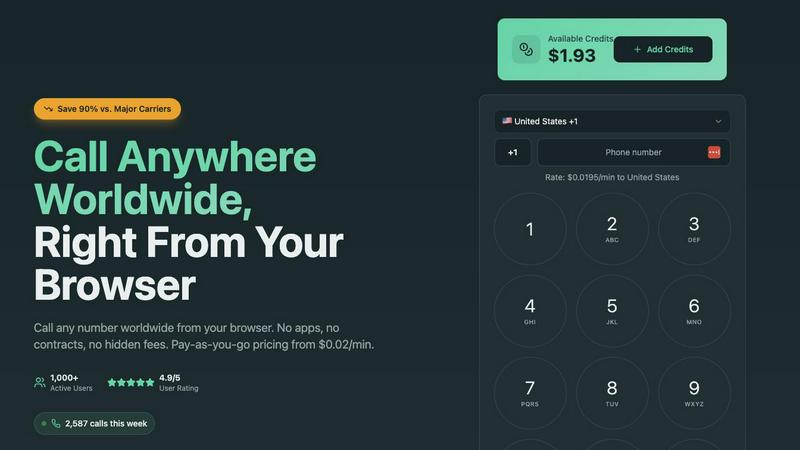
Experience seamless international calling from your browser with crystal clear quality and pay-as-you-go pricing from.
Last updated: March 1, 2026

Dokta transforms your scattered documents into a clear financial journey, automating invoices, quotes, and payments so you can focus on your work.
Last updated: April 4, 2026
Visual Comparison
Caller
Dokta

Feature Comparison
Caller
Simple Browser Access
Caller operates entirely from your web browser, meaning no downloads or installations are required. Just open your browser, enter a number, and make calls instantly. This feature makes international communication easier than ever, saving time and hassle for users.
Pay-As-You-Go Pricing
With Caller, you only pay for the minutes you actually use, starting from as low as $0.02 per minute. This transparent pricing model means there are no hidden fees or monthly charges, allowing you to budget effectively and avoid unexpected costs.
High-Definition Audio Quality
Enjoy crystal-clear conversations with Caller’s HD voice quality. Powered by enterprise-grade infrastructure, you can connect with anyone, anywhere, and hear every word as if you were in the same room, enhancing your communication experience.
Global Coverage
Caller enables you to connect with friends, family, or business associates in over 200 countries worldwide. Whether it's a landline or mobile phone, Caller ensures you can reach anyone, anywhere, making it an ideal choice for global communication.
Dokta
Instant AI Document Analysis
At the heart of Dokta is its powerful AI engine, powered by Claude from Anthropic. Within 60 seconds of uploading a photo, scan, or PDF, it performs automatic OCR reading, classifies the document type (invoice, quote, contract), and extracts critical data like amounts, due dates, and client details. This eliminates manual data entry, ensuring accuracy and saving you hours of tedious work every week.
Automated Invoicing & Quote Management
Dokta streamlines your entire billing workflow. Create professional invoices and quotes in just a few clicks. For freelancers on day-rate contracts, it can even automate monthly invoicing. A standout feature is the online quote acceptance; send a quote with a link for clients to approve, and convert it to an invoice with a single click, seamlessly moving from proposal to payment.
Real-Time Cash Flow Dashboard
Gain instant clarity on your financial health. Dokta’s dashboard provides a real-time overview of your invoiced revenue, collected cash, outstanding payments, and VAT. With a visual 12-month graph, you can track trends, forecast earnings, and make informed business decisions without ever opening a separate accounting spreadsheet.
Anomaly Detection & Client Intelligence
Dokta acts as your vigilant guardian. Its AI proactively detects anomalies in your documents, such as changed IBAN numbers, duplicate invoices, inconsistent VAT, or missing numbering. Furthermore, it automatically enriches contact details using SIRET numbers and provides payment scoring for clients and suppliers, building a smart, historical database of every business relationship.
Use Cases
Caller
Connecting with Clients
Freelancers and small business owners can effortlessly connect with international clients without worrying about high costs. Caller’s low rates and ease of use make it the perfect tool for closing deals and maintaining professional relationships.
Family Communication
For expats and those with loved ones abroad, Caller provides a simple way to stay in touch with family and friends. The affordability and quality of calls make it easy to share moments and maintain connections no matter the distance.
Team Collaboration
Remote teams can utilize Caller for seamless communication across borders. With the ability to make calls from any device, team members can collaborate effectively, regardless of physical location, fostering a productive work environment.
Government and Official Calls
Caller is also an excellent option for individuals needing to contact government offices or official entities in other countries. The straightforward setup and reliable connections make it a valuable resource for navigating international bureaucracy.
Dokta
The Freelance Developer or IT Consultant
For the freelance developer managing time-based contracts, Dokta is a game-changer. Set up a recurring day-rate contract once, and Dokta automatically generates and sends invoices monthly. It tracks payments and sends polite, professional reminders for late payers. This allows the developer to focus entirely on coding, confident that their cash flow is managed automatically and reliably.
The Creative Project Freelancer (Designer, Photographer)
Managing the project lifecycle from quote to final payment is seamless with Dokta. A graphic designer can create a quote, send it for online client acceptance, and with one click, turn the approved quote into a formal invoice. The platform tracks the project’s payment status and manages deadlines, ensuring creatives spend more time designing and less time on administrative follow-ups.
The Auto-Entrepreneur / Micro-Entrepreneur
Simplicity and compliance are key for auto-entrepreneurs. Dokta ensures all invoices are compliant, tracks collections against the URSSAF income ceiling, and sends alerts for contribution deadlines. It provides a straightforward, stress-free way to manage documentation and cash flow without the complexity of traditional accounting software, perfect for those just starting out.
The Growing Small Business (SMB)
For a small retail shop or service-based SMB, Dokta centralizes all document management. It handles incoming supplier invoices, outgoing customer quotes, and contracts. The real-time cash flow dashboard gives the owner an immediate snapshot of the business's financial standing, while automated payment reminders help maintain healthy cash flow, supporting sustainable growth.
Overview
About Caller
Caller is a revolutionary browser-based platform designed to simplify international communication, making it accessible and affordable for everyone. Imagine a world where making a call to a client overseas is as easy as typing a number into a web browser. That's the essence of Caller. It eliminates the complexities of traditional calling methods by allowing users to connect with others across the globe without the need for apps, SIM cards, or convoluted setup processes. Whether you're a freelancer, part of a remote team, a small business owner, or an expat staying in touch with family, Caller offers a seamless experience. With high-definition voice quality and the ability to connect to over 200 countries at rates that can be up to 90% cheaper than major carriers, Caller embodies a commitment to transparency and simplicity. The pay-as-you-go model ensures you only pay for the minutes you use, freeing you from long-term contracts and monthly fees. Start your journey with Caller today and experience international calling without boundaries.
About Dokta
Imagine a Sunday evening, the last light fading, and you're hunched over a spreadsheet, chasing down unpaid invoices and trying to remember which contract expires next week. This was the reality for countless freelancers and small business owners—until Dokta arrived. Dokta is your AI-powered business partner, designed to liberate you from the administrative grind. It’s a document management platform that thinks for you. Simply drop any document—an invoice, a quote, a contract—and in under 60 seconds, Dokta’s AI engine reads, classifies, and extracts the key data. It doesn't just stop at analysis; it manages the entire document lifecycle. From creating professional invoices and quotes to tracking payments, automating reminders, managing contract deadlines, and even generating tasks, Dokta turns your documents into actionable intelligence. It builds your client database automatically, gives you a real-time view of your cash flow, and exports everything neatly for your accountant. Built with the needs of freelancers, solo entrepreneurs, auto-entrepreneurs, and SMBs in mind, Dokta is more than a tool; it's the end of lost files, missed deadlines, and wasted weekends. Your business deserves to run smoothly, with you focused on your craft, not your paperwork.
Frequently Asked Questions
Caller FAQ
How do I get started with Caller?
To get started with Caller, simply sign up for a free account on the website. There’s no credit card required, and you can begin adding credits whenever you're ready to start making calls.
Are there any hidden fees with Caller?
No, Caller operates on a pay-as-you-go model with transparent pricing. You only pay for the minutes you use, and there are no hidden fees or monthly subscriptions involved.
Can I use Caller on my mobile device?
Yes, Caller is browser-based and can be accessed from any device that has a web browser. This means you can make calls from your smartphone, tablet, or computer without any additional apps or downloads.
Is my data secure with Caller?
Absolutely. Caller uses bank-level encryption for all calls and transactions, ensuring that your conversations and payment information are kept secure and private at all times.
Dokta FAQ
How does Dokta ensure the security of my documents?
Dokta takes security and privacy very seriously. All data is 100% GDPR compliant and hosted on secure AWS servers located in Paris, Europe. Documents and data are protected with AES-256 encryption, the same standard used by banks. You retain full ownership of your data at all times.
What happens if I exceed my monthly document limit?
Your plan includes a set number of documents you can process each month. If you exceed this limit, you will be notified and given the option to upgrade your plan to one with a higher document allowance to continue using the service without interruption.
Can I try Dokta before committing to a paid plan?
Absolutely. Dokta offers a free Discovery tier that allows you to process up to 15 documents per month at no cost and without requiring a credit card. This is a great way to experience the core AI analysis and features firsthand. Paid plans also come with a 14-day free trial.
Does Dokta integrate with other software like accounting tools?
Currently, Dokta focuses on being a powerful, all-in-one hub for your document management. While it does not have direct live integrations with other accounting software, it provides a key feature: the ability to export all your financial data to a standardized CSV file, which can be easily imported into any accounting software your accountant uses.
Alternatives
Caller Alternatives
Caller is a browser-based communication platform designed for global calling, allowing users to connect instantaneously without the need for complex software or hardware. It caters to freelancers, remote teams, small businesses, and anyone seeking to bridge the gap of international communication. Despite its impressive features, users may still seek alternatives due to factors like pricing, specific functionalities, or compatibility with different platforms. When searching for alternatives, it’s essential to consider the pricing model, ensuring it aligns with your budget and calling habits. Look for features that enhance user experience, such as call quality, ease of use, and flexibility. Additionally, assess the security measures in place to protect your communications, especially if sensitive information is being exchanged.
Dokta Alternatives
Dokta is an AI-powered document management platform designed to automate the administrative workload for freelancers, solo entrepreneurs, and small businesses. It belongs to the category of smart business tools that handle everything from invoicing and contract management to payment tracking and deadline reminders, all through intelligent automation. Users often explore alternatives for various reasons. Perhaps their business has outgrown a plan's document limits, or they require integrations with other specific software platforms. Others might be evaluating different pricing structures or seeking a tool with a stronger focus on a particular function, like advanced accounting or project management. When considering other options, it's wise to look beyond just price. Evaluate the core automation capabilities, how seamlessly it fits into your existing workflow, and the quality of data extraction. Security and data residency are also critical, especially for handling sensitive client information. The right tool should feel like a natural extension of your business, reducing friction, not adding to it.