
Avina vs Playwriter
Side-by-side comparison to help you choose the right product.

Avina
Avina's AI agents find and engage your ideal prospects the moment they're ready to buy.
Last updated: February 28, 2026

Playwriter
Give your AI agents the keys to your real browser, complete with your logins and extensions, for seamless automation.
Last updated: March 18, 2026
Visual Comparison
Avina
Playwriter

Feature Comparison
Avina
AI Signals Agent
This is the heart of Avina's intelligence. Instead of relying on rigid, pre-defined signals, you describe the buying behavior you're looking for in plain language. The AI Agent then builds a custom signal, scanning first-party, third-party, and web data to catch subtle buying moments—like a feature launch, a tech stack change, or a strategic pivot—that competitors using keyword-based tools would completely miss. It reads context, not just keywords, to understand the full story.
Web Visitor Identification (X-Ray Pixel)
Over 98% of website visitors leave without identifying themselves, creating a black hole of missed opportunities. Avina's X-Ray Pixel solves this by combining multiple data providers into a single, powerful tool. It automatically identifies anonymous companies visiting your site, enriches them with key contact and firmographic data, and instantly routes the high-intent prospects to your sales team, turning invisible traffic into your hottest leads.
Unified Intent Feed
Avina eliminates data silos by continuously scanning and unifying signals from every critical source: your website, CRM, LinkedIn, job boards, news sites, SEC filings, and the open web. It stitches these disparate data points into a single, coherent feed, giving your team full, real-time visibility into every account's activity and ensuring no crucial buying signal ever slips through the cracks unnoticed.
AI-Powered Account Scoring & ICP Filtering
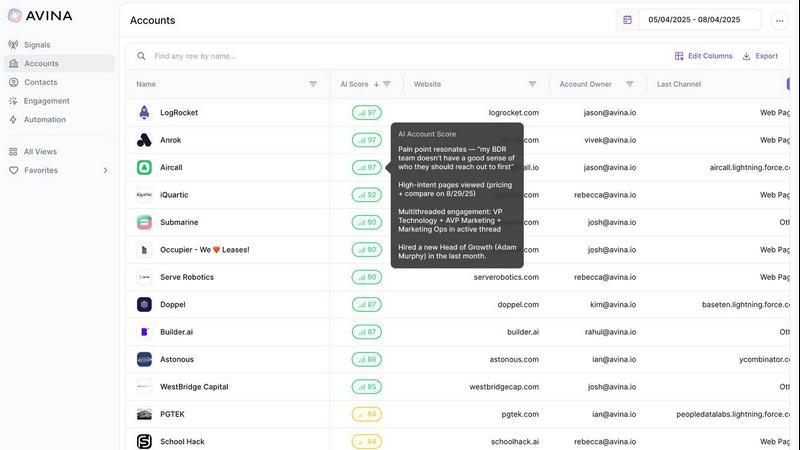
Raw signals are noisy. Avina brings clarity by first filtering accounts against your defined Ideal Customer Profile (ICP) on industry, size, and geography. Then, its AI scoring engine ranks every qualified account by signal strength, company fit, and historical engagement. This creates a live, prioritized list so your reps know exactly where to focus their energy, moving beyond intuition to data-driven precision.
Playwriter
Your Actual Browser Session
Playwriter's core magic is its ability to let AI agents operate within your existing, logged-in Chrome session. Instead of spawning a fresh, "incognito-like" instance that has no memory and triggers security flags, the agent works directly in a tab you control. All your cookies, active logins to sites like Gmail or GitHub, and essential browser extensions (like password managers or ad blockers) are present and functional. This eliminates the biggest hurdles in web automation: authentication walls and instant bot detection, creating a seamless and realistic browsing environment.
Full Playwright API via a Single Tool
Unlike other systems that limit agents to a pre-defined, narrow set of actions (like "click button" or "extract text"), Playwriter exposes the entire powerful Playwright automation library through one flexible execute command. This means your AI can write and run any Playwright code—setting breakpoints, intercepting network requests, profiling performance, or taking efficient accessibility snapshots. This "one tool to rule them all" approach keeps the AI's context window clean and unleashes sophisticated automation far beyond basic point-and-click scripts.
Live Collaboration and Debugging
This feature transforms automation from a black-box process into a transparent, collaborative session. You watch every action happen in real-time in your browser. If the agent encounters a captcha, you solve it. If it gets stuck on a dynamic element, you can pause, manually fix the page state, and let it continue. The integrated debugger and live code editor allow for on-the-fly adjustments. You're not just launching a script and hoping for the best; you're pair-programming with your AI, guiding it through the unpredictable web.
Lightweight Accessibility Snapshots
Traditional methods for letting AI "see" a page involve full screenshots, which are large (100KB+) and context-heavy. Playwriter captures intelligent, structured accessibility snapshots that are only 5-20KB. These snapshots provide the AI with a semantic understanding of the page—the roles, names, and states of every interactive element—without the visual bloat. This allows the agent to make precise decisions (e.g., click('aria-ref=e5')) efficiently, drastically reducing the cognitive and token load compared to analyzing pixel-based images.
Use Cases
Avina
Accelerating Pipeline for Enterprise Sales Teams
Large sales organizations can deploy Avina to monitor their entire Total Addressable Market (TAM) for precise buying signals. When a target account shows intent—like visiting pricing pages, engaging with specific content, or posting relevant job openings—Avina scores the account, enriches the right champion contacts, and automatically alerts the assigned Account Executive via Slack or CRM, enabling them to engage with a hyper-personalized message while the intent is hottest.
Empowering SDRs with High-Intent Leads
Sales Development Representatives often waste time prospecting into cold lists. Avina transforms their workflow by delivering a daily stream of pre-qualified, in-market accounts directly to their queue. Each lead comes with enriched data and context on the buying signal, allowing SDRs to craft relevant, timely outreach that dramatically increases connection and meeting-booked rates, turning them into efficiency experts.
Automating Revenue Operations Workflows
Revenue Operations teams use Avina to build sophisticated, no-code automation workflows. They can define a signal, such as a key contact visiting a competitor comparison page, and trigger a multi-step action: enrolling the prospect into a tailored email sequence, updating their CRM status, creating a task for the rep, and sending a Slack alert—all automatically, ensuring perfect, instantaneous follow-up without manual intervention.
Identifying Expansion Opportunities in Existing Accounts
Customer Success and Account Management teams leverage Avina to spot upsell and expansion signals within their current customer base. By monitoring for signals like usage spikes, hiring for new teams, or engagement with advanced feature content, Avina alerts the team to potential growth opportunities, allowing them to proactively offer the right solution and strengthen the customer relationship.
Playwriter
Automated Research and Data Aggregation
Envision tasking your AI with compiling a report on market trends. With Playwriter, it can log into your subscribed news sites, navigate past paywalls using your credentials, search across multiple platforms, and systematically extract relevant data into a structured format—all while you monitor its progress and assist only when a login verification pops up. It turns hours of manual browsing into a supervised, automated data-gathering mission.
Testing and Debugging Web Applications
As a developer, you can instruct your AI assistant to test a new user flow on your web app. Using Playwriter, the agent can interact with the application as a real user would, using your actual test account. It can execute complex sequences, intercept network calls to verify API payloads, and use the debugger to pause execution and inspect element states, providing deep, actionable insights far beyond simple "does it load" checks.
Repetitive Administrative Tasks
Free yourself from the monotony of daily digital chores. Whether it's downloading bank statements, filing routine forms on a government portal, or managing content across multiple CMS platforms, Playwriter enables your AI to perform these tasks reliably. Since it uses your authenticated sessions, it can navigate the often-complex, login-heavy interfaces of these services that would typically block a headless bot.
AI-Powered Web Interaction and Automation
This is for creating truly intelligent, adaptive web agents. Imagine an AI that can monitor a product page for stock changes, automatically apply discount codes from your email extension, and complete the checkout process. Or an agent that participates in a complex web-based workflow, making decisions based on live data it reads from the page. Playwriter provides the realistic, tool-rich environment needed for such advanced autonomous operations.
Overview
About Avina
Imagine a world where your sales team is no longer lost in a sea of cold calls and unresponsive emails, but instead, they are guided by a quiet, powerful intelligence that illuminates the path forward. This is the journey Avina enables. Avina is the AI-powered GTM platform for modern revenue teams who have grown weary of the inefficient "spray-and-pray" approach. It transforms the chaotic noise of the market—scattered web visits, silent CRM updates, fleeting email opens—into a clear, actionable signal of true buyer intent. Built for sales and revenue operations professionals, Avina acts as your team's compass, unifying real-time data from web intent, CRM activity, email interactions, ad engagement, and company news to paint a complete, dynamic picture of every account. Its core genius lies in using advanced LLMs to read the full context behind every interaction, understanding not just what a prospect did, but the story of why it matters. This allows Avina to score and prioritize accounts with human-like intuition, delivering a live, ranked list of warm opportunities directly to your team. The result is a transformative shift from guessing to knowing, empowering your team to act with precision and automate engagement with high-intent prospects through your existing sales stack, turning scattered intent into a mapped path to victory.
About Playwriter
Imagine your AI assistant, eager to help you research or automate a task online, but it's like a stranger in a foreign land. It opens a brand-new, empty browser with no memory of your logins, no trusted extensions, and is immediately flagged as a suspicious bot. The journey ends before it even begins. Playwriter changes that story. It's the bridge between your AI's potential and the real, lived-in digital world of your actual browser. With a simple Chrome extension and a powerful API, Playwriter grants AI agents—like those in Cursor, Claude Desktop, or VS Code—direct access to your browsing session. This means they operate with all your cookies, saved passwords, installed extensions, and established user history, bypassing bot detection and memory overhead. It's not just automation; it's a collaborative partnership where the AI handles the tedious navigation and data gathering, and you step in as the human guide for captchas and complex decisions, all while watching the process unfold live in your own browser tab. Open-source and locally run, Playwriter puts you in the director's chair, transforming your AI from a isolated script-kiddie into a powerful, integrated co-pilot for the web.
Frequently Asked Questions
Avina FAQ
What makes Avina different from other intent data platforms?
Unlike traditional platforms that rely on a fixed library of generic keywords, Avina uses an AI Signals Agent that understands context in plain language. This allows it to detect nuanced, company-specific buying behaviors that keyword-matching misses. Furthermore, Avina is an all-in-one platform that not only finds signals but also enriches, prioritizes, and automates actions based on them, creating a complete operational workflow rather than just a data feed.
How does Avina handle data privacy and compliance?
Avina is built with enterprise-grade security and compliance in mind. It integrates with first-party data you already own (like CRM and website analytics) and partners with reputable third-party data providers that adhere to strict privacy regulations. The platform is designed to be GDPR and CCPA compliant, ensuring that all intent data is sourced and processed ethically and legally.
Can Avina integrate with our existing sales tech stack?
Absolutely. Avina is designed to fit seamlessly into your existing workflow. It offers native integrations with popular CRM platforms like Salesforce and HubSpot, communication tools like Slack and Microsoft Teams, and email sequencing platforms. This ensures signals and automated actions flow directly into the tools your team already uses every day, requiring no change in habit.
How quickly can we start seeing results after implementing Avina?
You can start capturing intent signals from day one by connecting your data sources like your website pixel and CRM. The out-of-the-box signals begin working immediately, and you can build custom AI Signals within minutes. Many customers report seeing their first high-intent leads and automating their first outreach workflows within the first week of use.
Playwriter FAQ
How does Playwriter handle security and privacy?
Playwriter is designed with a strong privacy-first approach. All communication happens via a WebSocket relay that runs exclusively on your local machine (localhost:19988). No browsing data, cookies, or commands are sent to any remote server. The project is also open-source (MIT licensed), meaning its code can be audited by anyone. You remain in full control, as the extension must be manually activated per tab.
Can I use Playwriter with any AI or just specific ones?
Playwriter is built on the Model Context Protocol (MCP), an open standard. This means it works seamlessly with any MCP-compatible client. This includes popular AI-powered editors like Cursor and Windsurf, desktop agents like Claude Desktop, and code editors like VS Code with the right extensions. Its flexibility ensures you aren't locked into a single AI ecosystem.
What happens if the AI gets stuck or makes a mistake?
This is where the collaborative nature shines. You are watching the browser tab in real-time. If the agent gets stuck in a loop, clicks the wrong thing, or encounters an unexpected dialog, you can immediately intervene. You can disable the extension for that tab, manually correct the situation (e.g., navigate back, close a pop-up), then re-enable control. The agent can then continue from the new page state.
Does running Playwriter slow down my browser?
Playwriter is designed to be lightweight. It does not spawn a separate Chrome process, so it avoids the "double memory" penalty of traditional headless automation. The extension and local relay add minimal overhead. The primary performance impact would be from the Playwright commands themselves (e.g., rapidly loading many pages), which is similar to what would happen if you were manually performing those actions.
Alternatives
Avina Alternatives
Avina is an AI-powered go-to-market platform that acts as a compass for revenue teams, transforming scattered market signals into a clear path to warm opportunities. It belongs to the category of intelligent sales and marketing automation, designed to prioritize accounts with human-like intuition. Even with a compelling vision, teams often explore alternatives to find the perfect fit for their journey. This search might be driven by budget constraints, the need for specific integrations, or a platform that aligns with a unique sales motion. Some may seek simpler tools or more control over certain automation workflows. When evaluating other paths, consider what matters most for your team's success. Look for the core ability to unify intent data into a single view, the sophistication of the AI in interpreting true buyer context, and how seamlessly the platform activates those insights within your existing workflow. The right guide should turn noise into a narrative you can act on.
Playwriter Alternatives
Playwriter is an automation tool that gives AI agents the power to control your real Chrome browser. It solves a critical pain point: agents typically operate in isolated, sterile browser sessions with no logins, extensions, or history, making real-world web tasks impossible. Playwriter bridges this gap by providing access to your actual browsing environment. Users explore alternatives for various reasons. Some need a solution tailored to a different browser or platform, while others might prioritize specific features like a different licensing model or a more graphical interface over a command-line tool. Budget considerations and integration with existing tech stacks also commonly drive the search for other options. When evaluating alternatives, focus on the core problem you need to solve. Consider whether the tool provides authentic browser session access, its compatibility with your preferred AI agents and workflows, and the depth of its automation capabilities. Security, transparency, and the ability to debug and control the automation process are also crucial factors for a reliable and trustworthy solution.