
SLABCALC
SlabCalc turns your concrete project from guesswork into a confident plan with 34 calculators, AI crack analysis, and free cost insights.
VisitPublished on:
July 13, 2026
Pricing:
About SLABCALC
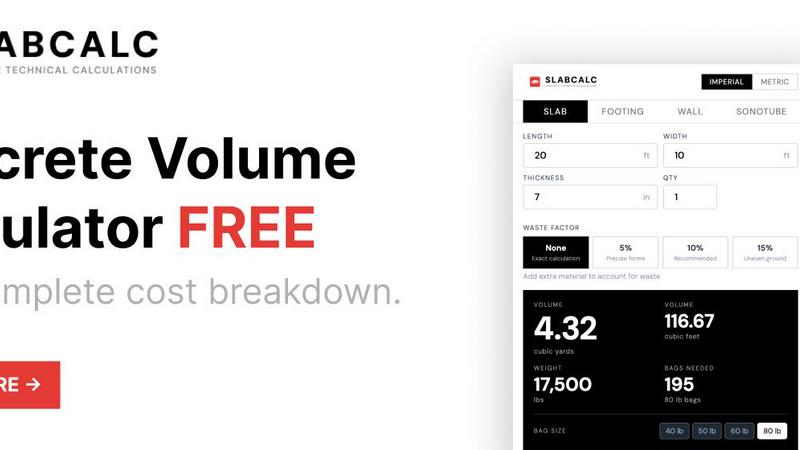
SLABCALC is a free, no-signup suite of concrete tools built for contractors, builders, and DIYers who need fast, accurate estimates for any concrete project. At its core are 34 specialized calculators covering slabs, driveways, patios, footings, foundations, walls, CMU block, columns, curbs, stairs, sonotubes, rebar, gravel, garage and basement floors, and more. Each calculator returns volume in cubic yards and cubic meters, pre-mix bag counts for 40, 50, 60, and 80-pound bags, total weight, and a cost estimate. An adjustable waste factor and an imperial/metric toggle give you full control over your calculations. Beyond estimating, SLABCALC adds AI-powered tools: a Concrete Crack Analyzer that diagnoses damage from a photo, identifying failure mode, severity on a scale of 1 to 5, and DIY-or-engineer advice. A Quote Analyzer breaks down a contractor's bid into labor, materials, and site prep categories, then flags red flags. Rounding it out are cost-by-city pricing pages, expert guides, a concrete glossary, a Chrome extension, and embeddable widgets. It is a one-stop platform for concrete planning, accessible from any device without creating an account. Whether you are pouring a small patio or a large foundation, SLABCALC helps you calculate exactly how much concrete you need, compare bagged versus ready-mix options, and understand true project costs before you order a single bag.
Features of SLABCALC
34 Specialized Concrete Calculators
SLABCALC provides 34 pre-configured calculators for every common concrete shape and project type. You can calculate slabs, cylinders, curbs, stairs, columns, walls, footings, circles, and tubes with tailored defaults and pro tips. Each calculator instantly returns volume in cubic yards and cubic meters, bag counts for 40, 50, 60, and 80-pound bags, estimated weight, and a full cost estimate. An adjustable waste factor lets you choose from none, 5 percent, 10 percent, or 15 percent to account for spills and uneven ground. The imperial/metric toggle supports projects anywhere in the world, making SLABCALC useful for both US and international users.
AI-Powered Concrete Crack Analyzer
SLABCALC includes an AI-powered tool that diagnoses concrete damage from a photo. Simply upload an image of a crack or damaged surface, and the analyzer identifies the failure mode, rates severity on a scale of 1 to 5, and provides actionable advice. For minor issues, it recommends DIY repair steps. For major structural concerns, it advises contacting an engineer. This feature helps homeowners and contractors quickly assess whether a crack is cosmetic or a sign of deeper problems, saving time and preventing costly mistakes.
AI-Powered Quote Analyzer
The Quote Analyzer helps you evaluate contractor bids with confidence. Upload a contractor's estimate, and the tool breaks it down into labor, materials, and site prep categories. It then flags potential red flags such as inflated line items, missing scope, or vague descriptions. This feature is especially valuable for homeowners who want to ensure they are getting a fair price. Contractors can also use it to double-check their own bids for completeness and accuracy before sending them to clients.
Cost-by-City Pricing and Expert Guides
SLABCALC provides localized cost estimates through cost-by-city pricing pages that reflect real market rates for concrete, delivery, and labor. You can see how much a typical slab costs in your area, from $6 to $12 per square foot installed. Expert guides cover topics like standard slab thickness, the 10 percent waste rule, and bagged versus ready-mix comparisons. A concrete glossary explains key terms, and the Chrome extension and embeddable widgets let you access SLABCALC from anywhere, including your own website or browser toolbar.
Use Cases of SLABCALC
Residential Patio and Sidewalk Planning
A homeowner planning a 10x10 foot patio at 4 inches thick can use SLABCALC to calculate exactly how much concrete is needed. The calculator shows volume in cubic yards, bag counts, and cost estimates for both bagged and ready-mix concrete. The pro tips advise adding 10 percent for waste, and the cost-by-city page shows local pricing. The user can then decide whether to mix bags themselves or order a delivery. The Quote Analyzer can review any contractor bid they receive, ensuring they are not overcharged.
Contractor Bidding and Estimation
A contractor bidding on a 20x40 foot driveway at 5 inches thick can use SLABCALC to generate a precise material list. The calculator returns cubic yards, bag counts, weight, and a cost estimate. The contractor can adjust the waste factor for uneven ground and toggle between imperial and metric units. The Quote Analyzer helps the contractor review their own bid for completeness, while the cost-by-city data ensures their pricing is competitive. The embeddable widget can be added to the contractor's own website for client self-service.
Foundation and Footing Design for Builders
A builder working on a new house foundation needs to calculate concrete for footings, walls, and columns. SLABCALC's specialized calculators handle each shape separately. The builder can calculate a 12-inch diameter column at 8 feet tall, a continuous footing, and a CMU block wall all in one session. The AI Crack Analyzer can inspect existing concrete for damage before pouring new sections. The builder can also use the expert guides to confirm standard thicknesses and reinforcement requirements, ensuring structural integrity.
DIY Driveway and Garage Floor Projects
A DIYer pouring a garage floor at 6 inches thick can use SLABCALC to determine whether bagged concrete or ready-mix is more economical. The calculator shows that projects over 1 cubic yard are typically cheaper with ready-mix. The DIYer can input their slab dimensions, add 10 percent waste, and get a total cost estimate. The cost-by-city page shows local ready-mix prices. The Quote Analyzer can review any quotes from local plants. The Chrome extension lets the DIYer access the calculator while browsing supplier websites for quick price comparisons.
Frequently Asked Questions
How does the Concrete Crack Analyzer work?
The Concrete Crack Analyzer uses AI to diagnose concrete damage from a photo you upload. It identifies the failure mode, such as shrinkage, settlement, or overloading, and rates severity on a scale of 1 to 5. For minor cracks, it provides DIY repair advice. For major structural issues, it recommends contacting a professional engineer. This tool is free and requires no signup, making it easy to get a quick assessment of any concrete surface.
What is the difference between bagged concrete and ready-mix?
Bagged concrete is pre-mixed dry material sold in 40, 50, 60, and 80-pound bags. It is ideal for projects under 1 cubic yard because you can mix it yourself with water and tools from a hardware store. Ready-mix concrete is delivered by truck from a plant and is more economical for larger projects because it costs less per unit and produces a more consistent mix. SLABCALC shows you both options with estimated costs so you can compare.
How do I account for waste and spillage in my calculation?
SLABCALC includes an adjustable waste factor that lets you add 5, 10, or 15 percent extra to your calculated volume. The default recommendation is 10 percent for most projects. This accounts for subgrade irregularities, spillage, slight over-excavation, and other common issues. Using a waste factor helps ensure you do not run short during a pour, which can be expensive and create cold joints in the finished slab.
Do I need to create an account to use SLABCALC?
No, SLABCALC is completely free and requires no signup or account creation. You can access all 34 calculators, the AI Crack Analyzer, the Quote Analyzer, cost-by-city pages, expert guides, and the concrete glossary without providing any personal information. The Chrome extension and embeddable widgets are also free to use. This makes SLABCALC a zero-friction tool for quick estimates on any device.
Similar to SLABCALC

PracticeSIEM
PracticeSIEM.com is an interactive, browser-based hands-on cybersecurity learning platform designed for Security Operations Center (SOC) analysts.
SQLCrab
SQLCrab (sqlcrab.com) is an interactive, browser-based SQL learning platform that lets you practice database queries directly in your browser.

Wordy
Learn languages with real movie and TV show clips.



AI UGC Video Generator
Create AI UGC video ads from a product URL, image, or script with lifelike creators, natural voices, captions, and clear CTAs.


ContextBolt Bookmarks
Save web pages and posts from X, Reddit and LinkedIn in one searchable library, with automatic topic tags.