
Prompt Builder
Transform your ideas into optimized AI prompts in seconds, effortlessly refining and managing them all in one intuitive place.
Visit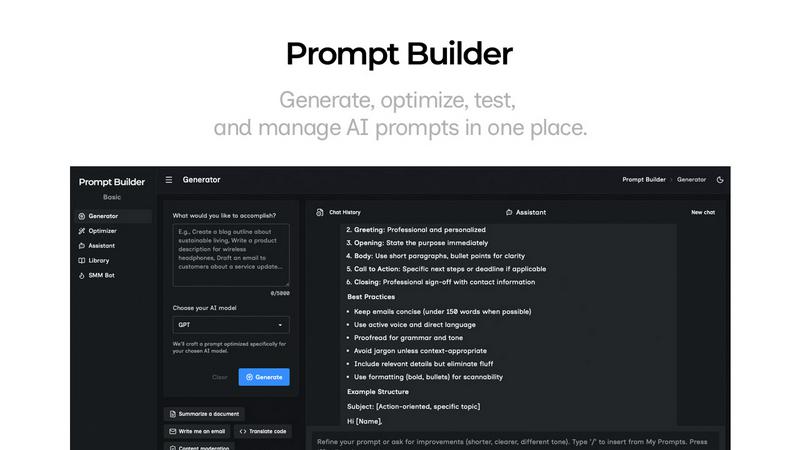
About Prompt Builder
Prompt Builder is an innovative workspace designed specifically for prompt engineering, allowing users to write, test, and save prompts seamlessly. Whether you are a novice or a seasoned AI enthusiast, Prompt Builder helps you create prompts that align perfectly with the model of your choice, such as GPT, Claude, or Gemini. The platform empowers users to start with a draft, engage in real-time refinement in a chat interface, and manage multiple versions of their prompts effortlessly. With the ability to save or pin your best prompts, you can quickly access them whenever needed. Additionally, the tool features an Optimizer to enhance existing prompts and a library of reusable prompts and templates sourced from the community. In just seconds, you can transform a simple idea into a polished prompt ready for execution, making your interaction with AI models efficient and productive.
Features of Prompt Builder
Prompt Generator
The Prompt Generator feature allows users to describe their ideas and select a target AI model, producing a professional-grade prompt that is optimized for that specific model. This process streamlines the creation of effective prompts, making it easy to translate thoughts into actionable requests.
Chat Refinement
Incorporating a built-in chat workspace, the Chat Refinement feature allows users to iterate on their prompts quickly. This interactive approach enables immediate feedback and adjustments, ensuring that the final prompt is precisely tailored to yield the best output from the selected AI model.
Prompt Optimizer
The Prompt Optimizer takes existing prompts and enhances them to improve clarity and effectiveness. By providing structured improvements, such as clearer constraints and output formats, users can elevate their prompts to a new level in just a few clicks, ensuring they are always putting forth their best work.
Prompt Library
The Prompt Library enables users to save, organize, and reuse their most effective prompts across various projects and use cases. With powerful search and filter options, users can easily find and manage their prompts while also exploring community contributions to enhance their own collections.
Use Cases of Prompt Builder
Content Creation
Content creators can leverage Prompt Builder to generate high-quality prompts for articles, blogs, and social media posts. By refining prompts tailored to specific platforms such as X, LinkedIn, or Instagram, users can streamline their content production and maintain consistency across channels.
Marketing Campaigns
Marketers can utilize Prompt Builder to craft targeted prompts for advertising campaigns or social media strategies. The ability to experiment with different prompts and quickly refine them ensures that messages resonate with the desired audience, ultimately leading to better engagement.
Academic Research
Researchers can benefit from Prompt Builder by generating prompts that assist in literature reviews, data analysis, or hypothesis formulation. By using AI to draft and refine research questions, academics can save time and enhance the quality of their inquiries.
Software Development
Developers can use Prompt Builder to create precise prompts for coding tasks or debugging processes. By refining prompts specific to programming languages or frameworks, users can optimize their workflow and reduce the time spent on troubleshooting and code generation.
Frequently Asked Questions
What AI models does Prompt Builder support?
Prompt Builder supports a wide range of AI models, including GPT, Claude, Gemini, Llama, Mistral, DeepSeek, Grok, and Perplexity. This versatility allows users to work with the models they are most familiar with.
How does the Chat Refinement feature work?
The Chat Refinement feature allows users to interactively refine their prompts in real-time. By engaging in a chat interface, users can receive immediate feedback and make adjustments, ensuring their prompts are well-optimized before running them.
Can I save my prompts for future use?
Yes, Prompt Builder includes a Prompt Library where you can save, organize, and reuse your best prompts. This feature helps maintain a repository of effective prompts for various projects and tasks, streamlining your workflow.
Is there a free trial available for Prompt Builder?
Yes, Prompt Builder offers a free plan that includes 25 assistant requests per month, allowing new users to explore its features without the need for a credit card. This is a great way to test the tool and see how it can enhance your prompt engineering process.
Similar to Prompt Builder



AI UGC Video Generator
Create AI UGC video ads from a product URL, image, or script with lifelike creators, natural voices, captions, and clear CTAs.


amaze.directory
A hand-checked directory of AI tools. Every listing was opened and used by a person before it went in, pricing is printed on the card, and nothing can

Ornold
AI browser automation for MCP agents across Chromium and antidetect profiles.

benchmark.directory
An independent directory of 146 AI tools. Every listing was paid for, set up and used on real work. Nobody can buy a place or a score.