ProcessSpy
ProcessSpy empowers you to masterfully monitor and analyze macOS processes with advanced features and seamless integration for a pro-level experience.
Visit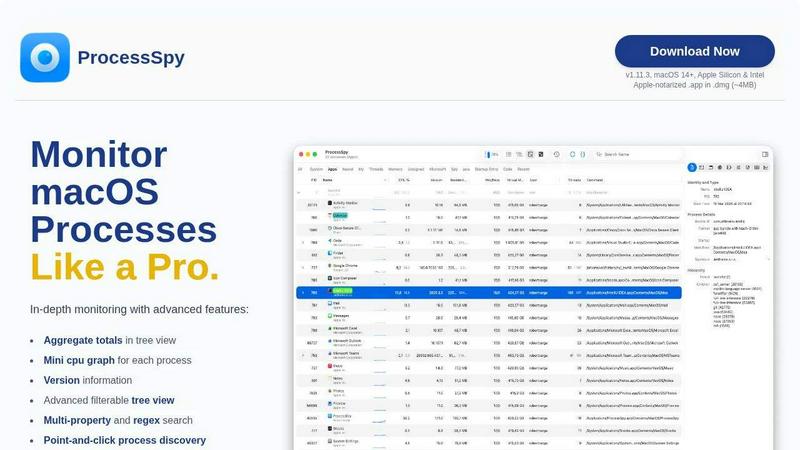
About ProcessSpy
ProcessSpy is a powerful macOS tool designed for developers and advanced users who need in-depth insights into their system processes. Unlike Activity Monitor, which often conceals crucial information, ProcessSpy reveals the hidden intricacies of each application running on your Mac. It allows you to visualize process trees, inspect open files, view environment variables, and instantly terminate unresponsive applications with ease. Built with a Mac-first approach, ProcessSpy leverages native APIs to ensure smooth performance and tight integration with macOS systems, making it an invaluable asset for those who require a deeper understanding of their running applications. Whether you're juggling multiple Java applications or troubleshooting performance issues, ProcessSpy equips you with the tools to monitor and manage your processes effectively. With features like advanced filtering, real-time CPU graphs, and the ability to remember finished processes, it elevates your monitoring experience to a professional level.
Features of ProcessSpy
Advanced Tree View
The advanced tree view feature provides a detailed hierarchical representation of processes. Users can access real-time filtering and search capabilities, including JavaScript filters, making it easy to navigate complex process structures. Additionally, it shows aggregate totals for CPU, Memory, and Threads, providing a comprehensive overview of system resource usage.
JavaScript Filters
ProcessSpy's JavaScript filter capability allows users to define intricate filters with multiple conditions. This means that users can customize their experience to display only the processes that meet specific criteria, enhancing the efficiency of process discovery and management.
Advanced Process Info (paid)
For those who require deeper insights, the advanced process information feature unlocks additional details such as entitlements, Info.plist, and bundle ID with a simple click. This allows developers to examine the underlying aspects of applications and their interactions with the system in greater detail.
Process History Recording (paid)
With the process history recording feature, users can track historical values for CPU, Memory, and Threads usage over time. This data can be exported to CSV, allowing for in-depth analysis and troubleshooting of application performance and behavior.
Use Cases of ProcessSpy
Managing Multiple Java Applications
For developers working with several Java applications, especially those using different JDK versions, ProcessSpy helps distinguish between processes that share similar names. Users can view complete command-line info, paths, and version details, allowing for effective management and troubleshooting.
Diagnosing Performance Issues
When applications become unresponsive or consume excessive resources, ProcessSpy allows users to identify the culprits quickly. With real-time CPU graphs and the ability to terminate stubborn processes instantly, users can regain control over their systems efficiently.
Analyzing Application Behavior
ProcessSpy provides a comprehensive view of open files and environment variables, enabling developers to analyze how applications interact with the system. This insight is critical for debugging and optimizing application performance.
Monitoring Resource Usage Over Time
With the ability to record process history, users can monitor how CPU and Memory usage fluctuates over time. This feature is particularly useful for identifying trends and making informed decisions about application performance optimizations.
Frequently Asked Questions
Is ProcessSpy safe to install on my Mac?
Yes. ProcessSpy is Apple-notarized and distributed as a signed .app within a .dmg file. It has been verified for safety and can be used on both Intel and Apple Silicon Macs without concerns.
Does ProcessSpy support older versions of macOS?
No, ProcessSpy is specifically designed for macOS 14 and newer versions. Users with older macOS installations will not be able to use this tool effectively.
What is the license model for ProcessSpy?
The license is valid for one user across unlimited devices, which includes lifetime updates and new feature access. This ensures that users can keep their software up to date without additional costs.
How does ProcessSpy compare to Activity Monitor?
ProcessSpy offers several advanced features not found in Activity Monitor, such as the ability to see full command-line and path information, aggregate values in hierarchy mode, and support for JavaScript-based filters. These capabilities make it a more powerful tool for monitoring and managing processes on macOS.
Similar to ProcessSpy


Sprite Sheet Maker
A free browser-based toolkit for creating, cutting, converting, and previewing sprite sheet animations.


laya.tools
A free directory of 950+ projects built on Laya, the open-source decision model. Updated daily.
JsonTranslate
Translate JSON, Markdown, and TXT while preserving keys, nested paths, and project structure.

Forms Plugin
The #1 Native Form Builder Plugin for Framer - No Code, No Embeds, No External Platforms.