
Hintder AI
Drop her profile, catch the thread, and send the opener that gets a reply instead of silence.
Visit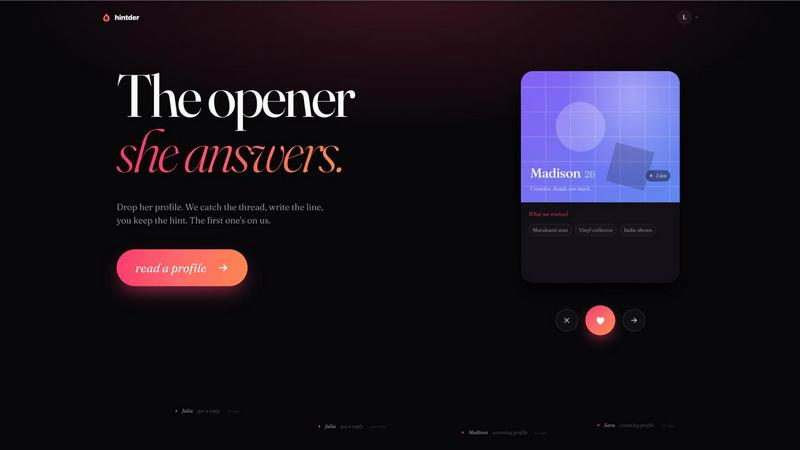
About Hintder AI
Hintder AI is the wingman for the moment right before she answers. It solves the single hardest problem in dating apps: the first message. Most guys send the same generic "hey" and wonder why the chat dies. Hintder fixes the part that actually matters by turning any dating profile screenshot into five tailored openers built to get a reply. You simply screenshot a profile from Tinder, Hinge, Bumble, or any other app, and Hintder reads the details, finds the hooks, and writes lines that feel playful and specific to her profile instead of the obvious AI cadence everyone can spot. It is not about blasting more messages into the void. It is about the one opener that lands while the generic one dies. The product is built for anyone tired of being ignored, stuck in boring conversations, or unsure how to start something real. Your first three hints are free with no card required. Screenshots are deleted after 30 days. And because it all runs off a screenshot, it works with any app you use. Hintder is the honest, private, and effective way to stop guessing and start connecting.
Features of Hintder AI
Screenshot-Based Profile Reading
You take a screenshot of any dating profile from Tinder, Hinge, Bumble, Coffee Meets Bagel, or any other app. Hintder scans the image, reads the bio, photos, and prompts, and extracts the specific hooks she gave you. This means you stay anonymous and in control. You never need to link accounts or share personal data. The entire process is private and runs entirely off the screenshot you provide.
Five Tailored Openers Per Profile
For every profile you scan, Hintder generates five distinct opening messages. Each opener is crafted to be playful, specific, and built to get a reply. You choose the tone that fits your style. The lines avoid the obvious AI cadence that everyone can spot. Instead, they sound like a confident version of you. You pick the best one, copy it, and send it. No more struggling to find the right words.
Second Message Assistance
Getting the first reply is only half the battle. Stuck after she replies? Hintder helps with the second message too. It reads the conversation context and suggests follow-up lines that keep the momentum going. This feature turns a single successful opener into a real conversation. It handles the harder part of maintaining interest after the initial spark.
Privacy-First Data Handling
Your screenshots are never stored permanently. They are kept for up to 30 days so you can reopen a match and see the photo report. After that, they are automatically deleted. Your data is never used to train AI models, never sold, and never archived past that window. Full details are available in the Privacy Policy. This ensures you can use the tool with confidence and without compromising your privacy.
Use Cases of Hintder AI
Starting Conversations on Any Dating App
You match with someone on Tinder, Hinge, or Bumble. Their profile is interesting but you have no idea what to say. You screenshot it, drop it into Hintder, and get five openers tailored to their bio and photos. You pick the one that feels right, send it, and watch the reply come in. This turns a moment of hesitation into a confident, effective first move.
Overcoming Writer's Block After a Match
You have a new match but your mind goes blank. Every opener you think of feels forced or generic. Hintder removes the pressure. It reads the profile for you and surfaces the specific hooks you missed. A mention of Murakami, a vinyl collection, or an indie show becomes a playful line that shows you actually paid attention. You stop overthinking and start connecting.
Keeping Conversations Alive After the First Reply
She replied to your opener, but now you are stuck. The conversation is fading and you do not know how to bring it back. Hintder helps with the second message. It analyzes her reply and your original opener, then suggests a follow-up that keeps things flowing naturally. This prevents the dreaded chat death and moves you toward a real connection or a date.
Practicing and Improving Your Messaging Skills
You want to get better at dating app conversations but you are not sure where to start. Hintder shows you what works. By seeing the hooks it extracts and the lines it writes, you learn how to spot opportunities in profiles yourself. Over time, you internalize the patterns of playful, specific, and reply-worthy messaging. The tool becomes a coach as much as a wingman.
Frequently Asked Questions
Does she know I used something to write the message?
No. Hintder does not write in the AI cadence. There are no em-dashes piled up, no "as an opener" phrasing, and no perfect grammar where the cool version skips a word. The line sounds like a confident version of you, the one you would land at 2am if you were funnier. She will never know you had help.
What dating apps does Hintder work with?
All of them. Tinder, Hinge, Bumble, Coffee Meets Bagel, or any new app you tried last week. If you can screenshot her profile, Hintder can read it. The tool does not plug into any app directly. You stay anonymous and in full control of what you share.
Are my screenshots saved anywhere?
Only briefly. They are kept for up to 30 days so you can reopen a match and see the photo report. After that, they are automatically deleted. They are never used to train AI models, never sold, and never archived past that window. Full details are in the Privacy Policy.
How is this different from just asking ChatGPT?
ChatGPT writes like ChatGPT. It optimizes for polite, helpful, and balanced, which is exactly the tone that bombs in a dating app. Hintder is tuned specifically on what actually gets replies in this medium: playful tension, specifics from her profile, and lines that force a real answer. The difference is the difference between a reply and a read receipt.
Similar to Hintder AI


AI UGC Video Generator
Create AI UGC video ads from a product URL, image, or script with lifelike creators, natural voices, captions, and clear CTAs.

amaze.directory
A hand-checked directory of AI tools. Every listing was opened and used by a person before it went in, pricing is printed on the card, and nothing can

Ornold
AI browser automation for MCP agents across Chromium and antidetect profiles.

benchmark.directory
An independent directory of 146 AI tools. Every listing was paid for, set up and used on real work. Nobody can buy a place or a score.