
DocuExtractor
Effortlessly transform messy receipts and invoices into structured data with DocuExtractor's automated extraction tools.
Visit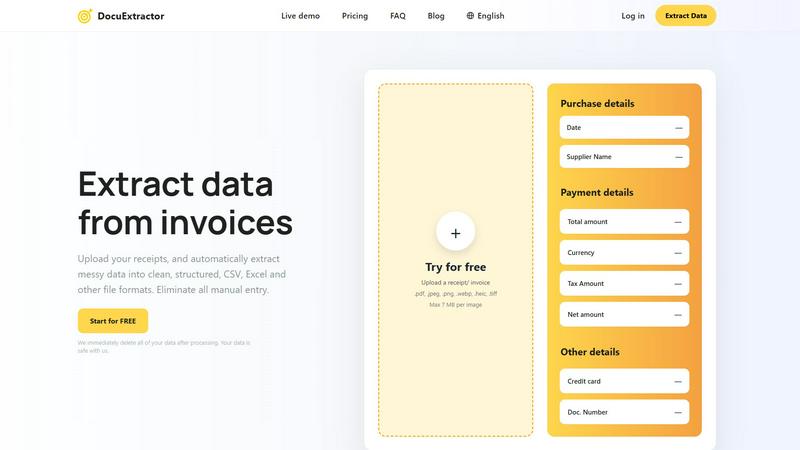
About DocuExtractor
DocuExtractor is a revolutionary document conversion software that redefines the way accountants, bookkeepers, and business professionals manage data entry tasks. With its state-of-the-art Optical Character Recognition (OCR) technology, DocuExtractor converts disorganized receipts, invoices, and bank statements into neat, structured data formats like CSV and Excel. This innovative tool is tailored for individuals and businesses seeking to eliminate the burdensome manual data entry process. By automating data extraction, DocuExtractor significantly improves efficiency and accuracy in financial reporting. Its intuitive interface allows users to easily upload documents, swiftly extract essential information, and quickly download results. The platform has become a vital asset for those wishing to reclaim hours of tedious administrative work, ensuring financial data is organized and easily accessible for decision-making.
Features of DocuExtractor
Advanced Optical Character Recognition (OCR)
DocuExtractor employs cutting-edge OCR technology that accurately extracts text from various document types, including receipts, invoices, and bank statements. This feature ensures that users receive precise data, minimizing errors and reducing the need for manual corrections.
Batch Processing Capability
With the ability to upload multiple documents at once, users can save significant time when processing large volumes of data. The batch processing feature allows for efficient handling of numerous files, making DocuExtractor an ideal solution for busy accountants and financial professionals.
User-Friendly Interface
The platform boasts a simple and intuitive interface that makes it easy for anyone to navigate. Users can quickly drag and drop documents, select preset fields, and choose their preferred output format, ensuring a smooth and hassle-free extraction experience.
High Accuracy and Speed
DocuExtractor is designed for speed and precision, boasting an impressive accuracy rate of 99.6%. Users can expect instant conversions, allowing them to extract data from documents in seconds, which significantly accelerates their workflow and enhances productivity.
Use Cases of DocuExtractor
Streamlining Expense Reports
Accountants can use DocuExtractor to streamline the creation of expense reports by quickly converting receipts into structured data. This not only saves time but also ensures that all expenses are accurately recorded and easily accessible.
Automating Invoice Processing
Businesses can automate their invoice processing by using DocuExtractor to extract key information from incoming invoices. This automation reduces the risk of human error and speeds up payment cycles, enhancing overall financial efficiency.
Simplifying Tax Preparation
During tax season, DocuExtractor helps accountants and tax professionals by converting financial documents into clean data formats. This simplification ensures that tax filings are based on accurate and well-organized information, reducing stress during a busy period.
Managing Financial Records
For small business owners, DocuExtractor serves as a powerful tool for managing financial records. By converting bank statements and other financial documents into structured formats, users can easily track income and expenses, facilitating better financial management.
Frequently Asked Questions
How secure is my data with DocuExtractor?
DocuExtractor prioritizes data security and privacy. After processing, all user data is immediately deleted, ensuring that your sensitive information remains safe and confidential.
What document types can I upload?
You can upload various document types, including receipts, invoices, and bank statements, in formats like PDF, JPEG, PNG, and more. The platform supports multiple image formats for your convenience.
Is there a limit to the number of documents I can process?
DocuExtractor allows batch uploads, enabling you to process many documents at once. However, each individual document has a maximum upload size of 7 MB.
Can I extract data in different languages?
Yes, DocuExtractor supports over 45 languages and features automatic language detection. This capability makes it easier for users to process documents in various languages without any additional steps.
Explore more in this category:
Similar to DocuExtractor

@fuck.it - email with attitude
Private email. Pure. Secure. Exclusive. No ads, no tracking, no data selling. GDPR compliant, EU-hosted.



Suparelay
Call landlines and mobiles in 200+ countries from your browser. The person you call needs no app. Prepaid, price shown before you dial.
Novastart
Apps and files on an infinite canvas where people and AI agents work together.


JevModel
JevModel helps teams make structured AI decisions with Choice, Score, and Noul frameworks.
Hishab
All-in-one POS, inventory, accounting and HR software for Bangladeshi SMEs — real-time sales, stock and finance in one place.