
RemoveTexts vs Vailo AI
Side-by-side comparison to help you choose the right product.

RemoveTexts
Effortlessly erase text, watermarks, and unwanted elements from images in seconds with RemoveTexts, no design skills needed.
Last updated: March 11, 2026

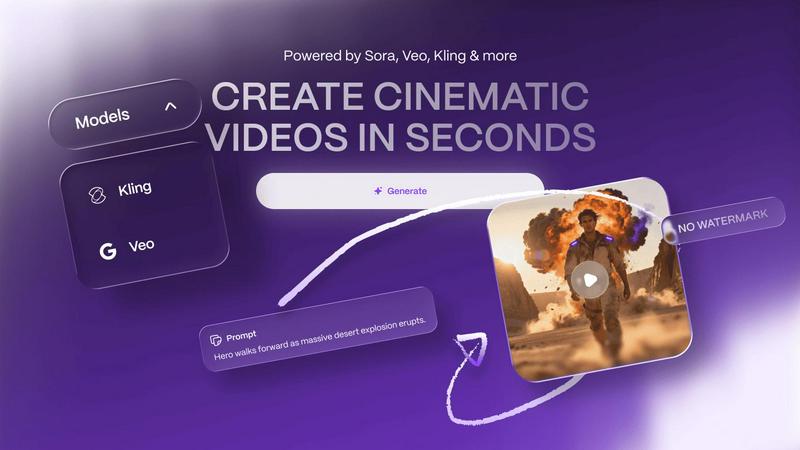
Unleash your creativity by turning simple text into stunning, watermark-free videos and images with Vailo AI.
Last updated: February 28, 2026
Visual Comparison
RemoveTexts

Vailo AI
Feature Comparison
RemoveTexts
Paint to Remove
This feature allows users to have precise control over the text removal process. By simply brushing over specific areas of unwanted text, users can ensure that only the intended elements are erased, resulting in a tailored editing experience.
Auto Remove All
With this intelligent feature, RemoveTexts automatically detects and removes all text elements in the image with just one click. This is perfect for users who want to clean up images rapidly without the need for manual adjustments.
Edit & Replace Text
RemoveTexts goes beyond simple removal by allowing users to replace existing text in images while perfectly matching the original style. This feature is ideal for those who want to change information or branding without altering the overall look of the image.
Remove Objects
This versatile feature enables users to erase not only text but also unwanted objects, logos, and visual elements from their images. It expands the utility of RemoveTexts beyond text-only tasks to comprehensive image editing.
Vailo AI
Text-to-Video Generation
With Vailo AI's Text-to-Video feature, you can effortlessly turn written prompts into captivating videos. Just input your text, and watch as Vailo transforms it into dynamic visual storytelling, complete with engaging animations and effects, all in a matter of seconds.
Image-to-Video Conversion
Transform your static images into lively, cinematic videos that bring your concepts to life. This feature allows you to select an image and generate a video that captures its essence, adding motion and depth that will captivate your audience.
Advanced Editing Tools
Vailo AI includes an array of advanced editing tools that enable you to fine-tune your videos with precision. From trimming clips to adding effects, users can customize their creations seamlessly, ensuring that every project meets their unique creative vision.
Motion Control and Transfer
This innovative feature allows users to control motion dynamics within their videos, adding a level of sophistication to the final product. With motion transfer capabilities, you can apply realistic movement to characters or objects, enhancing the storytelling aspect of your videos effortlessly.
Use Cases
RemoveTexts
E-commerce Product Photos
Online sellers can use RemoveTexts to clean up their product images by removing distracting watermarks or text overlays. This results in visually appealing photos that can enhance sales and attract potential customers.
Legal Document Redaction
Lawyers and legal professionals can utilize RemoveTexts to redact sensitive information from documents and images, ensuring that confidential details are securely removed without compromising the image's quality.
Social Media Content Creation
Content creators can take advantage of RemoveTexts to enhance their social media graphics by swiftly removing unnecessary text, allowing for a cleaner look that attracts more engagement from followers.
Educational Resources
Educators can use RemoveTexts to prepare instructional materials by removing unwanted text or distractions from images, ensuring that the focus remains on the essential content being presented.
Vailo AI
Marketing Campaigns
Marketers can leverage Vailo AI to create eye-catching promotional videos that resonate with their target audience. With the ability to generate authentic content quickly, brands can keep up with the fast-paced demands of digital marketing.
Storyboarding for Filmmakers
Filmmakers can use Vailo AI to visualize their storyboards by generating rough cuts of scenes. This feature helps directors and producers plan their projects more effectively, allowing for better communication with their teams.
Product Demonstrations
Brands can showcase their products through high-quality videos created with Vailo AI. By generating product demos that highlight features and benefits, companies can engage potential customers in a visually compelling manner.
Social Media Content Creation
Whether you are an influencer or a business, Vailo AI can help you create engaging content for social media platforms. Generate stunning videos and images that capture attention, increase engagement, and boost your online presence.
Overview
About RemoveTexts
RemoveTexts is a revolutionary AI-powered online tool designed for effortless image editing, specifically focusing on removing unwanted text from images. Whether you are a designer, marketer, or simply someone looking to enhance your images, RemoveTexts provides an intuitive solution to clean up visuals in mere seconds. With no prior design skills required, users can simply upload their images, and RemoveTexts will intelligently erase watermarks, captions, subtitles, and any other text elements while preserving the integrity of the original background. The tool harnesses advanced deep learning inpainting technology to ensure that the results are not only quick but also professional-grade. Trusted by over 100,000 users globally, RemoveTexts has established itself as an essential resource for anyone needing clean and polished images without the hassle of complex software.
About Vailo AI
Imagine a world where your creative vision flows seamlessly from your mind to the screen without being hindered by technical barriers or budget constraints. Vailo AI is your all-in-one creative AI studio, designed to transform simple text prompts or static images into stunning cinematic videos in mere seconds. This powerful platform democratizes high-end video production, making it accessible to creators at every skill level. Whether you are a solo filmmaker sketching out a storyboard, a marketer crafting the next viral ad, or a brand showcasing a product, Vailo provides the tools you need. Its core promise is compelling: create studio-grade, watermark-free content for social media, advertising, and storytelling without needing a camera or complex editing software. From the foundational V1 offering of Text-to-Video and Image-to-Video to the expansive V2 suite featuring advanced editing, multi-model engines, avatars, and batch processing, Vailo consolidates the entire creative workflow into one intuitive platform. Your journey from a spark of an idea to a polished, published video has never been shorter or more empowered.
Frequently Asked Questions
RemoveTexts FAQ
How does RemoveTexts work?
RemoveTexts uses advanced AI and deep learning inpainting technology to analyze surrounding pixels and seamlessly reconstruct the background after removing text. This ensures that the edited image looks natural and professional.
What file formats does RemoveTexts support?
Users can upload images in JPG, PNG, and WebP formats, with a maximum file size of 10 MB. This flexibility allows users to work with various image types for their editing needs.
Is there a limit to how many images I can process?
While RemoveTexts is designed for efficient processing, there is no specific limit on the number of images you can process. Users can upload and edit multiple images as needed.
Are there any skills required to use RemoveTexts?
No design skills are required to use RemoveTexts. The tool is designed to be user-friendly, allowing anyone to easily upload images and remove text without any prior experience in graphic design or editing software.
Vailo AI FAQ
What types of content can I create with Vailo AI?
You can create a wide variety of content, including promotional videos, product demos, cinematic storytelling, social media posts, and much more, all without needing extensive technical skills.
Is there a watermark on the videos created with Vailo AI?
No, Vailo AI allows users to create watermark-free content, letting you present your work in a professional manner suitable for any platform.
Can I use Vailo AI for commercial purposes?
Absolutely! Vailo AI is designed to support both personal and commercial projects, making it an ideal tool for businesses and independent creators alike.
What subscription plans are available for Vailo AI?
Vailo AI offers several subscription plans, including a free option with limited credits and paid plans tailored for creators and professionals, providing varying levels of access to features and credits for content generation.
Alternatives
RemoveTexts Alternatives
RemoveTexts is an innovative AI-powered tool designed to quickly and efficiently remove unwanted text from images, making it ideal for creators, marketers, and designers. This product falls within the image editing category, offering features that streamline the process of cleaning up visuals without the need for complex software like Photoshop. Users often seek alternatives to RemoveTexts for various reasons, including pricing considerations, specific feature sets, or compatibility with different platforms. When searching for an alternative, it's essential to evaluate aspects such as ease of use, the effectiveness of text removal technology, and the range of editing options available. Compatibility with multiple languages and the quality of output should also be key factors, as these elements significantly impact the overall user experience and satisfaction.
Vailo AI Alternatives
Vailo AI is an innovative platform that falls under the category of AI-assisted creative tools, allowing users to transform text and images into stunning, cinematic videos within seconds. This unique offering democratizes high-quality video production, making it accessible for creators, marketers, and storytellers of all levels. However, users often seek alternatives to Vailo AI for various reasons, such as pricing models, specific features, or compatibility with their existing workflows. When considering an alternative, it's essential to evaluate factors such as the range of creative tools offered, the flexibility of the platform, user-friendly design, and the quality of the final output. A good alternative will not only match your creative needs but also enhance your storytelling journey with intuitive features and streamlined processes.