
Tool.Video vs World Model Hub
Side-by-side comparison to help you choose the right product.

Tool.Video
Begin your creative journey with an all-in-one AI toolkit that crafts stunning videos, images, and soundtracks.
Last updated: March 1, 2026

Begin your creative journey with the world's best AI models for video, image, and 3D generation in one unified workspace.
Last updated: March 26, 2026
Visual Comparison
Tool.Video

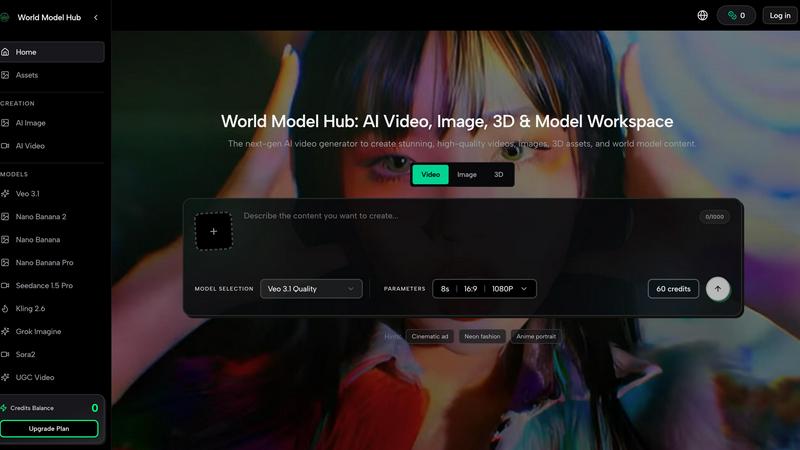
World Model Hub
Feature Comparison
Tool.Video
Integrated AI Video Generation
Embark on your video creation journey with access to the most advanced AI models, including OpenAI's Sora 2. Simply describe your scene in text, and watch as the platform generates videos with realistic motion, intricate details, and stunning visual fidelity. This feature supports multiple styles, from cinematic masterpieces to vibrant travel vlogs, providing the perfect starting canvas for any narrative you wish to tell.
AI-Powered Image & Storyboard Creation
Before the first frame of video is generated, you can visualize your story. Using powerful image generators like Nano Banana Pro, you can create striking keyframe images or a complete storyboard from text descriptions. This allows you to plan your visual narrative, experiment with styles, and ensure your creative direction is perfectly aligned before committing to the full video production process.
Original AI Music & Soundtrack Scoring
No visual journey is complete without a compelling auditory backdrop. Tool.Video includes state-of-the-art music generation tools like Suno 5, enabling you to score your videos with completely original soundtracks. Generate background scores, full songs with lyrics, or mood-setting melodies in any genre, ensuring your video's audio is as unique and impactful as its visuals.
Comprehensive Video Utility Toolkit
The journey continues even after your video is rendered. Tool.Video provides a suite of essential utilities to polish and prepare your content for the world. This includes generating AI-optimized thumbnails to maximize engagement, trimming clips to perfection, adding custom watermarks, and even removing watermarks from AI-generated content, giving you full control over the final presentation of your creative work.
World Model Hub
Unified Model Hub
Navigate the entire ecosystem of cutting-edge AI models without ever leaving the platform. World Model Hub provides centralized access to top-tier video generators like Seedance 2.0 and Kling Motion Control, powerful image models such as Nano Banana Pro, and advanced 3D creators like Hunyuan 3D. This eliminates the constant, time-consuming context-switching between different developer sites and applications, creating a cohesive environment for all your generative needs.
Comparative Creation & Iteration
Different models excel at different styles and tasks. This feature allows you to pit the giants against each other, generating assets from the same prompt across multiple models like Sora 2 and Veo 3.1 side-by-side. This direct comparison empowers you to make informed, quality-driven choices, refine your prompts based on visual feedback, and iterate rapidly to find the perfect output for your specific project's narrative and aesthetic requirements.
Production-Ready Workflow Organization
World Model Hub is built for real projects, not just one-off experiments. It provides the tools to keep your creative journey organized from the initial prompt to the final asset. Manage your prompts, reference images, generated outputs, and project iterations in a structured workspace. This repeatable process is essential for teams and professionals who need consistency, version control, and the ability to scale their AI content creation efficiently.
Ready-to-Use Creative Effects
Jumpstart your creativity and overcome prompt block with a library of popular, pre-configured creative effects. These curated starting points for AI video and image generation provide instant inspiration and professional styling, helping you quickly achieve specific looks like "Cinematic ad" or "Neon fashion" without deep technical prompting, accelerating the initial phases of your creative exploration.
Use Cases
Tool.Video
Social Media Content Creation
For influencers and digital marketers, the constant demand for fresh, engaging video content can be overwhelming. Tool.Video streamlines this process, allowing creators to rapidly produce high-quality clips, promotional reels, and branded stories for platforms like Instagram, TikTok, and YouTube, complete with custom thumbnails and music, all from a simple text idea.
Prototyping & Storyboarding for Filmmakers
Independent filmmakers and creative agencies can use Tool.Video as a powerful pre-visualization tool. Quickly generate concept art and dynamic storyboard sequences to pitch ideas, secure funding, or plan shoots. This visual blueprint helps communicate complex scenes and narratives before a single real-world camera rolls, saving significant time and resources.
Educational & Explainer Video Production
Educators and corporate trainers can transform dry information into captivating learning experiences. By inputting lesson outlines or product descriptions, they can generate illustrative videos that simplify complex topics. The integrated AI music feature also allows for the creation of consistent, professional background scores that enhance retention and viewer engagement.
Rapid TV Commercial (TVC) Development
Marketing teams and small businesses can leverage the dedicated AI TVC Generator to produce professional-quality advertisement videos in minutes. This enables rapid testing of different creative concepts, seasonal promotions, or targeted ad campaigns without the need for expensive production crews, actors, or lengthy editing timelines.
World Model Hub
Marketing & Advertising Campaigns
Craft stunning, consistent visual assets for entire campaigns from a single platform. Generate hero videos with Veo 3.1, product images with Nano Banana, and supporting 3D visuals—all while maintaining a unified brand aesthetic. The comparison tool ensures you select the highest-quality output for each channel, from social media clips to website banners, streamlining the entire content production pipeline.
E-commerce Content Creation
Rapidly produce vast catalogs of high-quality product visuals and lifestyle videos. Use the platform to generate multiple angles, styles, and contextual scenes for products without costly photoshoots. The organized workflow allows e-commerce teams to manage batches of assets efficiently, ensuring visual consistency across thousands of SKUs and iterating on visuals based on performance data.
Creative Storytelling & Film Pre-visualization
Visualize scenes and narratives before a single physical camera rolls. Filmmakers and storyboard artists can use models like Sora 2 and Kling 3.0 to generate dynamic video sequences from script excerpts, experimenting with tone, lighting, and motion. This use case turns the platform into a powerful pre-visualization sandbox, allowing for creative exploration and alignment long before production begins.
Game Development & 3D Asset Prototyping
Accelerate the game development pipeline by quickly generating concept art, texture ideas, and prototype 3D models. Artists can use the image models for environment concepts or character sketches and then leverage 3D generators to build basic asset forms. This rapid iteration cycle enables faster brainstorming and prototyping, helping teams solidify artistic direction and asset requirements early in the development journey.
Overview
About Tool.Video
Imagine a world where your creative vision flows seamlessly from a single spark of an idea into a fully-realized, professional video, complete with stunning visuals and an original soundtrack. This is the journey Tool.Video empowers you to begin. It is not merely a tool; it is a comprehensive creative companion designed for storytellers, marketers, educators, and developers who seek to bring their narratives to life without the traditional friction of complex software suites. Tool.Video consolidates the fragmented landscape of AI content creation into one intuitive platform. Your journey starts with a text prompt and unfolds through a powerful, integrated workflow. You can craft a visual storyboard, generate breathtaking video with models like Sora 2, compose a fitting musical score with Suno 5, and design eye-catching thumbnails—all within a single dashboard. By removing the need to juggle multiple applications and technical hurdles, Tool.Video allows you to focus purely on the art of storytelling, transforming your concepts into captivating video content with unprecedented ease and efficiency.
About World Model Hub
The journey of an AI creator is often one of exhilarating discovery, but also of frustrating fragmentation. You find a brilliant new model for video, only to realize your reference images are trapped in another tool. You perfect a prompt for an image, but must start from scratch to adapt it for 3D. World Model Hub was born from this very struggle. It is the next-generation workspace built to unify the chaotic landscape of AI media generation. Imagine a single, powerful hub where you can access, compare, and create with the world's leading AI models for video, image, and 3D content. This platform is designed for creators, marketers, and production teams who are tired of juggling disconnected tools and rebuilding workflows. Its core mission is to transform AI from a series of impressive demos into a practical, repeatable, and scalable production pipeline. By bringing models like Sora 2, Veo 3.1, Kling 3.0, and Nano Banana under one roof, World Model Hub empowers you to move seamlessly from a spark of inspiration to a production-ready asset, ensuring your creative journey is fluid, organized, and consistently high-quality.
Frequently Asked Questions
Tool.Video FAQ
What AI models does Tool.Video integrate?
Tool.Video integrates a suite of cutting-edge AI models to power different aspects of creation. This includes Sora 2 by OpenAI for high-fidelity text-to-video generation, Nano Banana Pro for advanced text-to-image and image-to-image creation, and Suno 5 for professional AI music and soundtrack generation. The platform acts as a unified gateway to these powerful technologies.
Can I use Tool.Video for commercial projects?
Yes, content created using Tool.Video is designed for commercial use. The platform provides the tools to create professional-grade videos, images, and music that can be used in marketing campaigns, social media, advertisements, and other commercial ventures. It is always recommended to review the specific terms of service for the latest usage policies.
Does Tool.Video require video editing experience?
Not at all. Tool.Video is built with an intuitive interface that democratizes video creation. The journey from text prompt to finished video is guided and streamlined. While experienced editors will appreciate the advanced controls and utilities, beginners can start creating impressive content immediately by simply describing their vision.
What is the "Invite & Get Gifts" program?
The "Invite & Get Gifts" program is a referral initiative. When you share your unique promo link with a friend and they sign up, both you and your friend receive bonus credits (such as 30 points each) to use within the Tool.Video platform. This allows you to extend your creative journey further by earning additional resources for generating more content.
World Model Hub FAQ
What AI models are available on World Model Hub?
World Model Hub provides access to a curated selection of leading models, which include top video generators like Seedance 1.5 Pro, Seedance 2.0, Sora 2, Veo 3.1, Kling 3.0, Kling Motion Control, and Kling 2.6. For images, you can use the Nano Banana family of models. For 3D generation, Hunyuan 3D is available. The platform's Model Hub is designed to let you explore and compare these options easily.
How does World Model Hub improve my workflow compared to using individual tools?
The primary improvement is the elimination of workflow fragmentation. Instead of managing accounts, prompts, and assets across multiple independent platforms, World Model Hub consolidates everything. You can create, compare outputs from different models using the same prompt and references, and manage all your iterations and final assets in one organized workspace. This saves significant time and reduces errors, making the creative process more fluid and scalable.
Is World Model Hub suitable for team collaboration?
Yes, a core idea behind World Model Hub is to make AI creation usable for real teams and businesses. The platform's focus on organized, repeatable workflows—keeping prompts, assets, and outputs structured in one place—inherently supports collaboration. Teams can share project workspaces, maintain consistency across assets, and build scalable production processes, moving beyond one-off individual demos to coordinated team output.
Can I use World Model Hub if I'm new to AI content creation?
Absolutely. While powerful enough for professionals, the platform includes features like "Popular Effects" and "Hints" that provide ready-to-use creative starting points, such as "Cinematic ad" or "Anime portrait." These lower the barrier to entry, helping newcomers generate impressive results quickly while they learn the nuances of prompting and model capabilities through the built-in comparison tools.
Alternatives
Tool.Video Alternatives
In the bustling world of AI content creation, Tool.Video stands as a comprehensive platform, an all-in-one toolkit designed to streamline the journey from a simple idea to a polished video. It belongs to the category of integrated AI video generation suites, weaving together advanced models for video, image, and music creation into a single, intuitive workflow. This holistic approach is its greatest strength, offering a unified creative space. Yet, every creator's path is unique, and the search for alternatives is a natural part of the exploration. Some may seek a different pricing structure that aligns with their budget, while others might need a platform that integrates more deeply with their existing software ecosystem. Specific feature requirements, such as a particular style of image generation or a focus on long-form video, can also lead users to look elsewhere for their perfect creative companion. When embarking on this search, it's wise to consider what truly matters for your projects. Look beyond just the headline features and evaluate the overall workflow, the quality and consistency of the AI outputs, and the platform's ability to grow with your skills. The right alternative should feel less like a collection of tools and more like a trusted partner on your creative journey.
World Model Hub Alternatives
World Model Hub is an all-in-one workspace designed for creators and teams working with advanced AI models for video, image, and 3D generation. It belongs to the category of integrated AI media creation platforms, aiming to unify a fragmented workflow into a single, practical environment for production-ready assets. Users often explore alternatives for various reasons. Some may have specific budget constraints or require a different pricing model. Others might be looking for a platform that focuses exclusively on one media type, like only video or only 3D, rather than a multi-format hub. Team structure, collaboration needs, and the desire for different feature sets can also drive the search for other solutions. When evaluating alternatives, consider your primary creative medium and whether you need a specialized tool or a broader platform. Look closely at how each option handles workflow organization, asset management, and iteration. The goal is to find a system that not only provides access to powerful models but also fits seamlessly into your team's real-world production process, helping you move from prompt to final asset efficiently and consistently.