
Perkoon vs SupaSidebar
Side-by-side comparison to help you choose the right product.

Perkoon allows you to effortlessly send unlimited files for free, ensuring your data stays private and secure.
Last updated: March 4, 2026

SupaSidebar
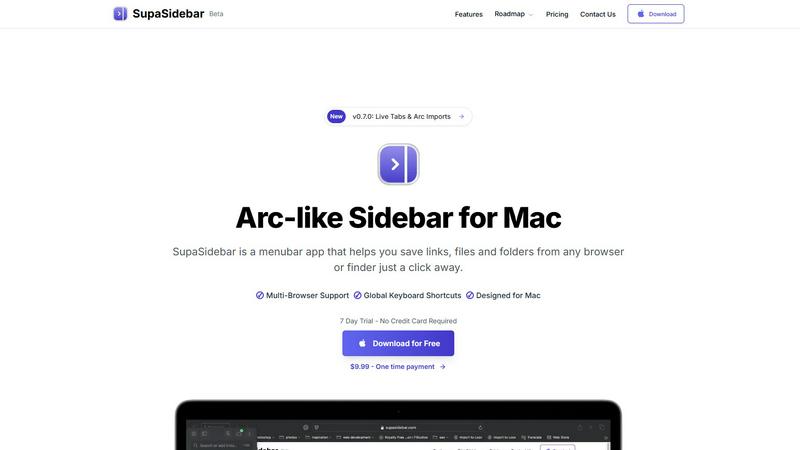
SupaSidebar elevates your Mac experience by providing instant access to links, files, and folders with just one click.
Last updated: February 28, 2026
Visual Comparison
Perkoon

SupaSidebar
Feature Comparison
Perkoon
P2P File Transfer
Perkoon's flagship feature allows users to send files directly between browsers using peer-to-peer technology. This means that as long as both sender and receiver are online, they can transfer files of any size without incurring any costs or needing an account.
Encrypted Cloud Storage
For instances when the recipient is offline, Perkoon provides an encrypted cloud storage solution. This premium feature ensures that files are stored securely on servers, while also covering the operational costs involved in maintaining the service, thus keeping the P2P feature free.
Privacy-Focused Design
At Perkoon, your privacy is paramount. P2P transfers do not touch any central servers, and the company cannot access the files being sent. In cloud storage, files are encrypted, ensuring that only the sender and recipient have access to the data, free from corporate surveillance.
AI Integration
Designed for the modern age, Perkoon includes built-in tools that allow AI agents to interact directly with the service. This means that automation is seamless, and users can leverage AI for enhanced file management without the need for cumbersome screen-scraping methods.
SupaSidebar
Natural Swipe & Show on Finder
SupaSidebar introduces a natural swipe feature that allows you to effortlessly access your sidebar while using Finder or any application. This intuitive design means you can switch contexts without losing your workflow, making it easier to manage your files and links seamlessly.
Global Keyboard Shortcuts
Designed with efficiency in mind, SupaSidebar offers global keyboard shortcuts that allow you to save or copy URLs in a flash. With simple commands like CMD CTRL S to save and CMD CTRL C to copy, you can streamline your digital tasks and reduce the time spent navigating through menus.
Fast Search Functionality
Finding what you need instantly is crucial in a fast-paced environment. SupaSidebar includes a powerful search feature that lets you press CMD CTRL K and type to find any file, folder, website, or app without the hassle of scrolling through countless options. This feature ensures that your productivity is never hampered by searching for resources.
Recents Tracking
SupaSidebar tracks every website you've visited in the last 48 hours, allowing you to quickly access your recent work without having to remember or search for it. This feature is particularly useful for professionals who juggle multiple tasks and need quick access to their most recently used links.
Use Cases
Perkoon
Personal File Sharing
Whether you're sending vacation photos to family or sharing large documents with friends, Perkoon’s P2P feature allows for smooth and fast transfers without any size limitations, ensuring that your files reach their destination with ease.
Professional Collaboration
In a work environment, Perkoon can facilitate the sharing of large files among team members. The ability to send files without accounts or limits means that colleagues can focus on collaboration rather than the technicalities of file transfer.
Secure Data Storage
For users who require temporary file storage, Perkoon’s encrypted cloud option allows for safe holding of important documents until they can be delivered to the intended recipient, ensuring that sensitive information remains protected.
AI File Management
With the integration of AI tools, businesses can automate file transfers and management processes. This feature enables more efficient workflows, allowing AI agents to handle file transfers directly, thus saving time and reducing manual effort.
SupaSidebar
Streamlined Research
For researchers who often browse multiple sources, SupaSidebar serves as a powerful tool to save and organize links related to their studies. With quick access to recent sites and a dedicated space for favorites, it allows users to maintain focus and avoid distractions.
Efficient Content Creation
Content creators can benefit from SupaSidebar by organizing their references, inspiration, and tools in one easy-to-access sidebar. This organization helps streamline the creative process, making it easier to pull from various resources without losing momentum.
Multitasking Professionals
SupaSidebar is ideal for multitasking professionals who juggle various applications and web pages simultaneously. With its fast search capabilities and global shortcuts, users can effortlessly switch between tasks, keeping their workflow smooth and efficient.
Organizing Personal Projects
If you manage personal projects or hobbies that require various online resources, SupaSidebar can help you keep everything organized. By pinning important links and tracking recent activity, you can ensure that all the information you need is always just a click away.
Overview
About Perkoon
Perkoon is not just another file transfer service; it's a revolutionary platform that redefines the way we share files. Designed for anyone who is weary of artificial limitations, mandatory sign-ups, and the commodification of personal data, Perkoon offers a refreshingly honest approach to file transfer. At its core, Perkoon utilizes peer-to-peer (P2P) technology, allowing users to send files directly between browsers without the need for an intermediary server. This means no size limits, no accounts, and complete privacy. For those moments when the recipient is offline, Perkoon provides a secure cloud storage option, ensuring that your files remain protected and accessible. What truly sets Perkoon apart is its commitment to privacy and its innovative tools designed for the age of AI. With a simple command-line interface (CLI) tool available, Perkoon empowers both individuals and machines to transfer files effortlessly, making it the go-to solution for anyone looking for a straightforward, powerful, and privacy-focused file transfer experience.
About SupaSidebar
SupaSidebar is an elegantly designed menubar application for Mac that revolutionizes how users manage their digital workspace. It is crafted with inspiration from the intuitive design of the Arc browser, SupaSidebar provides a beautifully crafted sidebar that allows users to save, access, and organize links, files, and folders from any browser or Finder with just a click. It is tailored for anyone feeling overwhelmed by the clutter of open tabs and scattered bookmarks. Whether you are a researcher, content creator, or a multitasking professional, SupaSidebar empowers you to stay organized, browse faster, and maintain your flow with ease. With seamless integration across all major browsers—such as Safari, Chrome, Firefox, Brave, and Arc—SupaSidebar ensures that your data remains accessible and manageable. Experience the joy of a distraction-free sidebar that is lightweight, efficient, and designed to fit perfectly into your macOS environment.
Frequently Asked Questions
Perkoon FAQ
Is Perkoon really free for P2P transfers?
Yes, Perkoon’s P2P file transfer service is completely free. The technology used for direct transfers does not incur costs for the company, allowing them to offer this service without charge.
How does the cloud storage feature work?
When the recipient is offline, your files are securely stored in Perkoon’s encrypted cloud storage. This feature is a paid service that ensures your files are held safely until the recipient can access them.
Can I use Perkoon on all browsers?
Perkoon is compatible with Chrome, Edge, and Brave browsers without limits. However, there may be restrictions when using Firefox and Safari, so it's best to check compatibility before starting a transfer.
How does the referral program work?
Perkoon encourages users to share their unique referral link. When a new user signs up through this link, both the referrer and the new user receive bonus storage, creating a mutually beneficial network for file sharing.
SupaSidebar FAQ
Is SupaSidebar a browser extension?
No, SupaSidebar is a standalone menubar application designed specifically for macOS. It integrates with all major browsers, allowing you to manage links and files without being tied to a single browser environment.
Which browsers does SupaSidebar work with?
SupaSidebar supports all major browsers, including Safari, Chrome, Firefox, Brave, and the Arc browser. This compatibility ensures that you can access and organize your digital workspace regardless of your preferred browsing tool.
What macOS version do I need?
SupaSidebar requires macOS 13 or higher to operate smoothly. This ensures that users have access to the latest features and improvements provided by Apple's operating system.
Where is my data stored?
Your data with SupaSidebar remains on your Mac, ensuring complete privacy and security. No information is sent to external servers unless explicitly shared by you, allowing you to manage your workspace with peace of mind.
Alternatives
Perkoon Alternatives
Perkoon is a file transfer service that belongs to the productivity and management category, offering users a straightforward way to send files without the hurdles of mandatory sign-ups or artificial limits. Its unique peer-to-peer technology allows for seamless transfers directly between browsers, catering to those who value privacy and simplicity. However, users often seek alternatives due to various reasons, such as differing platform needs, additional features, or concerns about pricing for premium services. When looking for an alternative, it's essential to consider factors such as ease of use, data security, transfer speed, and whether the service meets your specific needs, whether personal or professional. The ideal solution should align with your expectations, whether it's for occasional file sharing or more robust management of larger data transfers.
SupaSidebar Alternatives
SupaSidebar is a beautifully crafted menubar application for Mac, designed to transform how users manage their digital workspace. It belongs to the productivity and management category, specifically catering to individuals who seek an efficient way to save, access, and organize their links, files, and folders. Users often find themselves looking for alternatives due to various reasons such as pricing concerns, feature limitations, or specific platform requirements. The ideal alternative should offer a sleek user experience, robust functionality, and seamless integration with existing tools to enhance productivity. When searching for an alternative, consider what features are most important to your workflow. Look for options that prioritize user interface design and ease of access, as well as those that provide real-time updates and organizational capabilities. Additionally, ensure that the alternative you choose is compatible with your preferred browsers and operating systems, allowing for a more cohesive experience in managing your digital life.