
Facejam vs Sketch To
Side-by-side comparison to help you choose the right product.

Facejam
Transform your selfies into stunning professional headshots for LinkedIn and business profiles in minutes with Facejam.
Last updated: February 27, 2026
Sketch To
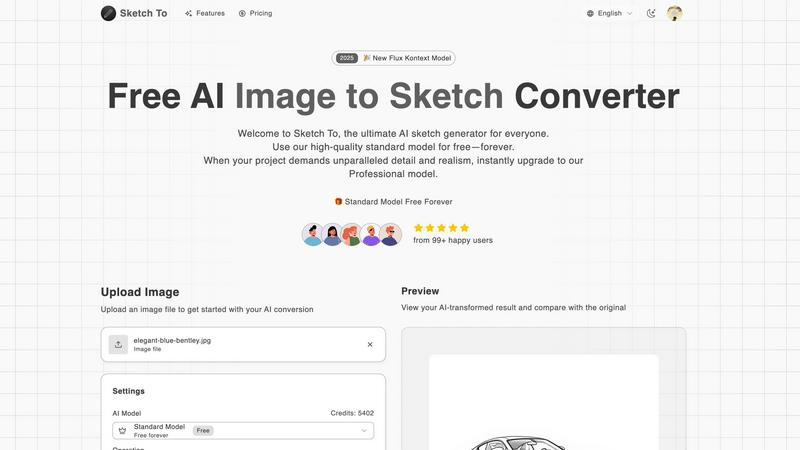
Begin your creative journey by transforming any image into a stunning AI sketch with ease.
Last updated: February 28, 2026
Visual Comparison
Facejam

Sketch To
Feature Comparison
Facejam
Extensive Style Options
FaceJam boasts over 100 professional styles designed specifically for diverse industries. Whether you are a creative, a lawyer, or a consultant, you can find a look that is tailored to your field. This vast selection means you can easily present a polished image that fits the professional standards of your industry.
Quick and Efficient Process
The beauty of FaceJam lies in its simplicity. Users can create high-quality headshots in mere minutes. By eliminating the need for scheduling appointments and commuting to a studio, FaceJam saves valuable time, allowing you to focus on what really matters—your career.
Realistic, Studio-Quality Images
The AI technology behind FaceJam ensures that the final headshots look authentic and professional. Unlike other AI tools that may produce images that feel artificial, FaceJam delivers results that could easily pass for those taken by a professional photographer, making it ideal for serious business use.
Ownership and Privacy
When you use FaceJam, you retain complete ownership of your generated images. With a full commercial license granted, you can use your headshots freely across various platforms. Additionally, privacy is a priority; your uploaded photos are only used to create your images and are not shared with others or used to train the AI further.
Sketch To
Dual-Direction AI Conversion
Sketch To empowers your creativity with its core, bidirectional magic. You can start your journey in either direction. Upload a photograph, and watch as our AI meticulously extracts lines, shadows, and textures to render it as a beautiful sketch in styles ranging from classic pencil to vibrant watercolor. Conversely, begin with a simple line drawing, and our advanced Pro model can infuse it with depth, color, and realism, transforming a basic sketch into a detailed image that looks like it was captured by a camera. This dual functionality makes it an incredibly versatile studio in your browser.
Tiered AI Model Ecosystem
Your creative journey is unique, and Sketch To honors that with a tailored model system. Start your exploration with the high-quality Standard Model, perfect for social media content, personal projects, and learning the ropes, with new users receiving trial credits to begin. When your project demands the utmost in detail, texture, and accuracy—for client work or commercial art—you can instantly upgrade to the Professional Model. This tiered approach ensures every creator, at every stage, has access to the perfect level of AI power for their needs without complexity.
Instant, High-Resolution Processing
The magic should be fast, not frustrating. Sketch To is built on a powerful, cloud-based AI engine that processes your conversions in seconds, not hours. There's no waiting for slow renders or dealing with laggy software. Furthermore, every creation you generate is delivered in high resolution, ensuring the output is not just quick but also of exceptional quality. This means your AI-generated sketches and images are ready for large prints, portfolio pieces, or high-definition digital displays the moment they are finished.
Expansive Artistic Style Library
Your vision has a specific tone, and Sketch To provides the palette. Beyond simple conversion, you guide the aesthetic outcome by choosing from a wide array of artistic styles. Whether you envision the gritty texture of a charcoal sketch, the bold lines of a comic, the delicate wash of watercolor, or the precise shading of a digital illustration, you can select the style that best fits your narrative. This feature allows for incredible creative control, letting you iterate and see your original file through multiple artistic lenses instantly.
Use Cases
Facejam
Professional Networking
With FaceJam, you can quickly generate eye-catching headshots for your LinkedIn profile. A polished image can significantly enhance your professional presence, making you stand out in a crowded job market. Your profile will not only look professional but also reflect the seriousness of your career ambitions.
Corporate Branding
For businesses looking to create a cohesive team image, FaceJam provides an efficient way to generate consistent headshots for corporate directories, team pages, and pitch decks. This helps establish a professional brand identity while ensuring all team members are represented equally.
Personal Branding for Creatives
Artists, writers, and other creatives can use FaceJam to create consistent, high-quality images for their personal websites and social media profiles. This helps in building a recognizable brand that attracts potential clients, collaborators, and followers, all while showcasing professionalism.
Real Estate Marketing
For realtors, having a compelling headshot is crucial in establishing trust with clients. FaceJam allows agents to generate polished headshots that can be used in marketing materials, helping to create a trustworthy and approachable image that resonates with potential buyers and sellers.
Sketch To
Social Media Content Creation
In the fast-paced world of social media, standing out is a journey of constant innovation. Content creators and influencers can use Sketch To to instantly transform their photos into eye-catching pencil sketches or artistic illustrations, creating unique, themed posts for Instagram, Pinterest, or TikTok. Conversely, they can conceptualize a scene with a quick sketch and use the AI to generate a realistic backdrop or product image, streamlining the content creation pipeline and captivating their audience with fresh, artistic visuals.
Professional Design & Storyboarding
For graphic designers, concept artists, and agencies, time is the most valuable currency. Sketch To accelerates the early stages of the creative journey. Designers can quickly convert client photos into sketch concepts for logos, characters, or environments to present ideas. Storyboard artists can sketch rough frames and use the "sketch to image" function to generate more polished, atmospheric scenes, allowing for faster client approvals and a more dynamic pitch process that visualizes the story effectively.
Personal Art Project Enhancement
Every hobbyist artist knows the journey has moments of both inspiration and limitation. With Sketch To, you can take a personal photograph—a portrait of a loved one, a pet, or a memorable landscape—and convert it into a beautiful sketch to use as a reference or the final piece for a traditional art project like painting or cross-stitch. Alternatively, if you have a sketch you love but lack the confidence or medium to fully render it, the AI can help visualize the final product, guiding your hand or serving as the completed digital artwork.
Educational & Learning Tool
The journey of learning art involves studying form, light, and composition. Students and art teachers can use Sketch To as an interactive educational aid. By converting photographs of master paintings or sculptures into line sketches, students can better analyze the underlying structures. They can also practice by drawing a sketch, then using the AI to generate a realistic version, comparing their understanding of form and lighting with the AI's interpretation to identify areas for improvement and growth.
Overview
About Facejam
In today's fast-paced digital world, first impressions matter more than ever. FaceJam offers a revolutionary solution for anyone looking to create stunning, professional headshots from the comfort of their own home. This innovative AI tool transforms your selfies into studio-quality portraits in just a few clicks. No longer do you need to book expensive photographers or endure awkward photoshoots. Simply upload a few photos, select from over 50 tailored styles, and watch as FaceJam generates high-resolution images that are perfect for LinkedIn, resumes, and personal branding. Designed for professionals across various industries—from real estate agents to corporate executives—FaceJam ensures that your visual representation aligns with your career aspirations. With its user-friendly interface and focus on quality, FaceJam empowers you to put your best face forward without the hassle and expense of traditional photography.
About Sketch To
Imagine you're an artist, standing before a blank canvas. In one hand, you hold a cherished photograph, a moment frozen in time. In the other, a sketch that's been living in your notebook, yearning to break free into full color. The journey from vision to masterpiece is often filled with technical hurdles and time-consuming processes. This is where Sketch To steps in, not just as a tool, but as your creative companion. Sketch To is an innovative, AI-powered platform designed to bridge the gap between imagination and reality. It serves a dual purpose: transforming your everyday photos into stunning, detailed sketches and, magically, breathing life into your simple drawings by converting them into photorealistic images. This journey-focused tool is built for everyone—from the hobbyist doodling for joy to the professional designer on a tight deadline. Its core promise is to remove friction from the creative process. With no software to install and no subscriptions locking you in, Sketch To offers a seamless path from upload to awe-inspiring result. Whether you're beginning your artistic journey with a free trial or scaling your professional work with world-class realism, Sketch To is the portal that turns your creative sparks into stunning visual stories.
Frequently Asked Questions
Facejam FAQ
How does your AI headshot generator work?
FaceJam operates on a straightforward two-step process. First, you upload your selfies, and then you choose your preferred template from a variety of styles. The AI takes it from there, producing realistic headshots ready for download in just minutes.
What do you do with my uploaded photos?
Your uploaded photos are used exclusively to create your headshots. They help the AI understand your likeness to generate realistic images. Importantly, your photos are not stored or used to enhance the AI model or serve other users.
How many good photos can I expect?
FaceJam guarantees at least one high-quality image in every package you purchase. Depending on the quality of the selfies you upload and how closely you follow the guidelines, you could receive 5-10 or more stunning headshots that you can use.
Who owns my AI photos?
You retain full ownership of all AI-generated photos. FaceJam grants you a complete commercial license, meaning you are free to use your headshots across various platforms without any restrictions or additional fees.
Sketch To FAQ
Do I need to download any software to use Sketch To?
No, your creative journey with Sketch To begins entirely online. There is no software to download or install. The platform is a web-based application that runs directly in your browser. All you need is an internet connection to upload your file, choose your style, and let our powerful cloud AI process your image instantly. This makes it accessible from any device, anywhere, removing all technical barriers to starting your project.
What is the difference between the Standard and Professional models?
Think of it as choosing the vehicle for your creative journey. The Standard Model is a robust, high-quality option perfect for everyday travel—social media posts, personal hobbies, and learning. It delivers excellent sketch conversions. The Professional Model is the high-performance upgrade for when your destination demands the best. It unlocks superior detail, unparalleled realism, sharper accuracy, and is licensed for commercial use. It's designed for professional projects, client work, and where the finest texture and depth are non-negotiable.
How do the free trial credits work?
We believe every journey should start with a first step, risk-free. New users who sign up for an account automatically receive free trial credits. These credits allow you to experience the power of the Standard Model and perform several conversions at no cost. It's the perfect way to explore the platform's features, test the quality, and see how Sketch To can fit into your creative workflow before deciding to purchase any additional credit packs or subscriptions.
What file formats and sizes do you support?
To ensure a smooth journey, Sketch To supports common image file formats like JPG, PNG, and WebP for upload. The current maximum file size for upload is 5MB, which is ideal for web-based images and typical photos. The output images you download are provided in high-resolution formats suitable for both digital use and print. Always check the upload area on the site for the most up-to-date specifications on supported formats and size limits.
Alternatives
Facejam Alternatives
Facejam is an innovative tool that falls under the category of image and photo editing, specifically designed to transform selfies into stunning studio-quality headshots using advanced AI technology. Users can effortlessly upload pictures, select from over 50 professional styles, and generate polished images in mere minutes, eliminating the need for expensive photographers and time-consuming edits. As users explore their options, they often seek alternatives for various reasons, such as budget constraints, specific feature requirements, or compatibility with different platforms. When choosing an alternative, it’s essential to consider aspects like the variety of styles offered, the realism of the generated images, and the overall ease of use, ensuring that the chosen solution aligns with personal branding needs and professional standards.
Sketch To Alternatives
Sketch To is a captivating AI-powered tool in the image and photo category, designed to bridge the gap between photography and drawing. It empowers creators to transform photos into beautiful sketches or elevate simple drawings into photorealistic images, all with the ease of a web-based platform. This journey from one artistic medium to another opens up a world of creative storytelling. Users often explore alternatives for various reasons. Some may seek different pricing structures or subscription models, while others might need specific features for niche projects. Platform compatibility, such as mobile apps or desktop software, and the desire for a particular artistic style can also lead creators to look at other tools on the market. When choosing an alternative, consider your creative destination. Look for a tool that aligns with your primary goal, whether it's achieving a specific sketch style, batch processing images, or integrating into a larger workflow. Ease of use, output quality, and the overall value for your artistic journey are the key landmarks to guide your decision.