
SimpleDraw vs Supermachine
Side-by-side comparison to help you choose the right product.

SimpleDraw
Effortlessly create precise floor plans and scale drawings online with SimpleDraw's intuitive web-based tool.
Last updated: March 1, 2026

Supermachine
Begin your creative journey and bring stunning AI images and videos to life with over 60 powerful models.
Last updated: March 18, 2026
Visual Comparison
SimpleDraw
Supermachine

Feature Comparison
SimpleDraw
Floor Plan Mode
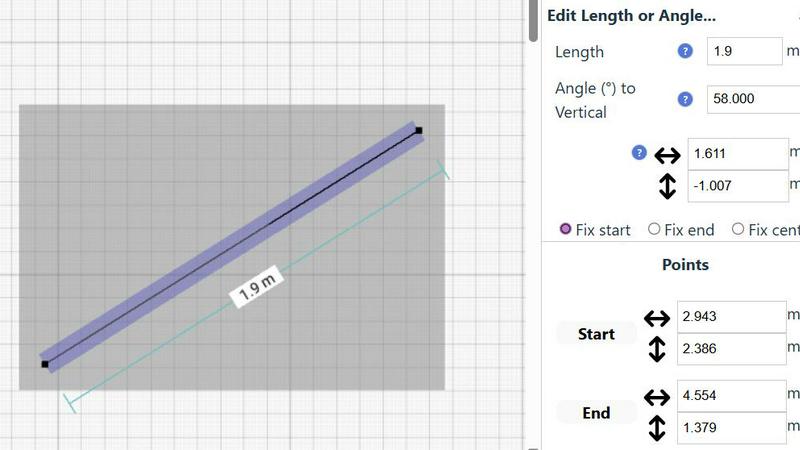
SimpleDraw includes a dedicated Floor Plan Mode, making it easy to create accurate floor plans for rooms, apartments, and entire houses. Users can effortlessly draw walls and add windows and doors with a single click. As adjustments are made, real-time measurements are displayed, ensuring that every detail aligns perfectly with the user's vision.
Smart Alignment System
The Smart Alignment System is a standout feature that assists users in placing points and lines exactly where they want them. By simply pointing the mouse, users can achieve precise positioning with clear visual cues. If adjustments are needed, zooming in provides greater precision, allowing users to guide elements accurately, making the drawing process seamless and efficient.
Comprehensive Measurement System
SimpleDraw offers a robust measurement system that allows users to toggle between metric and standard US units. Contextual measurements are dynamically displayed while users create their drawings. This comprehensive feature ensures that users can achieve the accuracy they need for their designs, whether they are planning a small room or an entire home.
Non-Destructive Editing
With 100% non-destructive editing, every element of a drawing can be modified at any time without losing previous work. SimpleDraw includes intuitive undo and redo options, facilitating easy adjustments. Users can also group elements for efficient movement and copying, streamlining repetitive tasks and enhancing productivity.
Supermachine
Curated AI Model Library
Supermachine takes the guesswork out of AI selection. Instead of a chaotic, ever-changing list of thousands of untested models, you get access to a hand-picked collection of over 60 high-performing models. Each model has been rigorously tested and selected for its reliability, output quality, and specific creative utility, ensuring you get professional-grade results without the hassle of constant experimentation.
Rapid Video Generation
Transform your static ideas into dynamic stories in moments. Supermachine's video generation feature allows you to create engaging short-form videos directly from text prompts or images. This tool is perfect for crafting social media clips, promotional content, or visual concepts, all within the platform's famously fast sub-15-second generation time, keeping your content pipeline flowing.
AI Image Edit Tool (Photoshop AI)
Consider this your intelligent digital darkroom. Go beyond simple generation and dive into precise editing. This powerful feature allows you to modify existing images using AI—effortlessly removing objects, changing backgrounds, extending scenes, or altering details with simple text instructions, bringing a level of control and refinement previously reserved for expert designers.
ControlNet & Custom Sizes
Take absolute control over your compositions. With features like ControlNet, you can guide the AI using reference images for pose, depth, or edges, ensuring your output matches your precise vision. Coupled with the ability to generate images in custom sizes and aspect ratios (like 4:3), you can create visuals perfectly tailored for any platform, from Instagram stories to website banners.
Use Cases
SimpleDraw
Kitchen and Bathroom Renovations
When planning a kitchen or bathroom renovation, SimpleDraw allows users to create accurate layouts that visualize their ideas before starting any work. This feature helps prevent costly mistakes, ensuring that the final design meets both functionality and aesthetic goals.
Room Layouts and Furniture Planning
Whether designing a cozy bedroom, an inviting living room, or a productive office space, SimpleDraw makes it easy to visualize room layouts. Users can experiment with different furniture arrangements, ensuring that everything fits and flows well before making any purchases.
House and Apartment Plans
For those creating complete floor plans for home projects or rental listings, SimpleDraw provides a user-friendly platform to design intricate layouts. From single-room designs to multi-level homes, users can create detailed plans that accurately represent their spaces.
Community-Driven Design Projects
SimpleDraw encourages community involvement by allowing users to share their designs and collaborate on projects. By joining the SimpleDraw community through Discord, users can request features, share ideas, and help shape the tool's future, fostering a sense of shared creativity.
Supermachine
Social Media Content Creation
For social media managers and influencers, Supermachine is a daily lifesaver. Rapidly generate a week's worth of unique, eye-catching images and short videos for posts, stories, and thumbnails. Maintain a consistent, professional aesthetic across all platforms without the need for expensive photoshoots or stock photo subscriptions, all in a fraction of the time.
Marketing & Advertising Campaigns
Marketers can swiftly prototype and produce high-quality visuals for campaigns, email newsletters, and digital ads. Test different creative concepts, generate custom illustrations that match brand identity, and create compelling ad assets that capture audience attention, accelerating the entire campaign development cycle from ideation to execution.
Digital Art & NFT Projects
Artists and creators can use Supermachine as a boundless source of inspiration and a powerful co-creation tool. Explore new styles, generate unique base artwork for further refinement, and create distinctive collections of digital art or NFTs. The platform's diverse model library helps artists break creative blocks and venture into new aesthetic territories.
Small Business Branding
Small business owners can build a strong, professional visual brand from the ground up. Create a cohesive set of logo concepts, product mockups, website graphics, and promotional flyers without hiring a designer. This empowers entrepreneurs to tell their brand story visually and compete in the marketplace with a polished, credible appearance.
Overview
About SimpleDraw
SimpleDraw is a groundbreaking online tool that empowers users to create precise and accurate scale drawings effortlessly. Ideal for DIY enthusiasts, home renovators, and anyone who wants to visualize a space, SimpleDraw is designed to transform ideas into reality. With its intuitive interface, users can jump right in, regardless of their experience level. The platform's primary value proposition lies in its blend of simplicity and accuracy, allowing for the creation of detailed floor plans, elevations, and other scale drawings without the need for complex software. Best of all, SimpleDraw is completely free to use, requiring no login or registration. This accessibility invites all users, from casual planners to seasoned designers, to explore their creativity and bring their projects to life.
About Supermachine
Imagine a world where your creative vision meets reality in the time it takes to brew a cup of coffee. This is the journey Supermachine invites you on. It is your all-in-one creative studio, powered by artificial intelligence, designed to democratize professional-quality visual creation. Whether you're a social media manager racing against the clock, a marketer dreaming up the perfect campaign visual, an artist exploring new digital frontiers, or a small business owner crafting compelling ads, Supermachine is your trusted companion. Its core promise is profound simplicity and breathtaking speed: generating stunning stock photos, illustrations, thumbnails, NFTs, and short-form videos in under 15 seconds. You don't need to be a prompt engineering expert; you just need an idea. Trusted by a thriving community of over 100,000 creators who generate a million images weekly, Supermachine stands apart by focusing on quality over quantity. Instead of overwhelming you with every new model, its team curates a selection of over 60 high-performing AI models that have proven genuinely useful and reliable. This ensures your creative journey is not a gamble with new tech, but a consistent path to top-tier results, project after project.
Frequently Asked Questions
SimpleDraw FAQ
Is SimpleDraw really free to use?
Yes, SimpleDraw is completely free to use. There are no hidden fees, and users do not need to create an account or log in to access its features.
Do I need any prior experience to use SimpleDraw?
No prior experience is required to use SimpleDraw. The platform is designed with a user-friendly interface that makes it accessible for beginners while still powerful enough for advanced users.
Can I save my drawings on SimpleDraw?
Currently, SimpleDraw does not support saving drawings directly. However, users can take screenshots of their designs or use other methods to save their work externally.
What types of drawings can I create with SimpleDraw?
With SimpleDraw, users can create a variety of drawings, including floor plans, room layouts, and architectural designs. The tool is versatile and suitable for both personal and professional projects.
Supermachine FAQ
Who is Supermachine designed for?
Supermachine is designed for creators of all skill levels. It is perfectly suited for social media managers, digital marketers, artists, small business owners, content creators, and anyone who needs to produce high-quality visual content quickly and without requiring deep technical expertise in AI or complex design software.
How fast can I create content with Supermachine?
The platform is built for speed. You can generate professional-quality images, illustrations, and short-form videos in under 15 seconds from a text prompt. This rapid turnaround time is core to its value proposition, enabling you to iterate on ideas and produce content at the pace of modern digital demands.
What makes Supermachine different from other AI art generators?
Supermachine differentiates itself through its curated approach. While many platforms offer hundreds of unstable or low-quality models, Supermachine selectively integrates and maintains a library of over 60 proven, high-performing models. This focus on reliability and quality ensures consistent, top-tier results, saving you time and frustration.
Do I need to be good at writing AI prompts?
Not at all. Supermachine is designed to simplify the process. While you can write detailed prompts for more control, the platform is optimized to deliver excellent results with straightforward, simple descriptions. Its intuitive interface and powerful models handle the complex engineering, allowing you to focus on your creative idea.
Alternatives
SimpleDraw Alternatives
SimpleDraw is a cutting-edge web-based drawing tool designed for users seeking to create precise scale drawings and floor plans with ease. As a design tool, it empowers individuals from all walks of life—whether DIY enthusiasts or seasoned professionals—to visualize their projects without the steep learning curve associated with traditional software. However, users often seek alternatives to SimpleDraw for various reasons, including pricing concerns, the need for additional features, or compatibility with different platforms. When looking for alternatives, it’s crucial to consider factors such as the user interface, the range of tools available, and whether the software can accommodate specific project requirements. A good alternative should also provide similar ease of use and flexibility, ensuring that users can continue their creative journey without interruption.
Supermachine Alternatives
Supermachine is a leading AI-powered design tool that helps creators generate images and videos with remarkable speed. It belongs to the vibrant category of creative AI platforms, where innovation is constant and user needs are diverse. Even with its powerful suite of over 60 models, creators often explore the landscape for different reasons. The search for an alternative can stem from many factors. Budget constraints, a need for a specific niche feature, or a preference for a different user interface are all common drivers. Some may seek platforms with a stronger focus on community or those that offer more granular control over the AI generation process. When evaluating other options, consider what matters most for your creative workflow. Key aspects to weigh include the quality and variety of output, the learning curve, pricing transparency, and the platform's roadmap. The right tool should not only meet your technical requirements but also feel like a natural extension of your creative journey.