
Gleem.AI Studio vs SimpleDraw
Side-by-side comparison to help you choose the right product.

Gleem.AI Studio
Gleem.AI Studio empowers your creativity by seamlessly generating and editing stunning visuals in one intuitive.
Last updated: February 27, 2026

SimpleDraw
Effortlessly create precise floor plans and scale drawings online with SimpleDraw's intuitive web-based tool.
Last updated: March 1, 2026
Visual Comparison
Gleem.AI Studio

SimpleDraw
Feature Comparison
Gleem.AI Studio
Text to Image Generator
Transform your ideas into stunning visuals using the text to image generator. Users can choose their desired size and set their creative vision, while Gleem's Prompt Enhance feature refines their input, ensuring the generated images align closely with their expectations.
AI Image Editing
Edit images effortlessly with the intuitive AI image editing tool. Users can add or remove objects, adjust poses, apply filters, and restore old images all in one convenient editor. This feature simplifies the editing process, enabling quick and effective adjustments without the need for complicated settings.
AI Avatars
Create and personalize your own AI avatars to integrate into any scene. This feature allows users to appear in photos, modify poses, or try on different outfits without the hassle of scheduling a photoshoot, offering a unique way to enhance visual content.
Organized Project Spaces
Each project lives in its own dedicated space, complete with saved prompts, edits, and versions. This organizational feature ensures that everything remains accessible, making it easy for users to build on their ideas and iterate without losing context or progress.
SimpleDraw
Floor Plan Mode
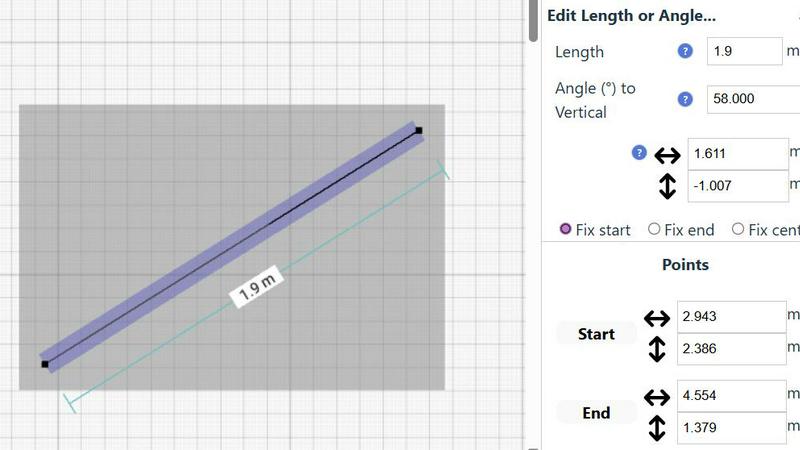
SimpleDraw includes a dedicated Floor Plan Mode, making it easy to create accurate floor plans for rooms, apartments, and entire houses. Users can effortlessly draw walls and add windows and doors with a single click. As adjustments are made, real-time measurements are displayed, ensuring that every detail aligns perfectly with the user's vision.
Smart Alignment System
The Smart Alignment System is a standout feature that assists users in placing points and lines exactly where they want them. By simply pointing the mouse, users can achieve precise positioning with clear visual cues. If adjustments are needed, zooming in provides greater precision, allowing users to guide elements accurately, making the drawing process seamless and efficient.
Comprehensive Measurement System
SimpleDraw offers a robust measurement system that allows users to toggle between metric and standard US units. Contextual measurements are dynamically displayed while users create their drawings. This comprehensive feature ensures that users can achieve the accuracy they need for their designs, whether they are planning a small room or an entire home.
Non-Destructive Editing
With 100% non-destructive editing, every element of a drawing can be modified at any time without losing previous work. SimpleDraw includes intuitive undo and redo options, facilitating easy adjustments. Users can also group elements for efficient movement and copying, streamlining repetitive tasks and enhancing productivity.
Use Cases
Gleem.AI Studio
Marketing Campaigns
Gleem.AI Studio is perfect for marketers looking to create visual assets for campaigns. With its streamlined workflow, users can generate eye-catching images tailored for various platforms, ensuring brand consistency and visual appeal.
Social Media Content Creation
Creators can utilize Gleem.AI Studio to design stunning social media visuals quickly. The ease of generating and editing images makes it possible to respond to trends and engage audiences effectively, all while maintaining a cohesive brand aesthetic.
Product Visualization
Small teams can leverage the platform to create high-quality product images without the need for extensive photography setups. The AI tools enable quick iterations on product shots, allowing teams to showcase their offerings in the best light.
Creative Experimentation
Artists and designers can use Gleem.AI Studio to test creative variations in a hassle-free manner. The ability to remix and edit images in one place fosters an environment of exploration and innovation, making it easier to bring imaginative ideas to life.
SimpleDraw
Kitchen and Bathroom Renovations
When planning a kitchen or bathroom renovation, SimpleDraw allows users to create accurate layouts that visualize their ideas before starting any work. This feature helps prevent costly mistakes, ensuring that the final design meets both functionality and aesthetic goals.
Room Layouts and Furniture Planning
Whether designing a cozy bedroom, an inviting living room, or a productive office space, SimpleDraw makes it easy to visualize room layouts. Users can experiment with different furniture arrangements, ensuring that everything fits and flows well before making any purchases.
House and Apartment Plans
For those creating complete floor plans for home projects or rental listings, SimpleDraw provides a user-friendly platform to design intricate layouts. From single-room designs to multi-level homes, users can create detailed plans that accurately represent their spaces.
Community-Driven Design Projects
SimpleDraw encourages community involvement by allowing users to share their designs and collaborate on projects. By joining the SimpleDraw community through Discord, users can request features, share ideas, and help shape the tool's future, fostering a sense of shared creativity.
Overview
About Gleem.AI Studio
Gleem.AI Studio is a revolutionary AI image workspace crafted for those who prioritize creation over configuration. This unified platform is designed to eliminate the hassles of juggling multiple tools for image generation, editing, and revisions. Instead, users can enjoy a seamless workflow where everything is housed in a single environment. Gleem.AI Studio empowers marketers, creators, and small teams to generate, edit, and remix visuals effortlessly. With its straightforward approach, users can focus on their visual storytelling, allowing their creativity to flow without getting bogged down by technical complexities. Whether you are crafting marketing materials, social media visuals, product images, or exploring creative variations, Gleem.AI Studio provides a simple, fast, and intuitive solution that keeps the creative process smooth and enjoyable.
About SimpleDraw
SimpleDraw is a groundbreaking online tool that empowers users to create precise and accurate scale drawings effortlessly. Ideal for DIY enthusiasts, home renovators, and anyone who wants to visualize a space, SimpleDraw is designed to transform ideas into reality. With its intuitive interface, users can jump right in, regardless of their experience level. The platform's primary value proposition lies in its blend of simplicity and accuracy, allowing for the creation of detailed floor plans, elevations, and other scale drawings without the need for complex software. Best of all, SimpleDraw is completely free to use, requiring no login or registration. This accessibility invites all users, from casual planners to seasoned designers, to explore their creativity and bring their projects to life.
Frequently Asked Questions
Gleem.AI Studio FAQ
What is Gleem.AI Studio?
Gleem.AI Studio is an integrated AI image workspace that simplifies the process of generating, editing, and remixing visuals, tailored for marketers, creators, and small teams.
How does the text to image generator work?
The text to image generator allows users to input their ideas in plain language. Users can adjust the size and vision, while the platform's Prompt Enhance refines the input for optimal image generation.
Can I edit images after generating them?
Yes, Gleem.AI Studio features an AI image editing tool that lets users make adjustments to generated images, including adding or removing objects and applying filters, all in one intuitive workspace.
Is there support available for new users?
Absolutely! Gleem.AI Studio provides resources, including guides and a support contact, ensuring that new users can get the assistance they need while navigating the platform.
SimpleDraw FAQ
Is SimpleDraw really free to use?
Yes, SimpleDraw is completely free to use. There are no hidden fees, and users do not need to create an account or log in to access its features.
Do I need any prior experience to use SimpleDraw?
No prior experience is required to use SimpleDraw. The platform is designed with a user-friendly interface that makes it accessible for beginners while still powerful enough for advanced users.
Can I save my drawings on SimpleDraw?
Currently, SimpleDraw does not support saving drawings directly. However, users can take screenshots of their designs or use other methods to save their work externally.
What types of drawings can I create with SimpleDraw?
With SimpleDraw, users can create a variety of drawings, including floor plans, room layouts, and architectural designs. The tool is versatile and suitable for both personal and professional projects.
Alternatives
Gleem.AI Studio Alternatives
Gleem.AI Studio is an innovative all-in-one AI image workspace that stands out in the marketing category for its ability to simplify the creation and editing of visuals. By offering a unified platform for generating and modifying images, it eliminates the hassle of switching between multiple tools, enabling users to focus on their creative vision rather than technical configurations. However, users often seek alternatives for various reasons, including pricing, feature set, and specific platform needs that may not be fully addressed by Gleem.AI Studio. When choosing an alternative, it's essential to consider the ease of use, the ability to streamline workflows, and the specific functionalities that align with your creative goals to ensure a seamless and efficient experience.
SimpleDraw Alternatives
SimpleDraw is a cutting-edge web-based drawing tool designed for users seeking to create precise scale drawings and floor plans with ease. As a design tool, it empowers individuals from all walks of life—whether DIY enthusiasts or seasoned professionals—to visualize their projects without the steep learning curve associated with traditional software. However, users often seek alternatives to SimpleDraw for various reasons, including pricing concerns, the need for additional features, or compatibility with different platforms. When looking for alternatives, it’s crucial to consider factors such as the user interface, the range of tools available, and whether the software can accommodate specific project requirements. A good alternative should also provide similar ease of use and flexibility, ensuring that users can continue their creative journey without interruption.