
quickseo.ai vs RemoveTexts
Side-by-side comparison to help you choose the right product.

QuickSEO.ai empowers brands to track and enhance their visibility on Google and AI platforms, all from one intuitive dashboard.
Last updated: March 11, 2026

RemoveTexts
Effortlessly erase text, watermarks, and unwanted elements from images in seconds with RemoveTexts, no design skills needed.
Last updated: March 11, 2026
Visual Comparison
quickseo.ai
RemoveTexts

Feature Comparison
quickseo.ai
Advanced Search Analytics
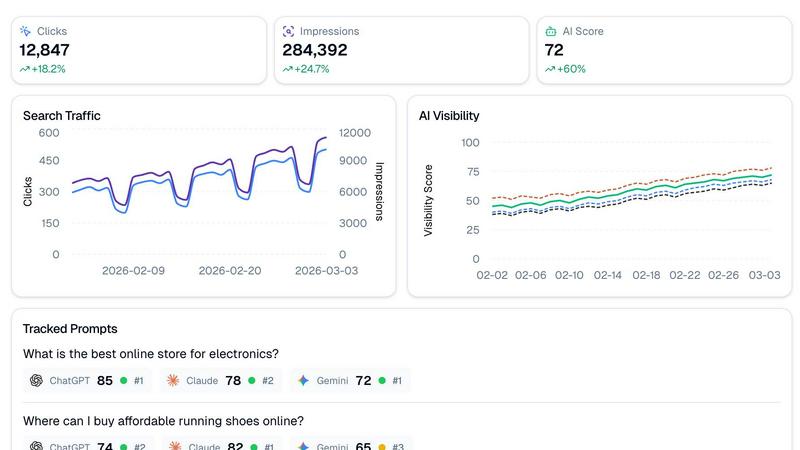
QuickSEO.ai offers a full suite of Google Search Console analytics, including clicks, impressions, and ranking trends. This comprehensive view helps users understand their SEO performance over time, providing essential insights to improve ranking strategies.
Daily AI Visibility Scoring
Get real-time insights into how your brand is performing across popular AI platforms. QuickSEO.ai generates daily visibility scores for your brand, allowing you to track changes and adapt quickly to maintain or improve your standing in AI-driven search results.
Tracked Prompt Rankings
Identify the questions your customers are asking AI chatbots and see where your brand ranks in those conversations. This feature lets you tailor your content strategy, ensuring you are present in the most relevant AI-generated answers.
Competitor Tracking
Stay informed about your competitors’ presence in AI search results with QuickSEO.ai’s competitor tracking feature. By automatically extracting mentions of your brand alongside others in AI responses, you can develop strategies to outperform your competition and capture more traffic.
RemoveTexts
Paint to Remove
This feature allows users to have precise control over the text removal process. By simply brushing over specific areas of unwanted text, users can ensure that only the intended elements are erased, resulting in a tailored editing experience.
Auto Remove All
With this intelligent feature, RemoveTexts automatically detects and removes all text elements in the image with just one click. This is perfect for users who want to clean up images rapidly without the need for manual adjustments.
Edit & Replace Text
RemoveTexts goes beyond simple removal by allowing users to replace existing text in images while perfectly matching the original style. This feature is ideal for those who want to change information or branding without altering the overall look of the image.
Remove Objects
This versatile feature enables users to erase not only text but also unwanted objects, logos, and visual elements from their images. It expands the utility of RemoveTexts beyond text-only tasks to comprehensive image editing.
Use Cases
quickseo.ai
Brand Performance Monitoring
Marketers can use QuickSEO.ai to monitor how their brand is perceived across various AI platforms. By analyzing AI visibility scores and sentiment analysis, businesses can adjust their marketing strategies to enhance brand reputation and visibility.
SEO Strategy Optimization
With access to detailed search analytics and tracked prompt rankings, SEO professionals can refine their strategies based on real-time data. This allows them to identify high-performing keywords and improve their content accordingly, ensuring they remain competitive.
Competitor Analysis
Businesses can utilize QuickSEO.ai to gain insights into their competitors’ performance in AI search. By understanding which brands are mentioned alongside theirs, they can identify gaps in their strategy and capitalize on new opportunities.
Targeting Consumer Behavior
QuickSEO.ai helps brands understand consumer behavior by analyzing the questions users ask in AI chatbots. This insight allows businesses to tailor their content to meet specific customer needs, ultimately driving engagement and conversions.
RemoveTexts
E-commerce Product Photos
Online sellers can use RemoveTexts to clean up their product images by removing distracting watermarks or text overlays. This results in visually appealing photos that can enhance sales and attract potential customers.
Legal Document Redaction
Lawyers and legal professionals can utilize RemoveTexts to redact sensitive information from documents and images, ensuring that confidential details are securely removed without compromising the image's quality.
Social Media Content Creation
Content creators can take advantage of RemoveTexts to enhance their social media graphics by swiftly removing unnecessary text, allowing for a cleaner look that attracts more engagement from followers.
Educational Resources
Educators can use RemoveTexts to prepare instructional materials by removing unwanted text or distractions from images, ensuring that the focus remains on the essential content being presented.
Overview
About quickseo.ai
QuickSEO.ai is an innovative tool designed to enhance your online presence by merging Google Search Console analytics with AI visibility metrics across major platforms like ChatGPT, Claude, and Gemini. As the digital landscape evolves, a staggering 44% of consumers now rely on AI as their primary search source, making it crucial for brands to understand their performance across these channels. QuickSEO.ai provides marketers and businesses with a comprehensive dashboard that eliminates guesswork, allowing users to track their brand's visibility in both traditional search and AI-driven environments. With features like daily AI visibility scoring, tracked prompt rankings, and sentiment analysis, QuickSEO.ai empowers brands to capture AI-driven traffic opportunities and stay ahead of the competition.
About RemoveTexts
RemoveTexts is a revolutionary AI-powered online tool designed for effortless image editing, specifically focusing on removing unwanted text from images. Whether you are a designer, marketer, or simply someone looking to enhance your images, RemoveTexts provides an intuitive solution to clean up visuals in mere seconds. With no prior design skills required, users can simply upload their images, and RemoveTexts will intelligently erase watermarks, captions, subtitles, and any other text elements while preserving the integrity of the original background. The tool harnesses advanced deep learning inpainting technology to ensure that the results are not only quick but also professional-grade. Trusted by over 100,000 users globally, RemoveTexts has established itself as an essential resource for anyone needing clean and polished images without the hassle of complex software.
Frequently Asked Questions
quickseo.ai FAQ
How does QuickSEO.ai track AI visibility?
QuickSEO.ai integrates data from Google Search Console with visibility metrics from AI platforms like ChatGPT, Claude, and Gemini. This dual approach provides a comprehensive view of brand performance across both traditional and AI-driven search environments.
What kind of insights can I gain from sentiment analysis?
The sentiment analysis feature of QuickSEO.ai evaluates how AI chatbots discuss your brand. It categorizes mentions as positive, neutral, or negative, giving you crucial insights into public perception and helping you address any negative feedback proactively.
Can I track my competition with QuickSEO.ai?
Absolutely! QuickSEO.ai includes a competitor tracking feature that automatically identifies which brands are mentioned alongside yours in AI responses. This enables you to stay informed about your competitive landscape and strategize accordingly.
Is there a free trial available for QuickSEO.ai?
Yes, QuickSEO.ai offers a free trial, allowing you to explore its features and benefits without any commitment. This is a great opportunity for marketers to experience the power of AI visibility tracking firsthand.
RemoveTexts FAQ
How does RemoveTexts work?
RemoveTexts uses advanced AI and deep learning inpainting technology to analyze surrounding pixels and seamlessly reconstruct the background after removing text. This ensures that the edited image looks natural and professional.
What file formats does RemoveTexts support?
Users can upload images in JPG, PNG, and WebP formats, with a maximum file size of 10 MB. This flexibility allows users to work with various image types for their editing needs.
Is there a limit to how many images I can process?
While RemoveTexts is designed for efficient processing, there is no specific limit on the number of images you can process. Users can upload and edit multiple images as needed.
Are there any skills required to use RemoveTexts?
No design skills are required to use RemoveTexts. The tool is designed to be user-friendly, allowing anyone to easily upload images and remove text without any prior experience in graphic design or editing software.
Alternatives
quickseo.ai Alternatives
QuickSEO.ai is an innovative tool designed to help brands track and improve their visibility on Google and across AI platforms through comprehensive analytics. It operates within the marketing category, offering features like advanced search analytics, daily visibility scoring in AI contexts, and competitor tracking. Users often seek alternatives to QuickSEO.ai due to factors such as pricing, the need for specific features, or compatibility with different platforms. When exploring alternatives, it's essential to consider aspects like usability, the scope of analytics provided, and how well the tool integrates with existing systems to ensure it meets your brand's unique needs. --- [{"question": "What is quickseo.ai?", "answer": "QuickSEO.ai is a tool that tracks and enhances brand visibility on Google and AI platforms through detailed analytics."}, {"question": "Who is quickseo.ai for?", "answer": "QuickSEO.ai is designed for marketers, brand managers, and businesses looking to optimize their online presence across search engines and AI."}, {"question": "Is quickseo.ai free?", "answer": "QuickSEO.ai offers various pricing plans, and it is advisable to check their website for details on free trials or pricing options."}, {"question": "What are the main features of quickseo.ai?", "answer": "Key features of quickseo.ai include advanced search analytics, AI visibility scoring, sentiment analysis, and competitor tracking."}]
RemoveTexts Alternatives
RemoveTexts is an innovative AI-powered tool designed to quickly and efficiently remove unwanted text from images, making it ideal for creators, marketers, and designers. This product falls within the image editing category, offering features that streamline the process of cleaning up visuals without the need for complex software like Photoshop. Users often seek alternatives to RemoveTexts for various reasons, including pricing considerations, specific feature sets, or compatibility with different platforms. When searching for an alternative, it's essential to evaluate aspects such as ease of use, the effectiveness of text removal technology, and the range of editing options available. Compatibility with multiple languages and the quality of output should also be key factors, as these elements significantly impact the overall user experience and satisfaction.