
Proofapp vs Refbox
Side-by-side comparison to help you choose the right product.

Proofapp
Stop endless email chains by pinning visual feedback directly on your website.
Last updated: March 4, 2026

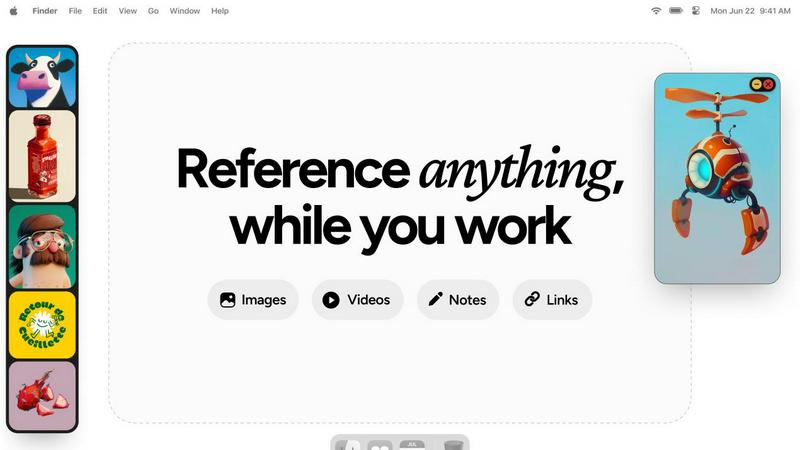
Refbox gives you instant, distraction-free access to all your essential references right above your workspace.
Last updated: February 28, 2026
Visual Comparison
Proofapp

Refbox
Feature Comparison
Proofapp
Visual Commenting
Gone are the days of describing a UI element as "top left, under the navigation, next to the blue thing." With Proofapp's visual commenting, reviewers simply click directly on the live screenshot to leave a pin. This creates a comment that is irrevocably tied to that exact pixel, eliminating all spatial ambiguity. Team members can then reply in threads, creating a clear, contextual conversation around each specific piece of feedback, ensuring nothing is lost in translation and every suggestion is perfectly understood.
Multi-Breakpoint Testing
In today's multi-device world, feedback on just a desktop view is insufficient. Proofapp understands this journey and automatically captures your website at both desktop and mobile breakpoints the moment you provide a URL. This allows stakeholders to provide precise feedback for each experience simultaneously, ensuring your design is polished and functional across all screen sizes without the need for manual, error-prone screenshotting from different browsers or devices.
Secure, Account-Free Sharing
The journey to gather client feedback often hits a roadblock when they are asked to create yet another account. Proofapp removes this friction entirely. You can share a project via a secure, expirable link that grants clients immediate access to view and comment. They participate fully in the feedback process without any sign-up forms, making the collaboration process incredibly smooth and professional, while you maintain control over access and project security.
Real-Time Collaboration & Resolution
Watching feedback arrive in real-time transforms a linear, slow process into a dynamic, collaborative session. As team members and clients pin comments, everyone sees them appear instantly. You can discuss, reply, and—most importantly—mark items as resolved. This creates a living, actionable task list directly on the design, providing a clear visual progress tracker that ensures no feedback falls through the cracks and everyone is aligned on what's done and what's next.
Refbox
Floating Reference Frames
Refbox allows you to pin images, videos, GIFs, and notes in floating frames that remain on top of any application you are using. This means your references are always available without the need to switch contexts, enhancing your focus and workflow.
Infinite Canvas and Slideshow View
Experience an infinite canvas that lets you see all your references at once. With the slideshow feature, you can seamlessly flip through items for quick comparisons, ensuring you have the right inspiration at your fingertips when you need it.
Auto-Hide and Quick Access
Refbox comes with an auto-hide feature that keeps your workspace clean. With a simple toggle, you can show or hide the reference box, allowing you to focus on your project while still having the ability to access your references instantly.
Customizable Shortcuts and Pixel Rendering
Enjoy full control over your references with customizable shortcuts that make navigating through your media a breeze. Additionally, the pixel rendering feature ensures that your pixel art is displayed accurately, maintaining the integrity of your work.
Use Cases
Proofapp
Freelancer-Client Website Reviews
For freelancers, time is the most precious commodity. Using email chains to collect client feedback on a new website design is a time-consuming journey filled with misinterpretation. Proofapp streamlines this into a professional, visual process. The freelancer shares a secure link, and the client clicks directly on the design to leave clear notes. This saves hours per project, reduces revision rounds, and presents a polished, efficient workflow that impresses clients and protects the freelancer's schedule.
Agency Managing Multiple Client Projects
Creative and development agencies juggle multiple client projects simultaneously, each with its own team and stakeholders. Managing feedback across all these projects via email and shared drives is a recipe for chaos. Proofapp provides a centralized, visual dashboard for each project. It keeps all client and internal feedback organized, threaded, and pinned to the correct design, ensuring that project managers can track progress accurately and teams never implement feedback from the wrong email thread.
In-House Design & Development Handoff
The journey from a design mockup to a live feature involves careful collaboration between designers and developers. Vague written specifications can lead to build errors and rework. With Proofapp, designers can share the live prototype or staging site URL. Developers can then pin specific questions or issues directly onto the UI element in question, creating a precise, visual dialogue that ensures the final build matches the design intent perfectly, speeding up the development cycle.
Marketing Team Landing Page Optimization
Launching a high-converting landing page requires input from copywriters, designers, and marketing managers. Proofapp facilitates this cross-functional review seamlessly. The team can collectively view the page, pin feedback on headlines, imagery, and call-to-action buttons, and attach supporting documents like brand guidelines or analytics reports. This visual collaboration ensures the final page is a cohesive, optimized asset before it ever goes live to the audience.
Refbox
Seamless Moodboarding
Refbox is perfect for designers who need to create moodboards quickly. By having all their visual references accessible in one place, designers can effortlessly curate inspiration, making the creative process more intuitive and enjoyable.
Animation Reference Management
Animators can benefit from Refbox by pinning crucial reference frames or videos that inform their work. This keeps their visual aids organized and readily accessible, allowing for enhanced productivity and creativity during the animation process.
UI/UX Design Integration
For UI/UX designers, Refbox serves as a tool to keep design inspirations, color palettes, and user interface elements in view while working on digital projects. This accessibility leads to faster iterations and more cohesive designs.
Concept Art Development
Concept artists can utilize Refbox to gather various references, from photographs to sketches, in one floating hub. This allows them to draw from multiple inspirations without disrupting their workflow, fostering a more fluid creative process.
Overview
About Proofapp
Imagine the last time you tried to collect feedback on a website design. The process likely started with a flurry of emails, each containing a new screenshot with hastily drawn arrows and the dreaded phrase, "See attached." Hours were lost to confusion, misinterpretation, and tracking down which comment referred to which version of the design. This was the old way. Proofapp is the new way. It is a visual feedback and collaboration platform built to transform this chaotic, error-prone journey into a smooth, efficient, and clear path from concept to launch. By simply pasting a URL, Proofapp automatically captures your site at desktop and mobile breakpoints, creating a shared visual canvas. On this canvas, clients, designers, developers, and marketers can pin comments directly onto the design, reply in organized threads, attach files, and resolve feedback—all without the reviewer needing an account. It replaces scattered emails and vague notes with a single source of truth, ensuring every piece of feedback is visual, contextual, and actionable. Built for freelancers, agencies, and product teams, Proofapp is the tool that finally turns the painful process of revisions into a collaborative journey, saving teams over five hours per week and cutting miscommunication by 60%.
About Refbox
Refbox is the ultimate floating reference companion designed specifically for creative professionals like illustrators, animators, 3D artists, UI/UX designers, and concept artists. It transforms the often chaotic and fragmented creative process into a streamlined experience, allowing users to keep their inspiration visible and accessible at all times. Imagine a workspace where your ideas, images, videos, GIFs, and notes float effortlessly above your primary applications, eliminating the need to alt-tab between cluttered folders and multiple browser tabs. Refbox is built to honor the creative journey by reducing distractions and maintaining momentum. By providing a centralized hub for all your media, it empowers you to focus on what truly matters: creating. With features that allow you to organize your references in a beautiful Masonry grid or access them through resizable frames, Refbox redefines how you interact with your inspiration, making it a vital tool for anyone serious about their craft.
Frequently Asked Questions
Proofapp FAQ
How do reviewers leave comments without an account?
The process is designed for maximum ease. When you create a project in Proofapp and capture your website, you generate a unique, secure sharing link. You simply send this link to your clients or stakeholders. When they open it, they are presented with the screenshots and can immediately start clicking to leave pinned comments and participate in threads. No registration, passwords, or downloads are required on their end, removing a major barrier to collaboration.
What kind of websites can I use with Proofapp?
Proofapp is built to work with any publicly accessible website URL. This includes live production sites, staging environments, password-protected sites (if you provide the credentials during capture), and even local development servers using a tunneling service. As long as a URL can be loaded in a browser, Proofapp can capture it for visual feedback, making it versatile for every stage of your development journey.
Is my data and feedback secure?
Yes, security is a cornerstone of the Proofapp journey. Projects are shared via secure links that you can set to expire. The platform offers enterprise-grade security features including role-based permissions and audit logs. Your website screenshots and all associated feedback conversations are stored securely, ensuring that sensitive client projects and internal design iterations are handled with care and confidentiality.
Can I integrate Proofapp with other tools like Slack?
Absolutely. Proofapp offers integration with Slack to streamline your team's workflow. You can connect your workspace to receive real-time notifications in a designated Slack channel whenever new feedback is posted or comments are resolved. This keeps everyone in the loop without requiring them to constantly check the Proofapp dashboard, embedding the feedback process directly into your team's existing communication journey.
Refbox FAQ
How does Refbox improve my workflow?
Refbox reduces context-switching by keeping all your references visible on top of your workspace. This allows you to maintain your creative flow and focus on your work without distractions.
Can I use Refbox with any application?
Yes, Refbox is designed to float above any application, making it compatible with various creative software like Photoshop, Blender, and Figma, among others.
Is there a way to organize my references in Refbox?
Absolutely! Refbox allows you to organize your media into collections, and you can view everything in a beautiful Masonry grid or access them through individual frames.
What types of media can I store in Refbox?
You can store a wide range of media in Refbox, including images, GIFs, videos, notes, and clickable bookmarks for tutorials, making it a comprehensive tool for all your creative needs.
Alternatives
Proofapp Alternatives
Proofapp is a visual feedback and website review platform, a vital tool in the design collaboration category. It streamlines the process of collecting and managing feedback by allowing users to pin comments directly onto live website screenshots, turning vague notes into clear, actionable tasks. Users often explore alternatives for various reasons. Some may need a different pricing structure as their team grows, while others might require deeper integrations with specific project management or development platforms. The search can also be driven by a need for more advanced features like video feedback, version history, or different permission controls. When choosing an alternative, focus on the core of your collaboration journey. Consider how your team communicates and resolves feedback today. Look for a solution that not only captures visual comments but also fits seamlessly into your existing workflow, ensuring that the tool enhances clarity rather than adding another layer of complexity to your process.
Refbox Alternatives
Refbox is an innovative tool designed for creative professionals, enabling them to keep essential references visible and easily accessible as they work on projects. This floating reference companion caters specifically to illustrators, animators, UI/UX designers, and concept artists, helping them maintain focus while minimizing the distractions that often arise from constant context-switching between applications. Users often seek alternatives to Refbox for various reasons, including pricing considerations, feature sets that better align with their specific workflows, or compatibility with different platforms. When exploring alternatives, it is essential to evaluate factors such as ease of use, the ability to organize references effectively, and whether the tool enhances or hinders your creative process. Finding the right fit can significantly impact your productivity and overall satisfaction with your creative work.