
IMsupporting Hybrid Live Chat vs Interhubz
Side-by-side comparison to help you choose the right product.

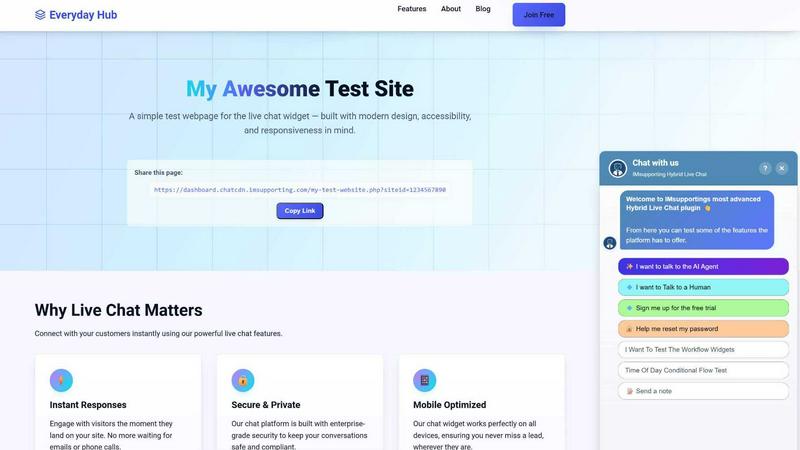
IMsupporting Hybrid Live Chat
Guide your customers from AI answers to human help in one seamless chat journey that builds trust and resolves issues faster.
Last updated: March 11, 2026

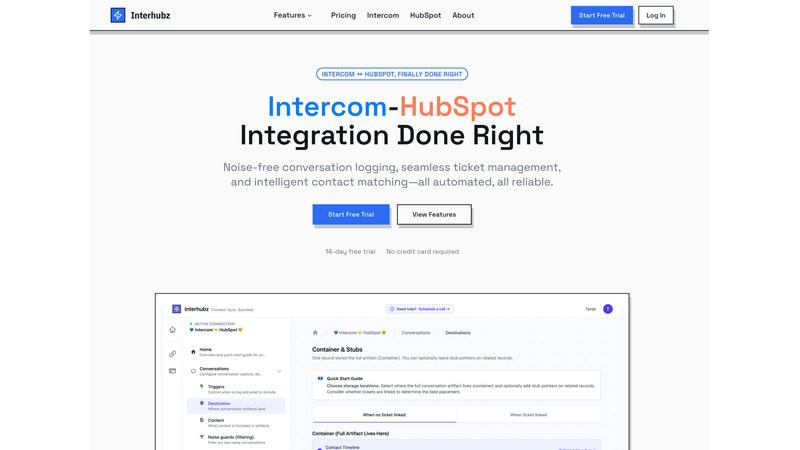
Interhubz
Interhubz effortlessly syncs Intercom chats to HubSpot as clean, organized entries with smart ticketing and noise.
Last updated: February 27, 2026
Visual Comparison
IMsupporting Hybrid Live Chat
Interhubz
Feature Comparison
IMsupporting Hybrid Live Chat
Visual Workflow Builder
Forget rigid, linear scripts. The visual workflow builder is your storytelling canvas for customer conversations. Using an intuitive drag-and-drop interface, you can design sophisticated chat journeys in minutes. Map out branching logic based on user intent, create steps for data capture, set conditions for routing by department or office hours, and seamlessly trigger AI actions or human handoffs. This empowers your team to build adaptive, intelligent support flows that feel natural and guide visitors to a resolution, whether through automation or a live agent, without ever breaking the narrative flow.
RAG-Based AI Knowledge Assistant
This feature ensures your AI doesn't just answer—it answers correctly, using your own voice. By uploading your company documents, FAQs, and knowledge base, you train the AI using Retrieval-Augmented Generation (RAG). This means the AI provides accurate, context-aware responses pulled directly from your trusted content. It’s like having a super-informed team member who has memorized every policy document and product manual, ensuring customers receive consistent, reliable information and freeing your human agents from repetitive factual queries.
Hybrid AI-Human Handoff
The core of the IMsupporting experience is the graceful dance between bot and human. The AI confidently handles routine inquiries, but the moment a conversation requires empathy, complex judgment, or specialist knowledge, it initiates a seamless transfer. The entire chat history is passed to the live operator, so the customer never has to repeat themselves. This creates a continuous, frustration-free story for the visitor, where they feel heard and efficiently helped, transitioning from automated support to personal care without a single hiccup.
Custom AI Tool Integration
Extend the narrative of your support beyond the chat window. This powerful feature allows you to connect the AI directly to your existing business systems—your CRM, inventory database, payment gateways, or any API. Imagine a story where a customer asks about an order status, and the AI, in real-time, fetches the tracking details from your logistics system. Or a visitor wants to check product stock, and the AI queries your warehouse database instantly. It turns the chat into an action center, automating complex workflows across your entire tech stack.
Interhubz
One Note Per Conversation
With Interhubz, every Intercom conversation is consolidated into a single, readable note in HubSpot. This feature eliminates the clutter of multiple entries, allowing teams to view conversation history clearly, which enhances productivity and decision-making.
Intelligent Contact Matching
Interhubz employs advanced algorithms to ensure accurate contact matching across platforms. By considering email, phone numbers, and custom properties, it eliminates duplicate entries, ensuring that your CRM remains clean and organized, fostering better customer relationships.
One-Click Ticket Creation
This feature allows users to create HubSpot tickets directly from Intercom with just a single click. The bi-directional status sync means that any updates made in Intercom reflect in HubSpot automatically, ensuring that your team's workflows remain synchronized without manual intervention.
Noise Guards
Interhubz comes equipped with smart noise guards that automatically filter out low-value interactions, such as bot conversations and spam. This means only meaningful conversations make their way into HubSpot, keeping your CRM clean and your team's focus intact.
Use Cases
IMsupporting Hybrid Live Chat
Public Sector & Citizen Services
For councils, police contact centers, and government portals, managing high-volume public inquiries efficiently is paramount. IMsupporting’s workflows can triage citizens, direct them to the correct forms or information pages, collect necessary details for case creation, and route complex or sensitive issues to the appropriate human advisor. This ensures faster service, reduces call center burden, and provides a modern, accessible digital contact channel that operates 24/7 for initial guidance and support.
E-commerce & Customer Support
Turn browsing into buying and issues into loyalty. The AI can instantly answer FAQs on shipping and returns, retrieve order details, and even process simple returns or check live stock levels via custom integrations. When a shopper has a pre-sales question about product specifications or a complex post-purchase issue, the conversation is smoothly handed to a live sales or support agent who has the full context, dramatically increasing conversion rates and customer satisfaction scores.
Legal & Financial Services Intake
For law firms, financial advisors, and consultancies, the initial client intake process is critical. IMsupporting can guide potential clients through a structured, conversational workflow to capture essential case details, assess eligibility, schedule consultations, and collect documents—all while ensuring GDPR compliance. This qualifies leads effectively, saves administrative time, and allows human professionals to step in for nuanced advice only after the foundational information is securely gathered.
Enterprise IT & Internal Help Desks
Streamline internal employee support. Staff can use the chat widget to get instant AI-powered answers to common IT policy questions, password reset workflows, or software how-tos from the company knowledge base. For more technical issues, the system can automatically create a ticket in your ITSM software (like Jira or ServiceNow) and route the live chat to the correct IT specialist team, complete with all the troubleshooting steps already attempted, ensuring rapid resolution.
Interhubz
Support Teams
Support teams using Intercom can effortlessly log conversations into HubSpot, ensuring that sales and customer success teams have access to complete and structured interaction histories, which enhances collaboration and customer follow-up.
Sales Teams
Sales professionals can leverage Interhubz to quickly create tickets from relevant support conversations, ensuring that they have the context needed for effective follow-ups without the hassle of switching between platforms.
Customer Success Teams
Customer success teams can utilize the clean and organized notes generated by Interhubz to understand customer issues and feedback better. This insight helps in providing tailored solutions and improving customer satisfaction.
Integration and Development Teams
Integration and development teams can take advantage of the API access provided by Interhubz. This allows them to create custom workflows and integrate additional tools, extending the functionality of their systems seamlessly.
Overview
About IMsupporting Hybrid Live Chat
Imagine a visitor arriving on your website, full of intent but perhaps a little lost. The clock is ticking. Will they find their answer, or will they slip away, another lost opportunity? This is the critical moment where IMsupporting Hybrid Live Chat steps in, transforming that fleeting visit into a meaningful journey. It's not just a chat widget; it's a dynamic, intelligent conversation engine designed to guide, assist, and connect. Built for organisations of all sizes—from nimble startups to established enterprises and public sector bodies—IMsupporting masterfully blends AI automation with human empathy. The platform acts as a tireless first responder, instantly answering common queries, retrieving information, and guiding users through workflows. But its true magic lies in its seamless handoff. When a conversation requires a personal touch or complex problem-solving, it intelligently routes the visitor, along with the full chat history, to a live human operator. This hybrid approach ensures no customer is left waiting and no query is ever too simple or too complex. The result is a powerful narrative of efficiency and care: dramatically reduced response times, significantly improved customer satisfaction, and a tangible increase in conversions, all powered by a conversation that feels effortlessly helpful from the very first "Hello."
About Interhubz
Interhubz is a powerful integration tool designed to bridge the gap between Intercom and HubSpot, alleviating the common frustrations that businesses face when managing customer communication across these platforms. It is specifically tailored for teams where support operates through Intercom while sales and customer success rely on HubSpot. Interhubz streamlines the synchronization of data, providing a seamless experience that eliminates timeline pollution and the chaos of fragmented conversations. With Interhubz, each Intercom conversation is transformed into a single, organized note in HubSpot, complete with the full transcript and attachments, ensuring that nothing valuable is lost in translation. By focusing on intelligent contact matching and automated ticket management, Interhubz empowers teams to focus on what matters most: building strong customer relationships without the manual overhead that typically bogs them down.
Frequently Asked Questions
IMsupporting Hybrid Live Chat FAQ
How quickly can I get IMsupporting live chat on my website?
The setup is designed for a swift start to your customer service story. You can have the basic live chat widget installed and operational on your website in under 5 minutes. The platform offers native plugins for popular platforms like WordPress and Shopify for near-instant deployment, along with a simple universal code snippet for any other site.
Is my customer data secure with IMsupporting?
Absolutely. Security is a foundational chapter in the IMsupporting story. The platform offers enterprise-grade security with bank-level encryption for data in transit and at rest. It is hosted in the UK in GDPR-compliant data centers, providing advanced threat protection and ensuring your customer data is handled with the highest standards of privacy and security for global operations.
Can the AI really handle conversations without human intervention?
Yes, for a wide range of defined interactions. The AI excels at managing routine, repetitive queries such as password resets, tracking orders, answering FAQs from your knowledge base, and collecting information through structured workflows. Its ability to provide instant, accurate responses 24/7 forms the efficient opening chapter of many customer journeys, with human agents ready to step in for the more complex plot twists.
What if I need to integrate with my existing CRM or other tools?
IMsupporting is built to fit into your existing tech narrative seamlessly. It offers native integrations with over 50 platforms like WordPress, Shopify, and Magento. For custom connections, it provides a robust REST API and webhook functionality. The Custom AI Tool Integration feature allows you to connect the AI directly to your internal APIs, enabling it to perform live actions within your CRM, inventory, or payment systems.
Interhubz FAQ
How does Interhubz eliminate timeline pollution?
Interhubz consolidates every Intercom conversation into a single note in HubSpot, which significantly reduces the number of entries per conversation, making it easier to track important interactions without clutter.
What platforms does Interhubz integrate with?
Interhubz primarily integrates with Intercom and HubSpot, providing a seamless connection between these two powerful tools to enhance operational efficiency and data synchronization.
Is there a free trial available for Interhubz?
Yes, Interhubz offers a 7-day free trial with no credit card required, allowing teams to test the features and see how it can benefit their operations before making a commitment.
How long does it take to set up Interhubz?
Setting up Interhubz is quick and efficient, with most users able to complete the connection process in less than 10 minutes, allowing teams to start syncing their data almost immediately.
Alternatives
IMsupporting Hybrid Live Chat Alternatives
Imagine a customer arriving at your digital doorstep, a question poised on their lips. In that critical moment, the bridge you build determines everything. IMsupporting Hybrid Live Chat is that bridge—a customer support platform that masterfully blends AI automation with the warmth of human connection, ensuring no visitor's journey is left unattended. Yet, every business has its own unique path. Some may seek alternatives due to budget constraints, needing a solution that scales differently. Others might require specific integrations, a particular user interface for their team, or a feature set tailored to a niche workflow. The quest for the right tool is a deeply personal part of a company's growth story. When exploring other options, focus on the heart of your customer's experience. Look for a balance of intelligent automation and seamless human handoff, robust analytics to understand the journey, and the flexibility to mold the tool to your brand's voice. The goal is to find a partner that doesn't just answer questions, but thoughtfully guides each visitor toward a successful destination.
Interhubz Alternatives
Interhubz is an innovative integration tool designed to sync Intercom chats with HubSpot, resulting in clean and organized single timeline entries. This product is particularly beneficial for teams that rely on Intercom for customer support while managing sales and customer success through HubSpot. By addressing common pain points, such as cluttered timelines and duplicate entries, Interhubz streamlines communication and enhances productivity. Users often seek alternatives to Interhubz for various reasons, including pricing, specific features, or unique platform requirements that may not be met by the product. When searching for an alternative, it's essential to consider factors such as integration capabilities, ease of use, and the ability to filter out unnecessary information while maintaining a seamless workflow. Prioritizing these elements will help ensure that the chosen solution effectively supports your team's objectives.