
Hush Touch | Voice-to-Text for MacOS vs URL to Any
Side-by-side comparison to help you choose the right product.

Hush Touch | Voice-to-Text for MacOS
Transform your Mac into a smart dictation tool that learns your words and works offline for just $20.
Last updated: February 27, 2026

URL to Any
Begin your journey from a simple link to any format you need with our free, all-in-one conversion toolkit.
Last updated: February 28, 2026
Visual Comparison
Hush Touch | Voice-to-Text for MacOS

URL to Any
Feature Comparison
Hush Touch | Voice-to-Text for MacOS
Dual-Engine Recognition
Hush Touch utilizes a unique dual-engine recognition system that combines the capabilities of DictationTranscriber for natural flow and punctuation with SFSpeechRecognizer for custom vocabulary enhancement. This blend of technologies ensures high accuracy in transcription, accommodating various speaking styles and technical jargon.
Custom Vocabulary Learning
The app comes equipped with a custom vocabulary feature that allows users to add up to 500 terms, including technical jargon, medical terms, and brand names. Hush Touch learns from corrections made by the user, continually improving its recognition accuracy and adapting to the user's unique language preferences.
Smart Text Processing
With intelligent text processing capabilities, Hush Touch removes filler words and auto-corrects common mistakes in real-time. It can also format numbered lists and recognize voice snippets for frequently used phrases, enhancing the dictation experience and ensuring polished, professional output.
Context Modes & Hands-Free Features
Hush Touch includes various context modes, such as General, Email, Code, and Notes, allowing users to switch seamlessly based on their dictation needs. The app supports hands-free operation; users can activate dictation using Siri and automatically insert text after a brief pause, making it a truly hands-free solution.
URL to Any
Multi-Format Conversion Engine
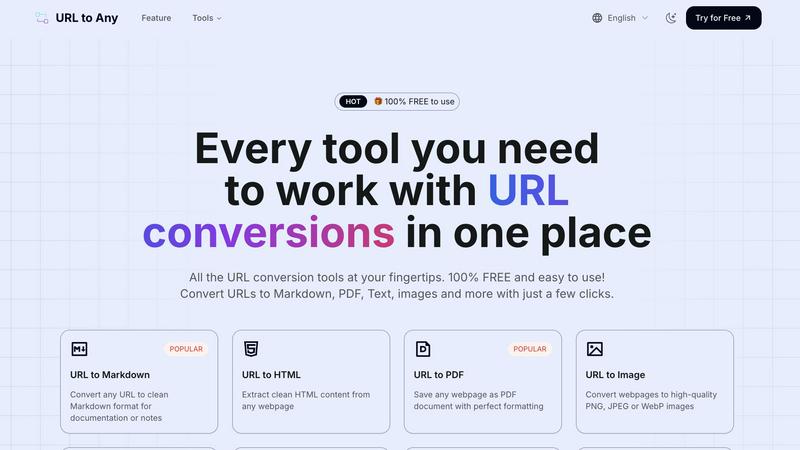
At the heart of URL to Any lies its powerful conversion engine, capable of morphing a single webpage into over ten different formats. Whether you need the structured clarity of Markdown for documentation, the portability of a PDF for archiving, the visual fidelity of a PNG image, or the data-friendly structure of JSON and XML, this tool handles it all. It's like having a specialized toolkit for every possible content need, all accessible through one simple interface, ensuring the web's information can fit perfectly into your workflow.
Intelligent Content Extraction
Beyond simple conversion, URL to Any intelligently extracts and cleans content. Tools like the URL to Text and URL to HTML features strip away ads, navigation bars, and other clutter, delivering only the core article or data you want. The AI Summarizer takes this further, using advanced technology to distill lengthy pages into concise summaries, while specialized extractors pull out meta tags, headings, and all embedded URLs, giving you clean, focused material ready for immediate use.
Instant QR Code & Shareability Tools
The journey from digital content to physical world sharing is seamless with the integrated QR code generator. Transform any URL into a scannable code in an instant, perfect for presentations, printed materials, or easy mobile sharing. Furthermore, tools like the URL Opener allow you to launch multiple webpages simultaneously, streamlining research or monitoring tasks, making information management not just about saving, but also about efficient access and distribution.
Secure, Cloud-Based Processing
Your privacy and security are paramount on this journey. All conversion magic happens in the cloud, requiring no software installation and freeing up your local resources. More importantly, your data is processed securely and is never stored on their servers. This means you can convert sensitive or private URLs with confidence, enjoying lightning-fast results that are both global in access and private in execution.
Use Cases
Hush Touch | Voice-to-Text for MacOS
Drafting Emails
Hush Touch makes composing emails effortless. Users can dictate their messages naturally, and with features like auto-punctuation and filler word removal, the output is polished and professional, allowing for quick and effective communication.
Taking Notes
For students and professionals alike, Hush Touch is an invaluable tool for taking notes during lectures or meetings. The app's ability to recognize context-specific vocabulary and format lists ensures that notes are well-organized and easy to follow.
Writing Content
Freelance writers and content creators can leverage Hush Touch to draft articles, blog posts, and reports hands-free. The adaptive learning feature helps the app recognize specific terminology related to various niches, streamlining the writing process.
Coding and Technical Documentation
Developers can benefit from Hush Touch by dictating code and technical documentation. The app's dual-engine recognition system is adept at handling programming language terms, allowing for efficient and accurate transcription of complex instructions.
URL to Any
Research and Academic Archiving
A student or researcher traversing the vast landscape of online journals, articles, and sources can use URL to Any to build a personal, organized library. By converting essential webpages into well-formatted PDFs or Markdown files, they create permanent, offline-friendly references that are easy to annotate and cite, ensuring crucial information is preserved beyond the lifespan of a browser tab.
Content Creation and Curation
Bloggers, writers, and social media managers often find inspiration across the web. With this tool, they can instantly convert a competitor's article into clean text for analysis, transform a news piece into an image for a social media post, or generate a QR code linking to their source material. It streamlines the curation process, turning found content into raw material for new, original creations.
Developer and Technical Documentation
For developers and technical writers, clean code and documentation are key. Converting API documentation pages or tutorial blogs into structured Markdown or HTML allows for easy integration into internal docs or project wikis. The JSON/XML conversion features are invaluable for data scraping prototypes or analyzing webpage structure, all without writing a single line of scraping code.
SEO and Digital Marketing Audits
Digital marketers embark on audits to analyze competitors or optimize their own sites. The URL Meta Tags and Heading Extractor tools provide instant insights into on-page SEO elements, which can be exported to CSV for further analysis. Simultaneously, converting key landing pages to PDF allows for easy visual comparison and presentation of findings to clients or team members.
Overview
About Hush Touch | Voice-to-Text for MacOS
Hush Touch is a revolutionary voice-to-text application designed specifically for macOS that transforms how users approach dictation. With an emphasis on speed, natural language processing, and privacy, Hush Touch enables users to dictate their thoughts seamlessly while maintaining full control of their data. The app operates entirely on-device, ensuring that your voice recordings and transcriptions remain private and secure, without reliance on cloud services. This innovative tool combines two advanced Apple transcription engines with an intelligent final processing pass, yielding cleaner and more accurate text output. Ideal for professionals, students, and anyone who values efficiency in their writing workflow, Hush Touch empowers users to draft emails, notes, and documents hands-free with minimal setup. At a one-time purchase of just $20, Hush Touch offers a lifetime license, making it an affordable and indispensable tool for enhancing productivity.
About URL to Any
Imagine you're deep in research, crafting a report, or building a project, and you stumble upon the perfect webpage. The information is gold, but it's trapped behind a browser tab. You need it in a different form—a clean document for your team, a formatted note for your knowledge base, or a shareable snapshot. This is where your journey with URL to Any begins. It's more than just a tool; it's your digital alchemist, transforming the raw ore of web content into the refined formats you need to move forward. Designed for content creators, developers, students, and professionals of all kinds, URL to Any eliminates the tedious middle steps of manual copying, pasting, and reformatting. Its core promise is profound simplicity: paste a link, choose your destination format, and receive a perfectly converted result in seconds. This completely free, no-registration-required platform empowers you to capture, preserve, and repurpose online information with unprecedented ease, turning the chaotic web into a structured, personal resource.
Frequently Asked Questions
Hush Touch | Voice-to-Text for MacOS FAQ
How does Hush Touch ensure my privacy?
Hush Touch operates entirely on-device, meaning all voice processing and transcription happen locally on your Mac. There is no data collection or cloud dependency, ensuring your voice remains confidential.
Can I customize the vocabulary in Hush Touch?
Yes, Hush Touch allows users to add up to 500 custom terms to its vocabulary. The app learns from corrections and adapts over time, improving its ability to recognize specialized terminology.
Is Hush Touch suitable for hands-free operation?
Absolutely! Hush Touch supports hands-free dictation via Siri activation. Users can dictate messages and commands without needing to touch their device, making it incredibly versatile for multitasking.
What is the pricing model for Hush Touch?
Hush Touch is available for a one-time purchase of $20, providing users with a lifetime license. This model eliminates subscription fees, making it an economical choice for anyone in need of reliable voice-to-text software.
URL to Any FAQ
Is URL to Any really free to use?
Yes, absolutely. URL to Any is 100% free to use. Every tool featured on the platform, from converting URLs to PDF and Markdown to using the AI Summarizer and meta tag extractors, is completely free. There is no registration required, no hidden fees, and no usage limits, making it an accessible resource for everyone.
What happens to the data from the URLs I convert?
Your privacy is a top priority. The data from the webpages you convert is processed securely in the cloud for the sole purpose of conversion. Importantly, this data is never stored on their servers after the conversion is complete. Each conversion is a transient, private event.
Can I convert a webpage that requires login or is behind a paywall?
Typically, no. URL to Any functions as a tool that accesses the publicly available version of a webpage, just like a standard web browser. It cannot bypass login screens, subscription paywalls, or any other forms of authentication that restrict public access to content.
What formats can I convert a URL into?
The platform supports a wide and growing array of formats. The most popular include Markdown, PDF, PNG/JPEG/WebP images, clean Text, HTML, JSON, and XML. You can also generate QR codes, extract all URLs from a site, and use specialized tools for encoding/decoding text in various formats.
Alternatives
Hush Touch | Voice-to-Text for MacOS Alternatives
Hush Touch | Voice-to-Text for MacOS is an innovative offline dictation application designed specifically for macOS users. It stands out in the AI Assistants category, utilizing two powerful Apple transcription engines along with an Apple Intelligence final pass to deliver remarkably accurate text without the need for an internet connection. This focus on privacy and performance makes it an appealing choice for individuals seeking a seamless dictation experience. However, users often find themselves exploring alternatives due to various reasons such as pricing, feature sets, or compatibility with different platforms. When looking for alternatives, it's essential to consider factors like the application's accuracy, ease of use, integration with existing workflows, and whether it maintains user privacy through offline processing. A thoughtful assessment of these elements can guide users toward a solution that best meets their specific needs and preferences.
URL to Any Alternatives
In the bustling world of AI assistants and content tools, URL to Any carves out a unique space. It’s the digital alchemist that transforms a simple webpage link into a treasure trove of formats—Markdown for your notes, PDFs for your archives, or QR codes for your campaigns. It’s designed for anyone on a journey to manage information more fluidly, from creators to developers, offering a free and instant bridge between the web and their projects. Yet, every traveler's path is different. Some may seek a tool that integrates directly into their existing workflow, while others might require advanced features like batch processing or API access. Perhaps the need for a specific output format not offered, or a desire for a different user interface, prompts the search for a new companion. The quest for the right tool is deeply personal. When evaluating other paths, consider what matters most for your journey. Look at the core conversion capabilities—does it handle the formats you use daily? Assess the ease of the journey itself; is the interface intuitive? Finally, consider the long-term road: are there usage limits, costs, or privacy policies that align with your destination? The right alternative isn't just about features; it's about finding a tool that seamlessly joins your workflow adventure.