
Giga AI vs Phishly
Side-by-side comparison to help you choose the right product.

Giga AI gives your coding assistant a project brain to build the right thing faster, without errors.
Last updated: February 28, 2026

Phishly
Navigate your inbox safely with AI that instantly spots phishing emails before you click.
Visual Comparison
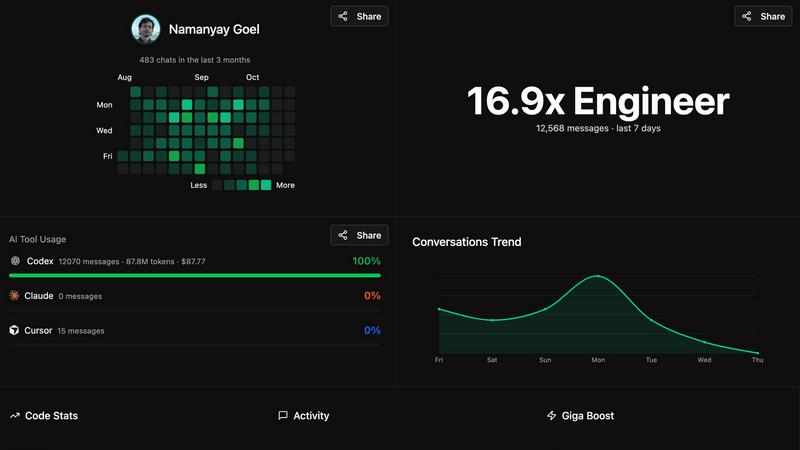
Giga AI
Phishly
Feature Comparison
Giga AI
Project Brain & Context Engineering
Giga AI acts as a persistent memory and reasoning layer for your entire project. It automatically analyzes your codebase from multiple angles, generating intelligent 'rules' files that capture your project's structure, dependencies, and style. This deep understanding means your AI assistant is never lost, building code that seamlessly integrates with your existing work instead of hallucinating incompatible solutions.
Universal IDE Integration
Begin your streamlined workflow in seconds, not hours. Giga AI installs effortlessly as an extension on all the popular AI-powered coding environments, including Cursor, Claude Code, VS Code, and more. It works alongside you as you write, providing continuous, real-time analysis without disrupting your natural development flow or requiring complex setup procedures.
Hallucination & Error Reduction
Say goodbye to the majority of frustrating AI mistakes. By providing your AI with a crystal-clear, constantly updated understanding of your project, Giga AI ensures code generation is accurate and relevant from the first prompt. Builders report a dramatic 72% reduction in bugs and errors, turning time spent on debugging back into time spent on building and innovation.
Autonomous Planning & Execution
Reclaim your role as the architect. With Giga AI managing the context, you can trust your AI to handle complex, multi-step tasks. Users confidently let 50-item plans run autonomously, knowing the AI will stay on track and aligned with the project vision. This shifts your focus from micromanaging prompts to overseeing high-level strategy and creative direction.
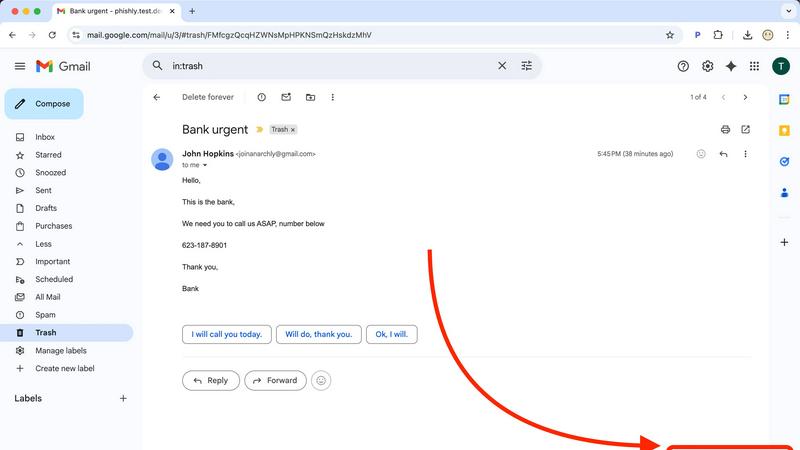
Phishly
One-Click Gmail Integration
Your investigation begins right where the suspicion does: inside your inbox. After installing the lightweight Chrome extension, a simple "Scan with Phishly" button appears in your Gmail interface. When an email raises an eyebrow, you don't need to navigate away or copy information. A single click initiates a comprehensive AI analysis, turning your moment of doubt into an actionable security report within seconds, all without leaving your familiar email environment.
AI-Powered Threat Detection Engine
At the heart of Phishly is a sophisticated AI trained to recognize the multifaceted nature of phishing attacks. It goes beyond simple spam filters, meticulously examining an email's DNA. The engine cross-references domains for spoofing attempts, analyzes the linguistic patterns for urgency and coercion, inspects links for hidden redirects, and evaluates the overall narrative for social engineering traps. This deep, contextual understanding allows it to catch sophisticated scams that often bypass traditional defenses.
Clear, Actionable Risk Assessment
Phishly believes clarity is the ultimate form of protection. Instead of overwhelming you with technical jargon or cryptic scores, it delivers a straightforward, color-coded verdict: Safe, Medium Risk, or High Risk. Each verdict is accompanied by a plain-English explanation, detailing the specific red flags found, such as "The sender's domain is suspiciously similar to a known brand" or "This email uses urgent language to pressure immediate action." This empowers you to make an informed decision on what to do next.
Privacy-First Web Analyzer
Not every suspicious email arrives in Gmail. For those phishing attempts that land in other clients or are forwarded by concerned friends or family, Phishly's web tool is your secure clearing house. Simply copy the full email content and paste it into the tool on our website. The same powerful AI provides an instant analysis without requiring any login or exposing your other emails. You maintain complete control, scanning only what you choose, with no data retention or privacy compromises.
Use Cases
Giga AI
The Solo Founder Building an MVP
For the non-technical founder or solo hacker bringing their vision to life, Giga AI is the indispensable co-founder that never sleeps. It understands the evolving codebase, ensuring every new feature or fix builds correctly upon the last. This turns the daunting task of building an MVP alone into a manageable, efficient journey from idea to launch.
The Engineer Shipping Faster Under Deadline
Professional developers and consultants on tight client deadlines use Giga AI to accelerate development without sacrificing quality. By eliminating context-switching and the back-and-forth of re-prompting, it allows for rapid prototyping and bug resolution. This means delivering higher-quality work faster, turning time pressure into a competitive advantage.
The Team Lead Standardizing Code Quality
For team leads and tech founders, Giga AI helps maintain consistency across a project. By encoding the project's architectural patterns and style rules, it ensures that every team member—and every AI interaction—produces code that adheres to the established standards, reducing review time and merging conflicts.
Converting Code Reviews into Action
Transform the tedious process of code review into immediate progress. With Giga AI's integrations, developers can convert review comments directly into structured, contextual to-do lists for the AI. This eliminates manual copy-pasting and context-switching, creating a seamless loop between feedback and implementation.
Phishly
The Hesitant Employee
A new employee receives an email that appears to be from the HR department, requesting they update their payroll details by clicking a link before the end of the day. Feeling pressured but unsure, they use the Phishly extension. The scan reveals a "High Risk" rating, noting the sender's email is from a public domain not associated with the company and the link leads to a fraudulent site. The employee confidently reports the phishing attempt, protecting both their own credentials and the company's network.
The Small Business Owner
A busy entrepreneur managing their own inbox gets an invoice from a regular vendor, but the payment instructions have changed to a new account. Instead of rushing to pay and risking a devastating financial loss, they paste the email into Phishly's web tool. The analysis returns a "Medium Risk" alert, highlighting that while the vendor name is correct, the email structure differs from previous legitimate correspondence. The owner calls the vendor directly and confirms it was a scam, averting a costly mistake.
The Concerned Family Member
A grandparent receives an emotional email purportedly from a grandchild, stranded in a foreign country and needing money wired immediately. The message feels off, but the worry is real. A family member helps by pasting the email text into Phishly. The AI detects the hallmarks of a "grandparent scam," flagging the generic greeting, the sense of panic, and the request for untraceable payment. This clear assessment provides the reassurance needed to ignore the scam and contact the grandchild through proper channels.
The Remote Freelancer
A freelance designer frequently receives emails from potential clients with project attachments or links to creative briefs. One such email, from a promising new client, contains a link to a "project mood board." Before clicking, the designer uses Phishly in Gmail. The tool identifies the link as "High Risk," pointing out that it uses a URL shortener to mask a malicious domain designed to deliver malware. The designer deletes the email, safeguarding their computer and valuable work files from a potentially crippling attack.
Overview
About Giga AI
Your journey from a spark of an idea to a functional, shipped product is supposed to be exhilarating. But for too many builders, that journey is derailed by a frustrating companion: an AI coding assistant that gets lost, forgets your previous conversations, and writes code that doesn't fit your vision. You find yourself in a cycle of debugging, re-prompting, and fixing "hallucinations," watching your momentum fade with each error. Giga AI is the turning point in that story. It is your project's dedicated brain, a revolutionary context engineering layer that sits between you and your AI tools like Cursor, Claude Code, or VS Code. Designed for first-time builders, solo founders, and engineers who are tired of AI errors, Giga AI deeply understands your unique codebase, your architectural decisions, and your end goals. It transforms your AI from a confused assistant into a focused, reliable partner that remembers, plans, and builds in perfect context. This shift cuts errors by 72% and saves builders an average of 20 hours per month, turning your journey back to what it should be: a creative sprint focused on bringing your business to life, not fighting with your tools.
About Phishly
Imagine you're sifting through your inbox, a daily ritual that feels more like navigating a minefield than managing messages. An email from your "bank" asks you to verify your account urgently. A shipping notification for a package you don't remember ordering includes a link. That moment of hesitation—the gut feeling that something is off—is where your digital journey meets Phishly. Phishly is your AI-powered sentinel, designed to cut through the uncertainty of modern email. It's a simple yet powerful Chrome extension for Gmail and a web-based tool that acts as your personal phishing detective. With one click on a suspicious email in Gmail or a quick paste onto our website, Phishly's advanced AI gets to work. It scans for the subtle hallmarks of deception: mismatched sender addresses, suspicious domain names, urgent language designed to provoke panic, and sophisticated social engineering tactics. In an instant, it provides a clear, understandable risk assessment—Safe, Medium Risk, or High Risk—along with a detailed breakdown of what triggered the alert. Built for individuals, remote workers, and small businesses, Phishly offers enterprise-grade detection without the complex setup or intimidating price tag. Your privacy is sacred; we only analyze emails you explicitly choose to scan. This journey from doubt to clarity is now free, instant, and requires no technical knowledge, empowering you to click with confidence.
Frequently Asked Questions
Giga AI FAQ
How does Giga AI actually work with my existing AI tools?
Giga AI installs as a lightweight extension or companion within your chosen IDE, such as Cursor or VS Code. As you code, it runs a silent, automatic analysis in the background, building a detailed, multi-faceted understanding of your project's structure, patterns, and goals. This "project brain" is then provided as context to your AI assistant (like ChatGPT or Claude within the editor), ensuring every prompt is answered with full awareness of your codebase.
Is my code safe and private with Giga AI?
Absolutely. Your code's privacy and security are paramount. Giga AI operates on a strict principle: your code is never stored on their servers long-term and is never used to train their or any other AI models. The analysis happens to provide real-time context, and your intellectual property remains entirely yours, on your machine.
What if I'm a complete beginner with no coding experience?
Giga AI is designed precisely to empower first-time builders. It handles the complex task of teaching the AI about your project's context, so you don't have to be an expert at prompting or system architecture. You can focus on describing your vision and business logic in plain language, while Giga ensures the AI translates that into correct, working code for your specific app.
Do I need to change my workflow to use Giga AI?
No, Giga AI is built to integrate seamlessly into your existing workflow. There's no need to learn a new platform or change your habits. You continue working in your favorite editor with your preferred AI assistant. Giga works quietly in the background, enhancing the understanding and output of the tools you already use, making your current process significantly more effective.
Phishly FAQ
How does Phishly protect my privacy?
Phishly is built on a foundation of user consent and privacy. We do not scan, read, or store any emails from your inbox automatically. Our analysis is only performed on the specific email you actively choose to scan by clicking the button in Gmail or pasting content into our web tool. We do not retain this data for training or any other purpose after delivering your instant result. Your email content remains under your control at all times.
What makes Phishly different from my email's built-in spam filter?
Your email's spam filter operates silently in the background, primarily filtering out mass, low-effort spam before it hits your inbox. Phishly is designed for the sophisticated threats that get through—the targeted phishing emails that mimic trusted contacts, brands, or colleagues. It provides you with an on-demand, interactive tool to investigate specific emails that cause you personal doubt, giving you transparent reasoning and empowering your own judgment, rather than making automated decisions for you.
Is technical knowledge required to use Phishly?
Absolutely not. Phishly was created to democratize phishing protection. The installation of the Chrome extension is as simple as adding any other tool from the Web Store. From there, using it requires just one click or one paste. The results are presented in clear, everyday language with simple risk categories (Safe, Medium, High Risk). You don't need to understand cybersecurity terminology to understand the threat and take appropriate action.
Is Phishly really free to use?
Yes, the core functionality of Phishly is completely free to use. You can install the Chrome extension and use the web analysis tool as often as you need without any cost, subscription, or tiered limit. We believe effective phishing protection should be accessible to everyone to create a safer digital ecosystem for all.