
FilexHost vs SupaSidebar
Side-by-side comparison to help you choose the right product.

FilexHost
Effortlessly host and share your files with FilexHost, generating shareable links in seconds using simple drag-and-drop.
Last updated: February 27, 2026

SupaSidebar
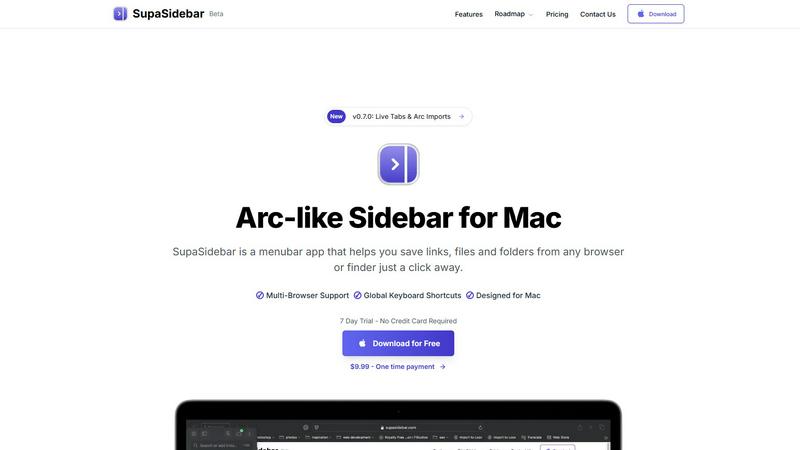
SupaSidebar elevates your Mac experience by providing instant access to links, files, and folders with just one click.
Last updated: February 28, 2026
Visual Comparison
FilexHost

SupaSidebar
Feature Comparison
FilexHost
Instant Subdomains
With FileXHost, you can enjoy instant subdomains for your files, such as your-file.filex.host, with zero setup required. This feature allows for immediate access and sharing without any technical barriers, making it incredibly user-friendly.
Free SSL Encryption
Every link generated through FileXHost comes with free SSL encryption, ensuring that your files are secure and protected during transit. This means you can share sensitive documents without worrying about potential breaches or data leaks.
Smart View Modes
FileXHost provides intelligent view modes that cater to different file types. You can choose between a direct render for immediate viewing or a download page for files that need to be saved. This flexibility ensures that your recipients have the best experience possible.
Optional Password Protection
For those who require an extra layer of security, FileXHost offers optional password protection and expiry settings for your links. You can tailor the access to your files by setting passwords and determining how long the files remain accessible, giving you complete control over your content.
SupaSidebar
Natural Swipe & Show on Finder
SupaSidebar introduces a natural swipe feature that allows you to effortlessly access your sidebar while using Finder or any application. This intuitive design means you can switch contexts without losing your workflow, making it easier to manage your files and links seamlessly.
Global Keyboard Shortcuts
Designed with efficiency in mind, SupaSidebar offers global keyboard shortcuts that allow you to save or copy URLs in a flash. With simple commands like CMD CTRL S to save and CMD CTRL C to copy, you can streamline your digital tasks and reduce the time spent navigating through menus.
Fast Search Functionality
Finding what you need instantly is crucial in a fast-paced environment. SupaSidebar includes a powerful search feature that lets you press CMD CTRL K and type to find any file, folder, website, or app without the hassle of scrolling through countless options. This feature ensures that your productivity is never hampered by searching for resources.
Recents Tracking
SupaSidebar tracks every website you've visited in the last 48 hours, allowing you to quickly access your recent work without having to remember or search for it. This feature is particularly useful for professionals who juggle multiple tasks and need quick access to their most recently used links.
Use Cases
FilexHost
Professional Report Sharing
Imagine a scenario where you need to share crucial client reports without the hassle of attaching files to emails. With FileXHost, you can simply upload the report and generate a shareable link. Your clients receive a beautifully rendered document that they can view instantly, enhancing professionalism.
Developer Hosting
Developers often need to showcase landing pages or mock APIs to clients and stakeholders. FileXHost makes this process seamless, allowing you to host entire websites or web projects effortlessly. Just upload your files, and you’re ready to demonstrate your work without the need for complex deployments.
Creative Distribution
For creators distributing digital products like eBooks, photography, or design assets, FileXHost serves as the perfect platform. You can upload your creative work and share it with your audience using secure links, ensuring that they receive it in the best possible format without attachments or download delays.
Friction-Free File Delivery
Anyone who has struggled with "request access" emails or file attachment limits knows the pain of traditional sharing methods. With FileXHost, you can provide a frictionless experience for your recipients, allowing them to access files directly through shareable links without cumbersome steps.
SupaSidebar
Streamlined Research
For researchers who often browse multiple sources, SupaSidebar serves as a powerful tool to save and organize links related to their studies. With quick access to recent sites and a dedicated space for favorites, it allows users to maintain focus and avoid distractions.
Efficient Content Creation
Content creators can benefit from SupaSidebar by organizing their references, inspiration, and tools in one easy-to-access sidebar. This organization helps streamline the creative process, making it easier to pull from various resources without losing momentum.
Multitasking Professionals
SupaSidebar is ideal for multitasking professionals who juggle various applications and web pages simultaneously. With its fast search capabilities and global shortcuts, users can effortlessly switch between tasks, keeping their workflow smooth and efficient.
Organizing Personal Projects
If you manage personal projects or hobbies that require various online resources, SupaSidebar can help you keep everything organized. By pinning important links and tracking recent activity, you can ensure that all the information you need is always just a click away.
Overview
About FilexHost
FileXHost is your go-to solution for instant file hosting and sharing, transforming the way you handle documents, media, and websites. Designed for professionals, developers, and creators alike, it simplifies the complex process of file sharing into a streamlined "Drop & Share" experience. With FileXHost, you can drag and drop any file type—be it PDFs, spreadsheets, or entire websites—and receive a secure URL in mere seconds. You no longer have to grapple with server configurations, DNS settings, or cumbersome login requirements for recipients. The focus is on efficiency and user-friendliness, ensuring that anyone can share files effortlessly, regardless of technical expertise. Whether you are sharing client reports, showcasing creative work, or distributing digital products, FileXHost delivers high-speed hosting with a beautiful viewer experience that eliminates the frustration of traditional methods.
About SupaSidebar
SupaSidebar is an elegantly designed menubar application for Mac that revolutionizes how users manage their digital workspace. It is crafted with inspiration from the intuitive design of the Arc browser, SupaSidebar provides a beautifully crafted sidebar that allows users to save, access, and organize links, files, and folders from any browser or Finder with just a click. It is tailored for anyone feeling overwhelmed by the clutter of open tabs and scattered bookmarks. Whether you are a researcher, content creator, or a multitasking professional, SupaSidebar empowers you to stay organized, browse faster, and maintain your flow with ease. With seamless integration across all major browsers—such as Safari, Chrome, Firefox, Brave, and Arc—SupaSidebar ensures that your data remains accessible and manageable. Experience the joy of a distraction-free sidebar that is lightweight, efficient, and designed to fit perfectly into your macOS environment.
Frequently Asked Questions
FilexHost FAQ
What is FileXHost?
FileXHost is an instant file hosting and sharing service that allows users to upload, host, and share a wide variety of file types with ease. The platform is designed to simplify the sharing process, making it accessible for everyone, from professionals to casual users.
Is it really free?
Yes, FileXHost offers a free plan that allows you to host up to 1,000 files with a maximum size of 25MB each. While this plan includes ads and a watermark, it is perfect for quick sharing and testing without any financial commitment.
What file types are supported?
FileXHost supports a wide array of file types, including documents (PDF, RTF, TXT), spreadsheets (XLSX, CSV, JSON), images (JPG, PNG, WEBP), media files (MP4, MP3), and archives (ZIP). This versatility makes it an excellent choice for various use cases.
How do I update my site?
Updating your hosted files on FileXHost is as simple as uploading a new version of your file. The platform generates a new link if required, ensuring that your recipients always have access to the latest version without any complicated processes.
SupaSidebar FAQ
Is SupaSidebar a browser extension?
No, SupaSidebar is a standalone menubar application designed specifically for macOS. It integrates with all major browsers, allowing you to manage links and files without being tied to a single browser environment.
Which browsers does SupaSidebar work with?
SupaSidebar supports all major browsers, including Safari, Chrome, Firefox, Brave, and the Arc browser. This compatibility ensures that you can access and organize your digital workspace regardless of your preferred browsing tool.
What macOS version do I need?
SupaSidebar requires macOS 13 or higher to operate smoothly. This ensures that users have access to the latest features and improvements provided by Apple's operating system.
Where is my data stored?
Your data with SupaSidebar remains on your Mac, ensuring complete privacy and security. No information is sent to external servers unless explicitly shared by you, allowing you to manage your workspace with peace of mind.
Alternatives
FilexHost Alternatives
FilexHost is a powerful tool designed to simplify the file hosting and sharing experience. As a productivity and management solution, it allows users to seamlessly store and distribute a variety of file types, from documents to media, with just a simple drag and drop. The convenience of instant sharing through secure URLs makes it a favorite among professionals and creators alike. However, users often seek alternatives to FilexHost for various reasons, such as pricing structures, specific feature requirements, or different platform compatibilities. When searching for an alternative, it’s essential to consider factors like storage limits, security features, ease of use, and the ability to customize sharing options to better fit individual or organizational needs. Finding a solution that aligns with your specific file-sharing goals can greatly enhance your overall experience.
SupaSidebar Alternatives
SupaSidebar is a beautifully crafted menubar application for Mac, designed to transform how users manage their digital workspace. It belongs to the productivity and management category, specifically catering to individuals who seek an efficient way to save, access, and organize their links, files, and folders. Users often find themselves looking for alternatives due to various reasons such as pricing concerns, feature limitations, or specific platform requirements. The ideal alternative should offer a sleek user experience, robust functionality, and seamless integration with existing tools to enhance productivity. When searching for an alternative, consider what features are most important to your workflow. Look for options that prioritize user interface design and ease of access, as well as those that provide real-time updates and organizational capabilities. Additionally, ensure that the alternative you choose is compatible with your preferred browsers and operating systems, allowing for a more cohesive experience in managing your digital life.