
DreamFace vs Seedance 2.0
Side-by-side comparison to help you choose the right product.

DreamFace lets you effortlessly create captivating avatar videos and photos with lifelike voice cloning in 19 languages.
Last updated: February 28, 2026

Seedance 2.0
Embark on a creative journey, transforming your words and images into stunning cinematic videos instantly.
Last updated: February 28, 2026
Visual Comparison
DreamFace
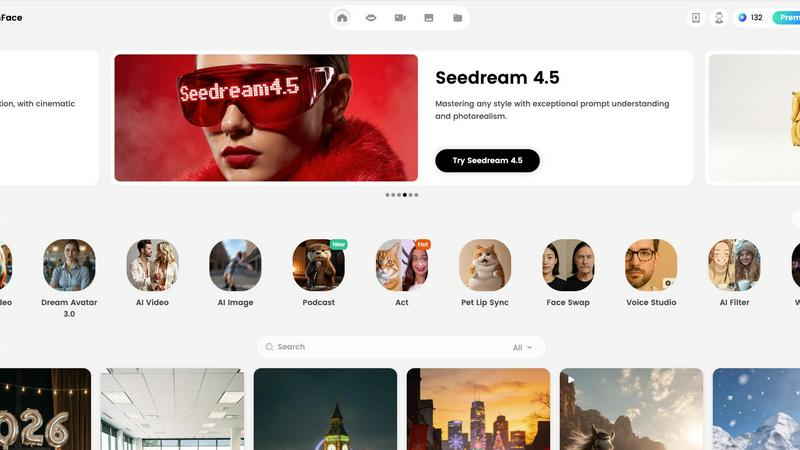
Seedance 2.0

Feature Comparison
DreamFace
Avatar Video Creation
DreamFace simplifies video creation by allowing users to generate high-quality avatar videos effortlessly. Just input your text or audio, and the AI does the rest, producing realistic visuals and voices without the need for actors or costly equipment.
AI Video Generator
Unleash your creativity with DreamFace’s AI video generator. This feature lets you turn your ideas into stunning, high-quality videos in just one click, making it perfect for marketers and content creators looking to engage their audiences with visually rich storytelling.
Background Remover
Say goodbye to unwanted backgrounds with DreamFace's background remover. This instant tool allows users to remove backgrounds from photos in seconds, making it easy to create clean, professional-looking images for any purpose.
Photo Enhancer
DreamFace's photo enhancer improves image quality and restores details automatically. This feature is invaluable for users looking to revive old photos or enhance new ones, ensuring every image looks its best with minimal effort.
Seedance 2.0
Text-to-Video Generation
Begin your creative journey by simply describing your vision. Seedance 2.0's advanced AI understands complex natural language prompts, cinematic terminology, and diverse artistic styles. Describe a "lonely astronaut gazing at a nebula from a crumbling space station" and watch as the platform weaves your words into a video with natural motion, realistic lighting, and professional visual effects, all without you ever touching a camera.
Image-to-Video Animation
Breathe life into static visuals. Upload any photograph, illustration, or concept art, and Seedance 2.0 intelligently analyzes the content to generate fluid, dynamic animation. It creates physically plausible motion that respects the original image's style and composition, transforming a simple product shot into a captivating showcase or a portrait into a living, breathing character.
Integrated Audio & Lip-Sync
Complete your narrative with sound. The platform's Pro model performs joint audio-video generation, creating perfectly synchronized soundscapes in a single pass. Generate realistic sound effects, ambient backgrounds, fitting music, and even multilingual voiceovers with accurate lip-sync, eliminating the tedious need for separate audio editing and post-production work.
Cinematic Motion Control
Direct your AI-generated scenes like a seasoned filmmaker. Seedance 2.0 provides advanced motion synthesis for cinema-grade camera work. Command smooth dolly shots, dramatic crane movements, intimate tracking shots, and dynamic zooms. This physics-aware control allows you to guide the viewer's eye and add a layer of professional polish and emotional depth to every generated video.
Use Cases
DreamFace
Marketing Campaigns
Marketers can leverage DreamFace to create stunning promotional videos and eye-catching images for campaigns. The platform's tools enable quick production, allowing teams to execute concepts that resonate with their audience effectively.
Social Media Content
With DreamFace, social media managers can generate engaging content in a fraction of the time it would typically take. From avatar videos that tell stories to enhanced images that grab attention, the possibilities are limitless, driving user engagement and interaction.
Personal Projects
Individuals looking to create personal projects, such as birthday videos or family photo albums, can use DreamFace to easily produce high-quality multimedia content. The user-friendly interface ensures that anyone can craft meaningful memories without needing extensive editing skills.
Educational Content
Educators can utilize DreamFace to create dynamic teaching materials and presentations. By transforming traditional lessons into engaging videos and visuals, instructors can enhance learning experiences and capture their students' attention more effectively.
Seedance 2.0
Marketing & Social Media Content
Craft attention-grabbing ads, product demonstrations, and brand story videos in minutes, not weeks. Marketers can rapidly prototype concepts, A/B test different visual styles, and produce a high volume of tailored content for various platforms, all while maintaining a consistent, professional quality that engages audiences and drives conversions.
Creative Storytelling & Film
Independent filmmakers and writers can visualize scenes, create animated storyboards, or produce short films directly from their scripts. This tool allows for the exploration of fantastical worlds and complex scenes that would be prohibitively expensive to film practically, unlocking new genres and narratives for solo creators and small studios.
Music Visualizers & Lyric Videos
Artists and music producers can transform their audio tracks into immersive visual experiences. Generate dynamic, thematic videos that sync perfectly with the rhythm, mood, and lyrics of a song. Create everything from abstract visualizers to narrative music videos that deepen the listener's connection to the music.
Concept Visualization & Prototyping
Designers, architects, and developers can use Seedance 2.0 to quickly visualize concepts and prototypes. Animate product designs, visualize architectural spaces with life and motion, or create explainer videos for new apps and software features, providing stakeholders with a clear, compelling vision of the final product.
Overview
About DreamFace
DreamFace is an innovative AI-powered content creation platform that has redefined how multimedia is produced, captivating over 20 million users globally. With more than 200,000 paid subscribers and a remarkable $10 million in annual recurring revenue, it has established itself as a go-to resource for creators, marketers, and businesses alike. DreamFace allows users to generate stunning avatar videos, AI videos, and images simply by inputting text, audio, or photos, making the art of multimedia creation accessible to everyone. Its main value proposition lies in democratizing professional-grade tools that were once confined to seasoned professionals. With intuitive features such as background removal, photo enhancement, and creative AI effects, DreamFace empowers users to unleash their creativity without requiring extensive technical skills or expensive equipment. Whether you are crafting marketing materials, social media posts, or personal projects, DreamFace opens a world of endless possibilities, transforming ideas into captivating visual stories.
About Seedance 2.0
Imagine a world where the barrier between a fleeting idea and a cinematic masterpiece is just a sentence. That is the journey Seedance 2.0 invites you on. It is more than an AI video generator; it is a creative companion for storytellers, marketers, and visionaries, designed to translate the whispers of your imagination into stunning, professional-quality videos. This platform is your gateway to a new era of creation, where you no longer need a film crew, expensive equipment, or months of post-production. Whether you are a solo creator sketching a storyboard, a marketer needing a compelling ad, or a developer prototyping a concept, Seedance 2.0 empowers you to bring your vision to life. By harnessing advanced AI models like its own Seedance 2, it offers unparalleled control over style, motion, and duration, dramatically reducing both production time and cost. Your journey from a simple text prompt or uploaded image to a fully realized video with synchronized audio is seamless, intuitive, and filled with limitless creative possibility.
Frequently Asked Questions
DreamFace FAQ
What platforms is DreamFace available on?
DreamFace is available on multiple platforms, including iOS, Android, and web, ensuring users can create content anytime and anywhere.
Can I use DreamFace for commercial purposes?
Yes, DreamFace can be used for both personal and commercial projects, allowing businesses to create marketing materials, advertisements, and more without restrictions.
Is it easy to use DreamFace if I'm not tech-savvy?
Absolutely! DreamFace is designed with user-friendliness in mind, enabling even those with limited technical skills to create professional-quality multimedia content with ease.
How does the background remover feature work?
The background remover feature uses advanced AI technology to detect and eliminate backgrounds from your photos instantly, providing a clean canvas for your images without the need for manual editing.
Seedance 2.0 FAQ
What is Seedance 2.0?
Seedance 2.0 is an innovative AI-powered platform that transforms text descriptions and images into high-quality, cinematic videos. It is designed for creators, marketers, and businesses to produce professional video content quickly and easily, leveraging advanced AI models for video and audio generation without the need for traditional filming equipment or extensive editing skills.
How do I start creating videos?
Starting your creative journey is simple and requires no setup. Just sign up for a free account which includes free credits. Then, choose your creation mode (Text-to-Video or Image-to-Video), describe your vision in the prompt box or upload an image, adjust settings like resolution and duration, and click generate. Your AI video will be created instantly.
Can I use the generated videos for commercial purposes?
Yes, according to the provided content, all videos generated using the Seedance 2 AI model can be used for commercial purposes. This means you can freely use the videos you create in marketing campaigns, social media, client projects, and other commercial applications.
What are the video generation modes available?
Seedance 2.0 offers two primary modes. The most popular is Text-to-Video, where you describe a scene. The second is Image-to-Video, where you animate an uploaded image. Additionally, the Pro feature includes Audio Generation, which creates synchronized sound, music, and voiceovers with lip-sync during the video creation process.
Alternatives
DreamFace Alternatives
DreamFace is an innovative AI-powered content creation platform that enables users to craft stunning avatar videos, images, and more with just a few clicks. By combining advanced technologies like voice cloning and AI image generation, DreamFace has become a go-to solution for creators, marketers, and businesses looking to produce high-quality multimedia content without extensive technical know-how. However, users often seek alternatives to DreamFace for various reasons, such as pricing concerns, feature sets that better match specific needs, or compatibility with different platforms. When exploring alternatives, it's essential to consider factors like the range of creative tools offered, user interface design, pricing plans, and the quality of customer support. Finding an alternative that aligns with your creative vision and project requirements can unlock new possibilities in content creation.
Seedance 2.0 Alternatives
Seedance 2.0 is a powerful AI video generator that transforms text and images into cinematic content, placing it at the forefront of the creative automation category. It's a tool for storytellers and marketers who want to bring their visions to life without traditional production hurdles. Yet, every creator's journey is unique, and the path to finding the right tool involves exploring different landscapes. Users often seek alternatives for various reasons. Some are driven by budget, looking for a different pricing structure or a free tier to start their experiments. Others have specific needs, perhaps requiring a different set of features, a particular user interface, or compatibility with their existing workflow. The quest is not about finding a replacement, but about discovering the companion that best fits the next chapter of their creative story. When choosing an alternative, consider the core of your creative mission. Look at the quality and style of video output, the flexibility of controls, and how the tool integrates into your process. Evaluate the learning curve and the community or support behind it. The goal is to find a platform that not only meets your technical requirements but also inspires and empowers your unique narrative.