
documentorium vs Refbox
Side-by-side comparison to help you choose the right product.

documentorium
Documentorium empowers service professionals to create customized contractor documents and PDFs in seconds with guided forms.
Last updated: March 26, 2026

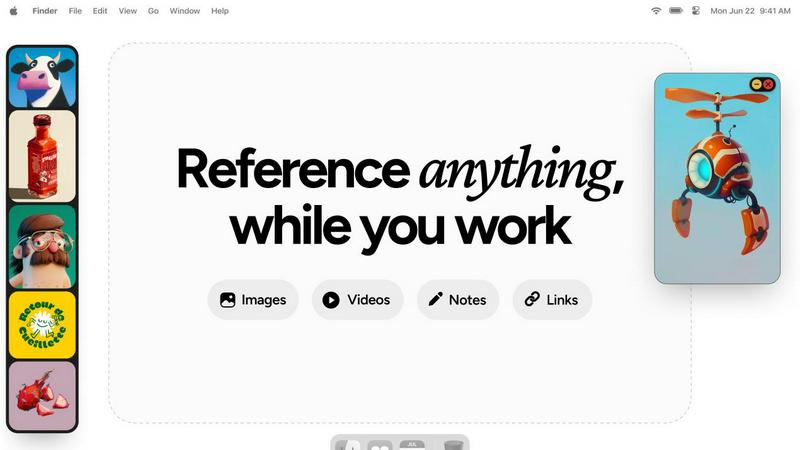
Refbox gives you instant, distraction-free access to all your essential references right above your workspace.
Last updated: February 28, 2026
Visual Comparison
documentorium

Refbox
Feature Comparison
documentorium
Guided Form Generation
Documentorium offers an intuitive guided form generation feature that allows users to create professional PDFs in mere seconds. This time-saving tool walks users through the necessary fields specific to their trade, ensuring no important detail is overlooked.
Trade-Specific Templates
With a library of over 200 templates categorized into 26 trade-specific groups, users can easily find the right document for their needs. Each template is meticulously crafted to include fields relevant to the industry, eliminating the frustration of generic forms.
Instant PDF Creation
Gone are the days of tedious formatting. Documentorium's instant PDF creation feature ensures that once a form is filled out, users receive a polished, print-ready document immediately. This allows for quick turnaround times and enhanced productivity.
Document History and Prefill
Documentorium tracks your document history, enabling users to access previously created documents easily. The platform allows for pre-filling fields for returning users, streamlining the process for repeated tasks and ensuring efficiency.
Refbox
Floating Reference Frames
Refbox allows you to pin images, videos, GIFs, and notes in floating frames that remain on top of any application you are using. This means your references are always available without the need to switch contexts, enhancing your focus and workflow.
Infinite Canvas and Slideshow View
Experience an infinite canvas that lets you see all your references at once. With the slideshow feature, you can seamlessly flip through items for quick comparisons, ensuring you have the right inspiration at your fingertips when you need it.
Auto-Hide and Quick Access
Refbox comes with an auto-hide feature that keeps your workspace clean. With a simple toggle, you can show or hide the reference box, allowing you to focus on your project while still having the ability to access your references instantly.
Customizable Shortcuts and Pixel Rendering
Enjoy full control over your references with customizable shortcuts that make navigating through your media a breeze. Additionally, the pixel rendering feature ensures that your pixel art is displayed accurately, maintaining the integrity of your work.
Use Cases
documentorium
Creating Detailed Quotes
Imagine being an HVAC technician who needs to provide a detailed quote for a new installation. With documentorium, you can select a guided quote template, fill in the necessary information, and generate a professional PDF in seconds. This not only impresses your clients but also speeds up the job acquisition process.
Managing Work Orders
For electricians and plumbers who handle multiple jobs daily, managing work orders can become overwhelming. Documentorium simplifies this by offering tailored work order templates that can be filled out quickly, ensuring that every job is documented efficiently and accurately.
Streamlining Invoices
Contractors often face the challenge of invoicing clients. Documentorium allows users to create invoices effortlessly with trade-specific fields, ensuring that they capture all necessary charges, thereby reducing errors and accelerating payment cycles.
Proposals for New Projects
When it comes to bidding on new projects, having a professional proposal is key to standing out from the competition. Documentorium provides a range of proposal templates that can be customized to match the specific needs of each project, enhancing the chances of winning the bid.
Refbox
Seamless Moodboarding
Refbox is perfect for designers who need to create moodboards quickly. By having all their visual references accessible in one place, designers can effortlessly curate inspiration, making the creative process more intuitive and enjoyable.
Animation Reference Management
Animators can benefit from Refbox by pinning crucial reference frames or videos that inform their work. This keeps their visual aids organized and readily accessible, allowing for enhanced productivity and creativity during the animation process.
UI/UX Design Integration
For UI/UX designers, Refbox serves as a tool to keep design inspirations, color palettes, and user interface elements in view while working on digital projects. This accessibility leads to faster iterations and more cohesive designs.
Concept Art Development
Concept artists can utilize Refbox to gather various references, from photographs to sketches, in one floating hub. This allows them to draw from multiple inspirations without disrupting their workflow, fostering a more fluid creative process.
Overview
About documentorium
Documentorium is a revolutionary document engine tailored specifically for tradespeople, offering a streamlined solution to create professional business documents with ease. Whether you are an electrician, plumber, contractor, HVAC technician, or roofer, documentorium eliminates the hassle of starting from a blank page. With over 200 guided templates spanning 26 trade categories, users can generate quotes, estimates, invoices, work orders, bids, contracts, service reports, inspection reports, proposals, warranties, change orders, and more. Each template is designed with fields customized for various trades, ensuring that every document is relevant and professional. In just seconds, users can fill out a guided form and receive a clean, print-ready PDF, allowing them to focus more on their craft and less on paperwork. Documentorium not only saves time but also empowers service professionals to present their work with credibility and professionalism.
About Refbox
Refbox is the ultimate floating reference companion designed specifically for creative professionals like illustrators, animators, 3D artists, UI/UX designers, and concept artists. It transforms the often chaotic and fragmented creative process into a streamlined experience, allowing users to keep their inspiration visible and accessible at all times. Imagine a workspace where your ideas, images, videos, GIFs, and notes float effortlessly above your primary applications, eliminating the need to alt-tab between cluttered folders and multiple browser tabs. Refbox is built to honor the creative journey by reducing distractions and maintaining momentum. By providing a centralized hub for all your media, it empowers you to focus on what truly matters: creating. With features that allow you to organize your references in a beautiful Masonry grid or access them through resizable frames, Refbox redefines how you interact with your inspiration, making it a vital tool for anyone serious about their craft.
Frequently Asked Questions
documentorium FAQ
Can I cancel anytime?
Yes, you can cancel your subscription at any time through your account settings. There are no penalties for cancellation, and your access will remain active until the end of the billing period.
What happens when my trial ends?
When your trial period ends, all your existing documents will still remain accessible. To create new documents, you will need to activate your subscription, but no data will be lost as a result of the trial expiring.
Do I lose my documents if I don't subscribe?
No, your documents will remain in your history even if you choose not to subscribe. You can view and download your documents whenever you want, but subscribing will allow you to create and edit new ones.
How does documentorium ensure my documents are professional?
Documentorium provides templates that are specifically designed for each trade, ensuring that all the necessary fields are included. This means that the documents generated will not only be professional but also relevant to your specific industry needs.
Refbox FAQ
How does Refbox improve my workflow?
Refbox reduces context-switching by keeping all your references visible on top of your workspace. This allows you to maintain your creative flow and focus on your work without distractions.
Can I use Refbox with any application?
Yes, Refbox is designed to float above any application, making it compatible with various creative software like Photoshop, Blender, and Figma, among others.
Is there a way to organize my references in Refbox?
Absolutely! Refbox allows you to organize your media into collections, and you can view everything in a beautiful Masonry grid or access them through individual frames.
What types of media can I store in Refbox?
You can store a wide range of media in Refbox, including images, GIFs, videos, notes, and clickable bookmarks for tutorials, making it a comprehensive tool for all your creative needs.
Alternatives
documentorium Alternatives
documentorium is a streamlined document engine designed specifically for tradespeople, including electricians, plumbers, and HVAC technicians. It allows these professionals to create a wide range of business documents quickly and efficiently, offering over 200 guided templates tailored to various trade categories. Users often seek alternatives for reasons such as pricing, desired features, or platform compatibility, as their needs may evolve over time or differ from what documentorium provides. When searching for an alternative, it’s essential to consider factors such as ease of use, the variety of templates available, and specific features that cater to your trade. Look for platforms that offer intuitive interfaces and customizable options, ensuring you can generate the professional documents you need without hassle. Additionally, consider the level of customer support provided and the overall value for your investment as you explore different solutions.
Refbox Alternatives
Refbox is an innovative tool designed for creative professionals, enabling them to keep essential references visible and easily accessible as they work on projects. This floating reference companion caters specifically to illustrators, animators, UI/UX designers, and concept artists, helping them maintain focus while minimizing the distractions that often arise from constant context-switching between applications. Users often seek alternatives to Refbox for various reasons, including pricing considerations, feature sets that better align with their specific workflows, or compatibility with different platforms. When exploring alternatives, it is essential to evaluate factors such as ease of use, the ability to organize references effectively, and whether the tool enhances or hinders your creative process. Finding the right fit can significantly impact your productivity and overall satisfaction with your creative work.