
Cosy vs qtrl.ai
Side-by-side comparison to help you choose the right product.

Transform your Slack into a vibrant community by automating member onboarding and introductions effortlessly with Cosy.
Last updated: February 28, 2026

qtrl.ai
qtrl.ai empowers QA teams to scale testing with AI-driven agents while maintaining complete control and governance.
Last updated: March 4, 2026
Visual Comparison
Cosy
qtrl.ai

Feature Comparison
Cosy
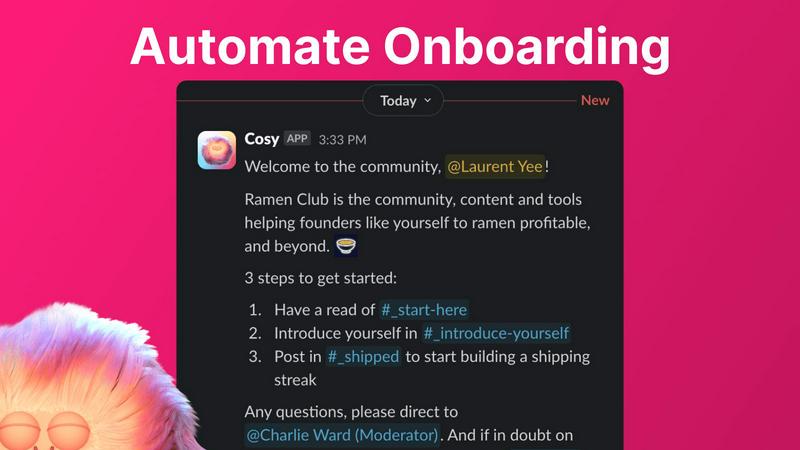
Automate Onboarding
Cosy allows you to create and automate up to 10 distinct onboarding welcome DM sequences. Whether the messages come from you, a team member, or the Cosy bot, new members will receive a warm welcome that can be customized with their names, links, emojis, and even time delays. This feature ensures that no one slips through the cracks when they join your community, even if they sign up at odd hours.
Connect Your Members
With Cosy, you can automatically introduce community members to each other via DMs, enhancing engagement and fostering connections. By customizing the frequency and timing of these introductions, you can create a vibrant network of relationships that grow organically within your community. Opted-in members are randomly selected for introductions, ensuring that everyone has the chance to connect with different people over time.
Member Directory
Cosy offers a simple, searchable directory of all your community members, allowing anyone to find and connect with others without leaving Slack. Members can customize their profiles with up to 10 custom fields, making it easier to engage and collaborate. Notifications prompt new joiners to fill out their profiles, ensuring that everyone stays informed about who is in the community.
Content Highlights
This feature lets you surface the top 10 most engaging posts in your community instantly. With a quick slash command, you can access the most engaged posts within a specific channel or across all public channels. Additionally, you can identify unreplied messages, ensuring that valuable discussions do not go unnoticed and that engagement is always encouraged.
qtrl.ai
Autonomous QA Agents
qtrl.ai features autonomous QA agents that can execute instructions on demand or run continuously, adapting to your team’s needs. These agents operate within your defined rules and provide real browser execution, ensuring reliable testing across different environments and scenarios.
Enterprise-Grade Test Management
With qtrl.ai's enterprise-grade test management, teams can maintain centralized test cases, plans, and runs. This feature ensures full traceability and audit trails, allowing for both manual and automated workflows that are built for compliance and auditability, making it easier to adhere to industry standards.
Progressive Automation
The platform offers a progressive automation feature where teams can start with human-written test instructions before gradually transitioning to AI-generated tests. qtrl.ai suggests new tests based on coverage gaps, allowing for a seamless review and approval process that keeps teams in control of their testing strategy.
Adaptive Memory
qtrl.ai includes an adaptive memory feature that builds a living knowledge base of your application. By learning from exploration, test execution, and identified issues, this feature powers smarter, context-aware test generation that becomes increasingly effective with every interaction, fostering continuous improvement.
Use Cases
Cosy
Streamlining Onboarding Processes
For community managers, onboarding new members can be a tedious task. Cosy automates this process, ensuring that each new member receives a personalized welcome message, thus saving significant time and effort. This automation allows managers to focus on building relationships and driving community initiatives.
Enhancing Member Engagement
Cosy’s automated introductions facilitate connections among community members, making it easier for individuals to meet and collaborate. This feature helps create a sense of belonging and increases overall engagement, as members are more likely to interact with others they have been introduced to.
Building a Comprehensive Member Directory
Community leaders can utilize Cosy's member directory to foster connections and facilitate networking. Members can search for others based on specific criteria, enhancing collaboration and ensuring that everyone is aware of who is in the community and what they bring to the table.
Highlighting Valuable Content
With Cosy’s content highlights feature, community managers can easily identify and promote engaging discussions. This ensures that members are aware of important conversations and encourages active participation, helping the community stay vibrant and informed.
qtrl.ai
Product-Led Engineering Teams
For product-led engineering teams, qtrl.ai provides a robust solution for managing complex testing scenarios while ensuring that quality remains a top priority. The platform allows teams to collaborate effectively, enabling faster release cycles without sacrificing oversight.
QA Teams Moving Beyond Manual Testing
QA teams that are transitioning from manual testing to automation find immense value in qtrl.ai. The platform’s gradual approach to automation allows teams to maintain control while incrementally adopting AI-driven testing methodologies, resulting in improved efficiency and coverage.
Companies Modernizing Legacy Workflows
Organizations looking to modernize their legacy QA processes can leverage qtrl.ai to streamline their testing efforts. The platform’s integration capabilities ensure compatibility with existing tools, facilitating a smoother transition to modern workflows that enhance quality and responsiveness.
Enterprises Requiring Governance
Enterprises that must adhere to strict compliance and auditing requirements can rely on qtrl.ai for its enterprise-grade features. With full traceability, audit trails, and permissioned autonomy levels, qtrl.ai provides the necessary governance and transparency that larger organizations demand.
Overview
About Cosy
Cosy is a transformative Slack-native platform designed to elevate your standard Slack workspace into a dynamic, engaged, and self-sustaining community. It caters to community managers, founders, and leaders who value human connection yet find themselves overwhelmed with the manual tasks of onboarding new members, facilitating introductions, and curating relevant content. With Cosy, these challenges become a thing of the past. The platform automates essential processes, enabling you to save hours of effort each week while focusing on strategic initiatives and meaningful interactions. Cosy’s core value proposition is to drive deeper engagement and foster serendipitous connections right where your members are most comfortable—inside Slack. From automated welcome sequences that work around the clock to a searchable member directory and smart content highlights, Cosy cultivates a warm and efficient environment for your community to thrive organically and authentically. Imagine a workspace where every new member is greeted promptly, connections spark effortlessly, and the best conversations are always within reach—this is the journey that Cosy enables.
About qtrl.ai
qtrl.ai is a revolutionary quality assurance platform designed specifically for modern software development teams aiming to enhance their QA processes without compromising on governance or control. By merging enterprise-grade test management with sophisticated AI-driven automation, qtrl.ai serves as a centralized hub for organizing test cases, planning test runs, and tracking quality metrics in real-time. With a focus on providing clear visibility into testing outcomes, qtrl.ai empowers engineering leads and QA managers to identify potential risks and ensure comprehensive coverage of requirements.
What sets qtrl.ai apart is its innovative approach to AI integration. Instead of implementing a one-size-fits-all, autonomous AI model, qtrl.ai offers a progressive pathway that allows teams to gradually adopt intelligent automation. Starting with manual test management, teams can transition to using autonomous agents that generate UI tests from simple English descriptions and adapt as applications evolve. This makes qtrl.ai particularly suitable for product-led engineering teams, QA groups transitioning from manual processes, organizations modernizing outdated workflows, and enterprises that require stringent compliance and audit trails. Ultimately, qtrl.ai bridges the gap between the slow pace of manual testing and the complexities of traditional automation, enabling faster, more intelligent quality assurance.
Frequently Asked Questions
Cosy FAQ
How does Cosy automate onboarding for new members?
Cosy allows you to set up automated welcome DM sequences that can be triggered when a new member joins your Slack workspace. You can customize messages and timing, ensuring that every new member feels welcomed immediately.
Can I customize the introduction messages sent to members?
Yes, Cosy provides customizable templates for introduction messages. You can modify the content, frequency, and timing of these introductions to suit the unique dynamics of your community.
Is there a limit to the number of custom fields in the member directory?
You can set up to 10 custom fields in the member directory. These fields can require text entry or multiple-choice answers, allowing for a personalized experience for each member.
How can I access the top engaging posts in my community?
Cosy offers slash commands that allow you to quickly surface the top 10 most engaged posts in specific channels or across all public channels. This feature makes it easy to keep track of valuable discussions and foster community engagement.
qtrl.ai FAQ
How does qtrl.ai ensure the security of my testing processes?
qtrl.ai is built with enterprise-ready security measures, ensuring that sensitive information is protected. The platform operates with permissioned autonomy levels and provides full agent visibility, eliminating black-box decision-making.
Can I start with manual testing and transition to automation later?
Yes, qtrl.ai is designed for progression. You can begin with manual test management and gradually introduce AI automation as your team becomes comfortable with the platform, making it adaptable to your pace.
What types of environments can I run tests on with qtrl.ai?
qtrl.ai supports multi-environment executions, allowing teams to run tests across development, testing, staging, and production environments. Each environment can have its own variables and encrypted secrets for added security.
How does qtrl.ai help in identifying coverage gaps?
qtrl.ai analyzes your existing test coverage and suggests new tests to fill any identified gaps. This proactive approach enables your team to maintain comprehensive coverage and ensure that all critical areas of your application are tested thoroughly.
Alternatives
Cosy Alternatives
Cosy is an innovative platform designed to enhance Slack workspaces by transforming them into dynamic communities. This tool streamlines the onboarding process and automates member introductions, helping community managers and leaders foster deeper connections among their members. Users often seek alternatives to Cosy for various reasons, including budget constraints, the need for additional or specific features, or compatibility with other platforms they may be using. When exploring alternatives, consider key factors such as the ability to customize onboarding experiences, the efficiency of member engagement tools, and how well the platform integrates with existing workflows. It's crucial to find a solution that not only meets your current needs but also has the potential to grow alongside your community.
qtrl.ai Alternatives
qtrl.ai is a cutting-edge QA platform that empowers software teams to enhance their quality assurance processes through a mix of AI-driven automation and robust test management capabilities. It is designed to help teams scale their testing efforts while maintaining stringent control and governance, providing a structured environment for managing test cases, tracking quality metrics, and ensuring comprehensive coverage of requirements. Users often seek alternatives to qtrl.ai for various reasons, including pricing considerations, specific feature requirements, or compatibility with existing platforms. When exploring alternatives, it’s essential to look for solutions that not only offer similar functionalities but also provide a user-friendly experience, reliable support, and the ability to integrate seamlessly into your current workflows. A clear understanding of your team’s needs and priorities will guide you in selecting the right tool.