
Cosy vs Playwriter
Side-by-side comparison to help you choose the right product.

Transform your Slack into a vibrant community by automating member onboarding and introductions effortlessly with Cosy.
Last updated: February 28, 2026

Playwriter
Give your AI agents the keys to your real browser, complete with your logins and extensions, for seamless automation.
Last updated: March 18, 2026
Visual Comparison
Cosy
Playwriter

Feature Comparison
Cosy
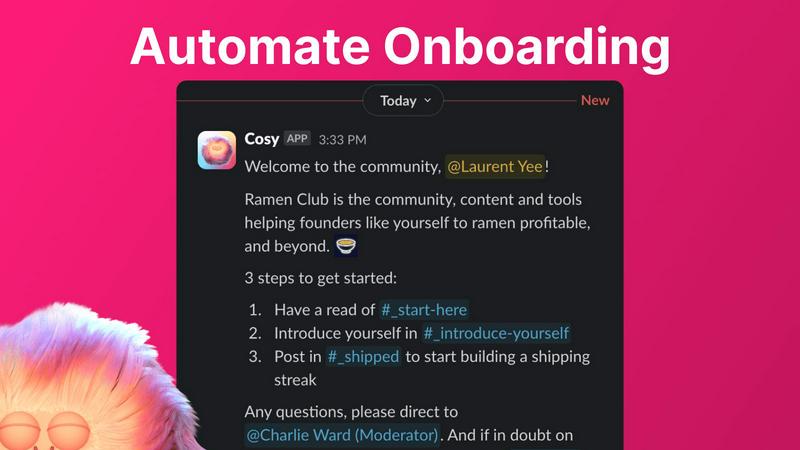
Automate Onboarding
Cosy allows you to create and automate up to 10 distinct onboarding welcome DM sequences. Whether the messages come from you, a team member, or the Cosy bot, new members will receive a warm welcome that can be customized with their names, links, emojis, and even time delays. This feature ensures that no one slips through the cracks when they join your community, even if they sign up at odd hours.
Connect Your Members
With Cosy, you can automatically introduce community members to each other via DMs, enhancing engagement and fostering connections. By customizing the frequency and timing of these introductions, you can create a vibrant network of relationships that grow organically within your community. Opted-in members are randomly selected for introductions, ensuring that everyone has the chance to connect with different people over time.
Member Directory
Cosy offers a simple, searchable directory of all your community members, allowing anyone to find and connect with others without leaving Slack. Members can customize their profiles with up to 10 custom fields, making it easier to engage and collaborate. Notifications prompt new joiners to fill out their profiles, ensuring that everyone stays informed about who is in the community.
Content Highlights
This feature lets you surface the top 10 most engaging posts in your community instantly. With a quick slash command, you can access the most engaged posts within a specific channel or across all public channels. Additionally, you can identify unreplied messages, ensuring that valuable discussions do not go unnoticed and that engagement is always encouraged.
Playwriter
Your Actual Browser Session
Playwriter's core magic is its ability to let AI agents operate within your existing, logged-in Chrome session. Instead of spawning a fresh, "incognito-like" instance that has no memory and triggers security flags, the agent works directly in a tab you control. All your cookies, active logins to sites like Gmail or GitHub, and essential browser extensions (like password managers or ad blockers) are present and functional. This eliminates the biggest hurdles in web automation: authentication walls and instant bot detection, creating a seamless and realistic browsing environment.
Full Playwright API via a Single Tool
Unlike other systems that limit agents to a pre-defined, narrow set of actions (like "click button" or "extract text"), Playwriter exposes the entire powerful Playwright automation library through one flexible execute command. This means your AI can write and run any Playwright code—setting breakpoints, intercepting network requests, profiling performance, or taking efficient accessibility snapshots. This "one tool to rule them all" approach keeps the AI's context window clean and unleashes sophisticated automation far beyond basic point-and-click scripts.
Live Collaboration and Debugging
This feature transforms automation from a black-box process into a transparent, collaborative session. You watch every action happen in real-time in your browser. If the agent encounters a captcha, you solve it. If it gets stuck on a dynamic element, you can pause, manually fix the page state, and let it continue. The integrated debugger and live code editor allow for on-the-fly adjustments. You're not just launching a script and hoping for the best; you're pair-programming with your AI, guiding it through the unpredictable web.
Lightweight Accessibility Snapshots
Traditional methods for letting AI "see" a page involve full screenshots, which are large (100KB+) and context-heavy. Playwriter captures intelligent, structured accessibility snapshots that are only 5-20KB. These snapshots provide the AI with a semantic understanding of the page—the roles, names, and states of every interactive element—without the visual bloat. This allows the agent to make precise decisions (e.g., click('aria-ref=e5')) efficiently, drastically reducing the cognitive and token load compared to analyzing pixel-based images.
Use Cases
Cosy
Streamlining Onboarding Processes
For community managers, onboarding new members can be a tedious task. Cosy automates this process, ensuring that each new member receives a personalized welcome message, thus saving significant time and effort. This automation allows managers to focus on building relationships and driving community initiatives.
Enhancing Member Engagement
Cosy’s automated introductions facilitate connections among community members, making it easier for individuals to meet and collaborate. This feature helps create a sense of belonging and increases overall engagement, as members are more likely to interact with others they have been introduced to.
Building a Comprehensive Member Directory
Community leaders can utilize Cosy's member directory to foster connections and facilitate networking. Members can search for others based on specific criteria, enhancing collaboration and ensuring that everyone is aware of who is in the community and what they bring to the table.
Highlighting Valuable Content
With Cosy’s content highlights feature, community managers can easily identify and promote engaging discussions. This ensures that members are aware of important conversations and encourages active participation, helping the community stay vibrant and informed.
Playwriter
Automated Research and Data Aggregation
Envision tasking your AI with compiling a report on market trends. With Playwriter, it can log into your subscribed news sites, navigate past paywalls using your credentials, search across multiple platforms, and systematically extract relevant data into a structured format—all while you monitor its progress and assist only when a login verification pops up. It turns hours of manual browsing into a supervised, automated data-gathering mission.
Testing and Debugging Web Applications
As a developer, you can instruct your AI assistant to test a new user flow on your web app. Using Playwriter, the agent can interact with the application as a real user would, using your actual test account. It can execute complex sequences, intercept network calls to verify API payloads, and use the debugger to pause execution and inspect element states, providing deep, actionable insights far beyond simple "does it load" checks.
Repetitive Administrative Tasks
Free yourself from the monotony of daily digital chores. Whether it's downloading bank statements, filing routine forms on a government portal, or managing content across multiple CMS platforms, Playwriter enables your AI to perform these tasks reliably. Since it uses your authenticated sessions, it can navigate the often-complex, login-heavy interfaces of these services that would typically block a headless bot.
AI-Powered Web Interaction and Automation
This is for creating truly intelligent, adaptive web agents. Imagine an AI that can monitor a product page for stock changes, automatically apply discount codes from your email extension, and complete the checkout process. Or an agent that participates in a complex web-based workflow, making decisions based on live data it reads from the page. Playwriter provides the realistic, tool-rich environment needed for such advanced autonomous operations.
Overview
About Cosy
Cosy is a transformative Slack-native platform designed to elevate your standard Slack workspace into a dynamic, engaged, and self-sustaining community. It caters to community managers, founders, and leaders who value human connection yet find themselves overwhelmed with the manual tasks of onboarding new members, facilitating introductions, and curating relevant content. With Cosy, these challenges become a thing of the past. The platform automates essential processes, enabling you to save hours of effort each week while focusing on strategic initiatives and meaningful interactions. Cosy’s core value proposition is to drive deeper engagement and foster serendipitous connections right where your members are most comfortable—inside Slack. From automated welcome sequences that work around the clock to a searchable member directory and smart content highlights, Cosy cultivates a warm and efficient environment for your community to thrive organically and authentically. Imagine a workspace where every new member is greeted promptly, connections spark effortlessly, and the best conversations are always within reach—this is the journey that Cosy enables.
About Playwriter
Imagine your AI assistant, eager to help you research or automate a task online, but it's like a stranger in a foreign land. It opens a brand-new, empty browser with no memory of your logins, no trusted extensions, and is immediately flagged as a suspicious bot. The journey ends before it even begins. Playwriter changes that story. It's the bridge between your AI's potential and the real, lived-in digital world of your actual browser. With a simple Chrome extension and a powerful API, Playwriter grants AI agents—like those in Cursor, Claude Desktop, or VS Code—direct access to your browsing session. This means they operate with all your cookies, saved passwords, installed extensions, and established user history, bypassing bot detection and memory overhead. It's not just automation; it's a collaborative partnership where the AI handles the tedious navigation and data gathering, and you step in as the human guide for captchas and complex decisions, all while watching the process unfold live in your own browser tab. Open-source and locally run, Playwriter puts you in the director's chair, transforming your AI from a isolated script-kiddie into a powerful, integrated co-pilot for the web.
Frequently Asked Questions
Cosy FAQ
How does Cosy automate onboarding for new members?
Cosy allows you to set up automated welcome DM sequences that can be triggered when a new member joins your Slack workspace. You can customize messages and timing, ensuring that every new member feels welcomed immediately.
Can I customize the introduction messages sent to members?
Yes, Cosy provides customizable templates for introduction messages. You can modify the content, frequency, and timing of these introductions to suit the unique dynamics of your community.
Is there a limit to the number of custom fields in the member directory?
You can set up to 10 custom fields in the member directory. These fields can require text entry or multiple-choice answers, allowing for a personalized experience for each member.
How can I access the top engaging posts in my community?
Cosy offers slash commands that allow you to quickly surface the top 10 most engaged posts in specific channels or across all public channels. This feature makes it easy to keep track of valuable discussions and foster community engagement.
Playwriter FAQ
How does Playwriter handle security and privacy?
Playwriter is designed with a strong privacy-first approach. All communication happens via a WebSocket relay that runs exclusively on your local machine (localhost:19988). No browsing data, cookies, or commands are sent to any remote server. The project is also open-source (MIT licensed), meaning its code can be audited by anyone. You remain in full control, as the extension must be manually activated per tab.
Can I use Playwriter with any AI or just specific ones?
Playwriter is built on the Model Context Protocol (MCP), an open standard. This means it works seamlessly with any MCP-compatible client. This includes popular AI-powered editors like Cursor and Windsurf, desktop agents like Claude Desktop, and code editors like VS Code with the right extensions. Its flexibility ensures you aren't locked into a single AI ecosystem.
What happens if the AI gets stuck or makes a mistake?
This is where the collaborative nature shines. You are watching the browser tab in real-time. If the agent gets stuck in a loop, clicks the wrong thing, or encounters an unexpected dialog, you can immediately intervene. You can disable the extension for that tab, manually correct the situation (e.g., navigate back, close a pop-up), then re-enable control. The agent can then continue from the new page state.
Does running Playwriter slow down my browser?
Playwriter is designed to be lightweight. It does not spawn a separate Chrome process, so it avoids the "double memory" penalty of traditional headless automation. The extension and local relay add minimal overhead. The primary performance impact would be from the Playwright commands themselves (e.g., rapidly loading many pages), which is similar to what would happen if you were manually performing those actions.
Alternatives
Cosy Alternatives
Cosy is an innovative platform designed to enhance Slack workspaces by transforming them into dynamic communities. This tool streamlines the onboarding process and automates member introductions, helping community managers and leaders foster deeper connections among their members. Users often seek alternatives to Cosy for various reasons, including budget constraints, the need for additional or specific features, or compatibility with other platforms they may be using. When exploring alternatives, consider key factors such as the ability to customize onboarding experiences, the efficiency of member engagement tools, and how well the platform integrates with existing workflows. It's crucial to find a solution that not only meets your current needs but also has the potential to grow alongside your community.
Playwriter Alternatives
Playwriter is an automation tool that gives AI agents the power to control your real Chrome browser. It solves a critical pain point: agents typically operate in isolated, sterile browser sessions with no logins, extensions, or history, making real-world web tasks impossible. Playwriter bridges this gap by providing access to your actual browsing environment. Users explore alternatives for various reasons. Some need a solution tailored to a different browser or platform, while others might prioritize specific features like a different licensing model or a more graphical interface over a command-line tool. Budget considerations and integration with existing tech stacks also commonly drive the search for other options. When evaluating alternatives, focus on the core problem you need to solve. Consider whether the tool provides authentic browser session access, its compatibility with your preferred AI agents and workflows, and the depth of its automation capabilities. Security, transparency, and the ability to debug and control the automation process are also crucial factors for a reliable and trustworthy solution.